1. Introduction
Thank you for choosing the Haofy 480W Mini Electric Drill Engraver Grinder. This versatile rotary tool is designed for various tasks including carving, cutting, grinding, slicing, polishing, and drilling. This manual provides essential information for safe operation, setup, maintenance, and troubleshooting to ensure optimal performance and longevity of your tool.
2. Safety Instructions
Always follow basic safety precautions to reduce the risk of fire, electric shock, and personal injury.
- Wear Eye Protection: Always wear safety goggles or safety glasses with side shields.
- Secure Workpiece: Always clamp or secure the workpiece to prevent movement during operation.
- Maintain a Clean Work Area: Cluttered areas invite accidents.
- Avoid Dangerous Environments: Do not use power tools in damp or wet locations, or expose them to rain.
- Keep Children Away: All visitors should be kept at a safe distance from the work area.
- Dress Properly: Do not wear loose clothing or jewelry. Contain long hair.
- Use the Right Tool: Do not force a small tool or attachment to do the job of a heavy-duty tool.
- Disconnect Power: Always disconnect the tool from the power source before changing accessories, making adjustments, or performing maintenance.
- Inspect Tool and Accessories: Before each use, check for damaged parts. Replace any damaged accessories immediately.
- Avoid Accidental Starting: Ensure the switch is in the OFF position before plugging in.
3. Product Overview
The Haofy 480W Mini Electric Drill Engraver Grinder is a compact and powerful tool designed for precision work. It features a robust copper motor, variable speed control, and a high-precision three-jaw chuck.
Components
- Main Unit (Motor Housing)
- Three-Jaw Chuck
- Variable Speed Dial
- Power Switch
- Power Cord
- Chuck Key
- Grinding Stones (example accessories)

Figure 3.1: Overview of the Haofy Mini Electric Drill Engraver Grinder and included accessories.

Figure 3.2: The rotary tool shown with examples of various bits that can be used for different applications like drilling, grinding, and cutting.
4. Setup
4.1 Unpacking
Carefully remove all contents from the packaging. Inspect the tool and accessories for any signs of damage. Retain packaging for future storage or transport.
4.2 Installing Accessories
- Ensure the tool is unplugged from the power source.
- Loosen the three-jaw chuck by rotating it counter-clockwise using the provided chuck key.
- Insert the desired accessory (drill bit, grinding stone, etc.) into the chuck. The chuck can clamp accessories in the range of 0.5mm to 7mm.
- Tighten the chuck securely by rotating it clockwise with the chuck key until the accessory is firmly held. Do not overtighten.
- Verify the accessory is centered and secure before operation.
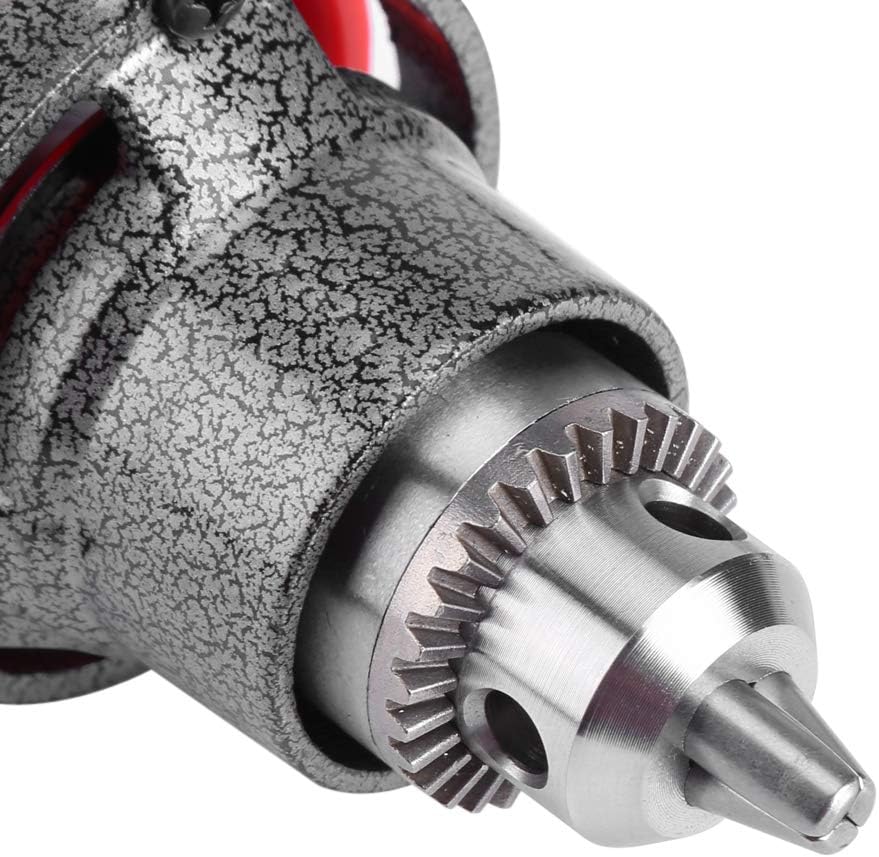
Figure 4.1: Detailed view of the three-jaw chuck, capable of holding various accessories securely.
5. Operating Instructions
5.1 Powering On and Off
- After installing the desired accessory, plug the power cord into a suitable electrical outlet.
- To turn the tool ON, slide the power switch to the 'I' position.
- To turn the tool OFF, slide the power switch to the 'O' position.

Figure 5.1: The power switch for turning the tool on and off.
5.2 Adjusting Speed
The tool features 6 variable speed settings, allowing you to adjust the rotational speed from 2600 RPM to 26000 RPM to match the requirements of your task and material.
- Rotate the speed dial located on the tool body to select the desired speed setting.
- Start with a lower speed for delicate work or when learning to use the tool, and gradually increase as needed.

Figure 5.2: The variable speed dial allows adjustment of the tool's rotational speed.
5.3 General Operation Tips
- Grip: The compact design allows for comfortable handling. For precision work, hold the tool like a pen. For more robust tasks, a hammer-like grip can be used.
- Application: This tool is suitable for carving, cutting, grinding, slicing, taring, polishing, and punching on materials such as wood, stone, glass, jade, and soft metals.
- Pressure: Apply light, consistent pressure. Let the tool do the work. Excessive pressure can lead to overheating, reduced performance, and damage to the tool or workpiece.
- Cooling: The tool features side heat dissipation vents. Ensure these are not obstructed during operation to prevent overheating and extend service life.

Figure 5.3: The ergonomic design allows for comfortable and controlled handling during various tasks.

Figure 5.4: Example of the rotary tool in use for precision carving on a workpiece.
6. Maintenance
Regular maintenance ensures the longevity and safe operation of your Haofy rotary tool.
- Cleaning: After each use, unplug the tool and use a soft brush or compressed air to remove dust and debris from the ventilation openings and chuck area. Do not use solvents or harsh chemicals.
- Accessory Inspection: Regularly inspect accessories for wear or damage. Replace worn or damaged bits to maintain performance and safety.
- Cord Inspection: Check the power cord for any cuts, fraying, or damage. If damaged, have it replaced by a qualified technician.
- Storage: Store the tool in a clean, dry place, out of reach of children.
7. Troubleshooting
| Problem | Possible Cause | Solution |
|---|---|---|
| Tool does not start | No power supply; Power switch is OFF; Damaged power cord. | Check power outlet; Ensure switch is ON; Inspect power cord for damage. |
| Reduced performance/Overheating | Excessive pressure; Obstructed ventilation; Worn accessories. | Reduce pressure; Clear ventilation openings; Replace accessories. |
| Accessory wobbles or is loose | Chuck not tightened properly; Incorrect accessory size. | Retighten chuck with chuck key; Ensure accessory diameter is within 0.5-7mm range. |
If you encounter issues not listed here or if solutions do not resolve the problem, please contact customer support.
8. Specifications
| Brand | Haofy |
| Model Number | Haofynr8g4gyhq0505 |
| Power | 480W |
| Voltage | 12 Volts (DC) |
| Power Source | Corded Electric |
| Speed | 2600 - 26000 r/min (Variable 6-speed) |
| Clamping Range | 0.5 - 7mm |
| Dimensions (L x W x H) | 11.42 x 3.54 x 3.15 inches |
| Item Weight | 2.46 pounds |
| Material | Copper motor, engineering ABS, copper brush holder, all steel bearings, rubber cables |
9. Warranty and Support
For warranty information, technical support, or service inquiries, please refer to the warranty card included with your product or contact Haofy customer service through the retailer where the product was purchased. Please have your model number (Haofynr8g4gyhq0505) and purchase date available when contacting support.
You can also visit the official Haofy store for more information: Haofy Store on Amazon