
1. Introduction
This manual provides detailed instructions for the safe and effective operation of the dh beauty Professional Electromagnetic Shock Wave Therapy Machine, Model V100. This device utilizes electromagnetic shockwave technology for pain relief and body relaxation. A shockwave is characterized by a rapid increase in pressure over a very short time, followed by a gradual decrease in pressure with a small negative pressure phase. The targeted application of these shockwaves aims to dissolve calcium deposits, improve vascularization, and ultimately provide pain relief.
Key advantages of this shockwave machine include:
- Targeted application minimizes stress to surrounding tissues.
- Non-pharmacological approach, reducing reliance on medications.
- Potential to prevent the necessity of surgical intervention for certain indications.
2. Safety Information
Please read all safety warnings and instructions carefully before using the device. Failure to do so may result in injury or damage to the device.
- Use with caution; minor discomfort may occur during treatment.
- Always follow standard electrical safety precautions. Ensure the power cord is undamaged and properly connected to a grounded outlet.
- Do not immerse the device or any of its components in water or other liquids.
- Keep the device out of reach of children.
- Consult a healthcare professional before use if you have any pre-existing medical conditions, are pregnant, or have a pacemaker.
- Statements regarding dietary supplements have not been evaluated by the FDA and are not intended to diagnose, treat, cure, or prevent any disease or health condition. This device is intended for pain relief and body relaxation.
3. Product Overview
The Professional Electromagnetic Shock Wave Therapy Machine is designed to provide effective pain relief and promote body relaxation. It features a large touching screen for intuitive operation and comes with various working probes to target different areas of the body.

Figure 3.1: Front view of the Professional Electromagnetic Shock Wave Therapy Machine V100, showing the main unit with a large touch screen display, the attached treatment handle, and various probe connections.

Figure 3.2: Another front view of the V100 Shock Wave Therapy Machine, highlighting the clean design and the touch screen interface displaying various treatment options.
3.1 Components and Accessories
The package includes the following items:
- 1 x Host instrument (main unit)
- 1 x Operation handle
- 7 x Working probes (various types)
- 1 x Power cord
- 1 x Handle rack
- 1 x Probe rack

Figure 3.3: Illustration of the complete package contents, including the main unit, operation handle, various working probes, power cord, handle rack, and probe rack.
3.2 Working Probes
The device comes with 7 different working probes, each designed for specific applications and treatment depths. These probes are essential for targeting various body areas and conditions effectively.

Figure 3.4: A visual representation of the seven different working heads (probes) and their corresponding rubber sleeves, used for various treatment applications.
3.3 Therapeutic Effects
The shockwave therapy machine provides several therapeutic benefits:
- Effect on nitrogen oxide system: Promotes bone healing and remodeling.
- Improvement of micro-circulation and metabolism.
- Dissolution of calcified fibroblasts.
- Supports the production of collagen.
- Analgesic effect (pain relief).

Figure 3.5: Diagram illustrating the various body areas and conditions that can benefit from physiotherapy massage using the shockwave machine, including shoulder, foot, arm, neck, leg, waist, and back, with specific benefits like stimulating cells, reducing pain, improving circulation, and promoting collagen.

Figure 3.6: Visual representation of common pain points and conditions that can be addressed by the therapy, such as shoulder pain, cervical pain, lumbago, soft tissue injury, leg pain, and foot pain.
4. Setup
Follow these steps to set up your shockwave therapy machine:
- Unpacking: Carefully remove all components from the packaging. Retain the packaging for future storage or transport.
- Placement: Place the main unit on a stable, flat surface, ensuring adequate ventilation around the device.
- Connect Handle: Connect the operation handle to the designated port on the main unit. Ensure the connection is secure.
- Attach Probes: Select the appropriate working probe for your intended treatment and attach it firmly to the operation handle. Ensure the rubber sleeve is correctly fitted.
- Power Connection: Connect the power cord to the main unit and then plug it into a suitable AC110V-AC220V power outlet.
- Organize: Use the provided handle and probe racks to keep your workspace organized.
5. Operating Instructions
The device features a user-friendly touch screen interface for easy operation.
- Power On: Press the power button to turn on the device. The touch screen will illuminate.
- Language Selection: The operation interface supports both Chinese and English. Select your preferred language from the initial screen or settings menu.

Figure 5.1: The touch screen interface showing options for language selection (Chinese/English) and detailed parameters for output frequency and energy levels.
- Select Treatment Area/Mode: The device offers 12 function modes, corresponding to different treatment areas. Select the desired area from the on-screen menu.

Figure 5.2: The touch screen displaying various function modes (treatment areas) and controls for setting the number of strokes, energy level, and frequency. Recommended energy and frequency ranges are also shown.
- Adjust Parameters:
- Frequency: Adjust the output frequency using the controls on the screen. There are 16 continuously adjustable frequency gears, ranging from 1Hz to 16Hz.
- Energy Level: Adjust the energy level. There are 27 continuously adjustable energy levels, ranging from 5mJ to 250mJ.
- Stroke Times: Set the desired number of strokes for the treatment session. There are 5 continuously adjustable gears for stroke times: 500, 1000, 1500, 2000, and 2500 times.
Recommended settings: For general use, a recommended energy value is 10-30mJ, a recommended energy frequency is 2-6Hz, and recommended times are 1000-2000 times.
- Start Treatment: Once parameters are set, press the 'Start' button on the screen to begin the treatment.
- During Treatment: Apply the selected probe to the target area. Move the probe slowly and steadily over the skin. Monitor the patient's comfort level.
- Stop Treatment: Press the 'Stop' button or the 'Return' button to pause or end the treatment session.
- Power Off: After use, power off the device and disconnect it from the power supply.
6. Maintenance
Proper maintenance ensures the longevity and optimal performance of your device.
- Cleaning: After each use, wipe the main unit, handle, and probes with a soft, damp cloth. For disinfection, use a mild, non-abrasive disinfectant. Ensure the device is powered off and unplugged before cleaning.
- Storage: Store the device and its accessories in a clean, dry place, away from direct sunlight and extreme temperatures. Use the provided racks to store the handle and probes.
- Inspection: Regularly inspect the power cord, handle, and probes for any signs of wear or damage. Do not use the device if any components are damaged.
- Probe Replacement: Replace working probes as needed, especially if they show signs of wear or reduced effectiveness.
7. Troubleshooting
If you encounter any issues with your device, refer to the following common troubleshooting steps:
| Problem | Possible Cause | Solution |
|---|---|---|
| Device does not power on | Power cord not connected; Power outlet faulty; Device fault | Ensure power cord is securely plugged in. Try a different power outlet. If problem persists, contact customer support. |
| No shockwave output | Handle not connected properly; Probe not attached; Settings incorrect | Check handle connection. Ensure probe is firmly attached. Verify frequency and energy settings on the screen. |
| Screen unresponsive | Temporary software glitch | Power off the device, wait 30 seconds, then power on again. |
| Unusual noise during operation | Internal component issue | Immediately power off the device and contact customer support. Do not attempt to repair. |
If the problem persists after attempting these solutions, please contact customer support for further assistance.
8. Specifications
Detailed technical specifications for the Professional Electromagnetic Shock Wave Therapy Machine V100:
| Parameter | Value |
|---|---|
| Product Name | Shock Wave Therapy Machine |
| Model | V100 (also referred to as V80B in some contexts) |
| Color | White |
| Voltage | AC110V-AC220V |
| Frequency | 50 Hz / 60 Hz |
| Power | 100W Max (Note: Image 51vf5qiT0LL.jpg states 200W MAX for V80-B) |
| Current | 2A Max (Note: Image 51vf5qiT0LL.jpg states 3A MAX for V80-B) |
| Number of Probes | 7 (Note: Description states 11 probes for V100, Image 51vf5qiT0LL.jpg states 7 for V80-B) |
| Frequency Gears | 16 (continuously adjustable) |
| Energy Levels | 27 (continuously adjustable) |
| Stroke Times Adjustment | 5 gears (500, 1000, 1500, 2000, 2500 times) |
| Product Dimensions | 200mm * 145mm * 65mm (7.87 x 5.71 x 2.56 inches) |
| Product Weight | 0.630kg (1.39 lbs) / 6.5 Kilograms (14.33 lbs) - Discrepancy in source data, likely 6.5kg for full package. |
| Material | Plastic (ABS) |
Note: There are minor discrepancies in specifications between the product description, product specifications list, and embedded images (specifically regarding model V100 vs V80B, power, current, and number of probes). The values provided above are compiled from the most consistent data points, with notes on discrepancies where applicable.
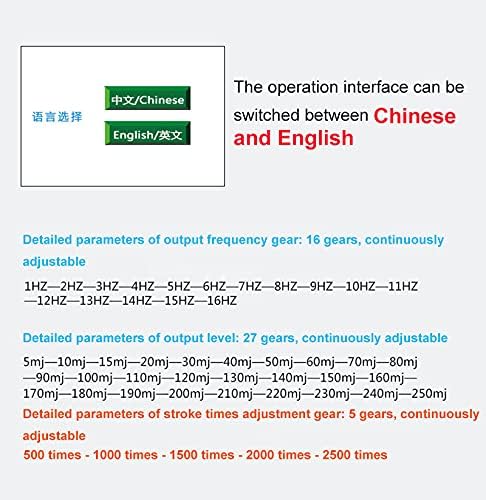
Figure 8.1: A table detailing product parameters, specifically for Model V80-B, which shows some differences from the V100 specifications mentioned elsewhere.
9. Warranty and Support
For warranty information, technical support, or any inquiries regarding your dh beauty Professional Electromagnetic Shock Wave Therapy Machine, please contact the seller or manufacturer directly. Refer to your purchase documentation for specific warranty terms and contact details.
Manufacturer: dh beauty
ASIN: B09D3FPVW5