
GODOX Godox V860III Canon
Contents
Godox V860III-C Flash for Canon Camera Flash Speedlite User Manual
Brand: GODOX | Model: Godox V860III Canon
1. Introduction
Thank you for purchasing the Godox V860III-C Flash. This advanced speedlite is designed for Canon EOS series cameras and is compatible with E-TTL II autoflash. It offers a robust set of features including a high-capacity Li-ion battery, integrated 2.4G wireless X system, and a versatile LED modeling light. This manual will guide you through the setup, operation, and maintenance of your new flash unit.
2. What's in the Box

Image: Godox V860III-C Flash unit with battery, charger, protection case, USB cable, mini stand, color filters, and diffuser.
- 1 x Godox V860III-C Flash Unit
- 1 x Lithium Battery (7.2V/2600mAh)
- 1 x Charger
- 1 x Protection Case
- 1 x USB Cable
- 1 x Instruction Manual
- 1 x Mini Stand
- 1 x USB Battery Charger
- 1 x Color Filters
- 1 x Diffuser
3. Setup
3.1 Battery Installation

Image: Hands inserting the Li-ion battery into the flash unit's battery compartment.
The Godox V860III-C uses a high-capacity 7.2V/2600mAh Li-ion battery. To install, open the battery compartment cover on the side of the flash unit. Insert the battery, ensuring the contacts align correctly, and close the cover securely. The battery is also interchangeable with Godox V1 series batteries.
3.2 Mounting the Flash

Image: Close-up of the flash's quick release lock mechanism on a camera hotshoe.
To mount the flash onto your camera's hotshoe, slide the flash foot into the hotshoe slot. Once in place, engage the quick release lock lever to secure the flash firmly. This updated quick lever design ensures a fast and secure attachment.
3.3 Initial Power On
Press and hold the power button located on the control panel until the LCD screen illuminates. The flash will perform a self-check and indicate its readiness for use. Ensure the battery is sufficiently charged for optimal performance.
4. Operating the Flash
4.1 Control Panel Overview
The V860III-C features an intuitive control panel with a clear LCD screen, function buttons, and a selection dial for easy navigation and setting adjustments.
4.2 Flash Modes (TTL, Manual, Multi-flash)

Image: Close-up of the quick button on the side of the flash for mode switching.
The flash fully supports TTL autoflash, manual flash, and multi-flash modes. A dedicated quick button on the side allows for rapid switching between TTL and Manual modes. Other functions include 1/8000s High-speed sync (HSS), flash exposure compensation (FEC), flash exposure lock (FEL), and second curtain sync.
4.3 Modeling Light
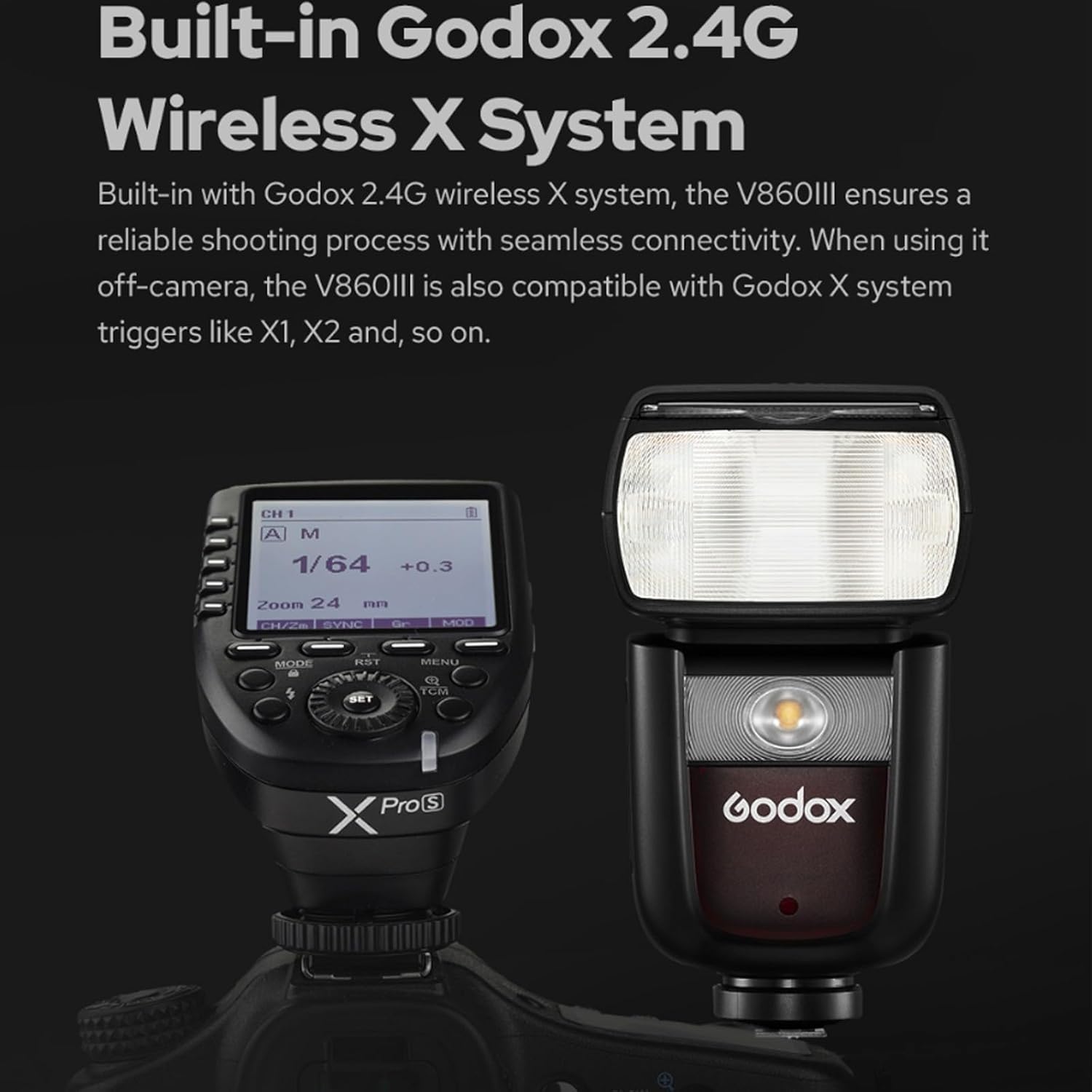
Image: The front of the flash showing the illuminated modeling light.
A built-in LED modeling light is located at the front of the flash. Its brightness is dimmable in 10 levels, aiding in pre-visualization of lighting effects and blending with ambient light.
4.4 Built-in Godox 2.4G Wireless X System
Image: The flash unit alongside a Godox XPro trigger, illustrating the wireless system.
The integrated 2.4G wireless X system provides all-in-one functions and a transmission distance of approximately 100 meters. It supports transmitter, receiver, and off modes, with 32 channels and 99 IDs for interference-free operation. This allows for seamless off-camera flash control when used with compatible Godox X series triggers (e.g., X1, X2, XPro).
4.5 Flash Head Zoom and Swivel
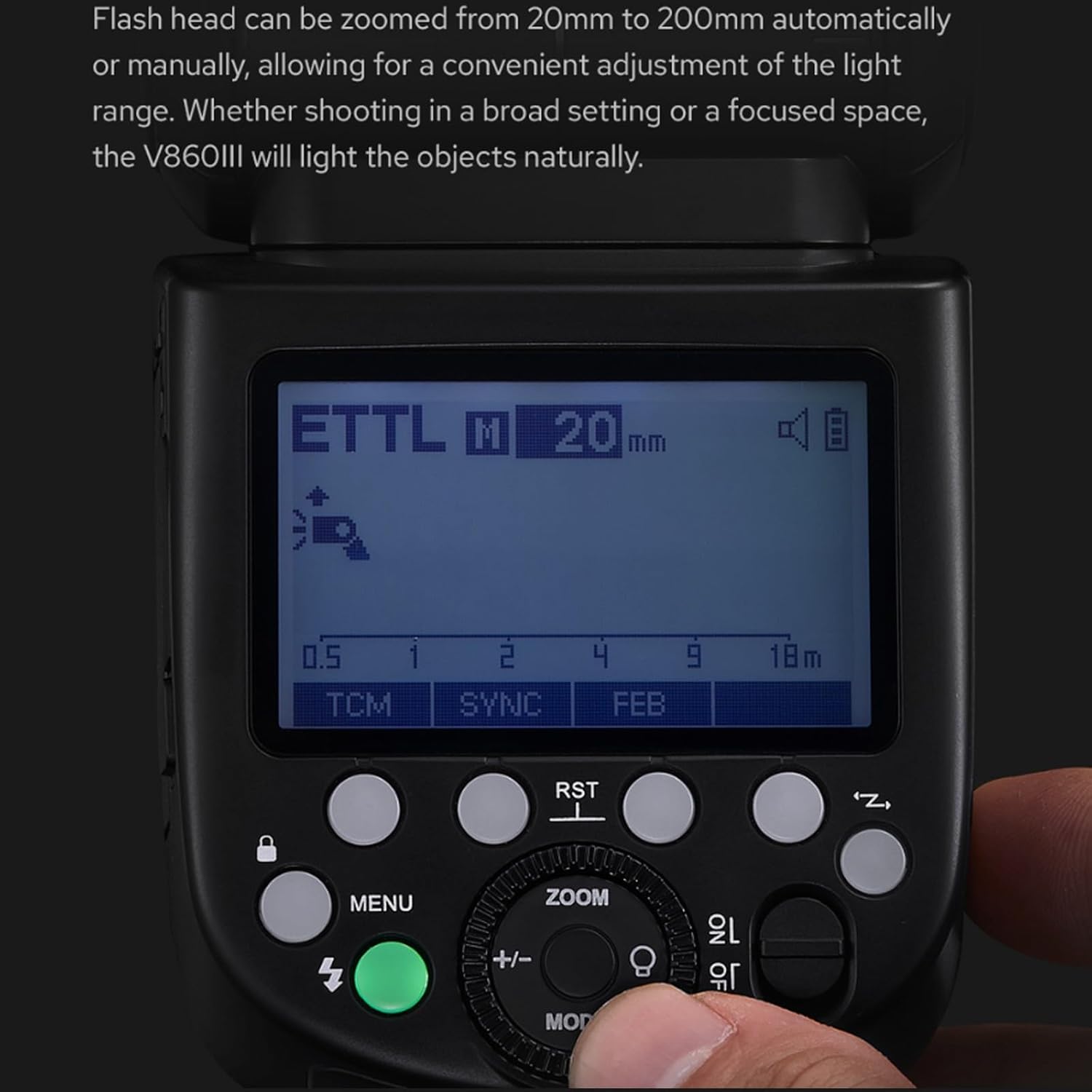
Image: The flash's LCD screen displaying the current zoom setting in millimeters.
The flash head can be zoomed automatically or manually from 20mm to 200mm, allowing for convenient adjustment of the light range to suit various shooting scenarios. The flash head also features a swivel angle from 0° to 330° horizontally and from -7° to 120° vertically, enabling easy direct flash, bounce flash, and other creative lighting techniques.

Image: A diagram illustrating the extensive horizontal swivel and vertical tilt capabilities of the flash head.
5. Maintenance
5.1 Cleaning
Regularly clean the flash unit with a soft, dry cloth. For stubborn dirt, use a slightly damp cloth and then dry thoroughly. Avoid using harsh chemicals or abrasive materials. Keep the flash contacts clean to ensure proper communication with the camera.
5.2 Battery Care

Image: The flash unit next to its powerful Li-ion battery, highlighting battery performance.
The upgraded 7.2V/2600mAh Li-ion battery offers approximately 480 full power flashes and a 1.5-second recycle time. To prolong battery life, store it in a cool, dry place when not in use. Avoid fully discharging the battery frequently. Recharge the battery using the provided charger. The green LED indicator will light up when the flash is ready after recycling.
6. Troubleshooting
| Problem | Possible Cause | Solution |
|---|---|---|
| Flash does not fire. | Low battery; Incorrect mode; Loose hotshoe connection. | Charge battery; Switch to appropriate mode (TTL/Manual); Re-mount flash securely. |
| Flash output is too weak/strong. | Incorrect flash exposure compensation (FEC); Manual power setting too low/high. | Adjust FEC; Change manual power setting. |
| Wireless trigger not working. | Incorrect channel/ID; Flash not in receiver mode; Distance too far. | Match channel/ID on flash and trigger; Set flash to receiver mode; Reduce distance. |
| Slow recycle time. | Low battery; High power setting. | Recharge battery; Use lower power settings when possible. |
7. Specifications
- Product Dimensions:
- 8.66 x 7.87 x 3.54 inches
- Item Weight:
- 1.98 pounds
- Item Model Number:
- Godox V860III Canon
- Batteries:
- 1 Lithium Polymer batteries required (included)
- Battery Life:
- Approx. 480 full power flashes
- Recycle Time:
- Approx. 1.5 seconds
- Flash Coverage:
- 20 to 200mm
- Flash Sync Speed:
- Up to 1/8000s (HSS)
- Color Temperature:
- 5300K±200K
- Wireless Function:
- Transmitter, Receiver, Off (2.4G Wireless X System)
- Transmission Range (approx):
- 100m
- Channels:
- 32 (1~32)
- ID:
- 01~99
- Manufacturer:
- Godox
- Date First Available:
- August 18, 2021
8. Warranty and Support
8.1 Warranty Information
The Godox V860III-C Flash typically comes with a 12-month manufacturer's warranty from the date of purchase. This warranty covers defects in materials and workmanship under normal use. Please retain your proof of purchase for warranty claims. For specific warranty terms and conditions, refer to the warranty card included in your product packaging or contact Godox customer service.
8.2 Customer Support
For technical assistance, troubleshooting, or service inquiries, please contact Godox customer support through their official website or the retailer from whom you purchased the product. You may also find additional resources and FAQs on the Godox support page.
Godox Official Website: www.godox.com
Ask a question about this manual
Ask about setup, troubleshooting, compatibility, parts, safety, or missing instructions. Manuals+ will review the question and use this page’s manual context to help answer it.