
1. Introduction
The AVCOO 30 Modes TENS EMS Unit is a compact, rechargeable, and portable dual-channel muscle stimulator designed for pain relief and muscle performance enhancement. This device utilizes Transcutaneous Electrical Nerve Stimulation (TENS) for pain management and Electrical Muscle Stimulation (EMS) for muscle re-education and strengthening. Please read this manual thoroughly before use to ensure safe and effective operation.
2. Important Safety Information
WARNING: Statements regarding this device have not been evaluated by the FDA and are not intended to diagnose, treat, cure, or prevent any disease or health condition. Consult your physician before using this device, especially if you have pre-existing medical conditions.
- Do not use if you have a pacemaker, implanted defibrillator, or other implanted metallic or electronic device.
- Do not use if you are pregnant.
- Do not use on areas of skin that are broken, irritated, or numb.
- Do not use on the head, face, neck, or across the chest.
- Keep out of reach of children.
- Discontinue use if you experience any adverse reactions and consult a medical professional.
- This device is not intended for medical diagnosis or treatment.
3. Package Contents
Verify that all items are present in the package:
- 1 x AVCOO TENS EMS Unit
- 2 x Lead Wires
- 2 x 2x4 inch Electrode Pads
- 6 x 2x3 inch Palm-shaped Electrode Pads
- 2 x 1x2 inch Small Oval Electrode Pads
- 1 x Type-C Charging Cable
- 3 x Cable Ties
- 1 x Instruction Manual (this document)
- 1 x Storage Bag
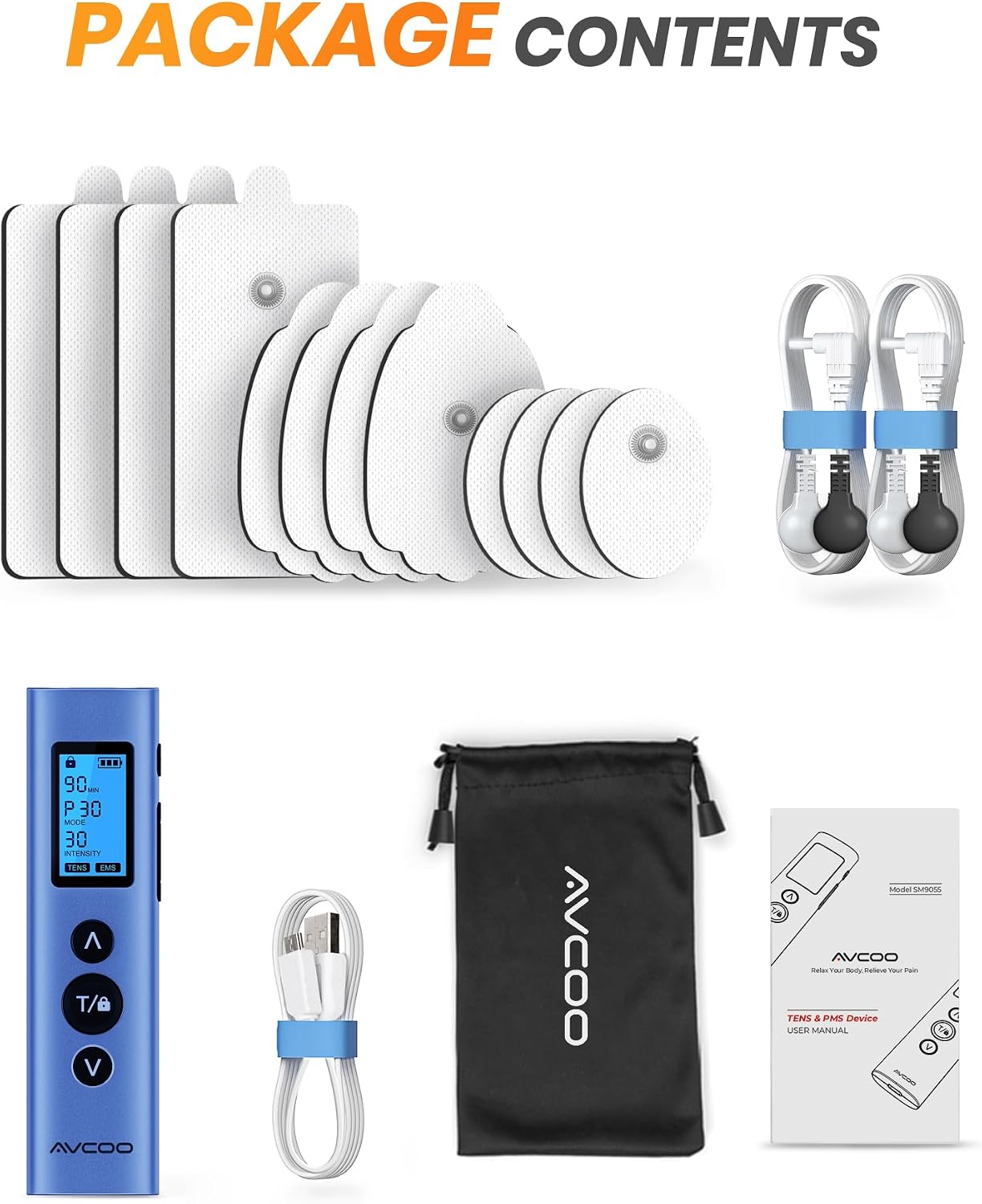
Figure 3.1: Contents included in the AVCOO TENS EMS Unit package.
4. Product Features and Components
The AVCOO TENS EMS Unit is designed for user convenience and effective therapy.
- Dual Channel: Allows for simultaneous treatment of two different areas or use of multiple pads.
- 30 Modes: Includes 17 TENS modes (P1-P17) for pain relief and 13 EMS modes (P18-P30) for muscle stimulation.
- 30 Intensity Levels: Adjustable intensity to suit individual comfort and therapeutic needs.
- Rechargeable Battery: Built-in battery provides up to 40 hours of standby time on a full charge.
- Type-C Fast Charging: Convenient and quick charging via a Type-C port.
- Memory Function: Remembers your last used settings for quick recall.
- Portable Design: Lightweight and compact for easy transport and use anywhere.

Figure 4.1: Device display and key features.
5. Setup
5.1 Charging the Device
- Connect the provided Type-C charging cable to the charging port on the device.
- Plug the other end of the cable into a USB power adapter (not included) or a computer USB port.
- The battery indicator on the screen will show charging status. A full charge typically takes a few hours.
- Disconnect the cable once fully charged.
5.2 Connecting Lead Wires and Electrode Pads
- Ensure the device is turned off before connecting accessories.
- Insert the pin connectors of the lead wires into the output ports on the top of the device.
- Attach the electrode pads to the snap connectors at the end of the lead wires. Ensure a secure connection.
- Remove the protective film from the electrode pads. Keep the film for reapplication after use.
6. Operating Instructions
6.1 Applying Electrode Pads
Clean and dry the skin area where the pads will be applied. Place the electrode pads firmly on the skin. Ensure pads are not placed over joints, bony areas, or directly on the spine. Refer to Section 7 for general placement guidelines.
6.2 Power On/Off
- To turn on: Press and hold the Power button (often labeled 'T/lock' or a dedicated power icon) for a few seconds until the screen illuminates.
- To turn off: Press and hold the Power button again until the screen turns off.
6.3 Selecting a Mode
- After powering on, the device will typically start in a default mode or the last used mode.
- Press the 'M' (Mode) button to cycle through the available 30 modes (P1-P30).
- Refer to Section 7 for details on TENS and EMS modes.
6.4 Adjusting Intensity
- Use the '▲' (Up) button to increase intensity and the '▼' (Down) button to decrease intensity.
- Adjust the intensity gradually until you feel a comfortable, strong, but non-painful sensation. Avoid setting the intensity too high.
- The device has 30 intensity levels.
6.5 Setting the Timer
- Press the 'T' (Timer) button to adjust the treatment duration.
- The available time settings will be displayed on the screen. Select your desired treatment time.
- The device will automatically shut off once the timer expires.
6.6 Lock Function
- To prevent accidental changes during therapy, press and hold the 'T/lock' button briefly to activate the screen lock.
- Repeat the action to unlock the screen.
7. Modes and Electrode Placement
The AVCOO TENS EMS Unit offers a variety of modes tailored for different therapeutic needs.
- TENS Modes (P1-P17): Primarily for pain relief. These modes deliver electrical pulses that help block pain signals and stimulate endorphin release. Ideal for deep tissue pain.
- EMS Modes (P18-P30): Designed for muscle stimulation. These modes cause muscle contractions, which can help improve muscle performance, re-educate muscles, and aid in recovery.

Figure 7.1: TENS and EMS mode applications.
7.2 General Electrode Placement Guidelines
For optimal results and safety, consider the following:
- Place pads on clean, dry, intact skin.
- For pain relief, place pads around the painful area, ensuring they are not directly on the pain source but surrounding it.
- For muscle stimulation, place pads on the belly of the muscle you wish to stimulate.
- Ensure pads are at least one inch apart but not so far apart that the current cannot effectively pass between them.
- Avoid placing pads on the front of the neck, across the chest, on the head, or over areas of skin irritation.
8. Maintenance and Care
8.1 Cleaning the Device
Wipe the device with a soft, damp cloth. Do not use abrasive cleaners or immerse the device in water.
8.2 Caring for Electrode Pads
- After each use, reapply the protective film to the adhesive side of the pads.
- Store pads in a sealed bag or container to prevent drying.
- If pads lose their stickiness, gently wipe the adhesive surface with a damp cloth and let air dry. Do not use soap or alcohol.
- Replace pads when they no longer adhere well to the skin or if they become damaged. Pads are designed for up to 100 uses with proper care.
8.3 Storage
Store the device and all accessories in the provided storage bag in a cool, dry place, away from direct sunlight and extreme temperatures.
9. Troubleshooting
| Problem | Possible Cause | Solution |
|---|---|---|
| Device does not turn on. | Low battery or device is off. | Charge the device. Press and hold the Power button to turn on. |
| No sensation or weak sensation. | Pads not adhering, lead wires loose, intensity too low, or pads worn out. | Ensure pads are firmly on skin. Check lead wire connections. Increase intensity gradually. Replace old pads. |
| Pads not sticking to skin. | Skin is oily/dirty, pads are dry/worn out. | Clean and dry skin before application. Gently wipe pad adhesive with a damp cloth and air dry. Replace pads if necessary. |
| Screen is locked. | Lock function activated. | Press and hold the 'T/lock' button briefly to unlock. |
10. Specifications
- Model: 30 Modes TENS EMS Unit (B09CYMZCK7)
- Manufacturer: AVCOO
- Dimensions: Approximately 5.8 x 3.3 x 2.2 inches
- Weight: Approximately 8.78 ounces
- Modes: 30 (17 TENS, 13 EMS)
- Intensity Levels: 30
- Channels: Dual
- Charging Port: Type-C
- Battery Life: Up to 40 hours standby time
11. Warranty and Support
The AVCOO TENS EMS Unit comes with a 12-month warranty from the date of purchase. This warranty covers manufacturing defects and malfunctions under normal use.
For warranty claims, technical support, or any questions regarding your device, please contact AVCOO customer service. Refer to the contact information provided on the product packaging or the official AVCOO website.