
Introduction
Thank you for choosing the OTL Technologies Hello Kitty Audio Band Wired Headband Headphones. These headphones are designed for comfort and safety, making them ideal for children aged 3 and above. This manual provides essential information on how to set up, operate, maintain, and troubleshoot your new audio band headphones.
The Hello Kitty Audio Band combines a soft, comfortable headband with integrated audio speakers, perfect for listening to music, audiobooks, or educational content at home or while traveling.
Product Overview
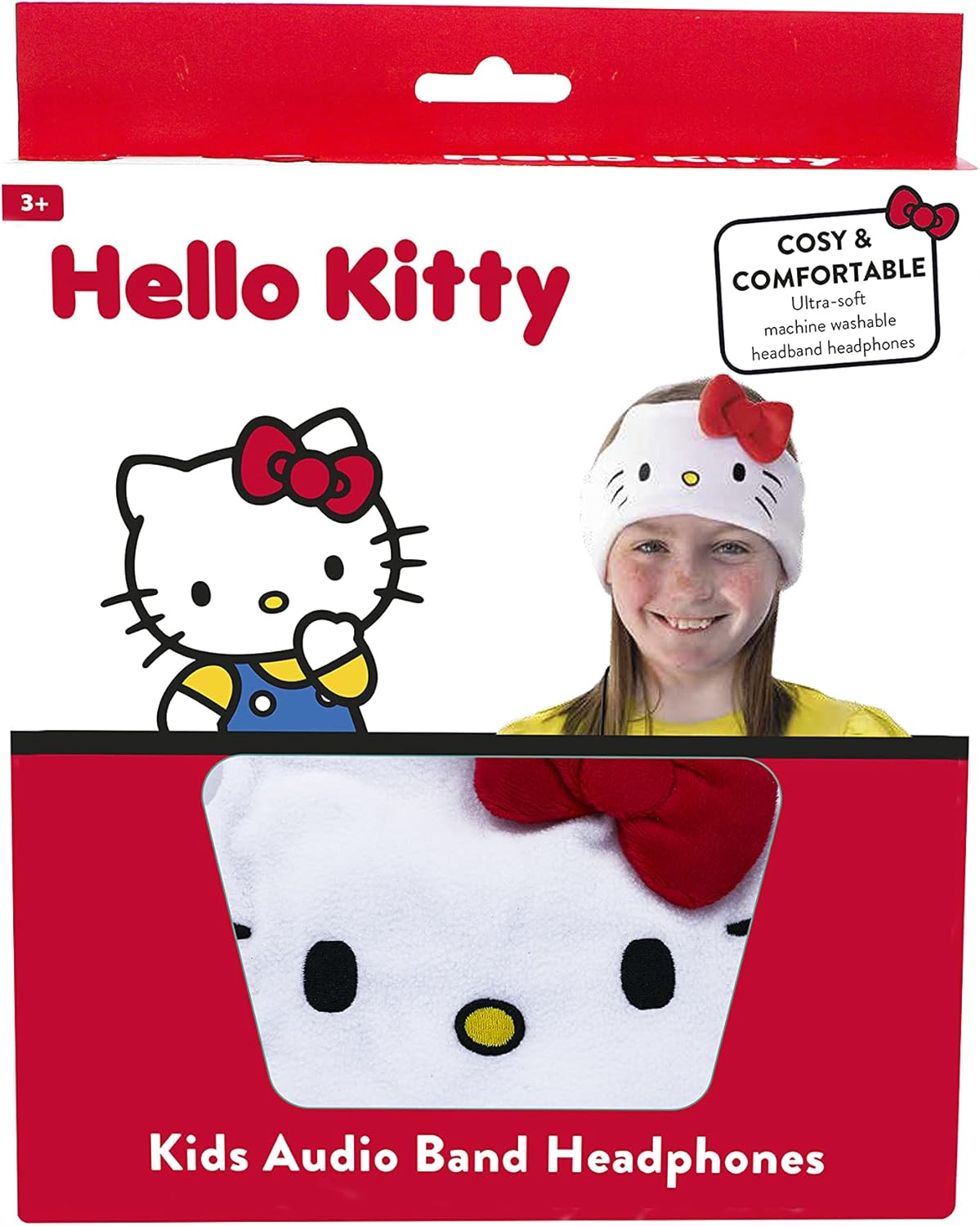
Image: The OTL Technologies Hello Kitty Audio Band Wired Headband Headphones, shown in its retail packaging, highlighting the Hello Kitty design and key features.
The OTL Technologies Hello Kitty Audio Band is a unique audio solution for children, featuring:
- Ultra-soft Fleece Headband: Designed for maximum comfort during extended wear.
- Removable Speakers: Allows for easy cleaning of the headband.
- Wired Connectivity: Connects via a standard 3.5mm audio jack.
- Sound Safe: Engineered with volume limits suitable for young ears.
- Adjustable Fit: Features a hook and loop closure for a snug and secure fit.
Setup
Setting up your Hello Kitty Audio Band is straightforward. Follow these steps to begin using your headphones:
- Unpack the Headphones: Carefully remove the audio band and its components from the packaging.
- Identify Components: You will find the soft headband with integrated speakers and an attached 3.5mm audio cable.
- Connect to Device: Insert the 3.5mm audio jack into the headphone port of your compatible device (e.g., iPad, tablet, smartphone, gaming console). Ensure the connection is secure.

Image: A close-up view of the OTL Technologies Hello Kitty Audio Band, illustrating the 3.5mm jack connection point, ready for use with a compatible device.
The headphones are compatible with all devices that feature a standard 3.5mm audio jack.
Operating Instructions
Once connected, your Hello Kitty Audio Band is ready for use. Follow these guidelines for optimal performance and safety:
- Wearing the Audio Band: Place the headband comfortably around the child's head, ensuring the speakers are positioned over the ears. Adjust the hook and loop closure at the back for a snug, but not tight, fit.
- Volume Control: The audio band features volume control. Adjust the volume directly on your connected device to a comfortable and safe listening level. These headphones are designed to be sound-safe for children.
- Safe Listening Practices:
- Avoid listening at maximum volume for extended periods.
- Take regular breaks from listening to prevent hearing fatigue.
- Supervise young children during use.

Image: A child wearing the OTL Technologies Hello Kitty Audio Band, demonstrating the comfortable fit and speaker placement over the ears.
Maintenance
Proper care will extend the life of your Hello Kitty Audio Band. The headband is designed for easy cleaning:
- Removing Speakers: Gently slide the ultra-flat speakers out of their pockets within the headband. Ensure the cable remains attached to the speakers.
- Washing the Headband: The fleece headband is machine washable. We recommend washing it on a cold, delicate cycle with similar colors. Do not use bleach or harsh detergents.
- Drying the Headband: Air dry the headband flat. Do not tumble dry or iron.
- Reinserting Speakers: Once the headband is completely dry, carefully reinsert the speakers into their designated pockets, ensuring they are positioned correctly over the ears.
- Speaker Care: Keep the speakers dry and clean. Avoid exposing them to excessive moisture or extreme temperatures.
Image: A detailed view of the OTL Technologies Hello Kitty Audio Band, illustrating the design of the headband and the location of the removable speakers for maintenance.
Troubleshooting
If you encounter any issues with your Hello Kitty Audio Band, please refer to the following common solutions:
- No Sound:
- Ensure the 3.5mm audio jack is fully inserted into both the device and the headphone port.
- Check the volume level on your connected device.
- Test the headphones with a different device to rule out device-specific issues.
- Distorted Sound:
- Lower the volume on your connected device.
- Ensure the audio jack is clean and free of debris.
- Headband Does Not Fit:
- Adjust the hook and loop closure at the back of the headband for a more secure or looser fit.
Specifications
| Model Name | Hello Kitty Audio Band |
| Model Number | HK0798 |
| Connectivity | Wired (3.5mm Jack) |
| Speakers | 20mm Drivers |
| Frequency Response | 20Hz - 20KHz |
| Impedance | 32 Ohm |
| Power Capability | 50 mW |
| Rated Power | 5 mW |
| Cable Length | 120 cm |
| Material | Fabric (Fleece) |
| Recommended Age | 3+ Years |
| Product Dimensions | 9.45 x 5.91 x 3.94 inches |
| Item Weight | 1.76 ounces (50 Grams) |
Warranty and Support
OTL Technologies products are manufactured to high standards. For information regarding warranty coverage and customer support, please refer to the documentation included with your purchase or visit the official OTL Technologies website.
Official Support Website: www.otltechnologies.com
Please retain your proof of purchase for any warranty claims.


