1. Introduction
This user manual provides detailed instructions for the installation, operation, and maintenance of your G-Homa 2K Wireless Outdoor WiFi Battery Surveillance Camera. Please read this manual thoroughly before using the product to ensure proper functionality and safety. This camera is designed to provide reliable security monitoring for both outdoor and indoor environments.
2. Product Overview
2.1 Components Included
The package contains the following items:
- Security Camera
- USB Charging Cable
- Mounting Bracket
- 4 Mounting Kits (screws and wall plugs)
- User Manual
Note: An SD card (up to 128GB) and solar panel are not included and must be purchased separately if desired.
2.2 Key Features
- 2K FHD Resolution & 110° Wide Angle Lens: Enhanced video quality with 2K HD resolution and a 110° wide-angle view for comprehensive coverage.
- Color Night Vision: Dual light source for clear color night vision up to 65 feet (20 meters) in darkness.
- 100% Wireless & Rechargeable Battery: Equipped with a 5200 mAh battery, offering up to 6 months of use (based on 20 daily 10-second recordings). Compatible with solar power for extended operation.
- Two-Way Audio: Allows for real-time communication with visitors via the mobile application.
- PIR Motion Detection & Real-time Alerts: Optimized PIR sensor detects human movement, sending instant video notifications to your phone.
- Smart AI Detection: Advanced AI recognition for detecting people, vehicles, packages, and pets, reducing false alarms. Customizable detection zones.
- Local & Cloud Storage: Supports up to 128GB SD card storage (not included) and offers free cloud storage for 3 days.
- IP65 Weatherproof: Designed to withstand various weather conditions, including heavy rain, strong sun, and snow.
- Remote Siren: Ability to remotely activate a siren via the app to deter suspicious individuals.
2.3 Camera Components Diagram
Refer to the diagram below for an identification of the camera's main components.

This diagram illustrates the various parts of the G-Homa camera, including the lens, infrared lamp, microphone, speaker, and ports for charging and SD card insertion. The mounting support is also shown.
3. Setup
3.1 Initial Charging
Before first use, fully charge the camera using the provided USB charging cable. Connect the cable to the Micro-USB port on the camera and a standard 5V/1.5A USB power adapter (not included). The indicator light will show charging status.
3.2 App Download and Account Creation
Download the "Vicohome" application from your smartphone's app store (Google Play Store for Android or Apple App Store for iOS). Once installed, open the app and follow the on-screen instructions to create an account and log in.
3.3 Camera Pairing
- Ensure your camera is fully charged and powered on.
- In the Vicohome app, tap the "+" icon to add a new device.
- Select your camera model from the list.
- Follow the app's instructions to connect the camera to your 2.4GHz Wi-Fi network. You may need to scan a QR code displayed on your phone with the camera's lens.
- Once connected, name your camera and complete the setup process.
3.4 Mounting the Camera
The camera comes with a mounting bracket and screws for easy installation. Choose a suitable location that provides the desired viewing angle and strong Wi-Fi signal. For outdoor installation, ensure the location offers protection from direct impact and allows for optimal solar panel charging if applicable.

This image shows the G-Homa camera securely mounted to a wall, highlighting its compact design and suitability for outdoor use, even in wet conditions.
4. Operation
4.1 Live View and Two-Way Audio
Open the Vicohome app and select your camera to access the live view. From here, you can monitor your property in real-time. Use the microphone and speaker icons within the app to enable two-way audio communication with anyone near the camera.
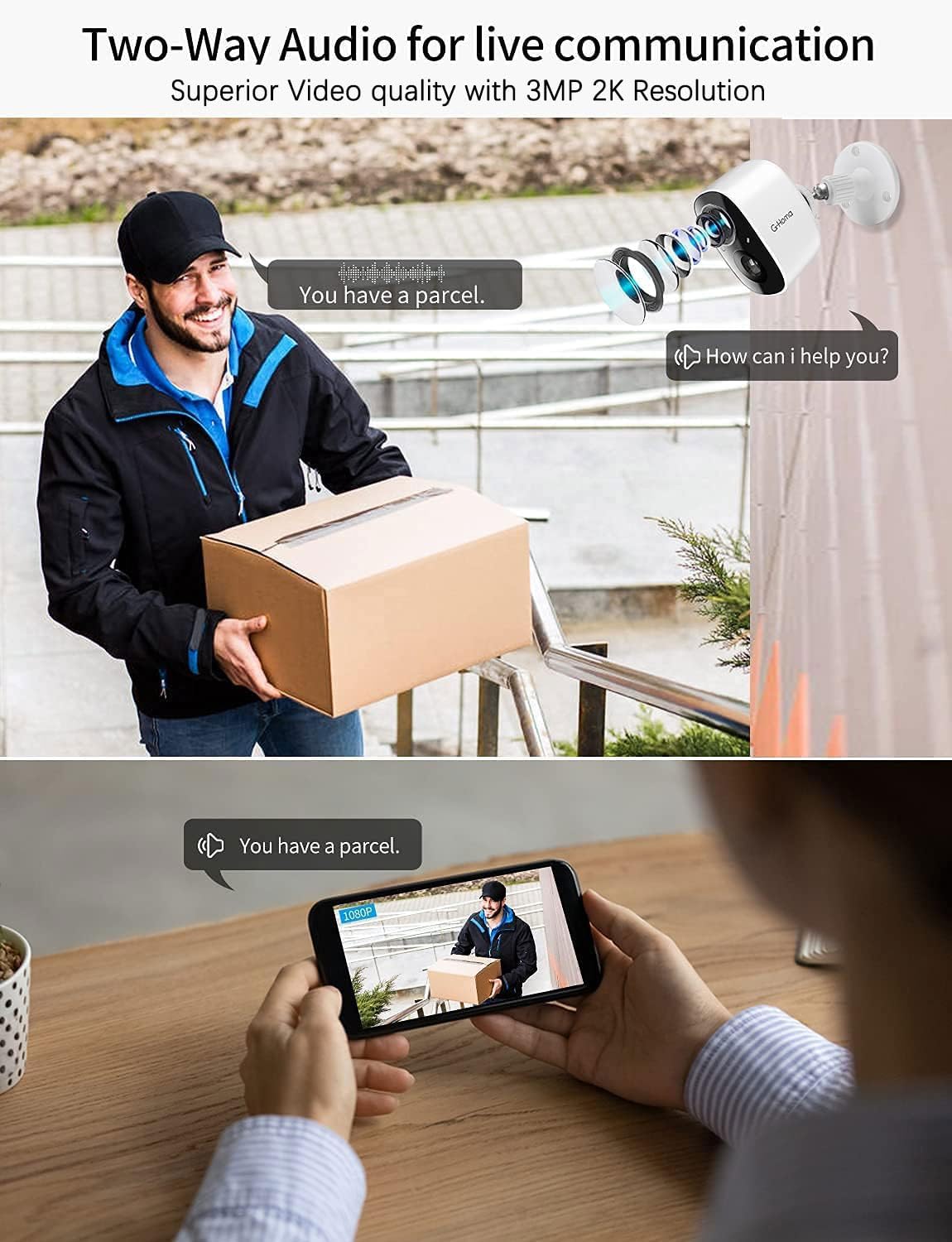
This image illustrates the two-way audio capability, allowing users to speak and listen through the camera via their mobile device, useful for interacting with visitors or delivery personnel.
4.2 Motion Detection and Alerts
The camera features an optimized PIR sensor for human motion detection. When motion is detected, the app will send a video notification to your phone. You can customize detection zones and sensitivity settings within the app to minimize false alarms.

This image demonstrates how the camera detects motion and sends instant video alerts to your smartphone, along with the option to activate a siren.
4.3 Smart AI Recognition
Leverage the camera's AI capabilities to differentiate between people, vehicles, packages, and pets. This feature helps in receiving only relevant notifications. You can also define custom privacy detection zones to focus monitoring on specific areas.

This image highlights the camera's advanced AI features, capable of distinguishing between different types of motion, such as people, vehicles, and pets, and allowing for customized detection zones.
4.4 Night Vision Modes
The camera supports both infrared (black and white) and color night vision. Color night vision is activated when the spotlight is on, providing clearer details in low-light conditions.

This image demonstrates the camera's ability to provide clear visuals both during the day and at night, with options for color night vision when the spotlight is active, and infrared mode when it's off.
4.5 Video Playback and Storage
Recorded videos can be accessed via the Vicohome app. The camera supports local storage on a Micro SD card (up to 128GB, not included) and offers 3 days of free cloud storage. You can review past events and download footage as needed.

This image shows the video playback interface on the Vicohome app, allowing users to review recorded events.

This image demonstrates the ability to view live camera feeds remotely from a smartphone.

This image illustrates the digital zoom feature available within the app, allowing users to magnify details in the live or recorded video.

This image shows the capability to monitor multiple G-Homa cameras simultaneously from a single smartphone interface.

This image illustrates the feature allowing multiple users to access and share camera feeds, enhancing family security.
5. Maintenance
5.1 Battery Management
The camera is powered by a 5200 mAh rechargeable lithium-ion battery. Battery life can vary based on usage (e.g., frequency of motion detection, live view access). To maximize battery life, consider purchasing a compatible solar panel (not included) for continuous charging. Regularly check the battery level in the Vicohome app and recharge as needed.

This image shows the G-Homa camera connected to an optional solar panel for continuous power, extending battery life and reducing the need for manual recharging.
5.2 Weather Resistance
The camera is rated IP65 weatherproof, meaning it is protected against dust ingress and low-pressure water jets from any direction. It is designed to operate effectively in various outdoor conditions, including rain, sun, and snow. However, avoid submerging the camera in water.

This image demonstrates the camera's robust IP65 rating, ensuring its durability and functionality in diverse weather conditions, from rain to intense sunlight.
5.3 Cleaning
To maintain optimal performance, periodically clean the camera lens and body. Use a soft, dry cloth to wipe away dust and smudges. For stubborn dirt, a slightly damp cloth can be used, but ensure no moisture enters the ports. Do not use harsh chemicals or abrasive cleaners.
6. Troubleshooting
| Problem | Possible Cause | Solution |
|---|---|---|
| Camera not connecting to Wi-Fi | Incorrect Wi-Fi password, camera too far from router, 5GHz Wi-Fi network. | Ensure correct 2.4GHz Wi-Fi password. Move camera closer to router or use a Wi-Fi extender. The camera only supports 2.4GHz Wi-Fi. |
| Frequent false alarms | High motion sensitivity, objects like trees or shadows causing triggers, pets. | Adjust motion detection sensitivity in the app. Utilize AI detection to filter out non-human motion. Set up custom detection zones to exclude busy areas. |
| SD card not recording or recognized | SD card not formatted, incompatible card, faulty card. | Format the SD card within the Vicohome app. Ensure the SD card is Class 10 or higher and up to 128GB. Try a different SD card. |
| Poor image/video quality at night | Obstructions in front of lens, insufficient ambient light for color night vision. | Clean the camera lens. Ensure there are no obstructions. If color night vision is desired, ensure the spotlight is enabled or there is sufficient ambient light. |
| Short battery life | Frequent motion events, extensive live view usage, cold weather. | Reduce motion detection sensitivity or frequency. Limit live view access. Consider purchasing a solar panel for continuous charging. Battery performance can be reduced in extreme cold. |
7. Specifications
| Feature | Specification |
|---|---|
| Video Recording Resolution | 2K |
| Color | White |
| Number of Items | 1 |
| Number of Channels | 2 |
| Wireless Communication Technology | Wi-Fi |
| Form Factor | Bullet |
| Effective Video Resolution | 3 Megapixels |
| Viewing Angle | 110 degrees |
| Night Vision Range | 10 Meters (approx. 33 feet) |
| Material | Plastic |
| Voltage | 5 Volts |
| Power | 5 Watts |
| Dimensions (L x W x H) | 10.2 x 5.1 x 5.1 centimeters (approx. 4.02 x 2.01 x 2.01 inches) |
| Special Features | Motion Detector |
| Model | Batterie (OBC1003P) |
| Battery Composition | Lithium-ion (2 Lithium-polymer batteries included) |
| Manufacturer Warranty | 3 years |
| Recommended Product Uses | Outdoor Security |
| Connectivity Technology | Wireless |
| Indoor/Outdoor Use | Outdoor |
| Compatible Devices | Smartphone |
| Power Source | Battery Powered / Solar Powered (not included) |
| Connectivity Protocol | WiFi |
| Controller Type | Vicohome |
8. Warranty and Support
8.1 Manufacturer's Warranty
The G-Homa 2K Wireless Outdoor WiFi Battery Surveillance Camera comes with a 3-year manufacturer's warranty. Please retain your proof of purchase for warranty claims. This warranty covers defects in materials and workmanship under normal use.
8.2 Customer Support
G-Homa is committed to 100% customer satisfaction. For any questions, technical assistance, or support needs, please utilize the following resources:
- Professional After-Sales Technical Team: Access support through the Vicohome app or G-Homa's official channels.
- Online Feedback: Submit your queries directly through the app's feedback section.
- Quick Response: Expect timely responses to your support requests.
- In-App Live Chat: For immediate assistance, use the live chat feature within the Vicohome application.
For more information, visit the official G-Homa website or contact their customer service directly.