
1. Introduction
This manual provides detailed instructions for the safe and effective use of your Tidrop Digital Infrared Thermometer. This non-contact device is designed for measuring the surface temperature of various objects. It features dual laser targeting, a backlit LCD display, and switchable Celsius/Fahrenheit units for convenience.
Important Note: This thermometer is not suitable for measuring human body temperature or the internal temperature of objects.
2. Safety Information
- Laser Safety: This device uses a Class II laser. Do not stare directly into the laser beam or point it at people or animals. Direct eye exposure can cause permanent eye damage.
- Temperature Measurement: Do not use this device to measure body temperature. It is designed for industrial and household surface temperature measurements only.
- Battery Handling: Ensure correct battery polarity when installing. Do not mix old and new batteries. Dispose of used batteries responsibly.
- Environmental Conditions: Do not expose the device to extreme temperatures, humidity, or direct sunlight. Avoid dropping or subjecting the device to strong impacts.
- Cleaning: Clean the device with a soft, damp cloth. Do not use abrasive cleaners or solvents.
3. Product Overview
Familiarize yourself with the components and display features of your infrared thermometer.

Image: Component and Display Diagram. This image illustrates the various parts of the thermometer, including the LCD screen, laser sign, low battery indicator, buttons for backlight, mode selection, and up/down adjustments, as well as the battery cover, measure key, laser hole, and infrared lens. The LCD display shows data hold, current temperature, setting display, high/low temp alarms, MAX/MIN/AVG/DIF measurements, and emissivity.
Key Features:
- Dual Laserlines: For precise targeting of the measurement area.
- LCD Display with Backlight: Ensures clear readability in various lighting conditions.
- Temperature Unit Conversion: Easily switch between Celsius (℃) and Fahrenheit (℉).
- Adjustable Emissivity: Allows for more accurate measurements on different surfaces (0.1-1.0).
- Data Hold Function: Freezes the last measured reading on the display.
- High/Low Temperature Alarm: Alerts you when temperatures exceed or fall below set limits.
- Measurement Modes: Includes MAX, MIN, AVG (Average), and DIF (Difference) temperature readings.
- Low Battery Indicator: Notifies you when the battery needs replacement.
- Automatic Shutdown: Conserves battery life by turning off after a period of inactivity.
4. Setup
Battery Installation:
- Locate the battery compartment on the handle of the thermometer.
- Open the battery cover.
- Insert one 9V battery (not included), ensuring the correct polarity (+/-) as indicated inside the compartment.
- Close the battery cover securely.
The device is now ready for use. If the low battery indicator appears on the display, replace the battery promptly.
5. Operating Instructions
Basic Temperature Measurement:
- Point the thermometer at the target object.
- Press and hold the measurement trigger (usually located on the handle). The dual lasers will activate, indicating the measurement area.
- The temperature reading will appear on the LCD display. Release the trigger to hold the reading (Data Hold function).
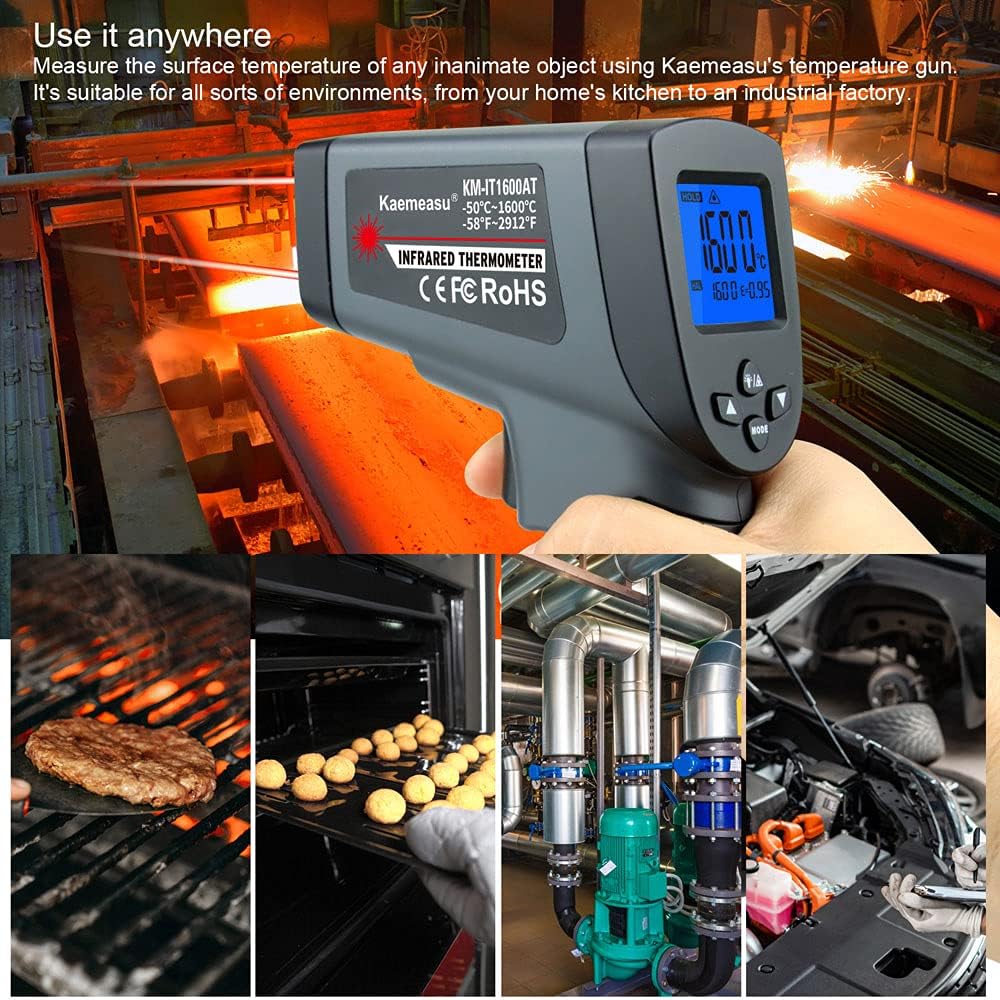
Image: Versatile Applications. This image demonstrates the thermometer's use in diverse environments, from industrial settings with hot metal to kitchen applications like grilling and baking, and automotive maintenance.
Distance to Spot Ratio (D:S):
The D:S ratio indicates the size of the measurement spot relative to the distance from the object. For example, a 12:1 D:S ratio means that at a distance of 12 inches, the measurement spot will be 1 inch in diameter. Ensure the target is larger than the spot size for accurate readings.

Image: Non-contact Double-laser and D:S Ratio. This diagram explains how the dual lasers pinpoint the measurement area and illustrates the concept of Distance to Spot (D:S) ratio, showing how the spot size changes with distance for both 12:1 and 50:1 ratios. It also includes a laser radiation warning.
Switching Temperature Units (℃/℉):
Press the ℃/℉ button (often combined with the backlight button) to toggle between Celsius and Fahrenheit temperature scales.
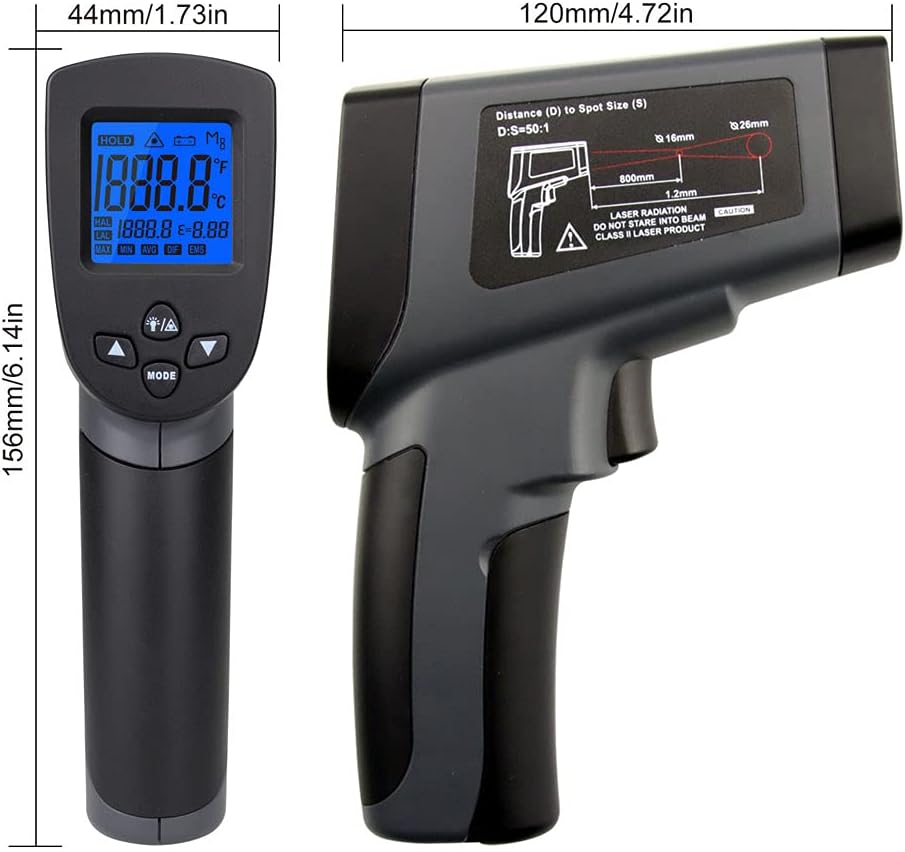
Image: Celsius/Fahrenheit Conversion. This image displays the thermometer's screen showing temperature readings in both Celsius and Fahrenheit, highlighting the ease of switching between units.
Adjusting Emissivity (EMS):
Emissivity is a measure of an object's ability to emit infrared energy. Different materials have different emissivity values. Adjusting the emissivity setting (0.1-1.0) improves measurement accuracy for various surfaces. The default setting is typically 0.95, suitable for most organic materials, painted surfaces, and plastics.
- Press the MODE button until "EMS" appears on the display.
- Use the Up/Down buttons to adjust the emissivity value.
- Refer to a standard emissivity table for common materials if precise measurements are required.

Image: Adjustable Emissivity. This image illustrates the concept of adjustable emissivity (0.1-1.0, default 0.95) and provides examples of different materials with their typical emissivity values, such as aluminum (0.3) and ice (0.96), to demonstrate how to achieve more precise readings.
Other Functions:
- Backlight: Press the backlight button (often combined with ℃/℉) to turn the LCD backlight on or off.
- High/Low Alarm (HAL/LAL): Press the MODE button to cycle through functions until HAL or LAL appears. Use the Up/Down buttons to set the desired high or low temperature alarm threshold.
- MAX/MIN/AVG/DIF: Press the MODE button to view the maximum, minimum, average, or difference between readings taken during a continuous measurement session.
- Auto Power Off: The device will automatically shut down after a period of inactivity to conserve battery life.

Image: Function Icons Overview. This image provides a visual guide to the various icons and functions available on the thermometer's display, including double laser, distance to spot ratio, temperature units, backlight, data hold, high/low temperature alarms, maximum/minimum/average/difference measurements, emissivity, low battery indicator, and auto power off.
6. Maintenance
- Cleaning the Lens: The infrared lens is the most delicate part of the thermometer. Clean it carefully with a soft, clean cloth or cotton swab moistened with water or rubbing alcohol. Do not use harsh chemicals.
- Cleaning the Casing: Wipe the device casing with a soft, damp cloth. Do not immerse the device in water.
- Storage: When not in use for extended periods, remove the battery and store the thermometer in a dry, cool place, away from direct sunlight and extreme temperatures.
- Battery Replacement: Replace the 9V battery when the low battery indicator appears on the display.
7. Troubleshooting
- Device does not turn on: Check if the battery is installed correctly and has sufficient charge. Replace the 9V battery if necessary.
- Inaccurate readings:
- Ensure the lens is clean.
- Verify the emissivity setting matches the material being measured.
- Ensure the target object is larger than the measurement spot size.
- Avoid measuring through glass or other transparent surfaces, as these can affect readings.
- Laser not visible: The laser may be difficult to see in bright sunlight. Ensure you are in appropriate lighting conditions.
- Display shows "ERR": This may indicate a measurement outside the device's range or a sensor error. Try restarting the device.
8. Specifications
| Specification | Value |
|---|---|
| Measurement Range (KM-IT550AT) | -50℃ to 550℃ (-58℉ to 1022℉) |
| Measurement Range (KM-IT750AT) | -50℃ to 750℃ (-58℉ to 1382℉) |
| Measurement Range (KM-IT1100AT) | -50℃ to 1100℃ (-58℉ to 2012℉) |
| Measurement Range (KM-IT1300AT) | -50℃ to 1300℃ (-58℉ to 2372℉) |
| Measurement Range (KM-IT1600AT) | -50℃ to 1600℃ (-58℉ to 2912℉) |
| Accuracy | ±2% or 2℃ |
| Distance Spot Ratio (D:S) | 12:1 (KM-IT550AT) / 50:1 (other models) |
| Emissivity | Adjustable 0.1-1.0 |
| Response Time | 500ms |
| Wavelength | 8-14µm |
| Repeatability | ±1% or ±1℃ |
| Resolution | 0.1℃ or 0.1℉ |
| Storage Ambient Temperature | -20℃ to 50℃ (-4℉ to 122℉) |
| Operating Temperature | 0℃ to 50℃ (32℉ to 122℉) |
| Power Supply | 1 x 9V Battery (not included) |
| Item Dimensions | 156 x 120 x 44mm (6.14 x 4.72 x 1.73in) |
| Item Weight | 169g (5.96ounce) |
| Material | Plastics |
| Display Type | LCD |
| UPC | 738769658902 |

Image: Product Dimensions. This image provides a clear visual representation of the thermometer's dimensions, showing its length, width, and thickness in both millimeters and inches.
9. Warranty and Support
For warranty information and customer support, please refer to the documentation included with your purchase or contact the retailer. Keep your purchase receipt as proof of purchase.