1. Setup Guide
This section provides instructions for setting up your ViewSonic VX1755 Portable Gaming Monitor.
1.1. What's in the Box
Please verify that all items listed below are included in your package:
- Portable Monitor
- mini HDMI to HDMI Cable
- USB Type-C Cable (Male-Male)
- USB Type-C to Type-A 3.2 Gen1 Cable
- AC/DC Adapter
- Quick Start Guide
- Protect cover

The image displays the ViewSonic VX1755 portable monitor along with its accessories: a protective cover, power adapter, USB-C to USB-C cable, USB-C to USB-A cable, Mini HDMI cable, and a QuickStart Guide.
1.2. Connecting the Monitor
The VX1755 monitor offers versatile connectivity options for various devices.
- USB Type-C Connection: Connect your laptop, smartphone, or gaming console using the provided USB Type-C cable. This single cable can transmit video, audio, data, and provide 60W power delivery.
- Mini HDMI Connection: Use the Mini HDMI to HDMI cable to connect to devices with an HDMI output, such as gaming consoles or desktop PCs.
- Power: The monitor can be powered via one of the USB-C ports using the included AC/DC adapter or a compatible power bank.

This image shows the back of the ViewSonic VX1755 monitor, highlighting its two USB-C ports, one Mini HDMI port, and an audio output. Below the monitor, icons illustrate compatibility with various devices including Nintendo Switch, Xbox, PlayStation (PS3/4/5), mobile phones, and laptops.

The image illustrates the 2-way powered USB Type-C functionality of the ViewSonic VX1755 monitor, showing it connected to a laptop. Icons above the monitor indicate that the 60W USB-C connection supports audio, data, video, and charging.
2. Operating Instructions
Learn how to operate your ViewSonic VX1755 monitor for optimal performance.
2.1. Power On/Off
To power on the monitor, connect it to a power source using the AC/DC adapter or a compatible USB-C power delivery source. The monitor will automatically power on when a signal is detected. To power off, disconnect the power source.
2.2. Display Settings
The VX1755 features a 17.2-inch Full HD (1920x1080p) IPS display with a 144Hz refresh rate and AMD FreeSync Premium technology for smooth gameplay. Adjust display settings via the On-Screen Display (OSD) menu using the buttons on the side of the monitor.
- Resolution: Full HD (1920x1080p) for crisp visuals.
- Refresh Rate: Up to 144Hz for fluid motion, especially beneficial for gaming.
- AMD FreeSync Premium: Ensures tear-free and stutter-free gaming by synchronizing the monitor's refresh rate with your GPU's frame rate.
- IPS Panel: Provides wide 178° viewing angles and vibrant colors.

This image shows the ViewSonic VX1755 portable monitor set up on a surface, displaying a vibrant gaming scene. The monitor is open, revealing its 17-inch screen, ViewSonic branding, USB-C port, and 144Hz AMD FreeSync Premium features.

The image features the ViewSonic VX1755 portable gaming monitor alongside a PlayStation 5 console and controller, showcasing its use as a portable gaming display. Icons above the monitor highlight its Full HD 1080p, IPS SuperClear, 144Hz, and AMD FreeSync Premium features.
2.3. Built-in Stand and Magnetic Cover
The monitor comes with a built-in stand that allows for flexible orientation in both portrait and landscape modes, with an adjustable tilt range of 20° to 62°. The durable magnetic cover protects the screen during transport and can also serve as an additional stand.

This image provides a side view of the ViewSonic VX1755 portable monitor, showcasing its slim profile and the integrated kickstand that supports the display.
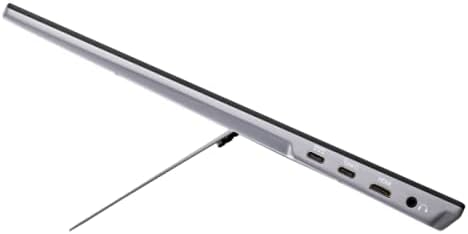
This image presents an angled side view of the ViewSonic VX1755 portable monitor, highlighting its slim design and the integrated stand that props it up for viewing.
3. Care and Maintenance
Proper care ensures the longevity and performance of your monitor.
3.1. Cleaning the Monitor
- Always power off the monitor and disconnect all cables before cleaning.
- Use a soft, lint-free cloth slightly dampened with water or a mild, non-abrasive screen cleaner.
- Do not spray liquid directly onto the screen or into the monitor's openings.
- Avoid using harsh chemicals, abrasive cleaners, or solvents.
3.2. Storage
When not in use, store the monitor in a cool, dry place. Always use the provided protective cover to prevent scratches and damage to the screen and body.
4. Troubleshooting Common Issues
This section addresses common issues you might encounter with your VX1755 monitor.
4.1. No Signal / Black Screen
- Ensure all cables (USB-C, Mini HDMI) are securely connected to both the monitor and the source device.
- Verify the source device is powered on and outputting a signal.
- Try connecting the monitor to a different port on your source device or a different source device to isolate the issue.
- Check the monitor's OSD menu to ensure the correct input source is selected.
4.2. Intermittent Restart / Power Issues
- Ensure the monitor is receiving sufficient power. If using a USB-C connection for both power and display, ensure your power adapter or source provides adequate wattage (e.g., 60W or higher if also powering a laptop).
- Use the included AC/DC adapter for dedicated power to the monitor if experiencing instability with USB-C power from a low-wattage source.
- Try a different power outlet.
4.3. Flickering or Distorted Image
- Check cable connections for looseness or damage.
- Ensure your source device's display settings (resolution, refresh rate) are compatible with the monitor's capabilities.
- If using AMD FreeSync, ensure it is enabled on both the monitor and your graphics card settings.
5. Product Specifications
Detailed technical specifications for the ViewSonic VX1755 Portable Gaming Monitor.
| Feature | Specification |
|---|---|
| Model Number | VX1755 |
| Screen Size | 17.2 Inches |
| Screen Resolution | 1920x1080 (Full HD) |
| Max Screen Resolution | 1920 x 1080 Pixels |
| Refresh Rate | 144Hz |
| Panel Type | IPS |
| Adaptive Sync Technology | AMD FreeSync Premium |
| Aspect Ratio | 16:9 |
| Item Weight | 2.2 pounds |
| Product Dimensions (LxWxH) | 0.7 x 15.6 x 9.7 inches |
| Connectivity | 2x USB Type-C, 1x Mini HDMI, 1x Audio Out |
| Power Source | 10 (AC/DC Adapter) |
| Voltage | 12 Volts (DC) |

This image highlights the ultra-portable design of the ViewSonic VX1755, showing its dimensions (39.6 cm / 15.6 in width, 24.7 cm / 9.7 in height, 1.7 cm / 0.7 in thickness) and its light weight of only 1kg (2.2lb).
6. Warranty and Support
For detailed warranty information and technical support, please refer to the official ViewSonic website or the documentation included with your product.
- User Guide (PDF): Download User Guide
- User Manual (PDF): Download User Manual