
ZdalaMit NB093 NB093UD
Contents
User Manual: NB093 NB093UD Replacement Remote Control
Brand: ZdalaMit | Model: NB093 NB093UD
1. Product Overview
The ZdalaMit NB093 NB093UD is a replacement remote control designed for seamless compatibility with a range of Magnavox DVD CD Player models. This remote requires no programming or pairing; simply install batteries, and it is ready for immediate use.
- Direct replacement for original Magnavox DVD CD Player remotes.
- Compatible with models: MDV2100, MDV2100/F7, MDV2300, MDV2100F7, DP100MW8BA, DP100MW8B.
- No programming or pairing required for setup.
- Operates on 2 x 1.5V AA Alkaline Batteries (not included).
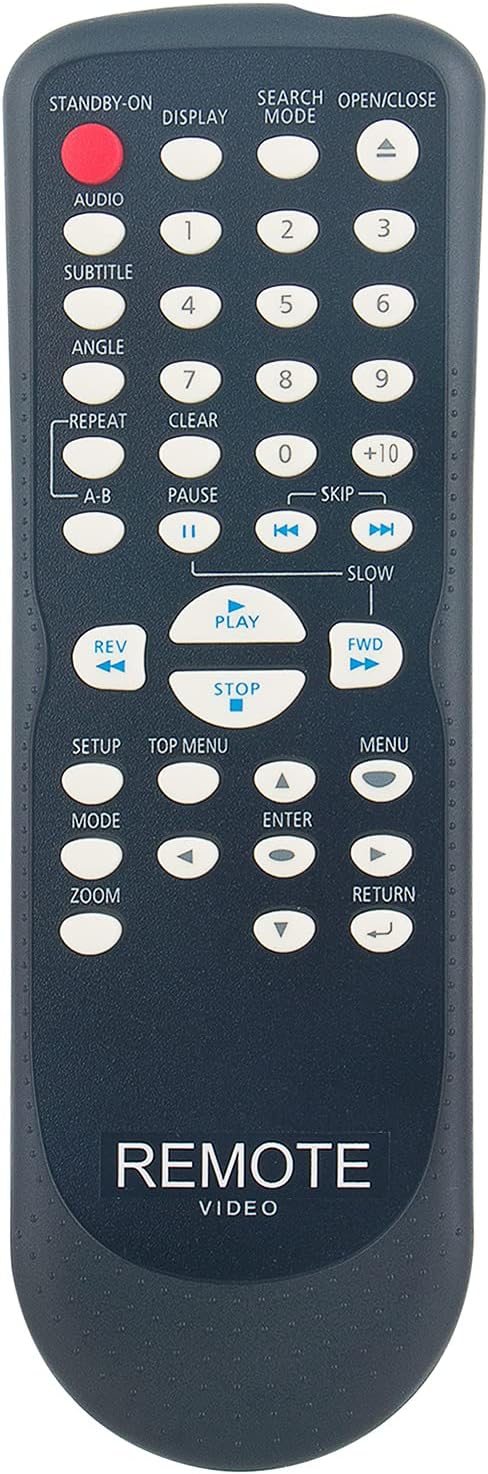
Image 1.1: Front view of the NB093 NB093UD Replacement Remote Control. This image displays the full layout of the remote's buttons, including the numeric keypad, navigation controls, and media playback buttons.
2. Setup Guide
2.1 Battery Installation
To begin using your replacement remote control, follow these steps to install the batteries:
- Locate the battery compartment on the back of the remote control. It typically has a sliding cover.
- Press down on the tab (if present) and slide the battery cover downwards or outwards to open it.
- Insert two (2) 1.5V AA Alkaline batteries into the compartment. Ensure that the positive (+) and negative (-) terminals of the batteries align correctly with the markings inside the compartment. Incorrect insertion can prevent the remote from functioning.
- Slide the battery cover back into place until it clicks securely.
Your remote control is now ready for use with your compatible Magnavox DVD CD Player.
3. Operating Instructions
This section details the primary functions of the buttons on your NB093 NB093UD replacement remote control.
- STANDBY-ON: Powers the DVD/CD player on or off.
- DISPLAY: Toggles the on-screen display of information such as elapsed time, remaining time, or disc status.
- SEARCH MODE: Activates search functions, allowing you to find specific content on the disc.
- OPEN/CLOSE: Opens or closes the disc tray.
- AUDIO: Cycles through available audio tracks or languages.
- SUBTITLE: Cycles through available subtitle languages.
- ANGLE: Changes the camera angle during playback of multi-angle DVDs.
- REPEAT: Repeats the current track, chapter, or entire disc.
- A-B: Sets a loop between two specified points (A and B) on the disc.
- Numeric Keypad (0-9, +10): Used for direct track/chapter selection or inputting numerical values.
- CLEAR: Clears numerical input or cancels a selection.
- PAUSE (II): Pauses playback. Press again to resume.
- SKIP (◀◀ / ►►): Skips to the previous or next track/chapter.
- SLOW: Activates slow-motion playback.
- REV (◀◀): Fast reverse playback.
- PLAY (►): Starts or resumes playback.
- STOP (■): Stops playback.
- FWD (►►): Fast forward playback.
- SETUP: Accesses the system setup menu of the DVD/CD player.
- TOP MENU: Returns to the main menu of the disc.
- MENU: Accesses the disc's chapter or title menu.
- Navigation Arrows (▲ ◄ ► ▼): Used to navigate through menus and selections.
- ENTER: Confirms a selection in menus.
- ZOOM: Zooms in on the picture during playback.
- RETURN: Returns to the previous screen or menu.
4. Care and Maintenance
Proper care will extend the life of your remote control:
- Cleaning: Use a soft, dry cloth to clean the remote. For stubborn dirt, slightly dampen the cloth with water or a mild, non-abrasive cleaner. Avoid using harsh chemicals or abrasive materials.
- Battery Replacement: Replace batteries when the remote's response becomes sluggish or it stops working. Always replace both batteries at the same time with new ones. Do not mix old and new batteries or different types of batteries.
- Storage: Store the remote in a cool, dry place away from direct sunlight, extreme temperatures, and high humidity.
- Avoid Drops: Protect the remote from physical impact. Dropping it can damage internal components.
- Liquid Exposure: Keep the remote away from liquids. Spills can cause short circuits and permanent damage.
5. Troubleshooting
If you encounter issues with your remote control, try the following troubleshooting steps:
- Remote Not Responding:
- Check battery orientation: Ensure batteries are inserted correctly (+/-).
- Replace batteries: Install fresh 1.5V AA Alkaline batteries.
- Remove obstacles: Ensure there is a clear line of sight between the remote and the DVD/CD player's infrared sensor.
- Short Operating Range:
- Replace batteries: Weak batteries can reduce the remote's range.
- Check for interference: Other electronic devices or strong light sources might interfere with the infrared signal.
- Specific Buttons Not Working:
- Clean the remote: Dirt or debris under the buttons can prevent them from making contact.
- Test with new batteries: Ensure sufficient power is supplied to all functions.
If the issue persists after trying these steps, please refer to the support information provided in Section 7.
6. Technical Specifications
| Feature | Specification |
|---|---|
| Product Dimensions | 6 x 2 x 0.5 inches |
| Item Weight | 1.41 ounces |
| Power Supply | 2 x 1.5V AA Alkaline Batteries |
| Compatible Devices | Magnavox DVD/CD Players (MDV2100, MDV2100/F7, MDV2300, MDV2100F7, DP100MW8BA, DP100MW8B) |
| Color | Black |
| Special Feature | Pre Programmed (No setup required) |
7. Warranty and Support
For any queries or assistance regarding your ZdalaMit NB093 NB093UD Replacement Remote Control, please contact the seller or manufacturer directly through your purchase platform. Please have your order details ready for faster service.
Ask a question about this manual
Ask about setup, troubleshooting, compatibility, parts, safety, or missing instructions. Manuals+ will review the question and use this page’s manual context to help answer it.