
Brondell P700BB-W
Brondell P700BB-W Pro Air Purifier Instruction Manual
Model: P700BB-W | Brand: Brondell
Product Overview
The Brondell P700BB-W Pro Air Purifier is designed to provide cleaner, healthier indoor air. It features a comprehensive 5-stage filtration system, including a pre-filter, H13 HEPA filter with AG+ technology, activated carbon filter, UV technology, and plasma purification. This system effectively captures airborne particles as small as 0.3 microns, reducing dust, pollen, smoke, pet dander, and odors in spaces up to 1,655 square feet.

Figure 1: Brondell P700BB-W Pro Air Purifier. This image shows the sleek, white design of the air purifier with its perforated front panel and black top control area.
Key Features
- Comprehensive 5-Stage Filtration System: Includes a pre-filter, H13 HEPA filter, activated carbon filter, UV technology, and plasma purification for thorough air cleaning.
- Rapid Airborne Contaminant Removal: Proven to remove over 99.99% of airborne particles within one hour.
- High-Efficiency Air Circulation: Designed for large rooms up to 1,655 square feet, performing four air changes per hour in rooms up to 413 square feet.
- H13 HEPA Filter with AG+ Coating: Enhances filtration efficiency and provides an added layer of defense against pollutants.
- Smart PM2.5 Air Quality Monitoring with Auto Mode: Continuously monitors indoor air quality and automatically adjusts settings for optimal purification.

Figure 2: Visual representation of key features including 5-stage HEPA filter, AG+ Technology, 1655 square foot range, and intuitive control panel.
Video 1: Brondell Pro Effectively Eliminates SARS-CoV-2 per MRIGlobal. This video demonstrates the scientific testing and validation of the Brondell Pro's effectiveness in eliminating airborne viruses.
Setup
Unpacking and Filter Installation
Before first use, ensure all packaging materials are removed and the filters are properly installed. The Brondell P700BB-W comes with a multi-layer filter system that needs to be unwrapped before operation.
- Carefully remove the front cover of the air purifier.
- Locate the HEPA filter and the activated carbon filter. These are typically wrapped in plastic for protection during shipping.
- Remove all plastic packaging from both filters.
- Insert the activated carbon filter first, followed by the HEPA filter, ensuring they are correctly oriented as indicated by any labels or guides on the filters or inside the unit.
- Replace the front cover securely.
Placement
Place the air purifier on a flat, stable surface in the desired room. Ensure there is adequate space around the unit (at least 6-12 inches) for optimal air intake and output. Avoid placing it directly against walls or furniture that might obstruct airflow.
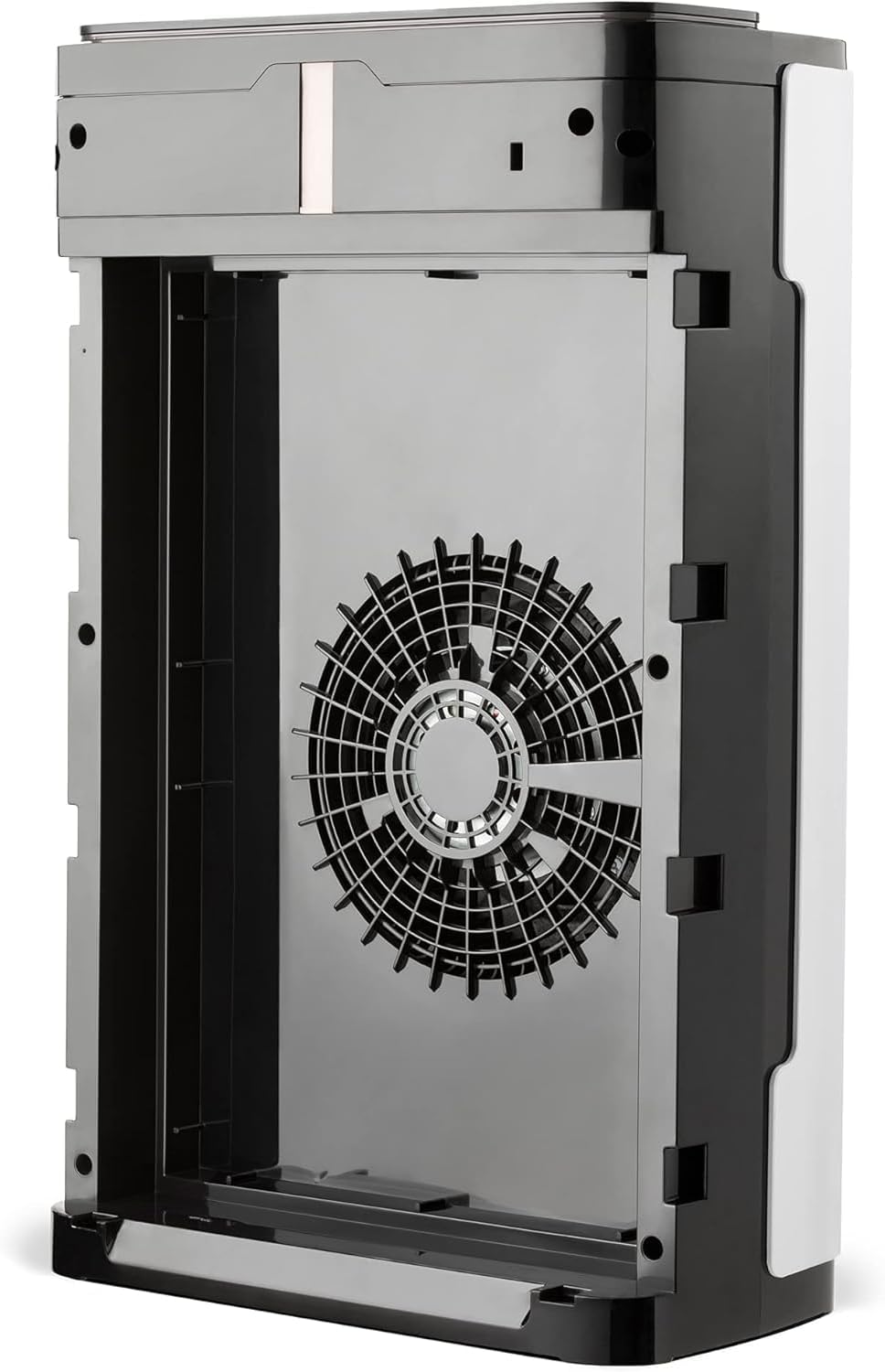
Figure 3: Internal view of the Brondell P700BB-W, illustrating the fan and the compartment where filters are installed.
Operating Instructions
The Brondell P700BB-W features an intuitive control panel on its top surface. Below are the functions of each button and display.

Figure 4: Top control panel of the Brondell P700BB-W, showing the digital display and touch-sensitive buttons for various functions.
- Power Button (⏻): Press to turn the unit ON or OFF.
- PM2.5 Display: The digital display shows the current PM2.5 concentration in the air, indicating air quality. Lower numbers signify better air quality.
- Fan Speed Button (☯): Cycles through different fan speeds (P0, P1, P2, P3). P0 is the lowest/auto setting, while P3 is the highest.
- Timer Button (⏱): Sets the operating time for the purifier.
- Night Mode Button (🌙): Activates a quiet operation mode, turning off all display lights for undisturbed sleep. The fan continues to operate.
- UV Button (☀): Toggles the UV-C light function, which helps to sanitize the air by inactivating viruses and bacteria.
- Child Lock Button (🔒): Press and hold for 3 seconds to activate/deactivate the child lock, preventing accidental changes to settings.
- Plasma Button (🌫): Activates the plasma purification function, which further enhances air cleaning by neutralizing microorganisms without generating ozone.
Auto Mode
When the PM2.5 display shows a higher number (indicating poorer air quality), the purifier can automatically adjust its fan speed to increase purification. This ensures optimal air quality without constant manual adjustments.
Maintenance
Filter Replacement
The multi-layer filter system requires periodic replacement to maintain optimal performance. The frequency of replacement depends on usage and air quality. Refer to the product packaging or Brondell's official website for recommended replacement intervals for the H13 HEPA and activated carbon filters.
Cleaning the Air Quality Sensor
To ensure accurate air quality readings, the PM2.5 sensor may need occasional cleaning, especially in environments with high dust or smoke. It is recommended to clean it once every two months to ensure the best performance.
- First, use a wet cotton swab to clean the surfaces of the sensor lights and the sensor opening.
- Then, use a dry cotton swab to remove any remaining water stains on the sensor.
Troubleshooting
- Unit Not Turning On: Ensure the power cord is securely plugged into both the unit and a working electrical outlet. Check for any disconnected internal wiring if the unit was recently opened (e.g., for filter replacement).
- Reduced Airflow or Odor: This often indicates that the filters are dirty and need to be cleaned or replaced. Check the pre-filter for large debris and replace the HEPA and carbon filters if necessary.
- Inaccurate PM2.5 Readings: Clean the air quality sensor as described in the Maintenance section.
- Unusual Noise/Vibration: Ensure the unit is placed on a flat, stable surface. Check that the front cover and filters are securely seated. If the noise persists, contact customer support.
Specifications
| Feature | Detail |
|---|---|
| Product Dimensions | 15.4"D x 8.3"W x 24.7"H |
| Weight | 19.2 Pounds |
| Item Model Number | P700BB-W |
| Manufacturer | Brondell |
| Color | White |
| Floor Area Coverage | 1655 Square Feet |
| Certification | CARB Certified |

Figure 5: Dimensions of the Brondell P700BB-W Pro Air Purifier.
Warranty and Support
For warranty information, technical support, or to purchase replacement filters, please visit the official Brondell website or contact their customer service. Keep your purchase receipt for warranty claims.
Online Support: Visit the Brondell Store on Amazon
User Guide (PDF): Download User Guide
Related documentsP700BB-W


Ask a question about this manual
Ask about setup, troubleshooting, compatibility, parts, safety, or missing instructions. Manuals+ will review the question and use this page’s manual context to help answer it.