
Introduction
The Jobar Hometrack-Elliptical Exerciser is designed to provide a smooth, low-impact workout, improving circulation and toning muscles. Its compact design makes it suitable for use in various settings, including your home or office, without occupying excessive space.
Safety Information
- Always consult with a healthcare professional before starting any new exercise program.
- Place the exerciser on a flat, stable surface to prevent tipping or movement during use.
- Ensure adequate clear space around the exerciser for safe operation.
- Keep children and pets away from the exerciser during operation.
- Do not exceed the maximum weight recommendation of 300 pounds.
- Wear appropriate athletic footwear during use.
- If you experience any pain, dizziness, or discomfort, stop exercising immediately and consult a healthcare professional.
- Unplug the unit when not in use or before cleaning.
Included Components
- Hometrack-Elliptical Exerciser Unit
- Remote Control
- Power Adapter
- User Manual (this document)

Figure 1: The Jobar Hometrack-Elliptical Exerciser, showing the main unit with foot pedals and the included remote control.
Setup
- Unpack all components from the packaging and ensure all parts are present.
- Place the elliptical exerciser on a firm, level surface. Ensure there is enough space around the unit for safe operation.
- Connect the power adapter to the exerciser's power input port and then plug it into a standard electrical outlet.
- Familiarize yourself with the control panel and remote control.
Operating Instructions
Control Panel Overview
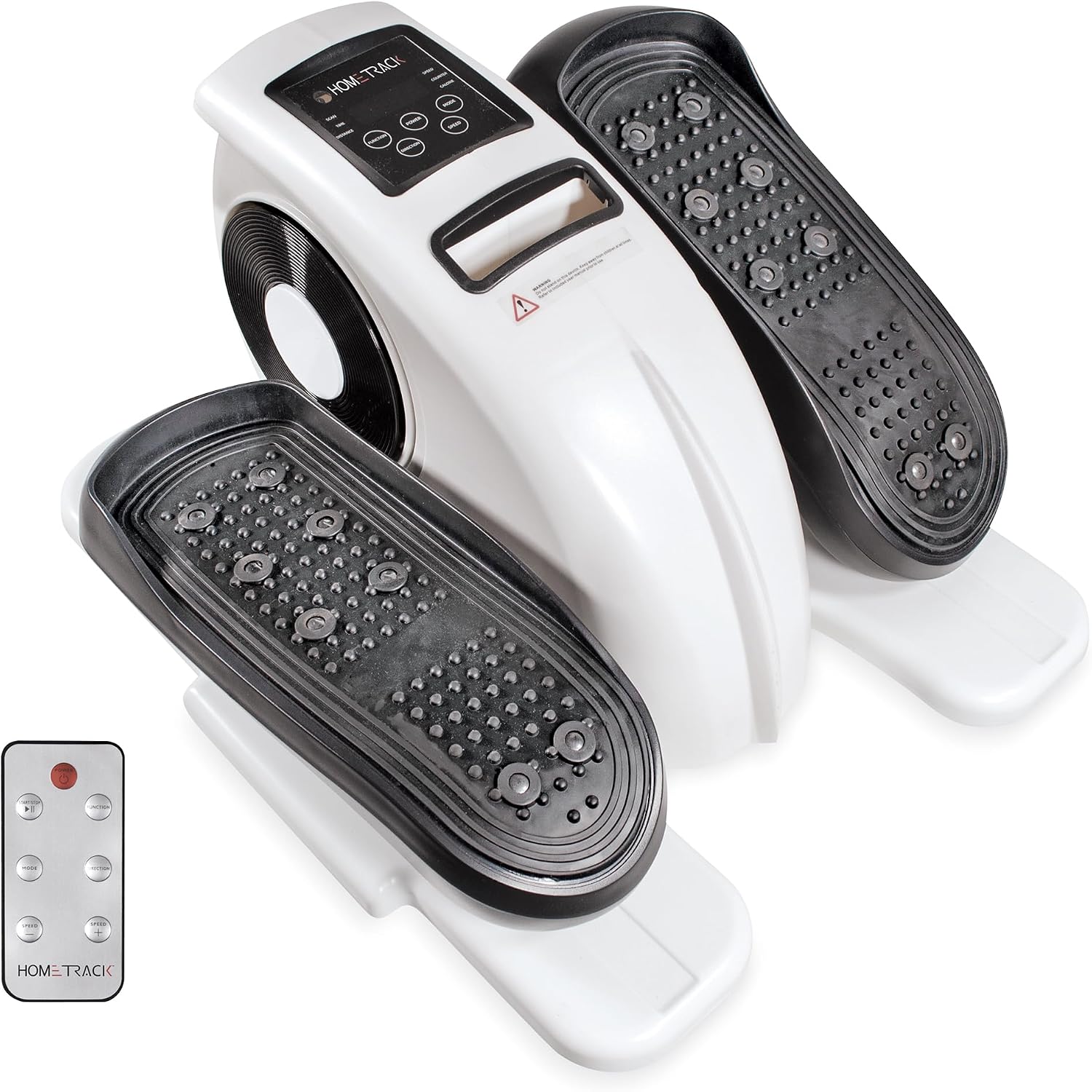
Figure 2: Detailed view of the control panel with various function buttons and digital display.
- SCAN: Automatically cycles through Time, Distance, Speed, Counter, and Calorie displays.
- TIME: Displays the duration of your workout.
- DISTANCE: Shows the estimated distance covered.
- SPEED: Indicates the current speed of your exercise.
- COUNTER: Tracks the total number of strides.
- CALORIE: Estimates calories burned during the workout.
- FUNCTION Button: Press to select a specific display mode (Time, Distance, etc.) or to reset values.
- POWER Button: Turns the unit ON/OFF.
- MODE Button: Selects different workout modes or programs.
- DIRECTION Button: Changes the direction of the elliptical motion (forward or reverse).
- SPEED Buttons (+/-): Adjusts the speed or resistance level of the elliptical motion. The unit has 8 resistance levels.
Starting a Workout
- Plug in the exerciser and press the POWER button to turn it on.
- Step onto the foot pedals. You can use the exerciser while seated or standing, ensuring stability.
- Begin pedaling. The display will automatically start tracking your workout data.
- Use the SPEED buttons to increase or decrease the resistance level to suit your fitness needs.
- Press the DIRECTION button to change between forward and reverse pedaling, targeting different muscle groups.
- Monitor your progress using the various display modes accessible via the FUNCTION button.

Figure 3: A user's feet positioned on the textured foot pedals of the elliptical exerciser, demonstrating its use.
Maintenance
- Clean the exerciser regularly with a soft, damp cloth. Do not use abrasive cleaners or solvents.
- Inspect all moving parts periodically for wear and tear.
- Ensure all screws and bolts are tightened securely.
- Store the exerciser in a cool, dry place away from direct sunlight and extreme temperatures.
Troubleshooting
| Problem | Possible Cause | Solution |
|---|---|---|
| Unit does not power on. | Power adapter not connected or faulty outlet. | Ensure power adapter is securely plugged into the unit and a working electrical outlet. Try a different outlet. |
| Pedals are stiff or not moving smoothly. | Low lubrication or debris in mechanism. | Check for any obstructions. Apply a small amount of silicone-based lubricant to moving parts if necessary (consult manufacturer for specific lubricant type). |
| Display is not showing data. | Loose connection or battery issue (if applicable). | Ensure all connections are secure. If battery-operated, replace batteries. |
Specifications
| Feature | Detail |
|---|---|
| Model Name | Hometrack-Elliptical Exerciser |
| Brand | Jobar |
| Model Number | JB8293 |
| Color | Multicolor |
| Product Dimensions (D x W x H) | 17"D x 15.55"W x 9.65"H |
| Material | Plastic |
| Resistance Mechanism | Magnetic |
| Maximum Weight Recommendation | 300 Pounds |
| Number of Resistance Levels | 8 |
| Item Weight | 7.85 Kilograms |
Warranty and Support
For warranty information or technical support, please contact Jobar customer service. Refer to your purchase documentation for specific warranty terms and contact details.
You may also visit the official Jobar website for additional resources and support information.