
Range Tour D30H
Contents
Range Tour D30H Dual Car Camera User Manual
Model: D30H
Introduction
Thank you for purchasing the Range Tour D30H Dual Car Camera. This advanced dash cam is designed to provide comprehensive recording of your driving experience, both inside and outside your vehicle. With features like 4K 2160P resolution, built-in WiFi and GPS, 170° wide-angle lenses, WDR technology, night vision, loop recording, and parking monitoring, the D30H ensures reliable and high-quality video evidence. Please read this manual thoroughly before operation to ensure proper use and optimal performance.
Package Contents
Please check the package contents upon opening to ensure all items are present:
- 1 x Range Tour D30H Car DVR Recorder
- 1 x Car Charger
- 1 x Hidden Holder Adhesive Sticker
- 1 x Suction Cup Mount
- 1 x User Manual
- (Note: Memory Card is not included and must be purchased separately.)

Product Features
- 4K HD Car Camera: Records at 2160p (4K) for the front camera only at 24fps, or dual 1080P@30fps for both front and inside cameras. Features a 170° wide-angle lens for comprehensive coverage. The front and rear cameras can be flipped 180 degrees, and left/right adjusted by 30 degrees to reduce blind spots.
- Dual Dash Cam with Wi-Fi & GPS: Built-in GPS module accurately logs vehicle location, speed, latitude, longitude, and route. View driving routes on Google Maps via the "Roadcam" app or with the Car Camera Recorder software. Integrated WiFi allows real-time footage viewing, video downloads to your phone, and easy sharing.
- Loop Recording: Records video in 1 or 3-minute segments. When the SD card is full, the oldest footage is automatically overwritten with new recordings, preventing memory shortage. Supports up to 256GB TF (microSD) cards (not included).
- G-Sensor: Automatically locks the current video footage upon detecting a sudden collision or impact, ensuring critical event recordings are not overwritten by loop recording.
- 24-Hour Parking Monitoring: When connected to a step-down hardwire kit (not included), the dash cam automatically turns on and records when motion is detected or an impact occurs while parked, providing evidence for financial loss or vehicle scratches.
- Super Night Vision: Equipped with an image sensor, 4 IR lights, f/1.8 aperture, and a 6-glass lens to capture clear videos and photos even in low-light conditions.


Setup and Installation
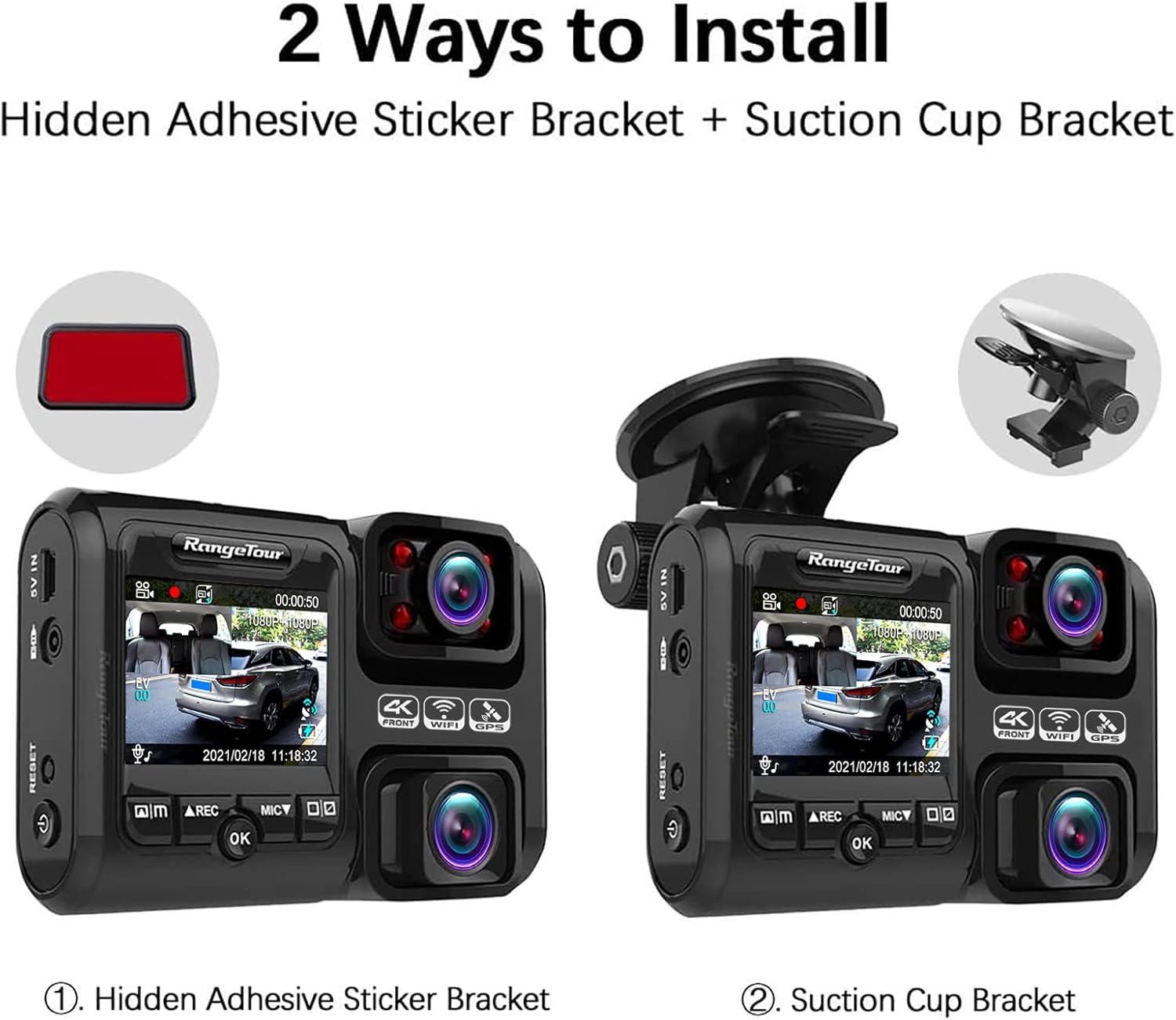
The Range Tour D30H offers two primary installation methods: using the hidden adhesive sticker bracket or the suction cup bracket.
- Prepare the Dash Cam: Before installation, ensure the dash cam is fully charged by connecting it to a power source for at least 2 hours. Insert a Class 10 or higher microSD card (up to 256GB, not included) into the card slot. Format the SD card using the camera's settings or a computer (FAT32 format recommended).
- Choose Mounting Location: Select a location on your car's windshield that does not obstruct your view of the road. The area should be clean and dry.
- Install Mounting Bracket:
- Hidden Adhesive Sticker Bracket: Peel off the protective film from the adhesive pad and firmly press the bracket onto the chosen windshield location for at least 30 seconds. Allow 24 hours for the adhesive to fully cure before attaching the dash cam.
- Suction Cup Bracket: Press the suction cup firmly against the windshield and flip the lever to secure it.
- Attach Dash Cam: Slide the D30H dash cam onto the installed mounting bracket until it clicks securely into place.
- Connect Power: Connect the provided car charger to the dash cam's 5V IN port and plug the other end into your vehicle's cigarette lighter socket. Route the power cable neatly along the windshield and dashboard edges to avoid obstruction.
- Adjust Camera Angle: Adjust the camera's angle to ensure both the front and interior lenses capture the desired view. The front lens can be rotated 180 degrees and the interior lens can be adjusted 30 degrees left/right.

Operation
Basic Operation
- Power On/Off: The dash cam will automatically power on and begin recording when your vehicle's engine starts and power is supplied. It will power off automatically when the engine is turned off. You can also manually power on/off by pressing and holding the power button.
- Recording: Once powered on, the dash cam automatically starts loop recording. A red indicator light or on-screen icon will confirm recording is active.
- Emergency Lock: In case of a sudden impact or collision, the built-in G-sensor will automatically lock the current video segment to prevent it from being overwritten. You can also manually lock a video by pressing the "OK" button during recording.
- Microphone: The dash cam records audio by default. Press the MIC button to toggle the microphone on or off.
Menu Settings
To access the menu settings, stop recording (if active) and press the Menu button. Use the navigation buttons to scroll through options and the OK button to select. Common settings include:
- Resolution: Adjust video resolution (e.g., 4K, 1080P).
- Loop Recording: Set loop recording duration (1/3 minutes).
- G-Sensor Sensitivity: Adjust the sensitivity of the G-sensor (Low, Medium, High).
- Parking Monitor: Enable or disable parking monitoring (requires hardwire kit).
- Date/Time: Set the correct date and time.
- Format SD Card: Format the inserted microSD card.
Using the Roadcam App (WiFi Function)
- Download the "Roadcam" app from your smartphone's app store.
- On the dash cam, enable WiFi mode through the menu settings. The dash cam will broadcast a WiFi network.
- On your smartphone, connect to the dash cam's WiFi network (SSID and password will be displayed on the dash cam screen).
- Open the "Roadcam" app. You can now view live footage, browse recorded videos, download videos to your phone, and adjust dash cam settings directly from the app.
Maintenance
- SD Card Maintenance: Regularly format the microSD card (at least once a month) to prevent data corruption and ensure optimal recording performance. Replace the microSD card if it shows signs of degradation or error.
- Cleaning: Use a soft, dry cloth to clean the camera lenses and the device body. Do not use abrasive cleaners or solvents.
- Temperature: Avoid exposing the dash cam to extreme temperatures. While designed for automotive use, prolonged exposure to direct sunlight in a parked car can affect performance and lifespan.
- Firmware Updates: Check the official Range Tour website periodically for firmware updates. Updating the firmware can improve performance, add new features, and fix bugs.
Troubleshooting
| Problem | Possible Cause / Solution |
|---|---|
| Dash cam does not power on. |
|
| Recording stops or freezes. |
|
| Video quality is poor. |
|
| GPS signal is not found. |
|
| WiFi connection issues. |
|
Specifications
- Model: D30H
- Product Dimensions: 3.94 x 1.97 x 3.54 inches
- Item Weight: 4.8 ounces
- Video Capture Resolution: Front 4K (2160P@24fps), Dual 1080P@30fps
- Field of View: 170 Degrees (Wide Angle)
- Special Features: Loop Recording, G-Sensor, Night Vision, Parking Monitor, Built-in WiFi, Built-in GPS
- Connectivity Technology: USB, Wireless (WiFi)
- Power Source: Car Charger (12V-24V)
- Battery: 1 Lithium Polymer battery required (internal capacitor for power-off protection)
- Storage: Supports up to 256GB TF (microSD) card (not included)
Warranty and Support
Range Tour provides a standard warranty for this product. For detailed warranty terms, conditions, and duration, please refer to the warranty card included in your package or visit the official Range Tour website. For technical support, troubleshooting assistance, or any product-related inquiries, please contact Range Tour customer service through the contact information provided on the official website or your purchase platform.
Always ensure you are using official accessories and following the instructions in this manual to maintain your warranty validity.
Ask a question about this manual
Ask about setup, troubleshooting, compatibility, parts, safety, or missing instructions. Manuals+ will review the question and use this page’s manual context to help answer it.