Introduction
This manual provides detailed instructions for the installation, operation, and maintenance of your Nexillumi LED Strip Lights. Please read this manual thoroughly before use to ensure proper functionality and safety.
The Nexillumi LED Strip Lights are designed to provide versatile and dynamic lighting for various indoor environments. Featuring music synchronization, color changing capabilities, and control via both remote and a dedicated mobile application, these lights offer a customizable lighting experience.
What's in the Box
Verify that all components are present before beginning installation:
- UL listed fireproof power adapter
- LED light strip with high-bond double-sided adhesive
- Remote Control (New or Old Type, shipped randomly)
- Controller Box (for app and music sync)

Image: Contents of the Nexillumi LED Strip Lights package, including the 100ft LED strip, remote, and controller.
Specifications
| Feature | Detail |
|---|---|
| Brand | Nexillumi |
| Model Number | 30M_Nex_ZTL_LX_DE |
| Color | Multicolor |
| Indoor/Outdoor Usage | Indoor |
| Light Source Type | LED |
| Power Source | Corded Electric |
| Voltage | 120 Volts |
| Wattage | 5 watts |
| Control Method | App, Remote Control |
| Special Features | Color Changing, Dimmable, Linkable, Remote Controlled, Timer, Music Sync |
| Material | Plastic |
| Item Weight | 8.78 ounces |
| Water Resistance Level | Not Water Resistant |
Setup and Installation
Follow these steps for a successful installation:
- Preparation: Ensure the installation surface is clean, dry, and smooth.
- Unspool the Strips: Before powering on, completely unspool the LED strips from the reel. This prevents overheating and potential damage to the strips.
- Adhesive Application: The LED strips come with upgraded high-adhesive double-sided tape. Peel off the protective backing and firmly press the strip onto the desired surface.
- Connecting Components: Connect the LED strip to the controller box, ensuring the arrows on the connectors are pointed to each other. This ensures proper electrical connection. Then, connect the power adapter to the controller box and plug it into a power outlet.
- Cutting the Strips (Optional): The LED strips are customizable and can be cut at designated cut marks. Note that 4-pin LED strip connectors are not included for extending length.
- Important Note: Do not fold the LED strips to make contact with each other while the lights are on, as this can cause a short circuit and damage the lights.

Image: Illustration emphasizing the importance of unspooling the LED strips before use to prevent damage.

Image: Close-up of the LED strip showing the ultra-strong 3M adhesive backing.
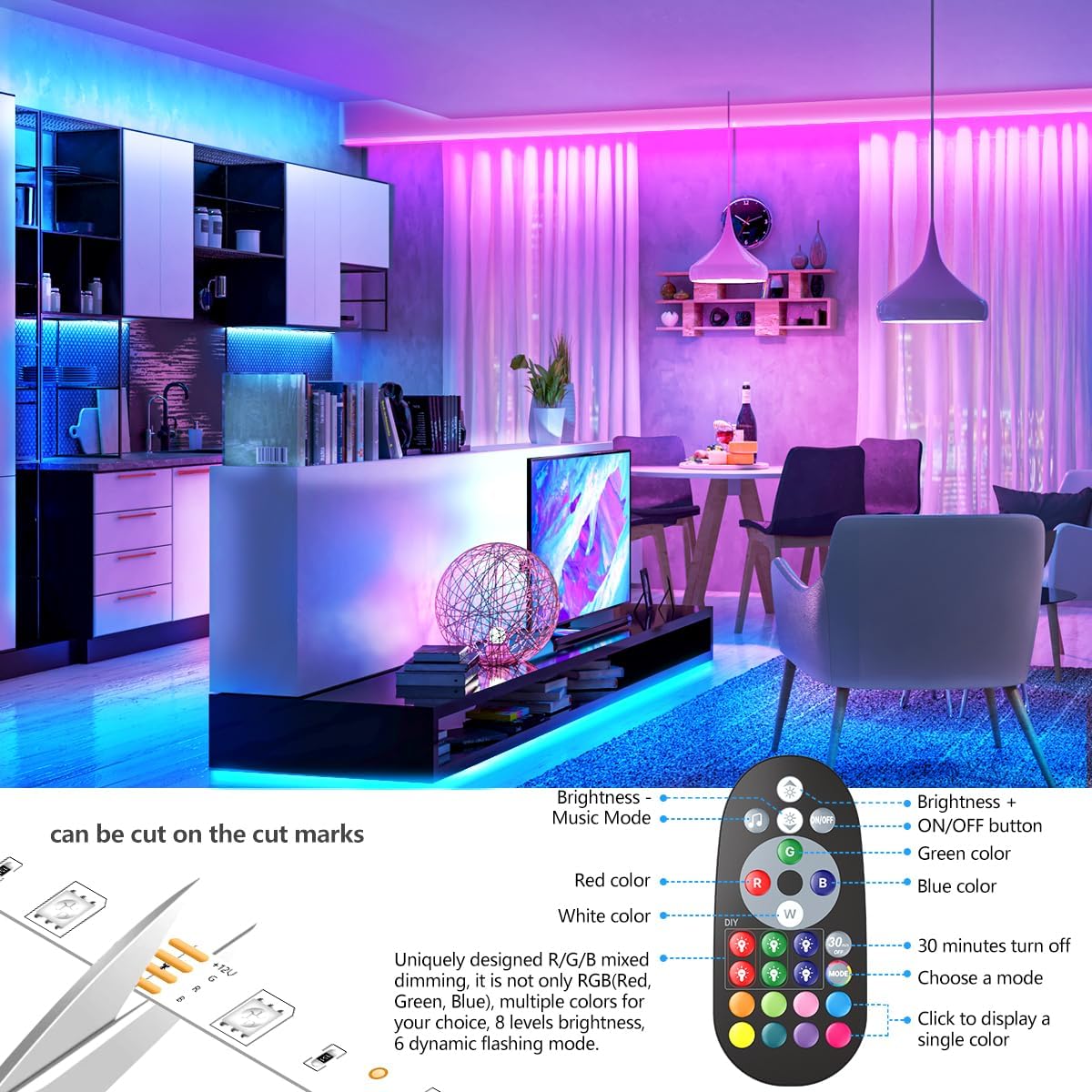
Image: Detailed diagram illustrating the "Arrow To Arrow" connection method for the LED strip and controller.

Image: Illustration of the LED strip's cut marks for customization.
Operating Instructions
Your Nexillumi LED Strip Lights can be controlled via the included remote control or a mobile application.
Remote Control Operation
The remote control allows for quick adjustments to your lighting. Functions include:
- Brightness Adjustment: Increase or decrease light intensity.
- Color Selection: Choose from a wide range of preset colors (Red, Green, Blue, White, etc.).
- DIY Colors: Create and save custom colors.
- Mode Selection: Switch between various dynamic lighting modes (e.g., flash, fade, jump).
- Timer: Set a 30-minute turn-off timer.
- On/Off Button: Power the lights on or off.

Image: Detailed view of the remote control, highlighting its various functions for color, brightness, and mode selection.
Note: New and old remote control models may be shipped randomly. Both provide similar functionality.

Image: Comparison of the two remote control designs that may be included with the product.
Mobile App Control
For advanced control and features, download the "illumi Home" app from the Google Play Store or iOS App Store. The app allows for:
- Adjustable Lighting: Fine-tune brightness and change colors.
- Music Sync Mode: Utilize the built-in microphone in the controller or your phone's microphone to synchronize light changes with music.
- Scenes Modes: Apply pre-programmed lighting scenes.
- Timing Function: Schedule lights to turn on/off at specific times.
- DIY Customization: Create and save personalized lighting effects.

Image: The illumi app interface for iOS and Android devices, demonstrating color and music control features. Download the app from lxillumi.com/manuals/download.html.

Image: The illumi app's comprehensive control panel, offering scenes, music mode, timing, color modes, microphone control, and brightness adjustment. Download the app from lxillumi.com/manuals/download.html.
Maintenance
To ensure the longevity and optimal performance of your Nexillumi LED Strip Lights, follow these maintenance guidelines:
- Cleaning: Gently wipe the LED strips with a dry, soft cloth to remove dust. Do not use liquid cleaners or abrasive materials.
- Power Adapter: Ensure the power adapter is kept in a dry environment and away from direct heat sources. The fireproof power adapter meets UL standards and has a built-in protective circuit to prevent overload or short circuit.
- Connections: Periodically check all connections to ensure they are secure and free from damage.
- Storage: If storing the lights for an extended period, ensure they are clean, dry, and coiled loosely to prevent damage to the strip or adhesive.
Troubleshooting
If you encounter issues with your Nexillumi LED Strip Lights, refer to the following common problems and solutions:
| Problem | Possible Cause | Solution |
|---|---|---|
| Lights do not turn on. | No power, loose connection, or faulty power adapter. | Check if the power adapter is securely plugged into the outlet and the controller. Ensure the "Arrow To Arrow" connection between the strip and controller is correct. Test the outlet with another device. |
| Lights are dim or flickering. | Low power, incorrect brightness setting, or damaged strip section. | Increase brightness via remote or app. Ensure the power adapter is sufficient. Inspect the strip for physical damage. |
| Remote control not working. | Battery depleted, remote not pointed at receiver, or interference. | Replace the remote battery. Ensure the remote is pointed directly at the IR receiver on the controller box. Remove any obstructions. |
| App control not connecting. | Bluetooth/Wi-Fi issue, app not updated, or incorrect pairing. | Ensure Bluetooth is enabled on your device and the app has necessary permissions. Restart the app and the LED lights. Re-pair the device within the app if necessary. |
| Music sync not working. | Microphone not enabled, low volume, or incorrect mode. | Ensure the microphone mode is activated in the app. Increase music volume. Check app permissions for microphone access. |
Warranty and Support
Nexillumi products are designed for reliability and performance. For specific warranty details, please refer to the product packaging or contact Nexillumi customer support.
For further assistance, technical support, or to download the latest version of the "illumi Home" app, please visit the official Nexillumi website or contact their customer service:
- Official Website: Nexillumi Store on Amazon
- App Download: lxillumi.com/manuals/download.html
- Customer Service: Refer to contact information provided on product packaging or the official website.
