
1. Introduction
Thank you for purchasing the Godox V860III-C Flash. This professional speedlight is designed for Canon cameras, offering advanced features such as a built-in 2.4G wireless X system, high-speed sync (HSS) up to 1/8000s, and a powerful 7.2V/2600mAh lithium battery. It also includes a 10-level adjustable modeling light for precise light preview. This manual provides detailed instructions for safe and effective use of your flash unit.

Image 1.1: Overview of the Godox V860III-C Flash, showcasing its modeling light, 2.4G wireless capability, 1.5s recycling time, M/TTL switch, and quick release lock.
2. What's in the Box
Please check that all the following items are included in your package:
- 1x Godox V860III-C Flash
- 1x Lithium Battery (7.2V/2600mAh)
- 1x Protective Case
- 1x Instruction Manual
- 1x USB Charger
- 1x USB Cable
- 1x Mini Stand
- 1x Flash Color Filter
- 1x Diffuser
- 1x Mini Softbox
- 1x 15cm x 17cm Softbox
Note: Some accessories may be located at the bottom of the black compartment in the packaging.
3. Setup
3.1 Battery Installation and Charging
- Insert Battery: Open the battery compartment cover on the flash unit. Insert the provided 7.2V/2600mAh lithium battery, ensuring correct polarity. Close the cover securely.
- Charge Battery: Connect the USB charger to a power source and attach the USB cable to the battery or the flash unit's USB-C port. The charging indicator will show the charging status. A full charge provides approximately 480 full-power flashes and a 1.5-second recycle time.

Image 3.1: Illustration of the flash's optimal battery performance, showing 1.5s recycle time and 480 full power flashes, alongside examples of the 10-level dimmable modeling light.
3.2 Mounting the Flash to Your Camera
- Attach to Hot Shoe: Slide the flash's hot shoe mount into your Canon camera's hot shoe.
- Secure with Quick Release Lock: Engage the quick release lock lever to firmly secure the flash to the camera. This ensures stability during use and allows for quick detachment.
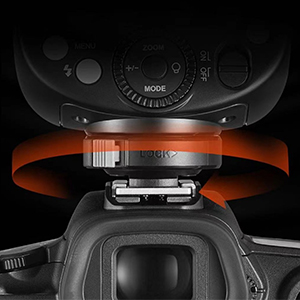
Image 3.2: Detail of the quick release lock, designed for secure and rapid attachment/detachment from the camera hot shoe.
4. Operating Instructions
4.1 Power On/Off
Press and hold the power button to turn the flash on or off. The LCD screen will illuminate upon power-on.
4.2 Switching Between TTL and Manual Mode
The V860III-C features a quick switch button on the side for seamless transitions between TTL (Through-The-Lens) automatic flash mode and Manual (M) flash mode. Slide the switch to select your desired mode.

Image 4.1: The dedicated TTL/M switch for quick mode changes.
4.3 Using the Modeling Light
The integrated modeling light allows you to preview the lighting effect before taking a shot. It offers 10 levels of adjustable brightness. Use the dedicated button or dial on the control panel to adjust the intensity.

Image 4.2: The modeling light provides a preview of the flash's effect.
4.4 Godox 2.4G Wireless X System
The V860III-C has a built-in Godox 2.4G Wireless X System, enabling it to function as both a master and slave unit. It is compatible with other Godox X system triggers (e.g., X1, X2, XPro) for off-camera flash control. Refer to the specific wireless trigger's manual for detailed pairing and group settings.

Image 4.3: The V860III-C integrates with the Godox 2.4G Wireless X System for remote flash control.
4.5 High-Speed Sync (HSS) and Flash Sync Speed
The flash supports High-Speed Sync (HSS) up to 1/8000s, allowing you to use wider apertures in bright conditions or freeze fast-moving subjects. This feature is typically activated through your camera's flash settings or the flash unit's menu.
4.6 Flash Head Adjustment and Zoom
The flash head can be tilted vertically from -7° to 90° and rotated horizontally 360° for bounce flash photography. The zoom function (20mm to 200mm) can be set automatically or manually to match your lens's focal length, optimizing light coverage.

Image 4.4: The flash head offers extensive tilt and swivel capabilities for flexible lighting.
4.7 Exposure Compensation
In TTL mode, you can adjust the flash exposure compensation from -3 to +3 EV in 1/3 stop increments to fine-tune the flash output. This is typically done via the flash's control panel or your camera's menu.

Image 4.5: The control panel and LCD screen allow for easy adjustment of flash settings, including exposure compensation and zoom.
5. Maintenance
5.1 Battery Care
- Always use the original Godox battery and charger.
- Do not expose the battery to high temperatures or direct sunlight.
- If storing the flash for an extended period, charge the battery to about 50% and remove it from the unit.
5.2 Cleaning
- Clean the flash body with a soft, dry cloth.
- For the flash tube and optical sensors, use a lens cleaning cloth or a soft brush.
- Avoid using solvents or abrasive cleaners.
5.3 Storage
Store the flash unit in a cool, dry place, away from dust and moisture. Use the provided protective case for added safety during transport and storage.
6. Troubleshooting
- Flash not firing:
- Check if the flash is securely mounted on the camera's hot shoe.
- Ensure the battery is charged and correctly inserted.
- Verify camera and flash settings (e.g., flash mode, sync speed).
- If using wireless, check trigger and receiver settings, channels, and groups.
- Inconsistent flash output:
- Check battery level; low battery can affect output.
- Ensure flash head is clean and unobstructed.
- Review exposure compensation settings on both flash and camera.
- Wireless connection issues:
- Confirm that the flash and trigger are set to the same channel and ID.
- Ensure there are no strong interfering signals in the environment.
- Check the distance between the flash and the trigger.
If problems persist, consult the detailed troubleshooting section in the full user manual or contact Godox customer support.
7. Specifications
| Feature | Specification |
|---|---|
| Brand | GODOX |
| Model Number | V860III-C |
| Compatible Mounts | Canon (1DX, 5D Mark III/II/IV, 6D/II, 7D/II, 60D, 50D, 40D, 30D, 650D, 600D, 550D, 500D, 450D, 400D Digital, 1100D, 1000D, 760D, 750D, 70D, 80D, 800D, 77D, M5, EOS R, 1500D, 3000D) |
| Flash Sync Speed | 1/8000s (High-Speed Sync) |
| Included Components | Flash unit, Lithium battery, Protective case, Manual, USB charger, USB cable, Mini stand, Color filter, Diffuser, Mini softbox, 15x17cm softbox |
| Color | Black |
| Connectivity Technology | Wireless (RF) |
| Battery Type | 1x Lithium-ion (included) |
| Mount Type | Hot Shoe Mount |
| Country of Origin | China |
8. Warranty and Support
Godox products are covered by a limited warranty. For specific warranty terms and conditions, please refer to the warranty card included with your product or visit the official Godox website. For technical support, service, or inquiries, please contact Godox customer service through their official channels.
You can find more information and support on the Godox Brand Store.
9. Product Videos
No official product videos with supported m3u8 format were found in the provided data to embed in this manual.


