1. Introduction
This instruction manual provides essential information for the safe and effective use of your Zenander BL2016 Lithium-Ion battery. This battery is designed as a replacement for Hytera PD985U and PD985 two-way radios. Please read this manual thoroughly before installation and operation to ensure proper functionality and longevity of the product.
2. Safety Information
Observe the following safety precautions to prevent damage to the battery, radio, or personal injury:
- Do not attempt to disassemble, open, or service the battery pack. This can lead to electric shock, fire, or explosion.
- Replace only with the battery pack designated for this product. Using incompatible batteries may cause damage or malfunction.
- Do not crush, puncture, short external contacts, or dispose of in fire or water. Mishandling can cause severe damage and safety hazards.
- Do not store above 60°C (140°F). High temperatures can degrade battery performance and pose a fire risk.
- New battery packs must be fully charged before use. This optimizes initial performance and battery life.
- Dispose of used batteries according to local regulations. Do not dispose of with household waste.
3. Product Overview
The Zenander BL2016 is a high-capacity Lithium-Ion battery designed for reliable power to your Hytera two-way radio. It features robust construction and adheres to international safety and quality standards.
3.1. Package Contents
- 1 x Zenander BL2016 Lithium-Ion Battery Pack
3.2. Key Features
- Compatibility: Fully compatible with Hytera PD985U and PD985 radio models.
- Battery Type: Lithium-Ion (Li-ion) for stable power delivery.
- Capacity: 2000mAh, 7.4V, 14.8Wh.
- Durability: Rated for 500 times of impulse discharge.
- Certifications: ISO9001, RoHS, CE, UN38.3, and MSDS certified for quality and safety.
3.3. Product Diagram

Figure 1: Top view of the Zenander BL2016 battery, showing the model number, rating, and safety warnings.
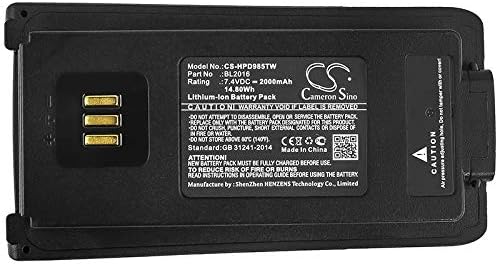
Figure 2: Detailed view of the battery label, highlighting specifications and certification marks.
4. Setup and Installation
Before installing the battery, ensure your radio is powered off. Use only the specified Hytera radio models (PD985U, PD985) for this battery.
4.1. Initial Charging
For optimal performance, fully charge the new battery before its first use. Use an official Hytera charger compatible with the PD985 series radios.
- Insert the battery into the charging tray.
- Connect the charger to a power source.
- Allow the battery to charge until the charger's indicator light signals a full charge (refer to your radio charger's manual for specific indicator meanings).
4.2. Battery Installation
- Ensure the radio is powered off.
- Align the battery with the battery compartment on the back of your Hytera PD985U or PD985 radio.
- Gently slide the battery into place until it clicks securely. Ensure the battery latch is engaged.

Figure 3: Angled view of the battery, showing the gold-plated contact points for connection to the radio.

Figure 4: Bottom view of the battery, illustrating the contact points and overall shape for proper radio fit.
5. Operating Instructions
Once the battery is installed and fully charged, your Hytera radio is ready for operation.
- Power On: Press and hold the power button on your radio until it turns on.
- Battery Level Check: Refer to your radio's display or indicator lights to check the current battery level.
- Recharging: When the battery level is low, power off the radio and place the battery in a compatible charger.
For detailed radio operation, refer to the instruction manual provided with your Hytera PD985U or PD985 radio.
6. Maintenance and Storage
Proper maintenance and storage will extend the life of your battery.
- Cleaning: Periodically clean the battery contacts with a clean, dry cloth to ensure good connection. Do not use abrasive cleaners or solvents.
- Storage: If storing the battery for an extended period, charge it to approximately 50% capacity and store it in a cool, dry place away from direct sunlight and extreme temperatures. Avoid storing fully charged or fully discharged batteries for long periods.
- Temperature: Operate and charge the battery within the recommended temperature range specified by Hytera for your radio.
7. Troubleshooting
If you encounter issues with your battery, refer to the following common problems and solutions:
| Problem | Possible Cause | Solution |
|---|---|---|
| Battery not charging |
|
|
| Radio not powering on with battery |
|
|
| Short battery life |
|
|
8. Specifications
| Feature | Detail |
|---|---|
| Model Number | CS-HPD985TW |
| Compatible Part Number | BL2016 |
| Compatible Radio Models | Hytera PD985U, Hytera PD985 |
| Battery Type | Lithium-Ion (Li-ion) |
| Voltage | 7.4V |
| Capacity | 2000mAh |
| Energy | 14.8Wh |
| Dimensions (L x W x H) | 2.09 x 4.17 x 0.71 inches |
| Weight | 8.4 ounces |
| Certifications | ISO9001, RoHS, CE, UN38.3, MSDS |
9. Warranty and Support
Zenander provides a customer satisfaction guarantee for this product.
- Warranty: Full Refund or a Free Replacement without Reason for 60 Days from the date of purchase.
- Customer Support: If you have any questions, concerns, or require assistance, please contact Zenander customer support through the retailer's platform where the product was purchased.


