
ClearClick Radio VR47
ClearClick Classic Vintage Retro Style AM/FM Radio
Model: Radio VR47
Introduction
Thank you for choosing the ClearClick Classic Vintage Retro Style AM/FM Radio. This beautifully crafted radio combines nostalgic aesthetics with modern functionality, offering AM/FM radio, Bluetooth connectivity, Aux-in, and USB playback. Its handmade wooden exterior and authentic style backlight provide a timeless appeal, while the built-in 5W speaker delivers clear, high-quality sound. This manual provides detailed instructions for setup, operation, and maintenance to ensure optimal performance and enjoyment of your new radio.
Key Features
- AM/FM Radio with Bluetooth, Aux-In, & USB Playback
- Beautiful, Handmade Wooden Exterior
- Clear, High-Quality Sound from Built-In 5W Speaker
- Authentic Style Radio Backlight (illuminates in all modes)
- Easy-to-Use Control Knobs for Volume and Tuning

Front view of the ClearClick Classic Vintage Retro Style AM/FM Radio, showcasing its wooden exterior and illuminated tuning dial.
Setup
- Unpacking: Carefully remove the radio from its packaging. Ensure all components are present.
- Placement: Place the radio on a stable, flat surface. For optimal radio reception, avoid placing it near large metal objects or other electronic devices that may cause interference.
- Power Connection: Locate the power input on the back of the radio. Connect the provided power cable to the radio and then plug it into a standard AC 120V-60Hz wall outlet.
- Initial Power On: Locate the power switch on the back of the unit. Flip the switch to the 'ON' position. The radio's tuning dial backlight will illuminate.
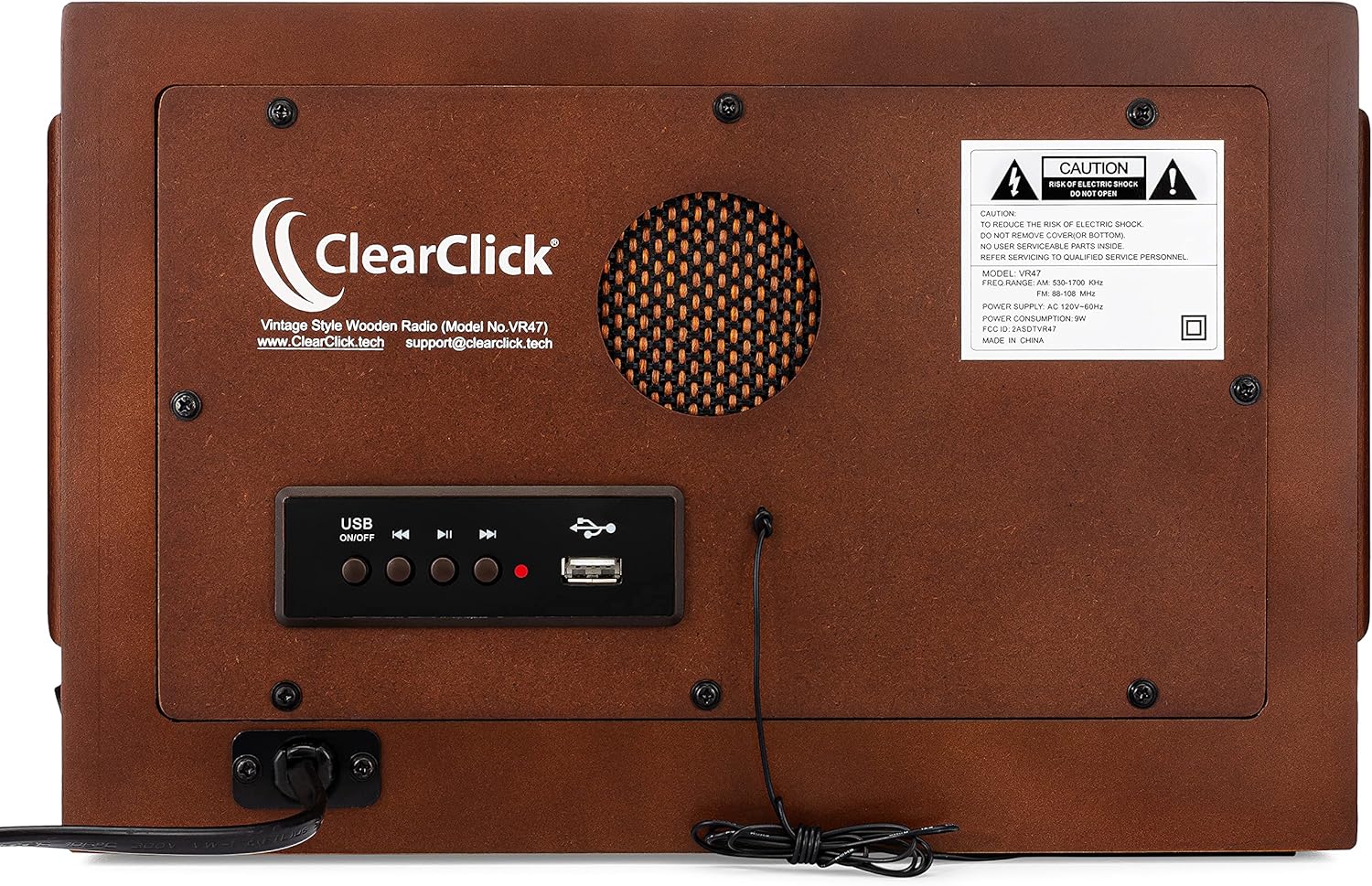
Rear view of the radio, highlighting the power input, Aux-in port, and USB playback controls.
Operating Instructions
AM/FM Radio Operation
- Select Mode: Press the 'AM' or 'FM' button on the front panel to select your desired radio band. The corresponding button will illuminate.
- Adjust Volume: Turn the left knob labeled 'VOLUME' clockwise to increase the volume and counter-clockwise to decrease it.
- Tune Station: Turn the right knob labeled 'TUNING' to scan for radio stations. The illuminated dial will indicate the frequency.
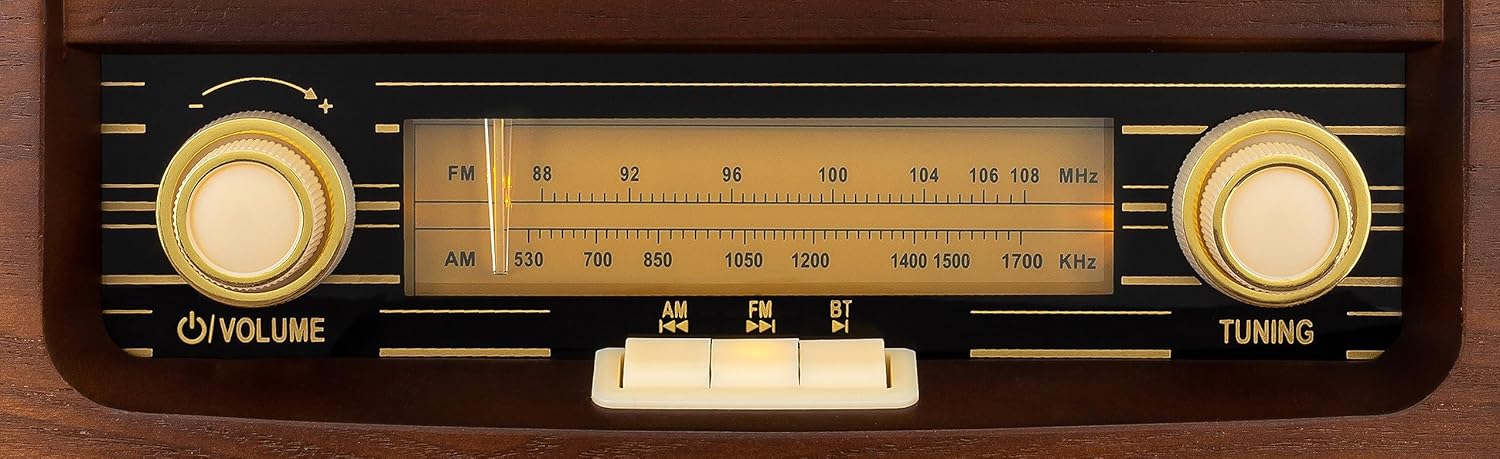
Close-up of the radio's front panel, showing the volume and tuning knobs, and the AM/FM/Radio/BT selection buttons.
Bluetooth (BT) Operation
- Select Mode: Press the 'RADIO/BT' button on the front panel until the blue indicator light above the button illuminates, indicating Bluetooth mode. The radio will enter pairing mode.
- Pairing: On your mobile device (smartphone, tablet, etc.), enable Bluetooth and search for available devices. Select "Vintage Radio VR47" from the list. Once connected, the blue indicator light will remain solid.
- Playback: Begin playing audio from your device. The sound will be streamed through the radio's speaker. Adjust volume using the radio's volume knob or your device's volume controls.
Official product video demonstrating the features and operation of the ClearClick Vintage Style AM/FM Radio VR47, including Bluetooth connectivity.
USB Playback
- Insert USB: Insert a USB flash drive containing MP3/WAV audio files into the USB port on the back of the radio.
- Automatic Playback: The radio should automatically switch to USB mode and begin playing the first compatible audio file.
- Controls: Use the control buttons next to the USB port on the back of the radio to play/pause, skip tracks forward/backward, and turn USB playback on/off.
Aux-in Operation
- Connect Device: Connect an external audio device (e.g., MP3 player, CD player) to the 'AUX IN' port on the back of the radio using a 3.5mm audio cable (not included).
- Automatic Mode: The radio will automatically switch to Aux-in mode when a device is connected.
- Playback: Play audio from your connected device. Adjust volume using the radio's volume knob or your device's volume controls.
Maintenance
- Cleaning: Wipe the exterior of the radio with a soft, dry cloth. Do not use liquid cleaners or abrasive materials.
- Storage: When not in use for extended periods, store the radio in a cool, dry place away from direct sunlight and extreme temperatures.
- Ventilation: Ensure the radio has adequate ventilation. Do not block the speaker grille or any vents.
Troubleshooting
| Problem | Possible Cause / Solution |
|---|---|
| No Power | Ensure the power cable is securely plugged into the radio and a working wall outlet. Check the power switch on the back of the unit is in the 'ON' position. |
| No Sound | Increase the volume using the 'VOLUME' knob. Ensure the correct mode (AM, FM, Radio/BT) is selected. If using Bluetooth or Aux-in, check the volume on your connected device. |
| Poor Radio Reception | Adjust the radio's position or orientation. Move away from other electronic devices that may cause interference. |
| Bluetooth Not Connecting | Ensure the radio is in Bluetooth mode (blue light illuminated). Make sure Bluetooth is enabled on your device and "Vintage Radio VR47" is selected. Try unpairing and re-pairing the device. Ensure no other devices are currently connected to the radio. |
| USB Playback Issues | Ensure the USB flash drive is properly inserted. Verify that the audio files are in compatible formats (MP3/WAV). Try a different USB drive. Note: The radio may restart playback from the beginning when turned off and on in USB mode. |
Specifications
- Model Number: Radio VR47
- Product Dimensions: 12 x 5.5 x 7 inches
- Weight: 5.67 Pounds
- Speaker Output: 5W
- Power Supply: AC 120V-60Hz
- Connectivity: AM/FM Radio, Bluetooth, Aux-in, USB
- Manufacturer: ClearClick
- Country of Origin: China
Warranty & Support
The ClearClick Classic Vintage Retro Style AM/FM Radio (Model No. VR47) comes with a 5-Year Warranty from ClearClick, a USA-Based Small Business. For any questions, technical support, or warranty claims, please contact ClearClick support directly.
Website: www.ClearClick.tech
Email: support@clearclick.tech
Related documentsRadio VR47


Ask a question about this manual
Ask about setup, troubleshooting, compatibility, parts, safety, or missing instructions. Manuals+ will review the question and use this page’s manual context to help answer it.