
Armitron 40/8284GXB
Armitron Sport Men's Digital Chronograph Watch
Model: 40/8284GXB | Brand: Armitron
Introduction
This manual provides detailed instructions for the operation and maintenance of your Armitron Sport Digital Chronograph Watch, model 40/8284GXB. This timepiece features a quartz movement, a metallic bluish purple resin case, and a black resin strap. Key functions include chronograph, lap time, alarm, dual time, military time, and backlight.
Product Overview
Familiarize yourself with the watch's components and button functions.

Image 1: Front View of the Watch. This image displays the watch face with its digital display, showing the time, day, and date. Four buttons are visible around the bezel: 'RESET' (top left), 'MODE' (bottom left), 'ST/STP' (top right), and 'EL' (bottom right). The metallic bluish purple resin case is prominent.
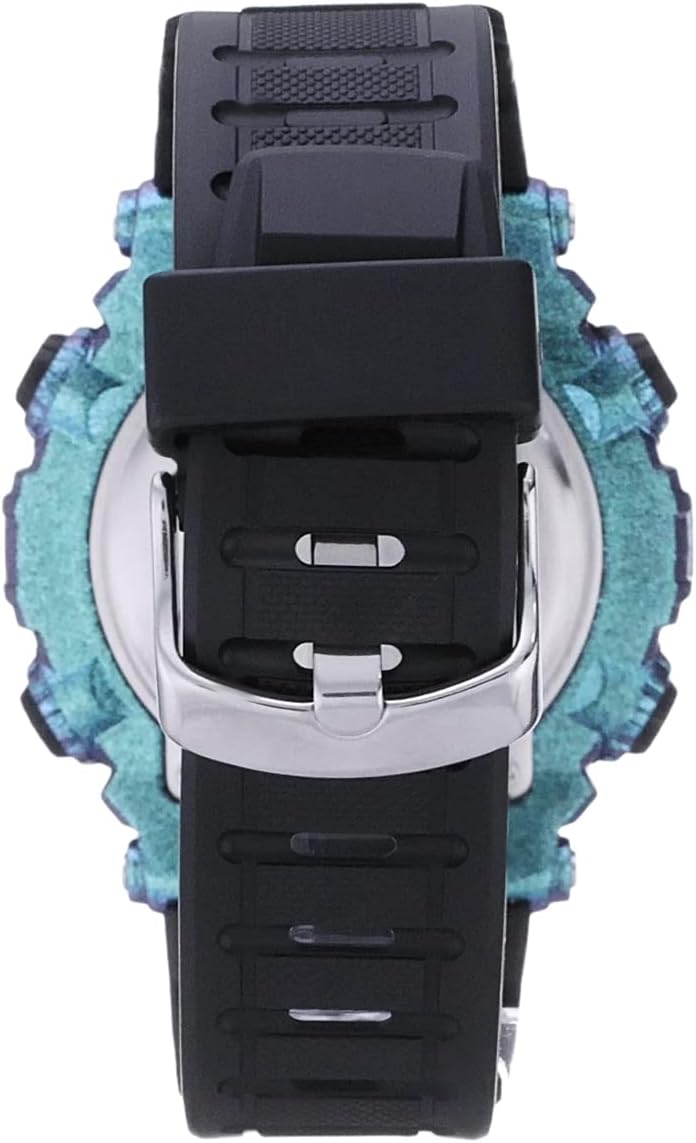
Image 2: Side and Back View of the Watch. This image shows the watch from a side angle, highlighting the black resin strap and the buckle closure. The metallic bluish purple resin case is also visible from this perspective.
Button Functions:
- MODE Button (Bottom Left): Used to cycle through different modes: Time, Chronograph, Alarm, Dual Time.
- RESET Button (Top Left): Used to reset values in chronograph mode or adjust settings in setting modes.
- ST/STP Button (Top Right): Used to start/stop functions in chronograph mode or select/confirm settings.
- EL Button (Bottom Right): Activates the backlight for improved visibility in low light conditions.
Initial Setup: Setting Time and Date
- From the normal time display, press the MODE button repeatedly until the time setting mode is reached (usually indicated by flashing digits).
- Press the RESET button to select the digit or setting you wish to adjust (e.g., seconds, hour, minute, year, month, day).
- Use the ST/STP button to increase the selected value. Hold down to advance rapidly.
- Continue pressing RESET and ST/STP until all desired settings (time, date, year) are correctly adjusted.
- Press the MODE button to exit the setting mode and return to the normal time display.
Operating Instructions
Chronograph Function:
- Press MODE until "CHRONO" or "STOPWATCH" appears on the display.
- Press ST/STP to start the chronograph.
- Press ST/STP again to stop the chronograph.
- Press RESET to clear the chronograph to zero.
Lap Time Function:
While the chronograph is running:
- Press RESET to record a lap time. The display will show the lap time while the chronograph continues to run in the background.
- Press RESET again to return to the running chronograph display.
Alarm Function:
- Press MODE until "ALARM" appears.
- Press RESET to select the hour or minute digits.
- Use ST/STP to adjust the selected digit.
- Press MODE to confirm and exit.
- To activate/deactivate the alarm, press ST/STP while in alarm mode. An alarm icon will indicate activation.
Dual Time Function:
This function allows you to set and view a second time zone.
- Press MODE until "DUAL TIME" or "T2" appears.
- Press RESET to select the hour or minute digits.
- Use ST/STP to adjust the selected digit.
- Press MODE to confirm and exit.
Military Time (24-Hour Format):
To switch between 12-hour and 24-hour (military) time format:
- In normal time display, press and hold the ST/STP button for a few seconds. The display will toggle between 12-hour (with AM/PM indicator) and 24-hour format.
Backlight:
Press the EL button (bottom right) to illuminate the display for a few seconds, enhancing visibility in dark environments.
Care and Maintenance
- Cleaning: Wipe the watch case and strap with a soft, damp cloth. Avoid using harsh chemicals or abrasive materials.
- Temperature: Avoid exposing the watch to extreme temperatures (hot or cold) for extended periods, as this can affect battery life and accuracy.
- Impact: While durable, avoid dropping the watch or subjecting it to strong impacts.
- Battery Replacement: When the display dims or functions become erratic, the battery may need replacement. This should ideally be performed by a qualified watch technician to ensure water resistance is maintained. The watch uses 1 product-specific battery.
Water Resistance
This Armitron Sport watch is water resistant to 330 feet (100 meters). This rating indicates suitability for swimming and snorkeling, but it is not recommended for scuba diving. Do not operate buttons while the watch is submerged in water.

Image 3: Water Resistance Chart. This chart illustrates various water resistance ratings. For this watch, rated at 100M (330FT), it is suitable for swimming and snorkeling, but not for scuba diving. It also shows lower ratings like 'Accidental Splashes' (30M) and 'Swimming' (50M).
Troubleshooting
| Problem | Possible Cause | Solution |
|---|---|---|
| Display is dim or blank. | Low battery. | Replace the battery. Consult a professional watch technician. |
| Time is incorrect or resetting. | Incorrect setting; low battery; exposure to strong magnetic fields. | Re-set the time and date. If problem persists, replace battery. Keep watch away from strong magnets. |
| Condensation under the crystal. | Water ingress; sudden temperature change. | Stop using the watch immediately. Seek professional repair to prevent further damage. Avoid extreme temperature changes. |
| Buttons are unresponsive. | Watch is in a locked mode; internal malfunction. | Try pressing the MODE button to cycle through modes. If unresponsive, a battery reset or professional service may be required. |
Specifications
- Model Number: 40/8284GXB
- Movement: Quartz Digital
- Case Material: Resin
- Strap Material: Resin
- Water Resistance: 100 meters (330 feet)
- Functions: Chronograph, Lap Time, Alarm, Dual Time, Military Time, Backlight, Time, Date, Day
- Battery: 1 Product Specific battery (included)
- Dimensions (Parcel): 10 x 8.1 x 7 cm
- Weight (Parcel): 100 g
- Manufacturer: Armitron Sport
Warranty and Support
This Armitron watch is typically covered by a manufacturer's warranty. Please refer to the warranty card included with your purchase or visit the official Armitron website for detailed warranty terms and conditions.
For technical support, service, or inquiries regarding your watch, please contact Armitron customer service directly. Contact information can usually be found on the official brand website or on your product packaging.
Official Website: www.armitron.com
Ask a question about this manual
Ask about setup, troubleshooting, compatibility, parts, safety, or missing instructions. Manuals+ will review the question and use this page’s manual context to help answer it.