
Introduction
The Studebaker Retro Edge Big Sound Bluetooth Boombox (Model SB2150B) is a versatile audio system designed for portable entertainment. It combines classic retro aesthetics with modern features, including a CD player, cassette player/recorder, AM/FM stereo radio, and Bluetooth connectivity. This manual provides detailed instructions for setup, operation, maintenance, and troubleshooting to ensure optimal performance and longevity of your device.
Important Safety Information
Please read all instructions carefully before operating this unit. Keep this manual for future reference.
- Do not expose this unit to rain or moisture.
- Do not block any ventilation openings.
- Do not install near any heat sources such as radiators, heat registers, stoves, or other apparatus (including amplifiers) that produce heat.
- Protect the power cord from being walked on or pinched.
- Only use attachments/accessories specified by the manufacturer.
- Unplug this unit during lightning storms or when unused for long periods of time.
- Refer all servicing to qualified service personnel.
Package Contents
Verify that all items are present upon unpacking:
- Studebaker Retro Edge Big Sound Bluetooth Boombox (SB2150B)
- AC Power Cord
- Instruction Manual
Product Features and Controls
Familiarize yourself with the various components and controls of your boombox.
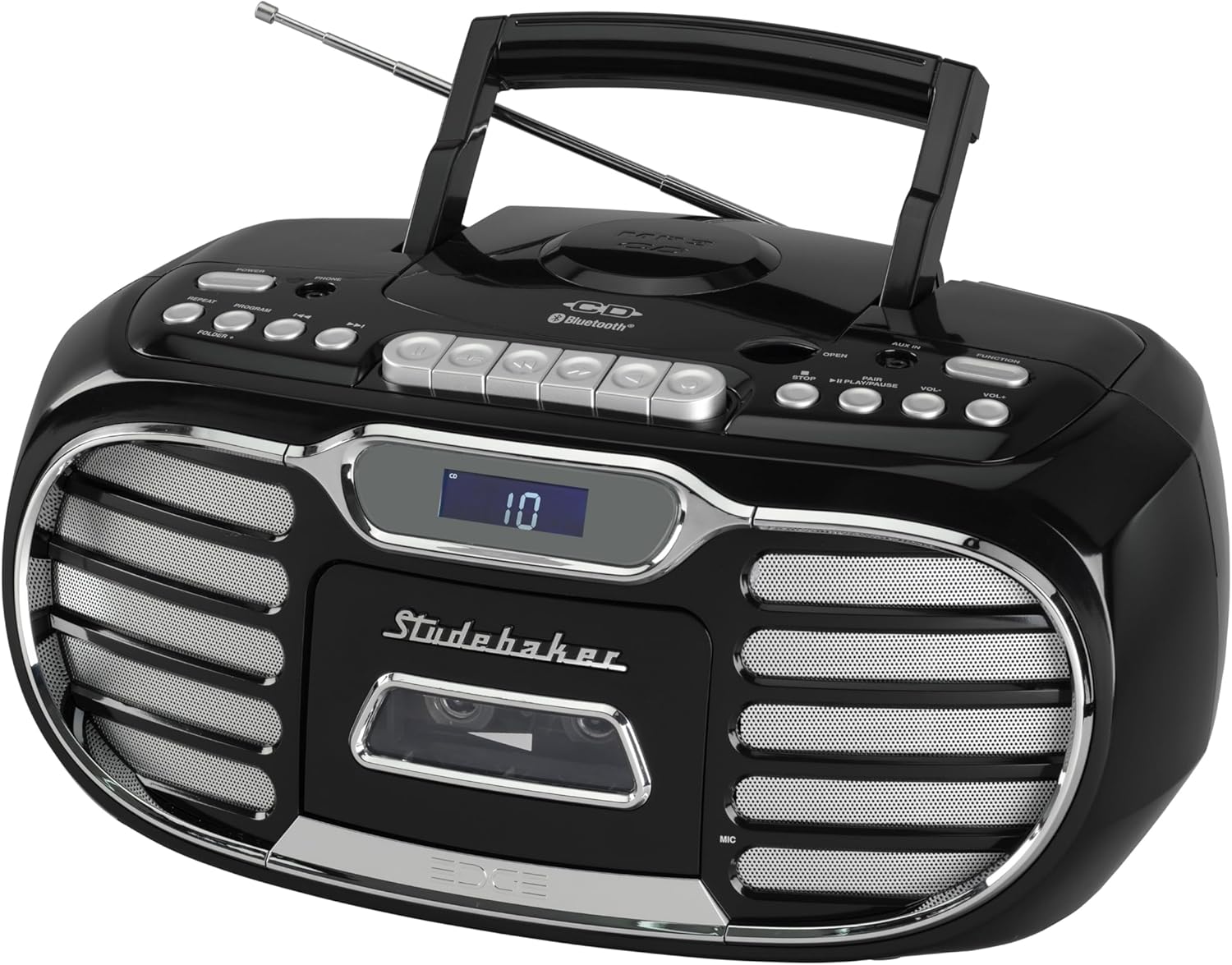
Figure 1: Overall view of the Studebaker Retro Edge Boombox, showcasing its classic design, integrated handle, and front-facing controls and speakers.

Figure 2: Front view highlighting the central LCD display, cassette compartment, and speaker grilles on either side. Control buttons are visible above the display.

Figure 3: Detailed view of the cassette player compartment, showing the tape mechanism and the transparent cover for tape visibility.

Figure 4: Close-up of the top-loading CD player with a disc inserted, illustrating the open compartment for disc placement.
Control Panel Overview:
- Power Button: Turns the unit on/off.
- Function Selector: Switches between CD, Cassette, AM, FM, Bluetooth, and AUX modes.
- Volume Control: Adjusts the audio output level.
- CD Controls: Play/Pause, Stop, Skip/Search (Forward/Backward), Program, Repeat.
- Cassette Controls: Play, Record, Fast Forward, Rewind, Stop/Eject, Pause.
- Radio Controls: Tuning knob/buttons, Band selector (AM/FM).
- Bluetooth Pairing Button: Initiates Bluetooth pairing mode.
- LCD Display: Shows current mode, track number, radio frequency, etc.
- AUX-in Jack: For connecting external audio devices.
- Headphone Jack: For private listening.
- Built-in Condenser Microphone: For recording audio to cassette.
- Telescopic Antenna: For FM radio reception.
Setup
Powering the Unit:
The boombox can be powered by AC power or batteries (not included).
- AC Operation: Connect the supplied AC power cord to the AC IN jack on the unit and then to a standard AC outlet (120V~60Hz).
- Battery Operation: Open the battery compartment, insert the required number of batteries (e.g., 8 x 'C' size, not supplied) ensuring correct polarity (+/-), and close the compartment.
Initial Use:
Extend the telescopic antenna fully for optimal FM radio reception. For AM, rotate the unit for best reception.
Operating Instructions
CD Player Operation:
- Press the Power button to turn on the unit.
- Press the Function button repeatedly to select "CD" mode.
- Open the CD compartment door by pressing the "OPEN" button.
- Place a CD (CD-R/RW or MP3 CD) onto the spindle with the label side facing up.
- Close the CD compartment door. The LCD display will show the total number of tracks.
- Press the Play/Pause button to start playback.
- Use the Skip/Search buttons to navigate tracks.
- Press the Stop button to stop playback.
- Use the Program button to program tracks for playback in a specific order.
- Use the Repeat button to repeat a single track or the entire CD.
Cassette Player/Recorder Operation:
- Press the Power button to turn on the unit.
- Press the Function button repeatedly to select "TAPE" mode.
- Press the Stop/Eject button to open the cassette compartment.
- Insert a cassette tape with the open edge facing down.
- Close the cassette compartment.
- Press the Play button to start playback.
- Use Fast Forward and Rewind buttons to navigate the tape.
- Press the Stop/Eject button to stop playback or eject the tape.
- Recording:
- From Built-in Microphone: Ensure the unit is in TAPE mode. Press the Record button. The unit will start recording from the built-in microphone.
- From Radio/CD/AUX/Bluetooth: Select the desired source (Radio, CD, AUX, or Bluetooth). Press the Record button on the cassette player. The unit will record the audio playing from the selected source.
- Press the Stop/Eject button to stop recording. The cassette player features auto-stop.
AM/FM Radio Operation:
- Press the Power button to turn on the unit.
- Press the Function button repeatedly to select "AM" or "FM" mode.
- Extend the telescopic antenna for FM reception. For AM, rotate the unit for best reception.
- Use the Tuning control to select your desired radio station. The frequency will be displayed on the LCD.
Bluetooth Operation:
- Press the Power button to turn on the unit.
- Press the Function button repeatedly to select "BT" (Bluetooth) mode. The LCD display will show "BT" and flash, indicating it's in pairing mode.
- Enable Bluetooth on your mobile device (smartphone, tablet, etc.) and search for available devices.
- Select "SB2150B" from the list of devices.
- Once paired, the "BT" indicator on the LCD display will stop flashing and remain solid. You can now play audio from your device through the boombox.
- To disconnect, disable Bluetooth on your mobile device or select a different function mode on the boombox.
AUX-in Operation:
- Press the Power button to turn on the unit.
- Press the Function button repeatedly to select "AUX" mode.
- Connect one end of a 3.5mm audio cable (not supplied) to the AUX-in jack on the boombox and the other end to the headphone jack or audio output of your external audio device (e.g., MP3 player, smartphone).
- Play audio from your external device. The sound will be output through the boombox speakers.
Headphone Operation:
For private listening, connect a pair of headphones (not supplied) to the Headphone Jack. The sound from the speakers will be muted automatically.
Maintenance
- Cleaning: Wipe the unit with a soft, damp cloth. Do not use abrasive cleaners or solvents.
- CD Player: Keep the CD compartment clean. Do not touch the lens.
- Cassette Player: Periodically clean the tape heads and pinch rollers with a cotton swab lightly moistened with isopropyl alcohol.
- Storage: If storing the unit for an extended period, remove batteries (if used) and disconnect from AC power.
Troubleshooting
| Problem | Possible Cause | Solution |
|---|---|---|
| Unit does not power on. | Power cord not connected; Batteries depleted or incorrectly inserted. | Ensure AC cord is securely plugged in. If using batteries, check polarity and replace if necessary. |
| No sound from speakers. | Volume too low; Incorrect function mode selected; Headphones connected. | Increase volume. Select the correct function mode (CD, TAPE, AM/FM, BT, AUX). Disconnect headphones. |
| CD does not play. | CD inserted incorrectly; CD is dirty or scratched; Unit in wrong mode. | Ensure CD is inserted label-side up. Clean or replace CD. Select "CD" function mode. |
| Cassette tape does not play/record. | Tape inserted incorrectly; Tape is damaged; Unit in wrong mode. | Ensure tape is inserted correctly. Try a different tape. Select "TAPE" function mode. |
| Poor radio reception. | Antenna not extended/positioned correctly; Interference. | Fully extend and adjust the telescopic antenna for FM. Rotate the unit for best AM reception. Move away from other electronic devices. |
| Bluetooth pairing fails. | Unit not in pairing mode; Device too far; Device already paired with another unit. | Ensure boombox is in "BT" mode and flashing. Move device closer. Disconnect from other Bluetooth devices. Try restarting both devices. |
Specifications
- Model: SB2150B
- Product Dimensions (L x W x H): 9.41 x 14.57 x 7.03 inches
- Item Weight: 6.78 pounds
- Power Source: AC 120V~60Hz or DC Battery Operation (Batteries not included)
- Speaker Type: Stereo
- Connectivity Technology: Auxiliary, Bluetooth
- Output Power: 2.2W x 2
- CD Compatibility: CD, CD-R/RW, MP3 CD
- Cassette Features: Player/Recorder, Auto Stop
- Radio Bands: AM/FM PLL Stereo
- Additional Features: Headphone Jack, Built-in Condenser Microphone, LCD Display with Backlight, Built-in Carrying Handle
Warranty and Support
For warranty information and technical support, please refer to the warranty card included with your product or contact Studebaker customer service directly. You may also visit the official Studebaker website for the most up-to-date support resources.
Manufacturer: Spectra Merchandising International, Inc.
