
1. Important Safety Information
Please read this manual thoroughly before operating the GoolRC 16889A Pro RC Car. Failure to follow instructions may result in damage to the product, property, or serious injury.
- This product is not a toy. It is intended for users aged 14 years and up.
- Always operate the RC car in open areas away from people, pets, and obstacles.
- Do not operate in wet conditions or near water to prevent damage to electronics.
- Ensure batteries are charged safely and correctly. Do not overcharge or short-circuit batteries.
- Always turn off the RC car and transmitter when not in use.
- Keep small parts out of reach of children.
- Regularly inspect the vehicle for damage and perform necessary maintenance.
2. Package Contents
Verify all items are present in the package before proceeding with setup.

Image: Contents of the GoolRC 16889A Pro RC Car package, including the RC car, remote controller, batteries, USB charging cable, LED lights, head wheel, screwdriver, and instruction manual.
- 1x GoolRC 16889A Pro RC Car
- 1x Remote Controller
- 3x Car Battery (LiPo 1000mAh)
- 1x USB Charging Cable
- 1x Instruction Manual
- 1x Set of LED Lights
- 1x Head Wheel
- 1x Screwdriver
Unboxing Video
Video: An unboxing demonstration of the GoolRC 16889A Pro RC Car, showing how to open the package and identify all included components.
3. Product Overview
The GoolRC 16889A Pro is a 1:16 scale 4WD brushless RC truck designed for high-speed off-road performance. It features a durable chassis and advanced electronics.
Key Features

Image: Visual representation of the RC car's key features, including Ready-to-Run (RTR), 4WD system, 2.4GHz control, qualified shocks/adjustable ring, ball bearings, brushless motor, brand new metal gear, and splash waterproof electronics.
- Brushless Motor: Equipped with a powerful 2840 brushless motor for speeds up to 45 km/h.
- 4WD System: Provides excellent traction and control on various terrains.
- 2.4GHz Remote Control: Offers a stable connection and allows multiple vehicles to operate simultaneously without interference.
- Durable Construction: Features hydraulic shock absorbers, adjustable aluminum ring suspension, and metal parts like differential and drive shaft for enhanced durability.
- Protection Functions: Includes charging protection (constant current/voltage), motor anti-blocking, and high-temperature protection.
Internal and External Components

Image: Detailed view of the RC car's internal structure, pointing out the battery compartment, 3-wire servo, shock absorber, brushless motor, LED lights, crash beam, waterproof ESC, and rubber tires. Also shows overall dimensions.
The RC car's design integrates key components for optimal performance and resilience. The chassis houses the brushless motor and waterproof Electronic Speed Controller (ESC), protected by a durable car cover. The suspension system, featuring hydraulic shock absorbers, is designed to handle various impacts and terrains. Non-slip rubber tires provide excellent grip.
4. Transmitter Introduction
Familiarize yourself with the remote controller's functions before operation.

Image: Labeled diagram of the 2.4GHz transmitter, indicating the Steering Wheel, Throttle Trigger, Battery Compartment, Steering Trim, Steering Direction Reverse, Power Indicator (Red), ON/OFF Power Switch, Steering D/R, Speed selection, Throttle Forward/backward Reverse, Power Indicator (Green), and Bind/Mode Button. Also shows battery installation steps.
- Steering Wheel: Controls the direction of the car (left/right).
- Throttle Trigger: Controls forward/backward movement and speed. Pull for forward, push for reverse/brake.
- Battery Compartment: Holds 3x AA batteries (1.5V each) for the transmitter.
- Steering Trim: Adjusts the neutral position of the steering.
- Steering Direction Reverse: Reverses the steering direction.
- Power Indicator (Red): Indicates transmitter power status.
- ON/OFF Power Switch: Turns the transmitter on or off.
- Steering D/R (Dual Rate): Adjusts the maximum steering angle.
- Speed Selection: Adjusts the maximum speed of the RC car, useful for beginners.
- Throttle Forward/Backward Reverse: Reverses the throttle direction.
- Power Indicator (Green): Indicates sufficient battery power.
- Bind/Mode Button: Used for pairing the transmitter with the RC car.
Transmitter Battery Installation:
Slide and remove the battery cover from the transmitter. Install three AA size batteries (1.5V each), ensuring correct polarity. Replace the battery cover. Do not reverse the polarities when installing. Always use batteries of the same brand. Remove batteries when not in use. Make sure battery power is sufficient before use.
Power Indicators (Red/Green): The lights indicate the current status of the transmitter batteries. When both power indicator lights are illuminated, the batteries have sufficient capacity to power the transmitter safely. If the green power indicator light begins to flash, the batteries are losing power and should be replaced soon. If both power indicator lights begin to flash, the batteries have only limited capacity to power the transmitter. In this case, the batteries should be replaced as soon as is safely possible.
5. Setup and Initial Operation
5.1 Charging the Car Battery
The GoolRC 16889A Pro comes with LiPo batteries. Use only the provided USB charging cable. Connect the battery to the charging cable, then plug the USB cable into a suitable USB power source (e.g., computer USB port, USB wall adapter). The charging indicator light will show the charging status. Do not leave batteries unattended while charging. Disconnect once fully charged.
- Charging time may vary depending on the power source.
- A full charge typically provides approximately 15-20 minutes of runtime, depending on driving style and terrain.
5.2 Installing the Car Battery
Locate the battery compartment on the RC car. Securely insert the charged LiPo battery into the compartment. Connect the battery connector to the car's power connector, ensuring correct polarity. Close the battery compartment cover.
5.3 Binding the Transmitter and Car
The transmitter and car are usually pre-bound from the factory. If re-binding is necessary:
- Ensure both the transmitter and car are turned off.
- Turn on the RC car. The car's indicator light will flash.
- Turn on the transmitter. The transmitter's indicator light will flash.
- Press and hold the "Bind/Mode" button on the transmitter (refer to the Transmitter Introduction diagram for location).
- Release the button once both the car and transmitter indicator lights become solid, indicating a successful bind.
- If binding fails, repeat the steps.
6. Operating Instructions
Once the car and transmitter are powered on and bound, you are ready to operate the vehicle.
6.1 Basic Controls
- Forward/Backward: Pull the throttle trigger towards you to move forward. Push the throttle trigger away from you for reverse.
- Braking: Push the throttle trigger away from you quickly to engage the brake. Push again for reverse.
- Steering: Turn the steering wheel left or right to control the car's direction.
6.2 Speed Adjustment (for Beginners)
The transmitter features a speed selection switch (refer to the Transmitter Introduction diagram). This allows you to limit the maximum speed of the RC car, which is highly recommended for new users or when operating in confined spaces. Gradually increase the speed as you become more comfortable with the controls.
6.3 Operating Environment
The GoolRC 16889A Pro is designed for all-terrain operation, including grass, sandy areas, muddy paths, and rocky surfaces. However, avoid deep water or extremely harsh conditions to prolong the life of the vehicle.

Image: The GoolRC 16889A Pro RC car depicted operating on different terrains such as grass, sand, mud, and rocks, demonstrating its all-terrain capabilities.
7. Maintenance
Regular maintenance will ensure the longevity and optimal performance of your RC car.
- Cleaning: After each use, especially in dusty or muddy conditions, clean the car to remove dirt and debris. Use a soft brush or compressed air. Avoid using water directly on electronics.
- Lubrication: Periodically lubricate moving parts such as universal joints (CV joints) and gears, especially if operating in sandy environments, to prevent wear and tear.
- Inspection: Regularly check for loose screws, damaged parts, or worn tires. Replace any damaged components promptly.
- Battery Care: Store LiPo batteries in a cool, dry place. Do not fully discharge them. If storing for extended periods, charge them to a storage voltage (around 3.8V per cell).
8. Troubleshooting
If you encounter issues with your GoolRC 16889A Pro, refer to the following common problems and solutions:
| Problem | Possible Cause | Solution |
|---|---|---|
| Car does not respond to transmitter. |
|
|
| Car runs slowly or lacks power. |
|
|
| Steering is erratic or not centered. |
|
|
| Overheating (motor/ESC). |
|
|
9. Specifications
Detailed technical specifications for the GoolRC 16889A Pro RC Car.
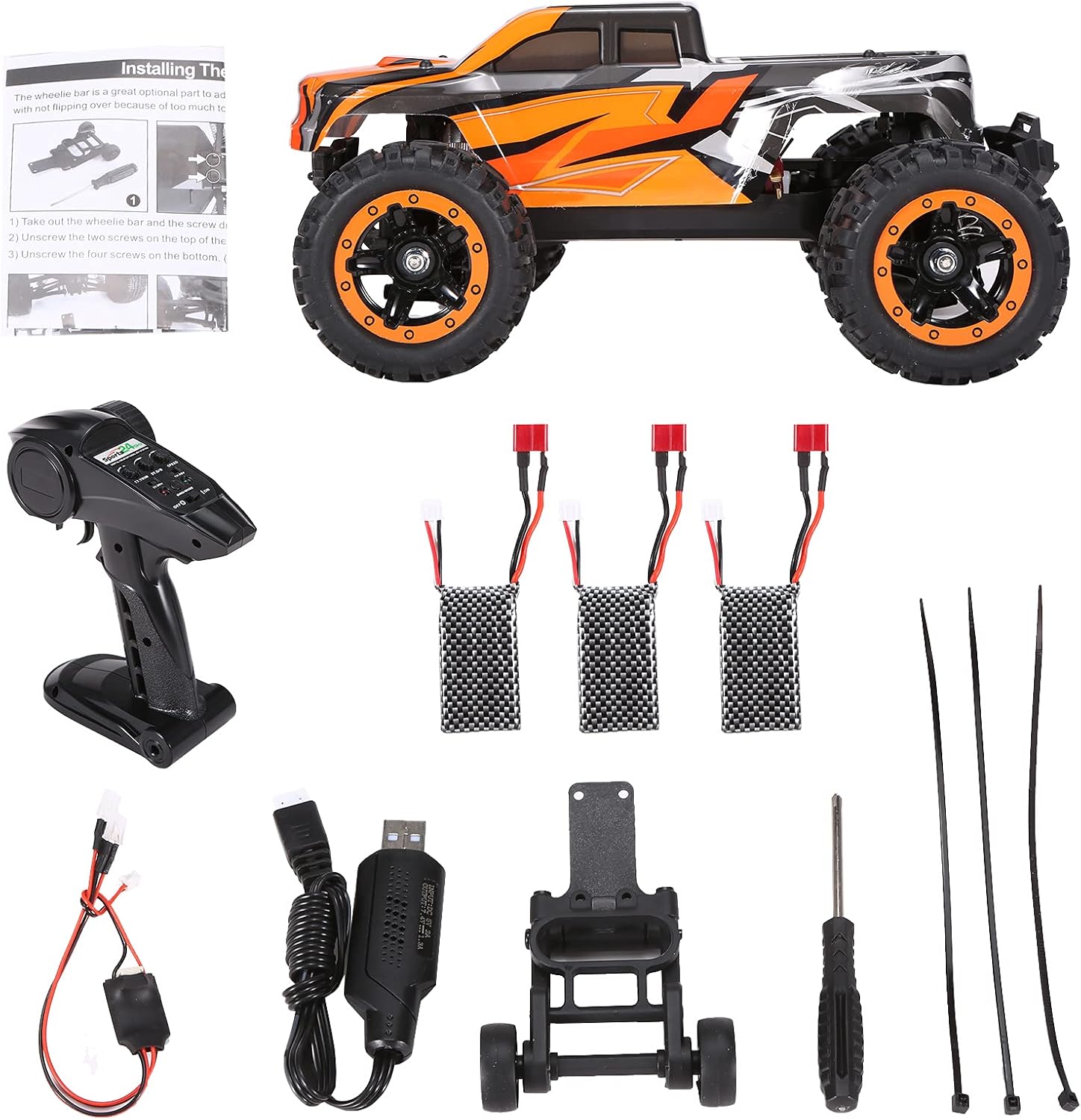
Image: Diagram illustrating the dimensions of the GoolRC 16889A Pro RC Car, showing its length, width, and height.
| Feature | Detail |
|---|---|
| Model | 16889A Pro |
| Scale | 1:16 |
| Drive System | 4-Wheel Drive (4WD) |
| Motor Type | Brushless (2840) |
| Max Speed | Up to 45 KM/H |
| Remote Control Frequency | 2.4GHz |
| Control Distance | Up to 120m |
| Car Battery | 1000mAh LiPo |
| Transmitter Battery | 3x AA (not included) |
| Package Dimensions | 11.65 x 10.2 x 7.44 inches |
| Item Weight | 3.78 pounds |
| Recommended Age | 14 years and up |
10. Warranty and Support
GoolRC products are manufactured to high quality standards. For any questions, technical support, or warranty claims, please contact GoolRC customer service through the retailer where the product was purchased or visit the official GoolRC website for contact information.
Please retain your proof of purchase for warranty purposes.
For more information, you may visit the GoolRC Store on Amazon.