
1. Introduction
This manual provides essential information for the safe and efficient use of your PowerSmart 42V 2A charger. This charger is specifically designed for 36V batteries equipped with a 5-pin SVD plastic connector, commonly found in Phylion and Joycube battery systems. Please read these instructions carefully before operating the charger to ensure proper function and to prevent damage or injury.
2. Important Safety Instructions
- Read all instructions: Before using the charger, read all instructions and cautionary markings on the charger, battery, and product using the battery.
- Indoor use only: Do not expose the charger to rain or wet conditions. It is designed for indoor use only.
- Proper voltage: Ensure the charger is connected to a power supply within the specified input voltage range (100V-240V AC).
- Correct connector: This charger is only compatible with 36V batteries that have a 5-pin plastic SVD connector. Do not attempt to use it with metal connectors or other pin configurations.
- Avoid short circuits: Do not short-circuit the output terminals.
- Ventilation: Ensure adequate ventilation around the charger during operation. Do not cover the charger.
- Unplug when not in use: Disconnect the charger from the power outlet when not in use or before cleaning.
- Damaged components: Do not operate the charger if it has been dropped, damaged, or if the cord or plug is damaged. Contact customer support for assistance.
- Children and pets: Keep the charger out of reach of children and pets.
3. Product Features
- Compatibility: Specifically designed for 36V batteries with a 5-pin plastic SVD connector.
- Input Voltage: 100V-240V AC, 50/60Hz.
- Output Voltage: 42V DC.
- Output Current: 2.0A.
- Power Output: 84W.
- Connector Type: 5-pin circular plastic plug.
- LED Indicator: Red for charging, Green for fully charged or disconnected.
4. Setup and Connector Verification
Before connecting the charger, it is crucial to verify that your battery's charging port is compatible with the 5-pin plastic SVD connector. This charger is not compatible with metal plugs or other pin configurations.

Image: Ensure your battery has a plastic 5-pin DC socket, not a metal one.
The charger features a 5-pin circular plastic connector. Please compare it carefully with your battery's charging port.

Image: PowerSmart 42V 2A charger with its 5-pin plastic connector.
This charger is specifically designed for Phylion and Joycube 36V batteries that utilize this specific 5-pin SVD plastic connector.

Image: Correct connection of the 5-pin charger plug.
Note: This charger is not compatible with NEOMOUV brand bikes fitted with Greenway 36V batteries, nor can it replace chargers with model numbers SHC-8100LC, STC-8129LC, and LBC100201.
5. Operating Instructions (Charging Process)
- Connect to Battery: First, connect the 5-pin charger plug securely into the charging port of your 36V battery.
- Connect to Power: Plug the charger's AC power cord into a standard 100V-240V wall outlet.
- Monitor LED Indicator:
- A RED LED light indicates that the battery is currently charging.
- A GREEN LED light indicates that the battery is fully charged or the charger is disconnected from the battery.
- Charging Time: Charging time will vary depending on the battery's capacity and its current charge level.
- Disconnect: Once the LED indicator turns green, the battery is fully charged. Disconnect the charger from the wall outlet first, then disconnect the charger plug from the battery.
Important Note on Voltage: The charger's output voltage (42V) is intentionally higher than the battery's nominal voltage (36V). This is normal and necessary for a complete charge cycle. Do not be alarmed by this difference.

Image: Charger output voltage is higher than battery voltage for full charge.
6. Maintenance
- Cleaning: Disconnect the charger from the power supply and battery before cleaning. Use a dry, soft cloth to wipe the exterior. Do not use liquid cleaners or solvents.
- Storage: Store the charger in a cool, dry place when not in use. Avoid extreme temperatures and humidity.
- Cable Care: Do not pull the cable forcefully or wrap it too tightly around the charger. Inspect the cable and plug regularly for any signs of damage.
7. Troubleshooting
If the charger is not functioning as expected, please check the following:
- No LED light:
- Ensure the charger is securely plugged into a working wall outlet.
- Verify the battery is properly connected to the charger.
- Check if the wall outlet is functional by plugging in another device.
- LED remains green when connected to battery:
- The battery may already be fully charged.
- Ensure the battery's charging port and the charger's plug are clean and free of debris.
- Confirm that the battery is a 36V battery with a 5-pin plastic SVD connector.
- Charger gets warm during use:
- It is normal for the charger to become warm during operation. Ensure it has adequate ventilation and is not covered.
- If the charger becomes excessively hot or emits smoke/unusual odors, immediately disconnect it from power and battery and cease use.
If these steps do not resolve the issue, please contact PowerSmart customer support.
8. Specifications
| Brand | PowerSmart |
| Model Number | 42V 2A (SSLC084V42M-01) |
| Input Voltage | 100V-240V AC, 50/60Hz |
| Output Voltage | 42V DC |
| Output Current | 2.0A |
| Power Output | 84W |
| Connector Type | 5-pin SVD Plastic Connector (circular) |
| Compatible Batteries | 36V batteries with 5-pin plastic SVD connector (e.g., Phylion/Joycube) |
| Power Source | AC |
| Weight | Approx. 0.5 kg |
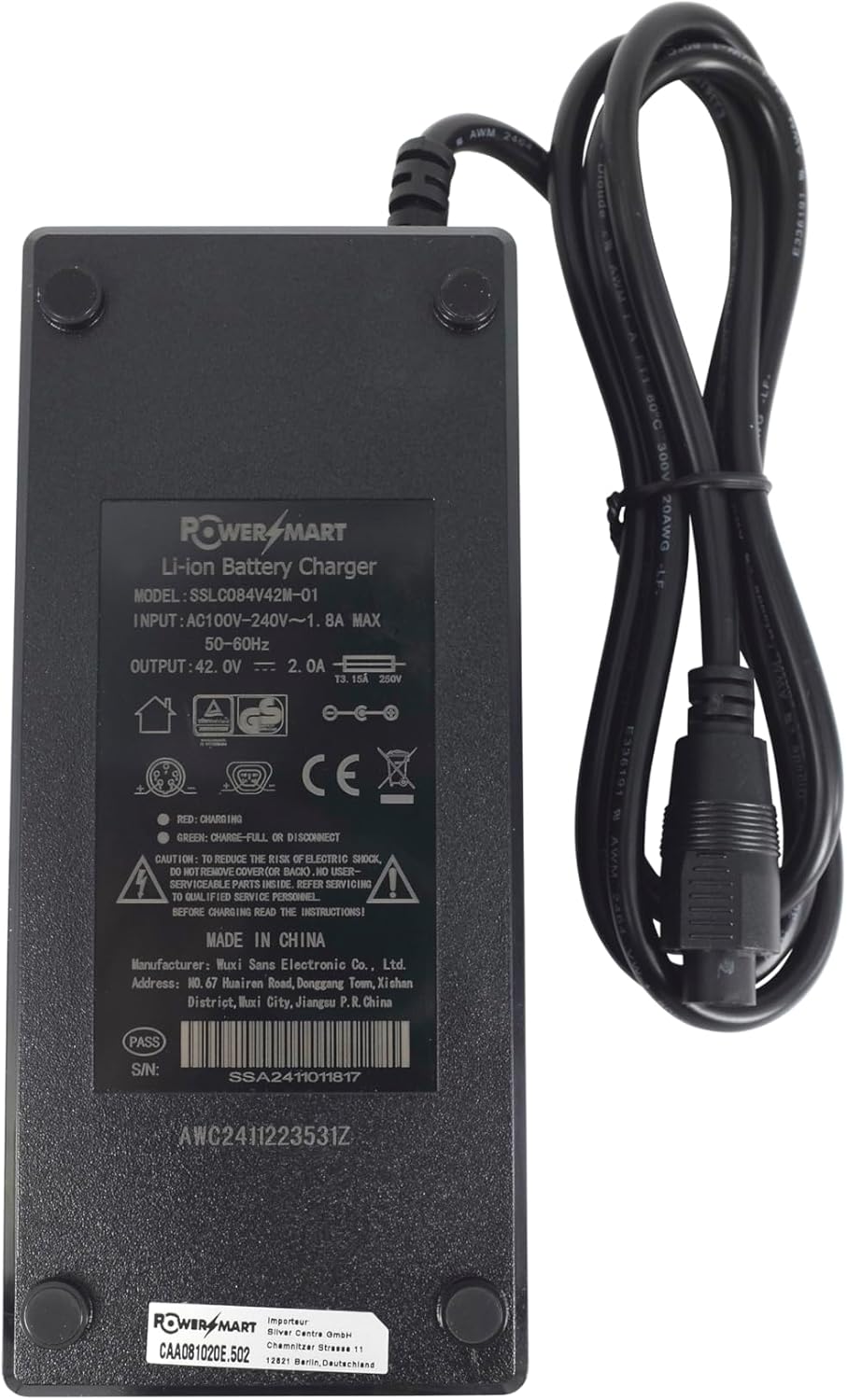
Image: Charger label with detailed specifications.
9. Warranty and Support
For warranty information or technical support, please refer to the documentation included with your purchase or contact PowerSmart customer service directly. Please have your product model number (42V 2A or SSLC084V42M-01) and purchase details available when contacting support.
Manufacturer: PowerSmart
Address: ID, 6F, Ren Road, Donggang Town, Xichen District, Wuxi City, Jiangsu P.R. China