Introduction
Thank you for choosing the Fitfiu Fitness BEST-320 Foldable Exercise Bike. This manual provides essential information for the safe assembly, operation, and maintenance of your new fitness equipment. Please read it thoroughly before first use and keep it for future reference.

Figure 1: The Fitfiu Fitness BEST-320 Foldable Exercise Bike in its upright, ready-to-use position. This image shows the overall design, including the seat with backrest, handlebars, pedals, and the central console.
Safety Instructions
- Consult a physician before starting any exercise program.
- Ensure all bolts and nuts are securely tightened before each use.
- Place the exercise bike on a flat, stable surface.
- Keep children and pets away from the equipment during use.
- Maximum user weight capacity: 120 kg (264 lbs).
- Wear appropriate exercise clothing and footwear.
- Stop exercising immediately if you feel faint, dizzy, or experience pain.
- This equipment is designed for home use only.
Setup and Assembly
The Fitfiu Fitness BEST-320 is designed for easy assembly. Follow these steps to set up your exercise bike.
- Unpacking: Carefully remove all components from the packaging. Verify all parts are present according to the included parts list.
- Stabilizer Bars: Attach the front and rear stabilizer bars to the main frame using the provided bolts and washers. Ensure they are firmly secured.
- Pedals: Identify the left (L) and right (R) pedals. Thread the left pedal counter-clockwise and the right pedal clockwise into their respective crank arms. Tighten securely with a wrench.
- Seat and Backrest: Mount the seat and backrest onto the seat post. Adjust the height to your preference using the quick-release lever.
- Handlebars and Console: Attach the handlebars and the console mast to the main frame. Connect any necessary sensor cables from the console to the main unit. Secure all connections.
- Elastic Bands: If not pre-attached, connect the elastic resistance bands to their designated points on the frame.

Figure 2: Front view of the exercise bike, highlighting the console, handlebars, and pedals. This perspective is useful for understanding the initial setup of these components.

Figure 3: Rear view of the exercise bike, showing the backrest and the rear stabilizer bar. This view assists in the correct assembly of the seat and backrest.
Operating Instructions
Adjusting the Seat and Backrest
The seat features a 7-point height adjustment (745-835 mm) for optimal comfort and ergonomic posture. To adjust, loosen the quick-release lever on the seat post, slide the seat to the desired height, and firmly secure the lever. The backrest provides additional support, especially for longer sessions.

Figure 4: An individual demonstrating the adjustment of the seat height on the exercise bike, highlighting the quick-release mechanism for personalized comfort.
Using the Resistance Levels
The BEST-320 offers 8 levels of magnetic resistance. Turn the tension control knob, located below the console, clockwise to increase resistance and counter-clockwise to decrease it. Adjust the resistance to match your fitness level and workout goals.

Figure 5: A close-up of a hand turning the resistance knob, illustrating the 8 adjustable levels of magnetic resistance for varied workout intensity.
Console Functions
The LCD console tracks your workout progress in real-time. It displays:
- Speed: Current cycling speed.
- Time: Duration of your workout.
- Distance: Total distance covered.
- Calories: Estimated calories burned.
- Heart Rate: Your pulse, measured via integrated sensors in the handlebars.
Use the "MODE" button to cycle through the display functions. To reset the values, press and hold the "MODE" button.

Figure 6: A detailed view of the LCD console, showing the digital display and the "MODE" button. This image illustrates how users interact with the console to monitor their workout metrics.
Using the Elastic Resistance Bands
The BEST-320 includes integrated elastic resistance bands for upper body training. These bands allow for a dual-function workout, engaging both legs and arms simultaneously. Hold the handles and perform various arm exercises while pedaling.

Figure 7: A user's hands gripping the elastic resistance bands, demonstrating their use for upper body exercises during a cycling session.
Tablet/Mobile Holder
A dedicated holder is provided above the console for your tablet or mobile device. This allows you to follow workout videos, watch shows, or listen to music during your exercise session.

Figure 8: A tablet securely placed in the device holder, illustrating how users can integrate entertainment or guided workouts into their routine.
Maintenance
- Cleaning: Wipe down the bike with a damp cloth after each use to remove sweat and dust. Do not use abrasive cleaners.
- Inspection: Regularly check all bolts, nuts, and moving parts for tightness and wear. Tighten any loose fasteners.
- Lubrication: No specific lubrication is required for the magnetic resistance system.
- Storage: The BEST-320 is foldable for easy storage. To fold, follow the instructions in reverse of assembly for the main frame. Utilize the transport wheels for convenient relocation. Store in a dry, cool place away from direct sunlight.
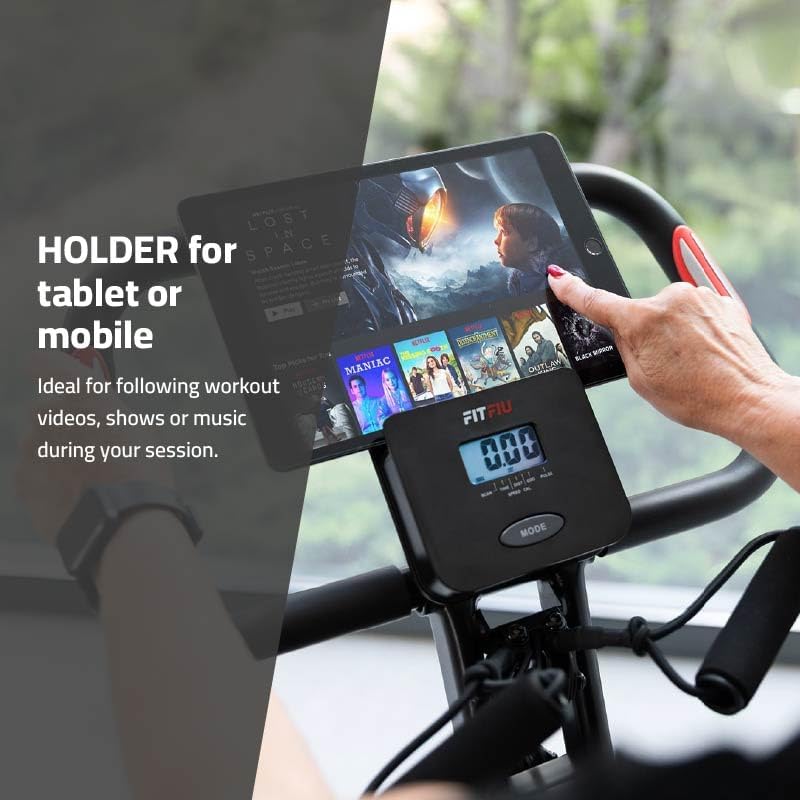
Figure 9: The exercise bike in its folded position, demonstrating its compact design for easy storage and the integrated transport wheels for mobility.
Troubleshooting
| Problem | Possible Cause | Solution |
|---|---|---|
| Console not displaying data. | Loose sensor cable connection; dead batteries. | Check all cable connections. Replace console batteries (if applicable, typically 2x AAA). |
| Pedals feel loose or wobbly. | Pedals not tightened correctly. | Ensure pedals are fully threaded and tightened with a wrench (left pedal counter-clockwise, right pedal clockwise). |
| Unusual noise during operation. | Loose components; friction from moving parts. | Inspect all bolts and nuts for tightness. Ensure no parts are rubbing against each other. |
| Resistance not changing. | Resistance cable disconnected or damaged. | Check the connection of the resistance cable to the tension knob and the flywheel mechanism. |
Specifications
| Model Number | 1100039 |
| Brand | Fitfiu Fitness |
| Type | Foldable Exercise Bike with Backrest and Elastic Bands |
| Flywheel Weight | 8 kg |
| Resistance System | Magnetic, 8 levels |
| Maximum User Weight | 120 kg |
| Display Functions | Speed, Time, Distance, Calories, Heart Rate |
| Seat Adjustment | 7-point height adjustment (745-835 mm) |
| Material | Stainless Steel (main frame), Rubber (handle grip) |
| Dimensions (L x W x H) | 105 x 50 x 120 cm (unfolded) |
| Product Weight | 20 kg |
| Power Source (Console) | Battery powered (Batteries not included) |

Figure 10: A close-up view of the 8 kg flywheel, emphasizing its role in providing smooth and quiet pedaling for effective workouts.
Warranty and Support
For warranty information and customer support, please refer to the documentation included with your purchase or visit the official Fitfiu Fitness website. Keep your proof of purchase for any warranty claims.
Manufacturer: FITFIU Fitness


