
Introduction
Thank you for choosing the Pisichen 17.3-inch Portable Monitor. This monitor is designed to enhance your productivity and entertainment experience, offering a versatile display solution for various devices. Its compact and lightweight design makes it ideal for business, travel, and gaming. This manual provides essential information for setting up, operating, and maintaining your monitor.

This image depicts the portable monitor integrated into a versatile setup, showing it connected to a smartphone, alongside a gaming controller, headphones, keyboard, mouse, and a DSLR camera, illustrating its use for both work and entertainment.

A detailed view of the monitor, emphasizing its durable aluminum alloy body and the non-slip rubber base for stability.
Package Contents
Please check the package for the following items:
- 17.3-inch Portable Monitor x 1
- HDMI Cable x 1
- Power Cable x 1
- Metal Stand x 1

This image displays the items included in the product package: the portable monitor, user manual, metal stand, HDMI cable, and DC power adapter.
Setup Instructions
Follow these steps to set up your Pisichen portable monitor:
- Power Connection: Connect the monitor to a power source using either a 5V/2A USB cable or the provided DC12V power adapter. The monitor requires sufficient power to operate. If your connected device (e.g., laptop) has low power output, the monitor may not start, and separate power supply will be necessary.
- Device Connection: Connect your device (laptop, PC, game console, etc.) to the monitor using an HDMI cable. The monitor features two HDMI input ports.
- Automatic Power On: The monitor will automatically power on once connected to a power source.
- VESA Mounting (Optional): If you wish to mount the monitor, it supports VESA mounting with M4 screws (75x75MM pattern).
This image illustrates the various ports and controls on the monitor. The back panel includes power LED, switch, volume controls, up/down buttons, and menu button. The bottom edge features a DC power supply input, USB input, audio jack, and two standard HDMI inputs.
Operating Instructions
The Pisichen portable monitor offers versatile functionality for various applications:
- Second Screen: Use it as a secondary display for your laptop, PC, or smartphone to extend your workspace or mirror content.
- Gaming Monitor: Compatible with Xbox One, PS3, PS4, Nintendo Switch, and Raspberry Pi for an immersive gaming experience.
- Media Playback: Connect to streaming media devices or TV boxes for Full HD visual enjoyment.
- DSLR Camera Monitor: Connect your DSLR camera for a larger view during photography or videography.
Display Modes
The monitor supports multiple display modes to suit your needs:
- Copy Method: Mirrors the content of your primary display.
- Extended Mode: Extends your desktop, allowing you to have different content on each screen.
- Show Above Monitoring Only: Uses the portable monitor as the sole display.

This image demonstrates three display modes: Copy method (mirroring the laptop screen), Extended mode (extending the desktop), and Show above Monitoring only (using the portable monitor as the primary display).
Compatibility
The monitor is compatible with various operating systems and devices:
- Windows 7/8/10
- Mac OS
- Linux (requires HDMI interface)
- Gaming Consoles: Xbox One, PS3, PS4, Nintendo Switch
- Other devices with HDMI output: Raspberry Pi, DSLR cameras, smartphones (with appropriate adapters, not included).

The image shows the portable monitor displaying content from a mobile phone, Xbox One, PS4, and a notebook, highlighting its compatibility with multiple devices including DVD players.
Maintenance
To ensure the longevity and optimal performance of your monitor, follow these maintenance guidelines:
- Cleaning: Gently wipe the screen with a soft, lint-free cloth. For stubborn smudges, use a screen-cleaning solution specifically designed for electronics, applied to the cloth, not directly to the screen.
- Storage: When not in use, store the monitor in a cool, dry place, away from direct sunlight and extreme temperatures.
- Handling: Avoid dropping or subjecting the monitor to strong impacts. Do not place heavy objects on top of the monitor.
- Ventilation: Ensure proper ventilation around the monitor to prevent overheating.
Troubleshooting
If you encounter issues with your monitor, refer to the following common solutions:
- Monitor does not power on: Ensure the monitor is connected to a sufficient power source (5V/2A USB or DC12V). If your connected device has low power output, try powering the monitor separately.
- No signal: Verify that the HDMI cable is securely connected to both the monitor and your device. Ensure your device's display output is active and configured correctly.
- Image quality issues (e.g., grey haze, inverted colors): While the monitor provides a clear image for direct viewing, extreme viewing angles may affect color and contrast. Adjust your viewing position for optimal clarity.
- Menu navigation is difficult: The menu buttons are located on the back of the monitor. Familiarize yourself with their positions and functions for easier adjustment.
- Compatibility with Mac/Linux: The monitor is compatible with Mac OS and Linux machines, provided your device has an HDMI interface for connection.
Specifications
| Screen Size | 17.3 inches |
| Shell Material | Aluminum Alloy |
| Resolution | 1600 x 900 |
| Aspect Ratio | 16:9 |
| Response Time | 5 milliseconds |
| Contrast Ratio | 800:1 |
| Brightness | 250 cd/m² |
| Refresh Rate | 60 Hz |
| Speakers | Integrated Dual 1.5W |
| Interfaces | HDMI 1, HDMI 2, 3.5mm Headphone Jack, DC (12V) Input, 5V USB Power Input |
| VESA Mount | M4 (75x75MM) |
| Special Feature | Portable |
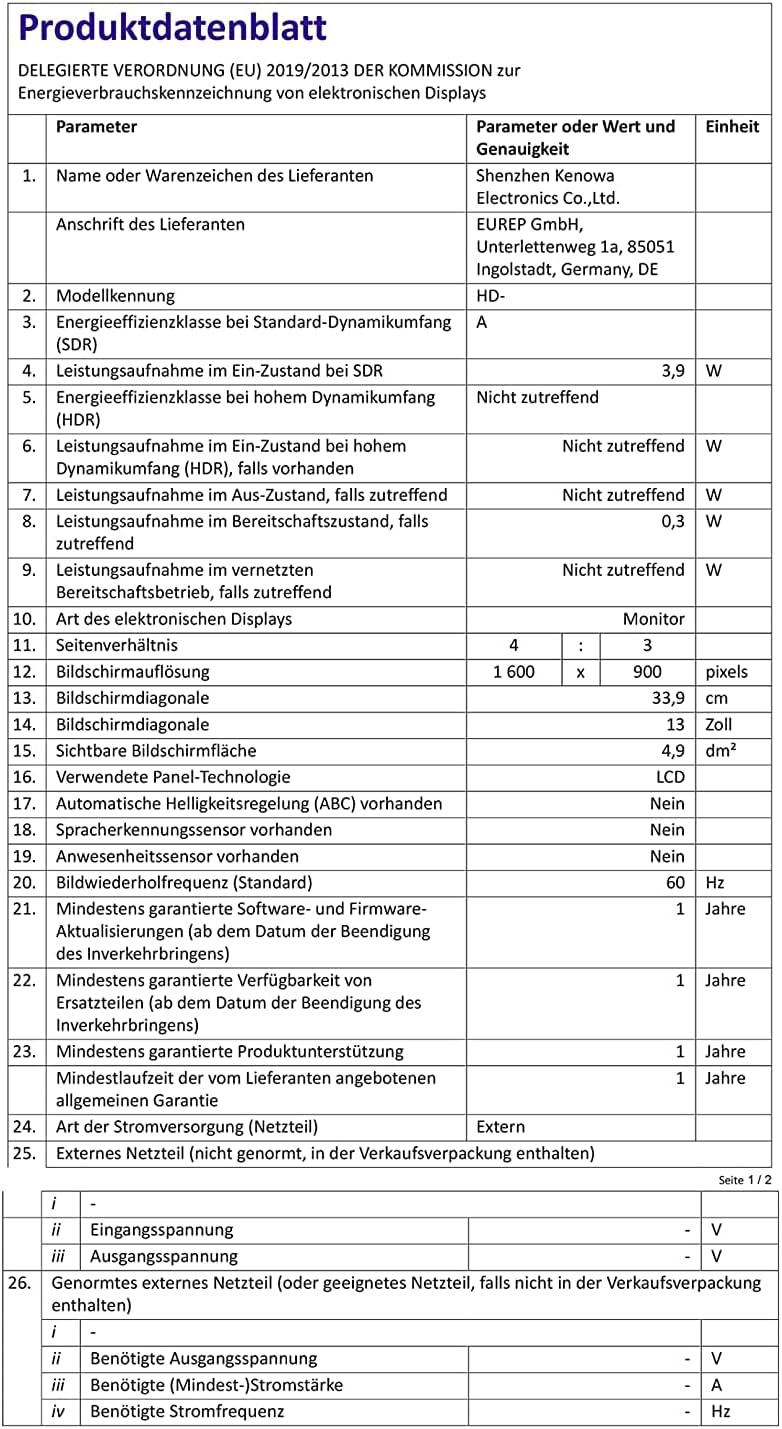
For more detailed product information, please refer to the official EU Product Information Sheet: https://eprel.ec.europa.eu/qr/1168672
Warranty and Support
Pisichen is committed to customer satisfaction. Your portable monitor comes with the following:
- 30-Day Money-Back Guarantee: For any issues within 30 days of purchase.
- One-Year Warranty: To ensure your satisfaction and cover manufacturing defects.
If you have any questions, concerns, or require technical assistance, please do not hesitate to contact our customer support team:
Email: shshlgwlkj@sohu.com
We are always ready to assist you.