
1. Introduction
This manual provides essential information for the safe and effective installation, operation, and maintenance of your LUBAN 12V LED Tower Stack Light, Model XHD04-2C-12V-YS. This industrial warning signal light is designed for facility safety and process indication, featuring durable LED lighting and an integrated buzzer.
Key Features:
- Durable LED Lighting: Industrial LED tower stack lights with vibration resistance for reliable operation.
- Versatile Mounting: Ceiling mount design allows flexible installation in various settings.
- Energy Efficient: Operates on 12V DC power source for cost savings.
- Safety Signaling: Red and green LED lights indicate safe or unsafe conditions.
- Built-in Buzzer: Optional buzzer feature provides additional safety alerting.
2. Safety Information
Please read and understand all safety instructions before installing or operating this product. Failure to follow these instructions may result in electric shock, fire, or serious injury.
- Electrical Safety: Ensure the power supply is disconnected before installation or maintenance. This device operates on 12V DC. Verify your power source matches this requirement. Incorrect voltage can damage the unit and pose a safety hazard.
- Installation: Installation should be performed by qualified personnel in accordance with local electrical codes and regulations. Ensure the mounting surface is strong enough to support the device securely.
- Environment: Do not expose the device to excessive moisture, dust, or extreme temperatures outside its specified operating range.
- Modifications: Do not attempt to modify or disassemble the unit. Unauthorized modifications will void the warranty and may lead to malfunction or injury.
3. Package Contents
Verify that all components are present and undamaged upon opening the package:
- 1 x LUBAN 12V LED Tower Stack Light (2-Layer with Buzzer)
- 1 x Alloy Steel Pole
- 1 x "L" Bracket Mounting Hardware (nuts, washers)
- Instruction Manual (this document)
4. Product Overview and Components
Familiarize yourself with the main components of your LED Tower Stack Light.
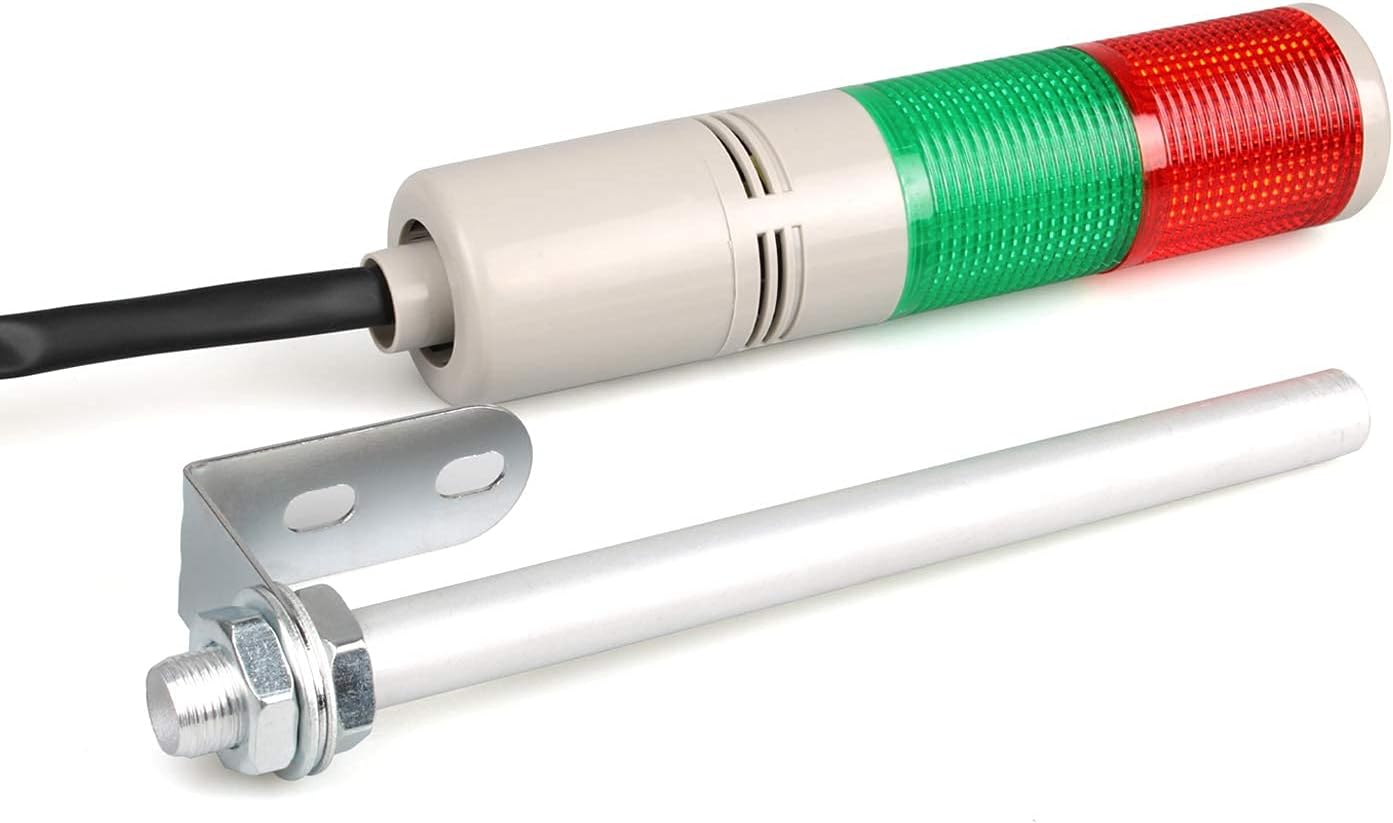
Figure 4.1: LUBAN 12V LED Tower Stack Light, showing the main unit, mounting pole, and wiring cable.

Figure 4.2: Detail of the alloy steel pole (Ø1.8cm/0.7in) and the "L" bracket mounting hardware for secure installation.

Figure 4.3: Illustration of the high-quality LED chips providing 360-degree lighting, designed for durability and energy efficiency.
5. Specifications
| Feature | Specification |
|---|---|
| Model Number | XHD04-2C-12V-YS |
| Voltage | DC 12V |
| Layers | 2 (Red, Green) |
| Buzzer | Yes (Maximum 90dB output) |
| Light Source Type | LED |
| Material | Acrylonitrile Butadiene Styrene (ABS), Plastic Shade |
| Mounting Type | Ceiling Mount (L-bracket) |
| Item Dimensions (L x W x H) | 8.7"L x 2"W x 2"H (approximate, main unit) |
| Item Weight | 8.8 ounces |
| Special Features | Vibration resistant, 360-degree beam angle |
6. Setup and Installation
Follow these steps for proper installation of your LUBAN LED Tower Stack Light.
6.1 Mounting
- Select a suitable mounting location on a ceiling or sturdy vertical surface that can safely support the weight of the light and is free from excessive vibration.
- Attach the "L" bracket to the alloy steel pole using the provided nuts and washers.
- Securely fasten the "L" bracket to the chosen mounting surface using appropriate screws (not included) for the material. Ensure the bracket is firmly attached to prevent movement.
- Insert the base of the tower light onto the top of the alloy steel pole and secure it.
6.2 Wiring
Important: Ensure power is disconnected before performing any wiring. This device operates on DC 12V. Incorrect wiring or voltage can cause damage or injury.

Figure 6.1: General wiring diagram. For this DC 12V model, ensure correct polarity for the black power line (+/-). Consult a qualified electrician if unsure.
- Identify the wires extending from the base of the tower light. Common wire colors are:
- Black: Power Line (DC 12V Positive/Negative, observe polarity)
- Grey: Common Line
- Red: Red Light Control
- Green: Green Light Control
- Orange: Buzzer Control
- Connect the Black wire to your DC 12V power source, ensuring correct polarity.
- Connect the Grey wire to the common ground of your control system.
- Connect the Red, Green, and Orange wires to your respective control outputs (e.g., PLC, switch) to activate the red light, green light, and buzzer independently.
- Ensure all connections are secure and properly insulated to prevent short circuits.
7. Operating Instructions
The LUBAN LED Tower Stack Light provides visual and audible signals for various industrial conditions.

Figure 7.1: Explanation of light and buzzer indications.
- Red Light: Typically indicates failure conditions such as an emergency stop, machine fault, or critical alert.
- Green Light: Typically indicates normal machine or process operation, safe conditions, or completion of a task.
- Warning Buzzer: The integrated buzzer provides an audible alert (maximum 90dB output). It is designed with a higher variable frequency to be heard above surrounding machinery noise. Activate the buzzer via its dedicated control wire when an audible warning is required.
The specific meaning of each light and the buzzer should be defined and communicated within your operational environment.
8. Maintenance
The LUBAN LED Tower Stack Light is designed for low maintenance. Follow these guidelines to ensure longevity and optimal performance:
- Cleaning: Periodically clean the outer surface of the light with a soft, damp cloth. Do not use abrasive cleaners or solvents, as these can damage the plastic housing.
- Inspection: Regularly inspect the mounting hardware and wiring connections for any signs of loosening, corrosion, or damage. Tighten connections as needed.
- LED Life: The LED chips have a lifespan of 50,000+ hours under normal operating conditions. No routine replacement of bulbs is necessary.
- Environmental Protection: Ensure the unit remains protected from direct water spray or harsh chemicals unless specifically rated for such exposure.
9. Troubleshooting
If you encounter issues with your LUBAN LED Tower Stack Light, refer to the following common problems and solutions:
| Problem | Possible Cause | Solution |
|---|---|---|
| Light does not illuminate | No power supply; incorrect wiring; faulty control signal; damaged LED. | Check DC 12V power connection and polarity. Verify control signal is active. Inspect wiring for breaks. If all checks fail, the LED may be damaged (contact support). |
| Buzzer does not sound | No power supply; incorrect wiring; faulty control signal; damaged buzzer. | Check DC 12V power connection. Verify buzzer control signal is active. Inspect wiring. If all checks fail, the buzzer may be damaged (contact support). |
| Intermittent operation | Loose wiring connections; unstable power supply; vibration. | Tighten all wiring connections. Ensure a stable DC 12V power source. Verify mounting is secure and minimizes vibration. |
If the problem persists after attempting these solutions, please contact LUBAN customer support.
10. Warranty and Support
LUBAN products are manufactured to high-quality standards. For specific warranty information, please refer to the product packaging or the retailer's terms of sale. If you require technical assistance or have questions regarding your LUBAN 12V LED Tower Stack Light, please contact your point of purchase or visit the official LUBAN website for support resources.
Please have your model number (XHD04-2C-12V-YS) and purchase date available when contacting support.