
1. Introduction
This instruction manual provides essential information for the safe and efficient operation of your Beatfoxx Silent Guide V2 SDT-BP30 Bodypack Transmitter. Please read this manual thoroughly before use and retain it for future reference.
The Beatfoxx Silent Guide V2 SDT-BP30 is a wireless UHF stereo bodypack transmitter designed for tour guide systems, silent disco applications, and similar scenarios requiring clear audio transmission to multiple receivers. It operates on 3 channels within the 863-865 MHz frequency range.

Image 1.1: Beatfoxx Silent Guide V2 SDT-BP30 Transmitter in a typical usage scenario.
2. Safety Information
- Read all instructions before operating the device.
- Do not expose the device to rain or moisture.
- Do not disassemble the unit. Refer all servicing to qualified personnel.
- Use only the specified power source (2 AA batteries, standard or rechargeable).
- Keep the device away from extreme temperatures and direct sunlight.
- Ensure proper ventilation to prevent overheating.
- This device is not compatible with "Silent V1" systems.
3. Package Contents
Verify that all items listed below are included in your package:
- Beatfoxx Silent Guide V2 SDT-BP30 Bodypack Transmitter
- External Antenna (pre-attached or to be attached)
- Charging Cable (USB)
- Metal Belt Clip (pre-attached)
4. Product Overview
The SDT-BP30 transmitter features a compact design with essential controls and inputs for versatile use.

Image 4.1: Front view of the transmitter showing the display and control buttons.
- Display: Shows selected channel and battery status.
- "M" Button (Menu): Used for channel selection and adjusting audio/microphone volume.
- "Down" Button: Decreases channel number or volume.
- "Up" Button: Increases channel number or volume.
- Low Battery Indicator: LED light indicating low battery.
- Power ON Indicator: LED light indicating the device is powered on.
- External Antenna: For enhanced signal range.

Image 4.2: Top view of the transmitter with audio and microphone input ports.
- AUDIO Input: 3.5mm stereo jack for connecting external audio sources (e.g., music player, mixer).
- MIC Input: 3.5mm mono jack for connecting an external microphone (e.g., Beatfoxx SDH-100, sold separately).
- USB Port: For charging rechargeable batteries (if used).
- Power Switch: To turn the device on or off.

Image 4.3: Back view of the transmitter showing the metal belt clip.
The integrated metal belt clip allows for convenient and secure attachment to clothing.
5. Setup
5.1. Installing Batteries
The SDT-BP30 requires two AA batteries (standard or rechargeable).
- Open the battery compartment cover on the back of the unit.
- Insert two AA batteries, ensuring correct polarity (+/-).
- Close the battery compartment cover securely.
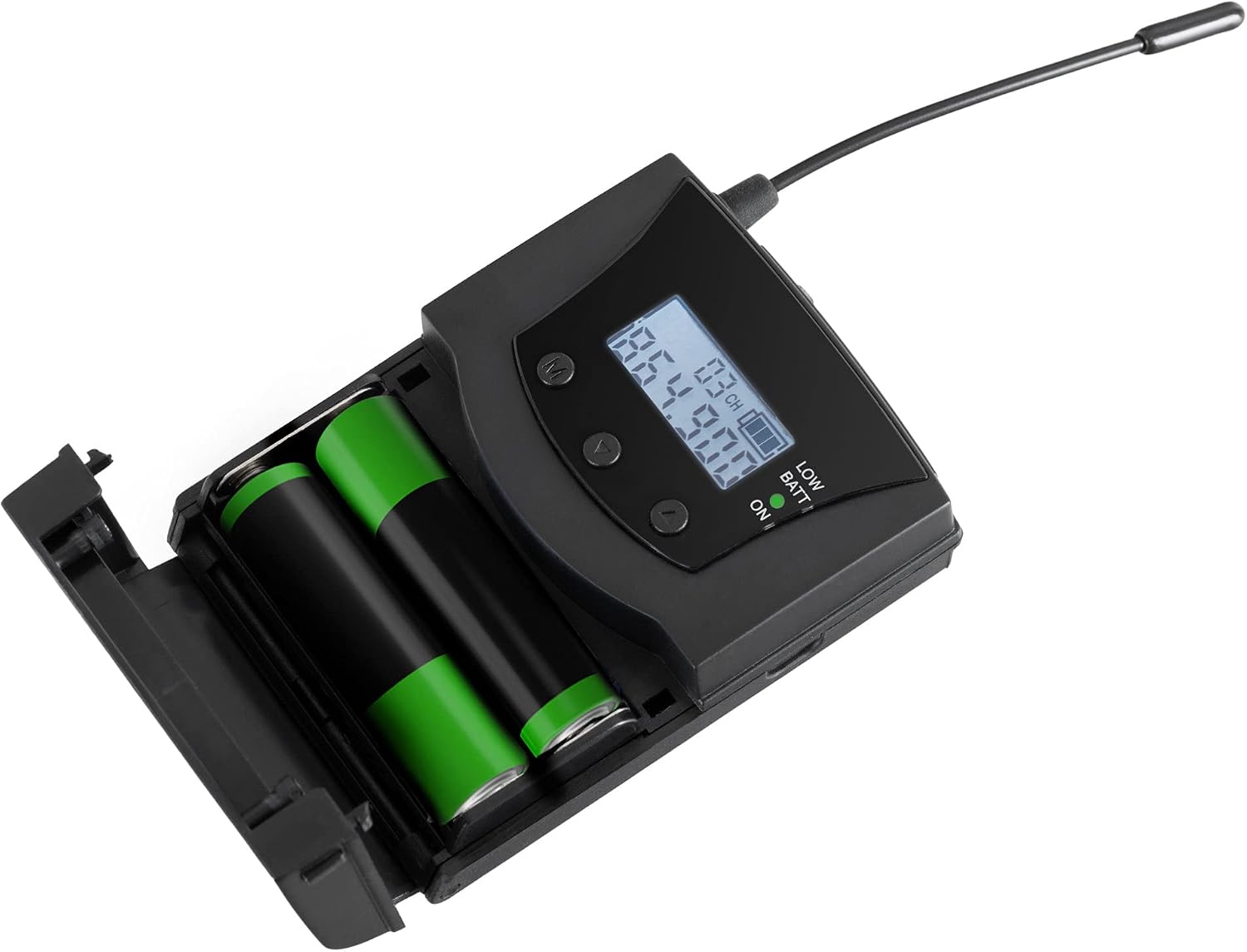
Image 5.1: Inserting AA batteries into the transmitter.
5.2. Connecting Audio Sources
You can connect either a microphone or an auxiliary audio source.
- Microphone: Plug a 3.5mm mono jack microphone into the "MIC" input.
- Auxiliary Audio: Connect an audio player, mixer, or other source using a 3.5mm stereo jack cable to the "AUDIO" input.
5.3. Attaching the Antenna
Ensure the external antenna is securely attached to the designated port for optimal signal transmission.
6. Operating Instructions
6.1. Powering On/Off
Slide the power switch to the "ON" position to turn on the transmitter. The power indicator LED will illuminate. Slide it to "OFF" to power down.
6.2. Channel Selection
The transmitter offers 3 selectable UHF channels: 863.3 MHz, 863.9 MHz, and 864.9 MHz.
- Press the "M" (Menu) button to enter channel selection mode. The channel number on the display will flash.
- Use the "Up" and "Down" buttons to cycle through the available channels.
- Press the "M" button again to confirm your selection.
Note: Ensure the transmitter and all connected receivers are set to the same channel for proper operation.
6.3. Adjusting Volume
You can adjust the microphone and audio input volumes independently.
- Press the "M" button repeatedly until the volume indicator (e.g., "VOL MIC" or "VOL AUX") appears on the display.
- Use the "Up" and "Down" buttons to increase or decrease the respective volume level.
- The setting will be saved automatically after a few seconds of inactivity or by pressing "M" again to exit the menu.
6.4. Charging Rechargeable Batteries
If using rechargeable AA batteries, connect the included charging cable to the USB port on the transmitter and to a suitable USB power adapter (not included). Charging time is approximately 12 hours.
Note: Only rechargeable batteries can be charged directly in the unit. Do not attempt to charge standard alkaline batteries.
7. Maintenance
7.1. Cleaning
Wipe the unit with a soft, dry cloth. Do not use liquid cleaners or abrasive materials.
7.2. Battery Care
Remove batteries if the device will not be used for an extended period to prevent leakage. Dispose of used batteries responsibly according to local regulations.
8. Troubleshooting
| Problem | Possible Cause | Solution |
|---|---|---|
| No sound from receivers. |
|
|
| Poor signal quality or limited range. |
|
|
| Low battery indicator is on. | Batteries are running low. | Replace or recharge batteries immediately. |
9. Specifications
| Feature | Detail |
|---|---|
| Model | SDT-BP30 |
| Brand | Beatfoxx |
| Transmission System | UHF Stereo |
| Channels | 3 |
| Transmission Frequencies | 863.3 MHz, 863.9 MHz, 864.9 MHz |
| Range | Up to 75 meters (approx. 246 feet) |
| Audio Input | 3.5mm Stereo Jack (AUX) |
| Microphone Input | 3.5mm Mono Jack (MIC) |
| Power Supply | 2 x AA Batteries (standard or rechargeable) |
| Battery Life | Approx. 24 hours |
| Charging Time (rechargeable) | Approx. 12 hours |
| Dimensions (without antenna) | 8.5 x 6.5 x 2.5 cm (3.35 x 2.56 x 0.98 inches) |
| Antenna Length | 8 cm (3.15 inches) |
| Weight (without batteries) | 62 g (2.19 oz) |
| Color | Black |
| Compatibility | Not compatible with "Silent V1" systems. |

Image 9.1: Physical dimensions of the Beatfoxx SDT-BP30 transmitter.
10. Warranty and Support
For warranty information and technical support, please refer to the official Beatfoxx website or contact your retailer. Beatfoxx is a brand of Musikhaus Kirstein.
You can find more information about Beatfoxx products and support at their official brand store: Beatfoxx Brand Store.
