
1. Introduction
This manual provides detailed instructions for the safe and efficient use of your LYONGTECH 30W Two-Way Charging Hub. This device is designed to charge two DJI Mini 4K, Mini 2, Mini 2 SE, or Mini SE drone batteries sequentially and can also function as a power bank.
2. Package Contents
Please verify that all items are present in your package:
- 1 x LYONGTECH 30W Two-Way Charging Hub
- 2 x USB-C Charging Cables
Note: Drone batteries and USB-A output cable are not included.
3. Product Overview
Familiarize yourself with the components of your charging hub.

Image 3.1: The LYONGTECH 30W Two-Way Charging Hub with two DJI Mini series drone batteries inserted into the charging slots. The hub features two USB-C input ports and a USB-A output port.
The charging hub includes two battery slots, two USB-C input ports for power, and one USB-A output port for power bank functionality.
4. Setup
To begin using your charging hub:
- Connect Power Source: Use the provided USB-C cables to connect the charging hub to a compatible USB power adapter (not included). For optimal charging speed, connect both USB-C input ports to a dual-port power adapter or two separate power adapters.
- Insert Batteries: Carefully insert your DJI Mini series drone batteries into the designated slots on the charging hub. Ensure they are seated correctly.
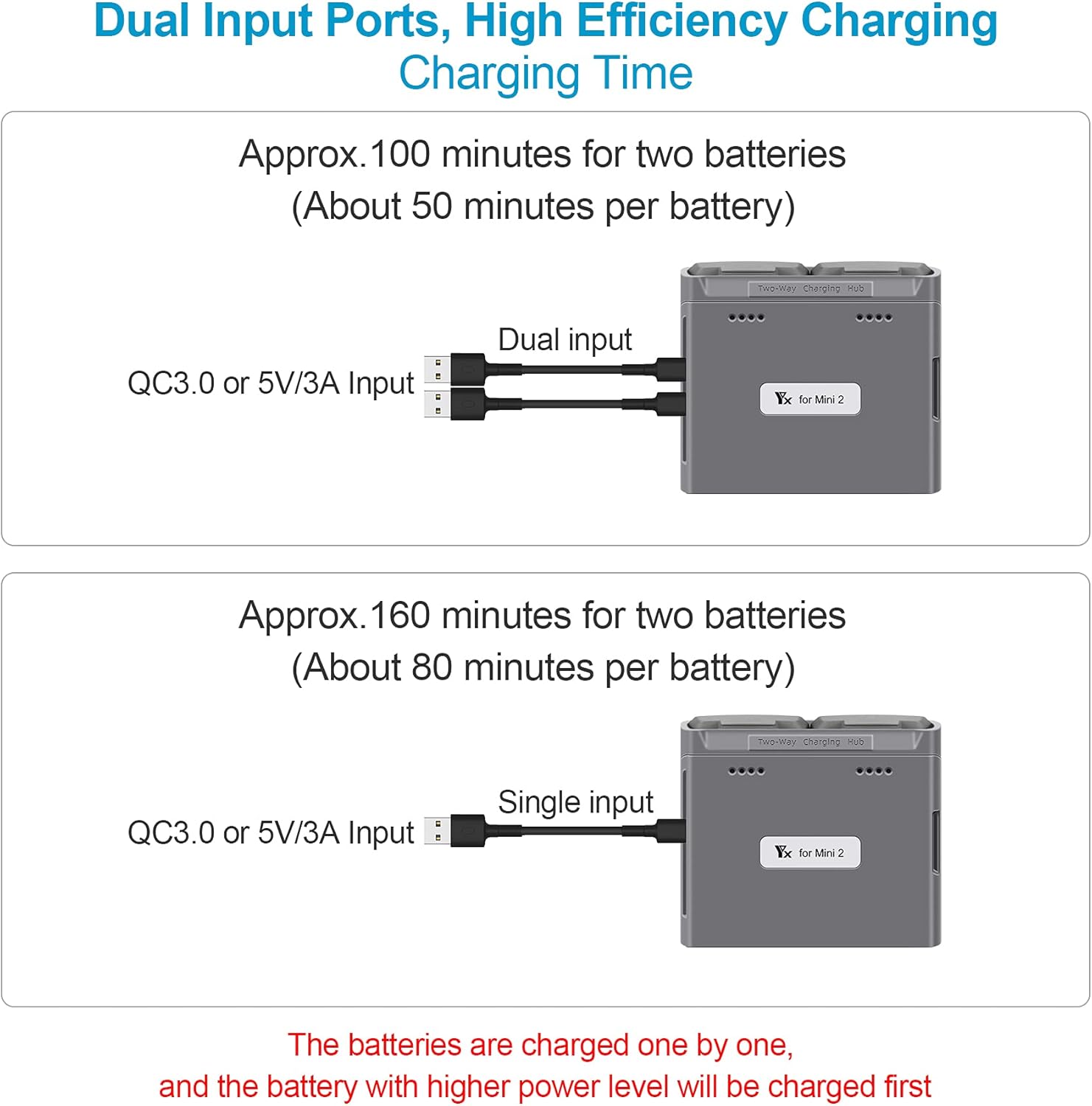
Image 4.1: The charging hub connected via two USB-C cables to a power source, with two drone batteries inserted and ready for charging.
5. Operating Instructions
5.1. Charging Drone Batteries
The hub charges batteries sequentially, prioritizing the battery with the higher power level first.
- Charging Process: Once batteries are inserted and power is connected, the hub will automatically begin charging. Indicator lights on the hub (or batteries, depending on model) will show charging status.
- Charging Times:
- Dual USB-C Input: Approximately 100 minutes for two batteries (50 minutes per battery).
- Single USB-C Input: Approximately 160 minutes for two batteries (80 minutes per battery).
5.2. Checking Battery Level
The charging hub allows you to quickly check the charge level of your DJI Mini series batteries without needing to insert them into the drone.
- Insert a battery into one of the charging slots.
- The indicator lights on the hub will illuminate to show the current charge level of the inserted battery.
5.3. Power Bank Function
You can use an inserted DJI Mini series battery to charge other USB devices, such as your drone's remote controller or a smartphone.
- Ensure at least one charged DJI Mini series battery is inserted into the hub.
- Connect your USB device to the USB-A output port on the charging hub using a compatible USB-A cable (not included).
- The hub will draw power from the inserted drone battery to charge your connected device.

Image 5.1: The charging hub with a drone battery inserted, connected via its USB-A output port to a smartphone for charging, demonstrating its power bank functionality.
6. Maintenance
To ensure the longevity and optimal performance of your charging hub:
- Keep the device clean and free from dust and debris. Use a soft, dry cloth for cleaning.
- Avoid exposing the hub to extreme temperatures, direct sunlight, or moisture.
- Do not attempt to disassemble or repair the device yourself. Contact customer support if issues arise.
7. Troubleshooting
If you encounter issues with your charging hub, refer to the following common problems and solutions:
| Problem | Possible Cause | Solution |
|---|---|---|
| Batteries not charging | No power supply; loose connection; incompatible power adapter; faulty battery. | Ensure power adapter is connected and functional. Check USB-C cable connections. Use a power adapter that meets specifications (5V/3A). Test with a different battery. |
| Slow charging speed | Single USB-C input used; low-power adapter. | Connect both USB-C input ports to a suitable power source. Use a power adapter capable of delivering 5V/3A per port. |
| Power bank function not working | Drone battery is depleted; device not compatible; faulty USB-A cable. | Ensure the drone battery has sufficient charge. Test with a different USB device and cable. |
8. Specifications
Technical details for the LYONGTECH 30W Two-Way Charging Hub:
| Feature | Specification |
|---|---|
| Brand | LYONGTECH |
| Model | 30W Two-Way Charging Hub |
| Compatible Devices | DJI Mini 4K, Mini 2, Mini 2 SE, Mini SE drone batteries |
| Input Voltage | 5.0V/3A (Max) x2 (USB-C) |
| Battery Output | 8.8V/3A (Max) |
| USB Output (Power Bank) | 5V/2A (Max) |
| Battery Charge Time (Dual Input) | Approx. 100 mins for 2 batteries (50 mins/battery) |
| Battery Charge Time (Single Input) | Approx. 160 mins for 2 batteries (80 mins/battery) |
| Dimensions (D x W x H) | 1.3" x 3.3" x 2.9" (3.3cm x 8.4cm x 7.4cm) |
| Item Weight | 108 Grams |
| Connector Type | USB-C (Input), USB-A (Output) |
| Number of Ports | 2 (USB-C Input), 1 (USB-A Output) |
9. Warranty and Support
Your LYONGTECH 30W Two-Way Charging Hub comes with a 1-Year Manufacturer Warranty from the date of purchase. This warranty covers defects in materials and workmanship under normal use.
For warranty claims, technical support, or any questions regarding your product, please contact LYONGTECH customer service through the retailer where you purchased the product or visit the official LYONGTECH website for contact information.
Please retain your proof of purchase for warranty service.