
1. Introduction
Thank you for choosing the ROARBATT 1000W Pure Sine Wave Power Inverter. This device is designed to convert 12V DC power from your vehicle battery or solar system into 110V/120V AC household power, providing a reliable and clean energy source for various electronic devices. With its advanced features and robust design, it is ideal for use in cars, RVs, homes, and outdoor activities.
Please read this manual thoroughly before operating the inverter to ensure safe and efficient use. Keep this manual for future reference.
2. Safety Instructions
WARNING: Failure to follow these safety instructions may result in serious injury or property damage.
- Do not open the inverter casing. There are no user-serviceable parts inside.
- Do not expose the inverter to water, rain, snow, or spray.
- Do not operate the inverter if it has been dropped or damaged.
- Ensure proper ventilation. Do not block the cooling fan or vents.
- Connect the inverter only to a 12V DC power source. Connecting to a 24V or higher DC source will damage the unit.
- Do not exceed the rated continuous power of 1000W. The peak power is 2000W for short durations.
- Keep children away from the inverter.
- Ensure the power switch is in the "OFF" position before connecting to the battery.
- Always connect the inverter to the battery terminals correctly: red clamp to positive (+), black clamp to negative (-). Reverse polarity will cause damage.
- Avoid using the inverter in environments with flammable fumes or gases.
- Disconnect the inverter from the power source when not in use.
3. Package Contents
Upon opening the package, please verify that all items listed below are present and in good condition:
- 1 x ROARBATT 1000W Pure Sine Wave Inverter
- 1 x Instruction Manual
- 1 x Pair of Battery Clips (1 black, 1 red)
- 4 x 40A Fuses

Image: The ROARBATT 1000W Pure Sine Wave Power Inverter shown with its included red and black battery clips and four spare 40A fuses.
4. Product Features
- 1000W Continuous Power: Provides stable 110V/120V AC power for various devices.
- 2000W Peak Power: Handles high surge loads for motor-driven appliances.
- Dual AC Outlets: Two standard 110V/120V AC outlets for connecting multiple devices.
- Dual 3.4A USB Ports: Two USB ports for charging smartphones, tablets, and other USB-powered devices.
- Pure Sine Wave Output: Produces clean and stable power, safe for sensitive electronics like laptops, medical equipment, and audio systems.
- Built-in Cooling Fan: Features an infinitely variable speed and temperature-controlled cooling fan to prevent overheating and ensure quiet operation (below 45 decibels).
- LCD Display: Digital display shows input voltage, output voltage, and error codes for easy monitoring and troubleshooting.
- Comprehensive Protection: Advanced isolation input and output technology provides protection against overvoltage, low voltage, overload, short circuit, and overheating.

Image: A detailed view highlighting the inverter's key features: Power Switch, Dual AC Outlets, Dual 3.4V USB Port, Pure Copper Terminal, and Cooling Fan.
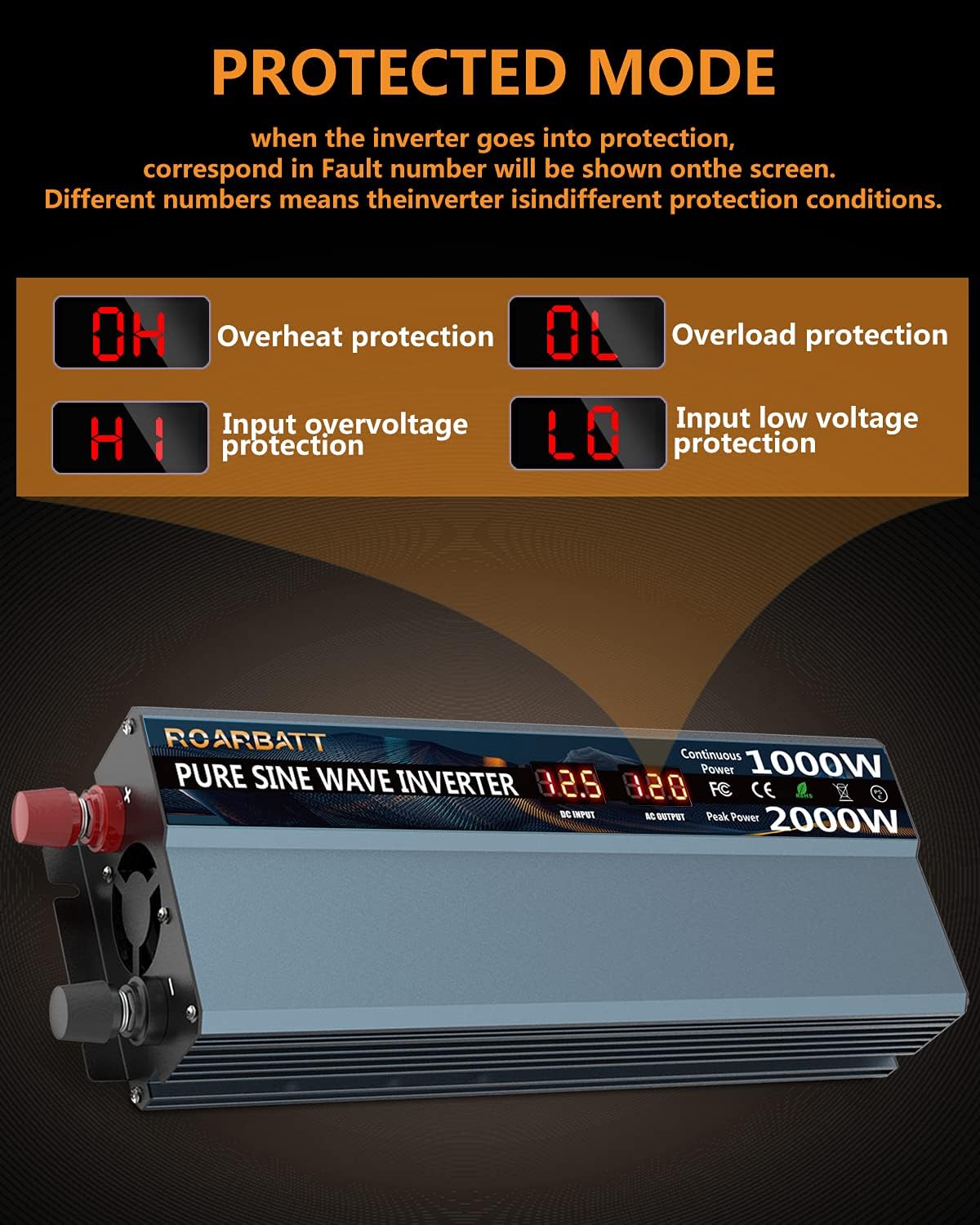
Image: Visual representation of the inverter's comprehensive protection mechanisms: Overvoltage, Overload, Overcurrent, Short circuit, Low voltage, and Abnormal temperature protection.
5. Specifications
| Parameter | Value |
|---|---|
| Model Name | 1000W |
| Continuous Power | 1000 Watts |
| Peak Power | 2000 Watts |
| Input Voltage | 12V DC |
| Output Voltage | 110V-120V AC |
| USB Output | Dual 3.4A USB Ports |
| Output Waveform | Pure Sine Wave |
| Product Dimensions | 10.63 x 3.94 x 2.36 inches |
| Item Weight | 2.99 pounds |
| Recommended Uses | Camping, Car, Home, Household appliances, Recreational Vehicle, Small electronics |

Image: Dimensions of the inverter (10.6in x 3.9in x 2.4in) and a visual of the included 40A fuses and battery clips.
6. Setup and Installation
Follow these steps to properly set up your ROARBATT Power Inverter:
- Preparation:
- Ensure the inverter's power switch is in the "OFF" position.
- Place the inverter on a flat, stable surface in a well-ventilated area, away from direct sunlight, heat sources, and moisture.
- Ensure there is sufficient space around the inverter for proper airflow, especially around the cooling fan and vents.
- Battery Connection:
- Connect the red battery clip cable to the positive (+) terminal of the 12V DC battery.
- Connect the black battery clip cable to the negative (-) terminal of the 12V DC battery.
- Connect the other end of the red cable to the red (+) terminal on the inverter.
- Connect the other end of the black cable to the black (-) terminal on the inverter.
- Ensure all connections are tight and secure to prevent loose connections and sparking.
- Powering On:
- Once the battery connections are secure, switch the inverter's power switch to the "ON" position.
- The LCD display will light up, showing the input DC voltage and output AC voltage.

Image: The inverter in use, powering a laptop and charging a smartphone, illustrating its practical application.
7. Operating Instructions
Once the inverter is properly set up and powered on, you can begin using it to power your AC and USB devices.
- Connecting AC Devices:
- Plug your 110V/120V AC device into one of the two AC outlets on the inverter.
- Ensure the total wattage of all connected AC devices does not exceed 1000W. For inductive loads (e.g., motors, compressors), consider their starting surge power, which can be significantly higher than their running power.
- It is recommended to use appliances with a power consumption of less than 800W for optimal performance and safety.
- Connecting USB Devices:
- Plug your USB charging cable into one of the two 3.4A USB ports on the inverter.
- Connect the other end of the cable to your smartphone, tablet, or other USB-powered device.
- Monitoring the LCD Display:
- The LCD display provides real-time information on the input DC voltage and output AC voltage.
- It also displays error codes (OH, OL, HI, LO) if a protection mechanism is triggered. Refer to the Troubleshooting section for details on these codes.
- Powering Off:
- Before disconnecting any devices or the inverter from the battery, switch the inverter's power switch to the "OFF" position.
- Disconnect the AC and USB devices, then disconnect the battery cables.

Image: Examples of devices compatible with the inverter, such as Bluetooth speakers, tablets, shavers, electric kettles, laptops, and cell phones.
8. Maintenance
Regular maintenance ensures the longevity and optimal performance of your inverter.
- Cleaning:
- Ensure the inverter is turned off and disconnected from all power sources before cleaning.
- Wipe the exterior of the inverter with a soft, dry cloth.
- Do not use abrasive cleaners or solvents.
- Periodically check the cooling fan and vents for dust accumulation. Use compressed air to clear any blockages.
- Connections:
- Regularly inspect battery cable connections for corrosion or looseness. Clean and tighten as necessary.
- Storage:
- If storing the inverter for an extended period, disconnect it from the battery and store it in a cool, dry place.
- Fuse Replacement:
- The inverter is equipped with internal fuses. If a fuse blows, it indicates an overload or short circuit. Contact customer support for assistance; do not attempt to replace internal fuses yourself. The included 40A fuses are spare external fuses for specific models or applications, not for internal replacement of this unit.
9. Troubleshooting
The LCD display on your ROARBATT inverter provides error codes to help identify and resolve common issues. Refer to the table below for guidance.
| LCD Code | Description | Possible Cause / Solution |
|---|---|---|
| OH | Overheat Protection | The inverter is too hot. Ensure proper ventilation, clear any blocked vents, reduce the load, and allow the unit to cool down. |
| OL | Overload Protection | The connected load exceeds the inverter's continuous power rating (1000W) or peak power rating (2000W). Disconnect some devices to reduce the load. |
| HI | Input Overvoltage Protection | The input DC voltage from the battery is too high (above 15V). Ensure you are using a 12V battery and check the battery voltage. |
| LO | Input Low Voltage Protection | The input DC voltage from the battery is too low (below 10.5V). Recharge or replace the battery. |
| No Output | No power from AC outlets or USB ports. | Check battery connections (ensure they are tight and correct polarity). Verify the inverter's power switch is ON. Check the battery charge level. If an error code is displayed, address it first. |

Image: The LCD display indicating various protection modes and their corresponding fault codes.
10. Warranty and Support
ROARBATT provides a 24-month warranty for this 1000W Pure Sine Wave Power Inverter, starting from the date of purchase. This warranty covers manufacturing defects and workmanship under normal use.
The warranty does not cover:
- Damage caused by improper installation or operation.
- Damage caused by unauthorized modifications or repairs.
- Damage caused by accidents, misuse, abuse, or natural disasters.
- Normal wear and tear.
For warranty claims, technical support, or any questions regarding your product, please contact ROARBATT customer service. When contacting support, please have your purchase information and product model number (1000W) ready.
ROARBATT is committed to providing the highest standard of service. For more information, you may visit the ROARBATT Store on Amazon.

