
1. Introduction
The ABB AD1NO-R-15m is an analog time switch designed for daily scheduling with a 15-minute switching interval. This modular device features one normally open (NO) channel and includes a power reserve function to maintain timekeeping during power outages. It is suitable for various electrical scheduling applications.
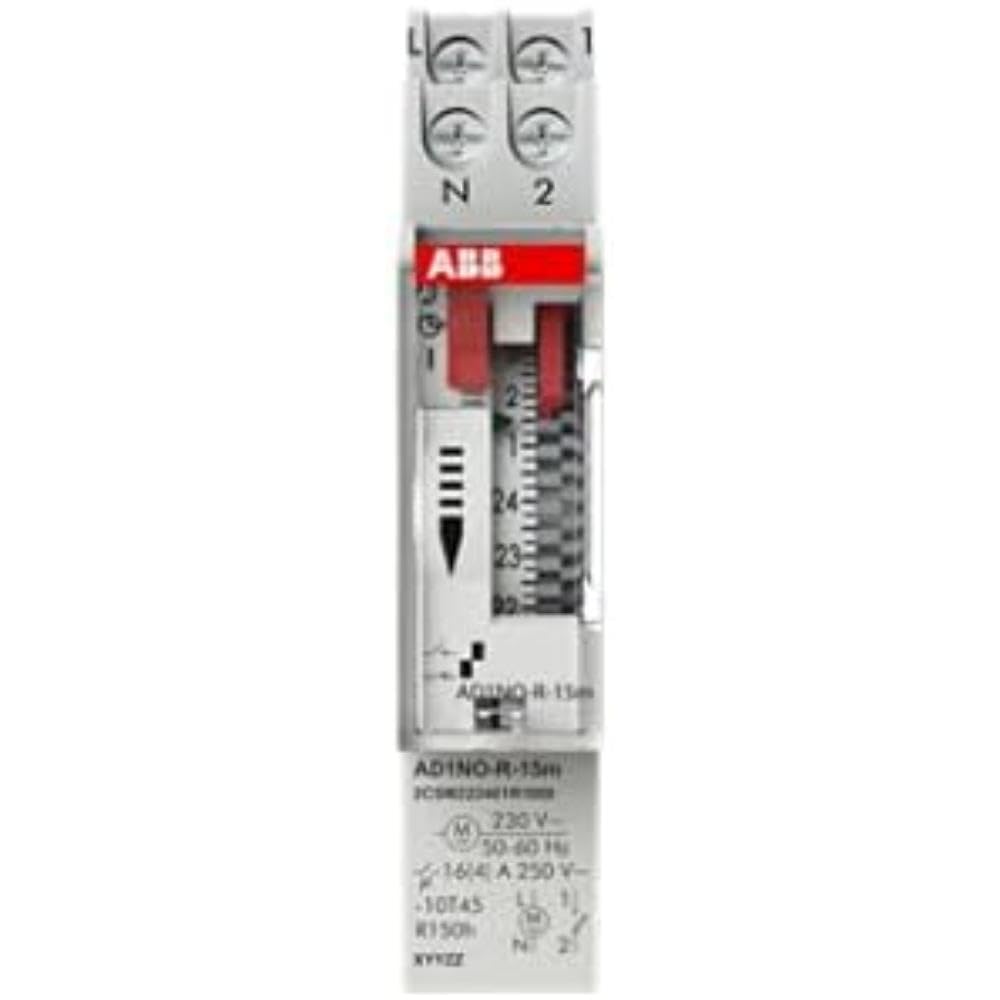
Figure 1: Front view of the ABB AD1NO-R-15m Modular Device Switch, highlighting its compact design and control interface.
2. Important Safety Instructions
Please read and understand all safety instructions before installing, operating, or maintaining this device. Failure to follow these instructions may result in electric shock, fire, or serious injury.
- Installation and maintenance must be performed by qualified personnel only.
- Disconnect power before installation, maintenance, or servicing to prevent electric shock.
- Ensure all wiring complies with local and national electrical codes and regulations.
- Do not operate the device if it appears damaged.
- This device is designed for indoor use in dry environments.
3. Product Overview
The AD1NO-R-15m is an analog time switch with the following key features:
- Analog Dial: For setting daily schedules.
- 15-Minute Switching: Allows precise control over connected circuits with 15-minute intervals.
- 1 Normally Open (NO) Channel: Controls one electrical circuit.
- Power Reserve: Maintains timekeeping for a specified duration during power interruptions.
- Modular Design: Suitable for integration into standard electrical panels on a DIN rail.
Note: The power reserve ensures the timer continues to function accurately even if the main power supply is temporarily lost.
4. Setup and Installation
Follow these steps for proper installation of the AD1NO-R-15m Modular Device Switch:
- Power Disconnection: Before beginning, ensure the main power supply to the installation area is completely disconnected at the circuit breaker or fuse box. Verify with a voltage tester.
- Mounting: Mount the AD1NO-R-15m switch onto a standard DIN rail within an appropriate electrical enclosure. Ensure it is securely fastened.
- Wiring:
- Connect the incoming phase (L) and neutral (N) wires to the designated input terminals of the time switch.
- Connect the load wire from the output terminal of the time switch to the device you wish to control.
- Ensure all connections are tight and secure. Refer to the wiring diagram printed on the device for specific terminal identification.
- Power Restoration: Once all connections are verified and secure, close the electrical enclosure and restore power to the circuit.
Always consult a qualified electrician for installation if you are unsure or lack experience with electrical wiring.
5. Operating Instructions
To set the time and program the switching schedule:
- Set Current Time: Rotate the analog dial clockwise until the current time aligns precisely with the reference arrow or marker on the device's face.
- Program Switching Times: The dial features small segments around its perimeter. Push in the segments corresponding to the times you want the connected circuit to be ON. Pull out segments for OFF periods. Each segment typically represents a 15-minute interval.
- Operating Mode (if applicable): If your model includes a manual override switch (e.g., ON, AUTO, OFF), ensure it is set to "AUTO" for programmed operation.
The internal power reserve will automatically charge when the device is powered, ensuring continued accurate timekeeping during short power outages.
6. Maintenance
The AD1NO-R-15m is designed for minimal maintenance. Follow these guidelines to ensure optimal performance:
- Cleaning: Keep the device clean and free from dust. Use a dry, soft cloth for cleaning. Do not use liquid cleaners, abrasive materials, or solvents.
- Inspection: Periodically inspect the wiring connections for tightness and any signs of wear, corrosion, or damage. Ensure all terminals are secure.
- Environmental Conditions: Ensure the operating environment remains within the specified temperature and humidity ranges to prevent damage.
There are no user-serviceable parts inside this device. Do not attempt to open the casing, as this will void the warranty and may expose you to electrical hazards.
7. Troubleshooting
If you encounter issues with your AD1NO-R-15m switch, refer to the table below for common problems and solutions:
| Problem | Possible Cause | Solution |
|---|---|---|
| Device not switching | No power supply | Check the circuit breaker or fuse. Ensure wiring connections are correct and secure. |
| Device not switching | Incorrect programming | Re-check the dial settings and ensure the correct segments are pushed in or pulled out for desired ON/OFF times. |
| Device not switching | Manual override engaged | Set the operating mode switch to "AUTO" for programmed operation. |
| Time is incorrect after power outage | Power reserve depleted or faulty | Allow the device to charge its power reserve by keeping it connected to power. If the issue persists, contact customer support. |
If the problem persists after attempting these solutions, please contact ABB customer support for further assistance.
8. Technical Specifications
- Model: AD1NO-R-15m
- Part Number: 2CSM222461R1000
- Manufacturer: ABB
- Type: Analog Time Switch
- Switching Interval: 15 minutes
- Channels: 1 Normally Open (NO)
- Power Reserve: Yes
- Item Weight: Approximately 2.82 ounces (80 grams)
- Product Dimensions: Approximately 3.54 x 0.69 x 2.6 inches (90 x 17.5 x 66 mm)
- Mounting Type: DIN Rail (Wall Mount)
- Included Components: Modular device switch
- Batteries Required: No (features internal power reserve)
- ASIN: B09BP4PFMF
- First Available: December 21, 2024
Note: Specifications are subject to change without prior notice.
9. Warranty and Support
Warranty Information
For detailed warranty terms and conditions, please refer to the official ABB warranty statement provided with your purchase or visit the official ABB website. Keep your proof of purchase for warranty claims.
Customer Support
For technical assistance, troubleshooting, or service inquiries, please contact ABB customer support through their official website or the contact information provided in your product packaging.
ABB Official Website: www.abb.com
