
Philips DST5030/80
Philips 5000 Series Steam Iron User Manual
Model: DST5030/80
Introduction
Thank you for choosing the Philips 5000 Series Steam Iron. This appliance is designed to provide efficient and effective ironing for a variety of fabrics, featuring powerful steam output, a durable SteamGlide Plus soleplate, and convenient functions like the Drip Stop System and automatic limescale cleaning. This manual provides essential information for safe and optimal use of your iron.

Image: Front view of the Philips 5000 Series Steam Iron, showcasing its dark purple and black design.
Important Safety Information
Please read this user manual carefully before you use the appliance and save it for future reference. Always follow basic safety precautions when using electrical appliances to reduce the risk of fire, electric shock, and personal injury.
- Ensure the voltage indicated on the appliance corresponds to the local mains voltage before you connect the appliance.
- Do not use the iron if the plug, the mains cord, or the appliance itself shows visible damage, or if the appliance has been dropped.
- Always unplug the iron from the mains socket before filling it with water, emptying it, or cleaning it.
- Never immerse the iron in water or any other liquid.
- Keep the iron and its cord out of reach of children when it is switched on or cooling down.
- Do not leave the iron unattended when it is connected to the mains.
- The soleplate of the iron can become extremely hot and may cause burns if touched.
Product Overview
Familiarize yourself with the different parts of your Philips 5000 Series Steam Iron.
- Water filling hole
- Temperature dial
- Steam boost button
- Spray button
- Steam slider
- Calc-clean button
- Soleplate
- Water tank (with MAX indication)
- Power cord
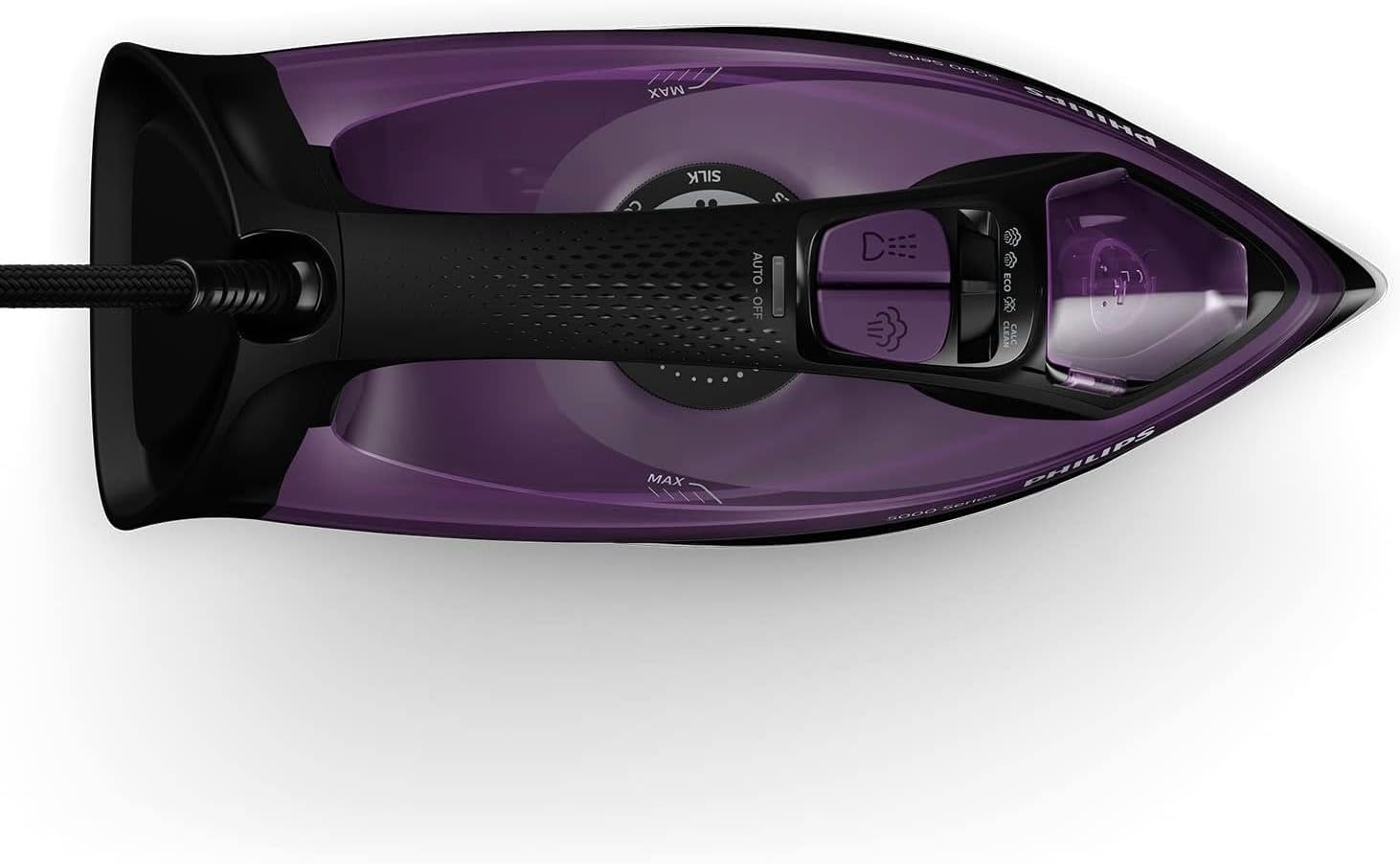
Image: Top-down view of the iron, showing the temperature dial, steam and spray buttons, and water tank.

Image: Close-up of the SteamGlide Plus soleplate, highlighting its scratch-resistant surface and steam vents.
Setup
Before First Use
- Remove any stickers or protective foil from the soleplate.
- It is normal for a small amount of smoke to be produced the first time you use the iron. This will stop after a short while.
Filling the Water Tank
- Ensure the iron is unplugged from the mains socket.
- Open the water filling hole cover.
- Hold the iron in a slightly tilted position and fill the water tank with tap water up to the 'MAX' indication. Do not overfill.
- Close the water filling hole cover securely.

Image: A hand pouring water from a measuring cup into the water tank of the iron.
Operating the Iron
Setting the Temperature
- Plug the iron into a grounded wall socket.
- Turn the temperature dial to the desired setting according to the fabric type. Refer to the garment's care label.
- The indicator light will illuminate, indicating the iron is heating up. It will turn off when the set temperature is reached.
Steam Ironing
- Ensure the water tank is filled.
- Set the temperature dial to the steam zone (usually indicated by three dots or a steam symbol). Steam is only produced at higher temperatures.
- Adjust the steam slider to the desired steam output.
- For an extra burst of steam, press the steam boost button. This is useful for stubborn creases.

Image: A person using the Philips steam iron on a blue fabric, with visible steam being emitted from the soleplate.
Vertical Steaming
- The iron can be used for vertical steaming of hanging garments, curtains, etc.
- Hold the iron vertically at a short distance from the fabric.
- Press the steam boost button repeatedly to release bursts of steam.
Drip Stop System
- This system prevents water from dripping onto your garments when the iron's temperature is too low for steam production.
- If the iron cools down, the steam function will automatically stop to prevent drips.

Image: The iron being used on a garment, demonstrating the effectiveness of the Drip Stop System by showing no water stains.
Maintenance
Cleaning the Iron
- Always unplug the iron and let it cool down completely before cleaning.
- Wipe the soleplate with a damp cloth and a non-abrasive cleaner if necessary.
- Clean the upper part of the iron with a damp cloth.
- Do not use scouring pads, abrasive cleaning agents, or harsh solvents.
Automatic Limescale Cleaning (Calc-Clean)
The iron features an integrated Calc-Clean function to remove limescale buildup and maintain optimal steam performance. Perform this function regularly, especially if you live in a hard water area.
- Fill the water tank to the 'MAX' level.
- Plug in the iron and set the temperature dial to the maximum setting.
- Once the indicator light goes out, unplug the iron.
- Hold the iron over a sink, press and hold the Calc-Clean button. Gently shake the iron back and forth. Steam and boiling water will come out of the soleplate, carrying limescale particles.
- Continue until the water tank is empty.
- Plug in the iron again and let it heat up to dry the soleplate.
- Unplug and let it cool down before storing.
Troubleshooting
| Problem | Possible Cause | Solution |
|---|---|---|
| Iron does not heat up. | Not plugged in, power outlet faulty, temperature dial set to minimum. | Check power connection, try another outlet, turn temperature dial to a higher setting. |
| No steam or insufficient steam. | Water tank empty, temperature too low, steam slider set to 'dry ironing', limescale buildup. | Fill water tank, set temperature to steam zone, adjust steam slider, perform Calc-Clean. |
| Water drips from the soleplate. | Temperature too low for steam, Drip Stop System activating. | Allow iron to heat up fully before using steam. |
| White flakes coming from soleplate. | Limescale buildup. | Perform Calc-Clean procedure. |
Specifications
- Model: DST5030/80
- Power: 2400 Watts
- Steam Boost: Up to 180 g
- Continuous Steam: 45 g/min
- Soleplate: SteamGlide Plus (Scratch Resistant)
- Drip Stop System: Yes
- Vertical Steam: Yes
- Limescale Cleaning: Integrated Calc-Clean
- Item Weight: 1.25 Kilograms
- Product Dimensions: 13.7L x 33.2W centimetres
- Colour: Dark Purple
- Care Instructions: Tap water suitable
- Included Components: Steam Iron with mains plug
Warranty and Support
Philips products are designed and manufactured to the highest standards. This product is covered by a standard manufacturer's warranty. For detailed warranty terms and conditions, please refer to the warranty card included with your purchase or visit the official Philips website.
For technical support, product registration, or to find a service center, please visit www.philips.com/support or contact your local Philips customer service helpline.
Related Documents - DST5030/80
 |
Philips 5000 Series Steam Iron DST5030/80 Discover the Philips 5000 Series Steam Iron (DST5030/80). Features 2400W power, SteamGlide Plus soleplate, Drip Stop technology, and vertical steaming for efficient garment care. |
 |
Philips 3000 Series Steam Iron DST3040/76: Powerful and Efficient Ironing Discover the Philips 3000 Series Steam Iron DST3040/76, featuring 2600W power, 40g/min continuous steam, and a 200g steam boost for fast and effective crease removal. Includes a durable ceramic soleplate, drip stop, and auto shut-off for convenience and safety. |
 |
Philips 3000 Series Steam Iron DST3040/76: Powerful Steam, Fast Results Explore the Philips 3000 Series Steam Iron DST3040/76. This iron offers 2600W of power, a 200g steam boost, and a smooth ceramic soleplate for efficient wrinkle removal and effortless ironing. |
 |
Philips Iron Soleplate Cleaning Stick GC012/00 Product Overview Product overview and specifications for the Philips GC012/00 iron soleplate cleaning stick, designed for effective stain removal and improved gliding performance on all iron types. |
 |
Philips DST5000 Series Steam Iron User Manual User manual for the Philips DST5000 Series steam iron, providing essential information on safe operation, usage, maintenance, and warranty. Learn how to use your Philips iron effectively and safely. |
 |
Philips 5000 Series Steam Iron DST5010/16 - 2400W, SteamGlide Plus Explore the Philips 5000 Series Steam Iron (DST5010/16) designed for performance and durability. Features 2400W power, 40g/min continuous steam, 160g steam boost, and a long-lasting SteamGlide Plus soleplate for efficient crease removal. |
Ask a question about this manual
Ask about setup, troubleshooting, compatibility, parts, safety, or missing instructions. Manuals+ will review the question and use this page’s manual context to help answer it.