
1. Introduction
This manual provides comprehensive instructions for the safe and efficient installation, operation, and maintenance of your Luminous iCon 1100 Inverter and RC25000 Tall Tubular Battery Combo. Please read this manual thoroughly before using the product to ensure optimal performance and longevity. This combo unit is designed to provide reliable power backup for homes, shops, and offices, ensuring uninterrupted electricity during outages.

The Luminous iCon 1100 Inverter and RC25000 Tall Tubular Battery are shown together, highlighting their compact and integrated design.
2. Safety Instructions
- Electrical Safety: Ensure all electrical connections are made by a qualified technician. Do not operate the unit with damaged cords or plugs.
- Battery Safety: The battery contains corrosive acid. Avoid contact with skin and eyes. Wear protective gear (gloves, eye protection) during installation and maintenance. Ensure adequate ventilation around the battery to prevent gas accumulation.
- Placement: Install the unit in a dry, well-ventilated area, away from direct sunlight, heat sources, and flammable materials. Ensure the unit is placed on a stable, level surface.
- Children and Pets: Keep the unit out of reach of children and pets to prevent accidental contact with electrical components or battery acid.
- Overload: Do not overload the inverter beyond its specified capacity (756W peak load). Refer to the specifications section for details.
3. Product Overview
The Luminous iCon 1100 Inverter and RC25000 Tall Tubular Battery Combo offers a seamless power backup solution. The iCon 1100 is a Pure Sine Wave Inverter with a 900VA/12V capacity, providing stable and clean power suitable for sensitive electronics. The RC25000 is a 200Ah/12V Tall Tubular Battery, known for its rugged construction and long-lasting performance.
Key Features:
- Integrated Design: The inverter features an integrated battery enclosure, providing a sleek and modern appearance while ensuring safety by concealing the battery.
- Pure Sine Wave Output: Delivers clean power, making it safe for all types of appliances, including sensitive electronics.
- Simplified LED Indications: Easy-to-understand twin-color LED lights indicate operational status (Mains On, Charging, Battery Low, System On, Fault).
- Tall Tubular Battery: The RC25000 battery offers high capacity and durability, with 6 water level indicators for convenient monitoring.
- Mobility: Equipped with wheels for easy movement and placement of the combined unit.

This image illustrates the integrated design of the Luminous iCon 1100 Inverter, showing how the battery fits neatly within its enclosure for a clean and safe setup.
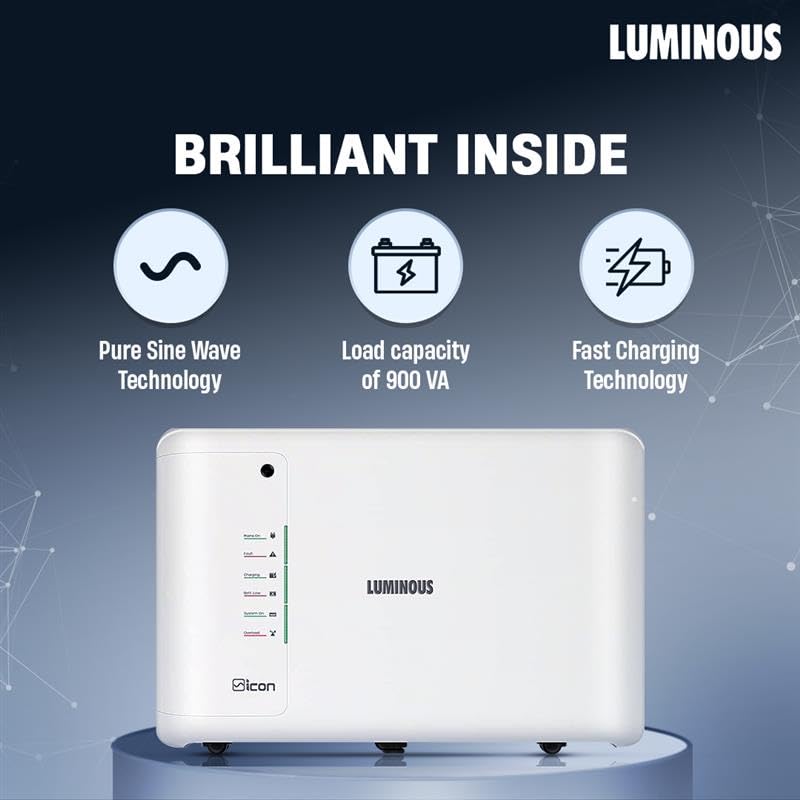
This image highlights the internal capabilities of the Luminous iCon 1100 Inverter, such as Pure Sine Wave technology, 900 VA load capacity, and fast charging.

A close-up of the Luminous RC25000 Tall Tubular Battery, detailing its features including the 6 water level indicators for easy maintenance.
This video provides a visual overview of the Luminous iCon Inverter and Battery Combo, demonstrating its features, design, and ease of use. It highlights the integrated battery design, LED indicators, and mobility features.
4. Setup
4.1 Unpacking and Placement
- Carefully unpack the inverter and battery from their packaging. Retain packaging for future transport or service.
- Choose a location that is dry, well-ventilated, and away from direct sunlight, heat sources, and flammable materials. Ensure there is sufficient space around the unit for air circulation.
- Place the unit on a firm, level surface. The integrated design allows for a compact footprint.

An illustration of the Luminous iCon Inverter's design, showcasing its on/off mode selection, new LED design, backside profile with air vents, wheels for easy movement, and integrated battery enclosure.
4.2 Battery Connection
- Open the top flap of the inverter to access the battery compartment.
- Carefully place the RC25000 Tall Tubular Battery into the enclosure.
- Connect the battery cables: Ensure the positive (+) terminal of the battery connects to the positive (+) terminal of the inverter, and the negative (-) terminal of the battery connects to the negative (-) terminal of the inverter. Tighten the terminals securely.
- Close the top flap of the inverter.
4.3 Mains Connection
- Plug the inverter's mains input cable into a properly grounded wall socket.
- Connect your appliances to the output sockets of the inverter.
5. Operating Instructions
5.1 Turning On/Off
- To Turn On: Press the power button located on the front panel. The 'System On' LED will illuminate.
- To Turn Off: Press and hold the power button until the 'System On' LED turns off.
5.2 Understanding LED Indicators
The Luminous iCon 1100 features simplified twin-color LED indicators for easy status monitoring:
- Mains On (Green): Indicates that the inverter is receiving power from the main utility supply.
- Charging (Green): Indicates that the battery is currently being charged.
- Battery Low (Red): Indicates that the battery charge is low and requires recharging.
- System On (Green): Indicates that the inverter is active and providing power to connected appliances.
- Fault (Red): Indicates an error or malfunction. Refer to the Troubleshooting section.
5.3 Load Management
To maximize backup time and prevent overloading, manage your connected appliances. The iCon 1100 has a peak load capacity of 756W. Avoid connecting high-power appliances simultaneously. For guidance on appliance types and backup times, refer to the table below:

A table providing guidance on selecting inverter and battery capacities based on home size (BHK) and types of appliances used, including backup time, inverter VA, and battery Ah.
6. Maintenance
6.1 Battery Water Level Check (RC25000 Tall Tubular Battery)
The RC25000 battery is a Tall Tubular type and requires periodic water level checks. It features 6 water level indicators for easy monitoring.
- Ensure the inverter is turned off and disconnected from the mains supply.
- Open the top flap of the inverter to access the battery.
- Observe the water level indicators on the battery. If any indicator shows a low level, carefully add distilled water until the appropriate level is reached. Do not overfill.
- Close the top flap securely.
6.2 Cleaning and Ventilation
- Regularly clean the exterior of the inverter and battery with a dry, soft cloth. Do not use liquid cleaners.
- Ensure that the air vents on the inverter are clear of dust and obstructions to maintain proper cooling.
6.3 General Checks
- Periodically check all cable connections for tightness and signs of corrosion.
- Ensure the unit is not exposed to excessive moisture or extreme temperatures.
7. Troubleshooting
If you encounter any issues, refer to the table below for common problems and their solutions. If the problem persists, contact customer support.
| Problem | Possible Cause | Solution |
|---|---|---|
| No power output from inverter | Inverter is off; Battery is discharged; Overload; Fault condition. | Turn on the inverter; Check battery charge and mains supply; Reduce connected load; Check 'Fault' LED and contact support if necessary. |
| Battery not charging | Mains supply off; Loose connections; Inverter fault. | Check mains supply; Secure all connections; Contact support if 'Charging' LED does not illuminate. |
| 'Battery Low' LED is on | Battery charge is critically low. | Connect to mains supply immediately to recharge the battery. Reduce load if possible. |
| 'Fault' LED is on | Internal error or severe overload. | Turn off the inverter, disconnect all loads, and restart. If the fault persists, contact Luminous customer support. |
8. Specifications
8.1 Luminous iCon 1100 Pure Sine Wave Inverter
- Capacity: 900VA / 12V
- Output Power: 756 Watts (Peak Load)
- Output Voltage (Inverter Mode): 220V AC
- Waveform: Pure Sine Wave
- Battery Support: Single 12V Battery
- Dimensions (LxWxH): 76.5 x 24.6 x 50.5 cm
- Weight: Approximately 54.7 kg (combined with battery)
8.2 Luminous RC25000 Tall Tubular Battery
- Capacity: 200Ah / 12V
- Type: Tall Tubular Battery
- Construction: Rugged
- Indicators: 6 Water Level Indicators
- Dimensions (LxWxH): 50.2 x 19.1 x 44.0 cm
9. Warranty and Support
Your Luminous Inverter & Battery Combo comes with a comprehensive warranty to ensure peace of mind.
- Warranty Period: 36 months warranty on both the inverter and battery. This includes 18 months flat warranty and an additional 18 months pro-rata warranty.
- Claim Process: In the event that the inverter or battery develops any technical faults, please contact Luminous customer care.
- Customer Support:
Toll-Free Number: 1800 103 3039
Email: care@luminousindia.com - Documentation: For more detailed information regarding warranty terms and conditions, please refer to the warranty card provided with your product.

