
Introduction
Thank you for choosing the Polk Signature Elite ES30 Center Channel Speaker. This manual provides essential information for the proper setup, operation, and maintenance of your speaker. Please read these instructions carefully to ensure optimal performance and longevity of your product.
The Polk Signature Elite ES30 is designed to deliver clear dialogue and dynamic sound for your home theater system, making it suitable for movies, music, and gaming. It features advanced acoustic technologies to provide an immersive audio experience.
Product Features
- Dynamically Balanced Acoustic Array: Engineered for a wide, immersive soundstage and precise imaging.
- High-Resolution Terylene Tweeter: A 1-inch tweeter delivers crystal-clear highs up to 40kHz, supporting Hi-Res Audio formats.
- Mica-Fortified Polypropylene Woofers: Two 5.25-inch woofers provide clean, clear mid-range and impactful bass.
- Patented Power Port Technology: Enhances bass response by smoothly transitioning airflow from the speaker into your listening area, reducing turbulence and distortion.
- Hi-Res Audio Certified: Ensures accurate sound reproduction from high-resolution audio sources.
- Dolby Atmos & DTS:X Compatible: Designed to integrate seamlessly with modern surround sound receivers and amplifiers.
- Timbre-Matched Components: Allows for seamless blending with other Polk Signature Elite series speakers for a cohesive surround sound system.
- Secure Five-Way Connections: Dual gold-plated binding posts ensure a reliable, high-purity connection for maximum signal transfer.

This image displays the front of the Polk Signature Elite ES30 Center Channel Speaker in its white finish, revealing the central 1-inch Terylene tweeter and the two 5.25-inch mica-fortified polypropylene woofers.
Setup
Placement
The ES30 is a center channel speaker and should be placed directly above or below your television or projection screen, centered horizontally. Ensure the speaker is positioned to direct sound towards the primary listening area. Avoid placing objects directly in front of the speaker that could obstruct sound dispersion.
- On a Shelf: Place the speaker on a stable, level surface.
- On Speaker Stands: For optimal height and isolation, consider using dedicated speaker stands.

This image shows the Polk ES30 speaker in white, with its protective grille in place, mounted on dedicated speaker stands. This configuration is suitable for optimal sound dispersion in a home theater setup.
Connections
Connect the ES30 center channel speaker to the corresponding 'Center' output on your AV receiver or amplifier using high-quality speaker wire. Ensure correct polarity: connect the red (+) terminal on the speaker to the red (+) terminal on your receiver, and the black (-) terminal on the speaker to the black (-) terminal on your receiver.
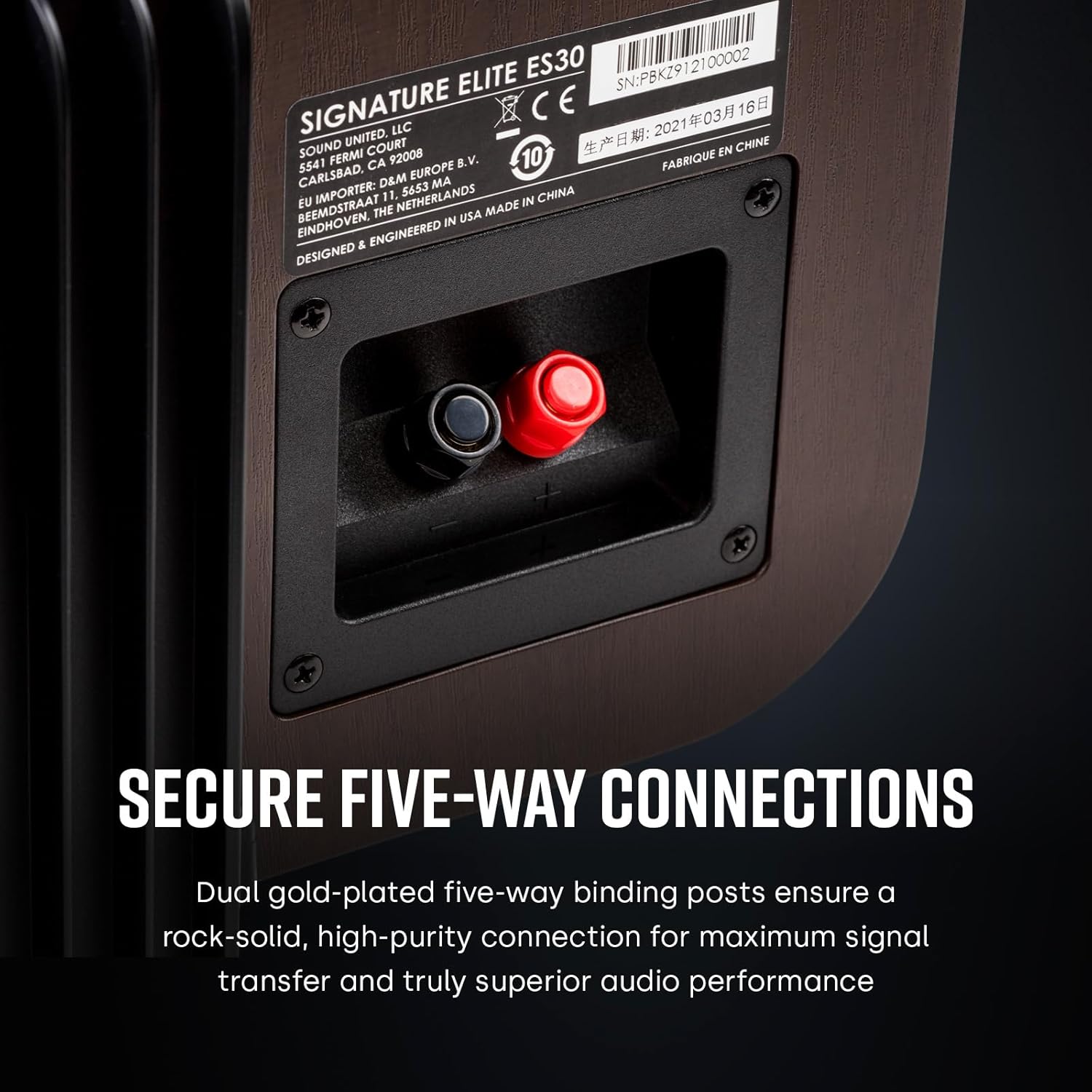
This image shows the rear panel of the Polk ES30 speaker, highlighting the dual gold-plated five-way binding posts for secure and high-purity audio connections.
Operating Instructions
Initial Power On and Configuration
- After connecting all speakers to your AV receiver, power on the receiver and your display device.
- Access your receiver's setup menu. Most modern receivers include an automatic calibration system (e.g., Audyssey, MCACC, YPAO) that uses a microphone to optimize speaker levels, distances, and equalization. It is highly recommended to run this calibration.
- If manual setup is required, configure the center channel speaker as 'Small' or 'Large' based on your preference and the presence of a subwoofer. For most setups with a subwoofer, setting the center channel to 'Small' and a crossover frequency between 80Hz-100Hz is recommended.
- Adjust the individual channel levels to ensure the center channel is balanced with your other speakers. Dialogue should be clear and distinct without being overly loud or quiet compared to other audio elements.
General Use
The ES30 center channel speaker is designed to reproduce dialogue and central sound effects in a multi-channel audio system. Ensure your AV receiver is set to an appropriate surround sound mode (e.g., Dolby Digital, DTS, Dolby Atmos, DTS:X) to utilize the center channel effectively.
Maintenance
Cleaning
- To clean the cabinet, use a soft, dry cloth. Avoid using harsh chemicals, cleaning sprays, or abrasive materials, as these can damage the finish.
- The speaker grille can be gently removed for cleaning. Use a soft brush or a vacuum cleaner with a brush attachment to remove dust.
Care
- Avoid exposing the speaker to direct sunlight, extreme temperatures, or high humidity.
- Do not place heavy objects on top of the speaker.
- Ensure adequate ventilation around the speaker to prevent overheating.
Troubleshooting
If you encounter issues with your ES30 speaker, please refer to the following common troubleshooting steps:
| Problem | Possible Cause | Solution |
|---|---|---|
| No sound from center channel | Incorrect wiring; Receiver settings; Source issue | Check speaker wire connections for correct polarity and secure fit. Verify receiver's speaker settings (center channel enabled, volume). Ensure audio source is multi-channel. |
| Distorted or unclear sound | Overdriven signal; Loose connections; Incorrect receiver settings | Reduce receiver volume. Check all speaker wire connections. Review receiver's EQ or tone control settings. Ensure speaker is not placed too close to a wall if rear-ported. |
| Dialogue is too quiet or too loud | Center channel level imbalance | Adjust the center channel level in your AV receiver's speaker setup menu. Re-run automatic calibration if available. |
If these steps do not resolve the issue, please consult your AV receiver's manual or contact Polk Audio customer support.
Specifications
| Feature | Specification |
|---|---|
| Model Name | ES30 |
| Speaker Type | Center Channel |
| Mounting Type | Tabletop Mount |
| Tweeter Diameter | 1 Inch (Terylene) |
| Woofer Diameter | 5.25 Inches (Mica-Fortified Polypropylene) x 2 |
| Impedance | 8 Ohm (4- & 8-Ohm compatible) |
| Frequency Response | Up to 40 KHz |
| Speaker Maximum Output Power | 25 Watts (RMS, typical for center channel) |
| Product Dimensions (D x W x H) | 10.6" x 20" x 7.5" |
| Item Weight | 19 Pounds |
| Color | White |
| Included Components | Speaker |
| UPC | 747192134211 |

This diagram illustrates the physical dimensions of the Polk ES30 speaker, providing measurements for width, height, and depth to assist with placement planning.
Warranty and Support
For warranty information and customer support, please refer to the documentation included with your purchase or visit the official Polk Audio website. Product registration may be required to activate your warranty.
For technical assistance or further inquiries, please contact Polk Audio customer service through their official channels.


