
AULA F2028 / K/M
Aula F2028 Mechanical Wired Gaming Keyboard User Manual
Model: F2028 / K/M
Introduction
This manual provides comprehensive instructions for the setup, operation, and maintenance of your AULA F2028 Wired Gaming Keyboard. Designed for PC and laptop compatibility, this keyboard features a multicolor RGB backlight, a durable honeycomb hollow design, and a matte surface for enhanced grip and aesthetics. Please read this manual thoroughly to ensure optimal performance and longevity of your device.

Image: Top-down view of the AULA F2028 keyboard, showcasing its full layout and keycap design.
Setup
- Unpacking: Carefully remove the keyboard from its packaging. Ensure all components are present.
- Connection: The AULA F2028 keyboard connects via a wired USB interface. Locate an available USB port on your PC or laptop.
- Plug and Play: Insert the USB connector into the USB port. The keyboard is designed for plug-and-play functionality and should be automatically recognized by your operating system.
- Driver Installation (Optional): For advanced customization, such as custom key programming and detailed RGB lighting effects, it is recommended to download and install the official AULA software from the manufacturer's website. Refer to the "Custom Programmable via Software" section in the specifications image for more details.

Image: Top and bottom views of the AULA F2028 keyboard, showing the USB cable connection point and the stable base.
Operating Instructions
Basic Keyboard Functions
The AULA F2028 is a full-sized 104-key keyboard. Standard key functions operate as expected. The keyboard features 26-key anti-ghosting for reliable input during intense gaming sessions.
RGB Backlighting
The keyboard features vibrant RGB backlighting. Specific lighting modes and brightness levels can be adjusted. Refer to the manufacturer's software for advanced customization of lighting effects.
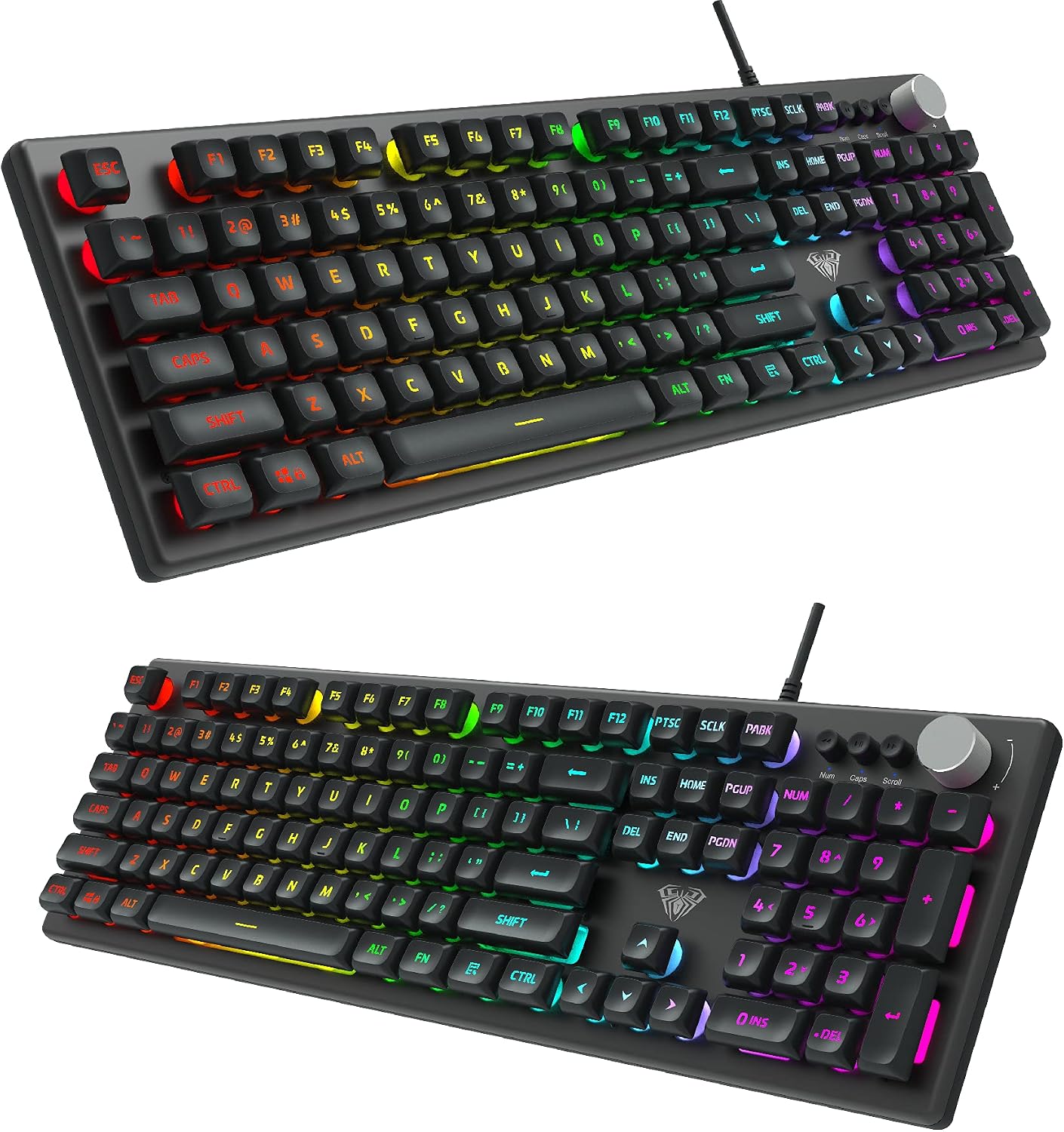
Image: Angled view of the AULA F2028 keyboard, highlighting the multi-color RGB backlighting.
Multifunction Knob
The AULA F2028 includes a multifunction knob, typically located on the upper right side of the keyboard. This knob provides quick access to various controls, often related to media playback and volume. The specific functions are:
- Short Press: Toggle between different modes (e.g., media mode, lighting mode).
- Long Press: Switch between volume control and lighting brightness adjustment.
- Rotate: Adjust volume (in volume mode) or lighting brightness (in lighting mode).
- Button below knob: Typically used for play/pause or next/previous track control.

Image: Detailed infographic of the AULA F2028 keyboard, illustrating the multifunction knob's capabilities and other design elements like ABS floating keycaps and the metal sandblasting panel.
Maintenance
- Cleaning: Use a soft, dry cloth to wipe down the keyboard surface. For dust and debris between keys, use compressed air. Avoid using liquid cleaners directly on the keyboard.
- Keycap Removal (if applicable): If keycaps need to be removed for deeper cleaning, use a keycap puller to avoid damage. Reinstall them carefully, ensuring they are properly aligned.
- Storage: When not in use for extended periods, store the keyboard in a clean, dry environment away from direct sunlight and extreme temperatures.
- Cable Care: Avoid sharp bends or kinks in the USB cable to prevent internal wire damage.
Troubleshooting
| Problem | Possible Cause | Solution |
|---|---|---|
| Keyboard not responding | Loose USB connection, faulty USB port, driver issue. |
|
| Keys not registering or ghosting | Debris under keycaps, software conflict, hardware defect. |
|
| RGB lighting not working | Lighting mode off, software issue, power issue. |
|
Specifications
| Feature | Detail |
|---|---|
| Brand | AULA |
| Model Number | F2028 / K/M |
| Connectivity | Wired USB |
| Compatibility | PC & Laptop |
| Keyboard Language | English & Arabic (Layout shown is English) |
| Key Type | Mechanical (as per product title) / Membrane (as per infographic) |
| Keycap Type | ABS Floating Keycap |
| Number of Keys | 104 |
| Anti-Ghosting | 26 Keys |
| Backlighting | RGB (Multi Color) |
| Special Features | Multifunction Knob, Honeycomb Hollow Design, Matte Surface, Thick Metal Sandblasting Panel, Custom Programmable via Software |
| Dimensions (L x W x H) | 430 x 137 x 35 mm (approx.) |
| Package Dimensions | 49.4 x 17.7 x 5.4 cm |
| Item Weight | 1.01 kg |
Warranty and Support
For warranty information and technical support, please refer to the documentation included with your purchase or visit the official AULA website. Keep your proof of purchase for any warranty claims.
Online Resources: For the latest drivers, software, and FAQs, please visit the official AULA support page. This will ensure you have access to the most up-to-date information and resources for your keyboard.
Related documentsF2028 / K/M

Ask a question about this manual
Ask about setup, troubleshooting, compatibility, parts, safety, or missing instructions. Manuals+ will review the question and use this page’s manual context to help answer it.