
1. Product Overview
The SWAREY Portable Power Station S500 is a versatile and reliable power source designed for various applications, including outdoor adventures, emergency backup, and remote work. With a substantial 518Wh capacity and a pure sine wave 500W AC outlet (1000W surge), it can power a wide range of electronic devices and small appliances. Its compact and portable design, coupled with multiple charging options, makes it an ideal companion for camping, travel, fishing, and RV use.

2. Key Features
- 518Wh Capacity and 500W AC Outlet: The S500 boasts a 518Wh (3.6V/144Ah, 21.6V/24Ah) capacity, providing ample power for extended use. Its pure sine wave 500W AC outlet (with a 1000W surge capability) ensures stable and safe power for sensitive electronics.
- Charge 8 Devices Simultaneously: Equipped with a 500W AC outlet, a 65W USB-C PD port, a USB QC 3.0 port, two USB-A ports, two DC ports, and a car cigarette lighter, this power station can charge multiple devices concurrently. This includes refrigerators, cameras, smartphones, laptops, tablets, drones, and projectors.
- Multiple Charging Methods: The solar generator can be conveniently recharged using wall sockets, car chargers, or compatible solar panels (not included). An integrated MPPT charge controller optimizes solar charging efficiency, reducing recharge time.
- Portable and Compact: Weighing only 8.8 lbs (4 kg) and with compact dimensions of 7.5 x 6.3 x 6.7 inches, the S500 is designed for easy transport. It features a sturdy hidden handle and comes with a carrying bag for enhanced portability, making it ideal for outdoor adventures.
- Safe & Secure: The clear digital screen displays real-time remaining power, output, and input power. An advanced Battery Management System (BMS) provides comprehensive protection against over-temperature, short-circuit, over-current, overload, over-charge, and short-circuit conditions, ensuring safe operation.
- Emergency LED Light: The unit includes an LED light with multiple modes (strong, strobe, SOS) for emergencies, providing illumination when needed.
- Ideal for CPAP Users: Its stable power output and quiet operation make it suitable for powering CPAP machines, ensuring worry-free sleep during power outages or off-grid situations.


3. Included Components
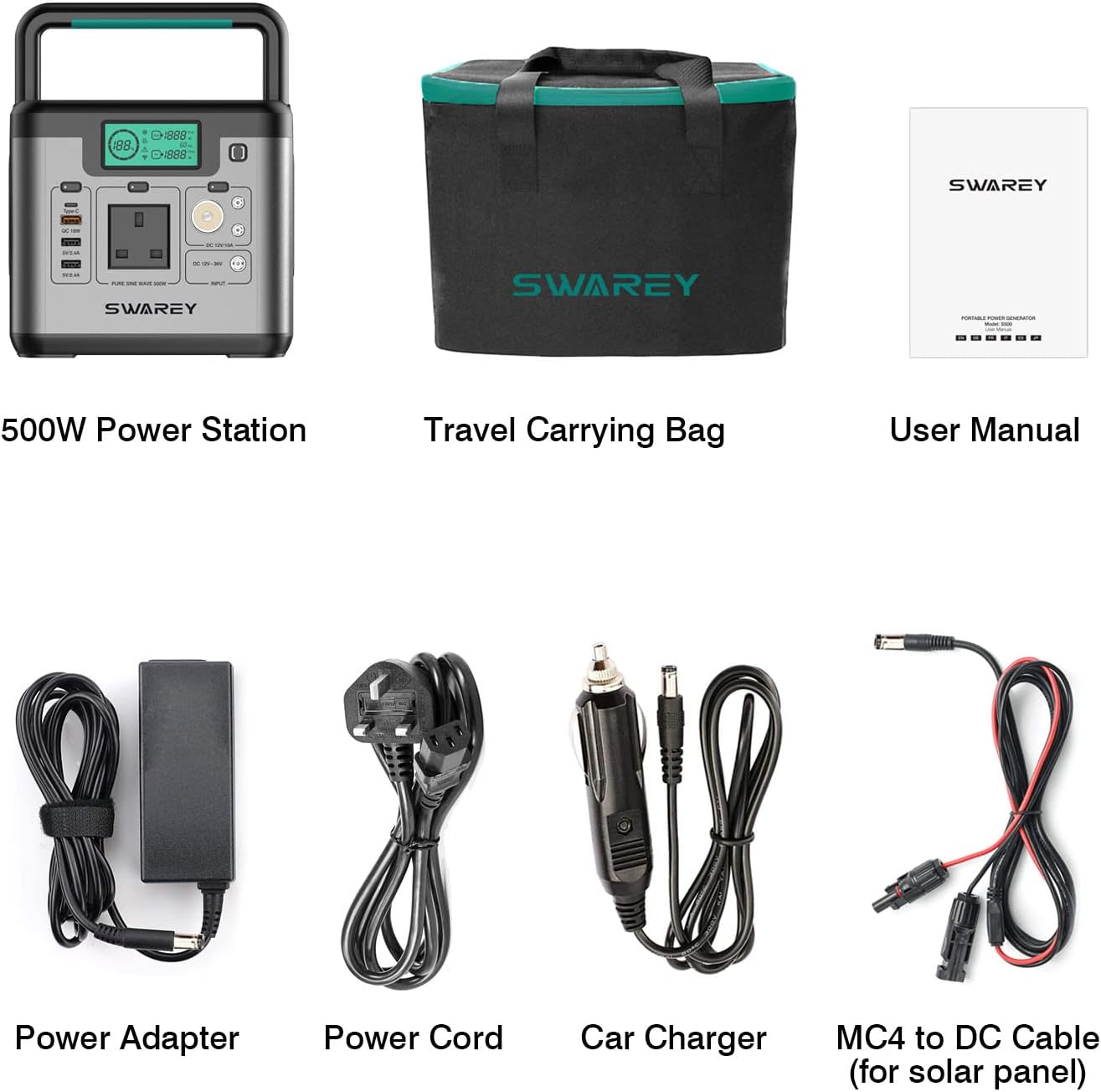
Your SWAREY Portable Power Station S500 package includes the following items:
- 1 * 518Wh Power Station
- 1 * Power Adapter
- 1 * Power Cord
- 1 * Car Charger
- 1 * DC-MC4 Cable (for solar panel connection)
- 1 * Carrying Bag
4. Setup and Initial Use
4.1 Unpacking and Inspection
Upon receiving your SWAREY Portable Power Station S500, carefully unpack all components and inspect them for any signs of damage. If any items are missing or damaged, please contact customer support immediately.
4.2 Initial Charging
Before first use, it is recommended to fully charge the power station. Connect the provided power adapter to the AC input port on the S500 and plug it into a wall outlet. The digital display will show the charging status. A full charge typically takes several hours.
5. Operating Instructions
5.1 Powering On/Off
To power on the unit, press and hold the main power button until the display illuminates. To power off, press and hold the main power button again until the display turns off.
5.2 Using Output Ports
Each group of output ports (AC, DC, USB) has its own activation button. Press the corresponding button to enable power output for that section. The display will indicate active outputs. Ensure your devices are within the power station's wattage limits.
5.3 Digital Display
The digital display provides real-time information:
- Battery Level: Shows the remaining battery percentage.
- Input Power: Displays the current power input (W) when charging.
- Output Power: Shows the current power output (W) being drawn by connected devices.
- Status Indicators: Icons for AC, DC, USB active outputs, and warning indicators.
6. Charging Methods
The SWAREY S500 offers flexible charging options to keep you powered up wherever you are.
6.1 AC Wall Charging
Use the provided power adapter and cord to charge the power station from a standard wall outlet. This is the fastest charging method.
6.2 Car Charging
The included car charger allows you to recharge the S500 from your vehicle's 12V cigarette lighter port. This is convenient for charging on the go.
6.3 Solar Charging
Connect a compatible solar panel (not included) to the DC input port using the provided DC-MC4 cable. The built-in MPPT controller will optimize solar input for efficient charging, making it ideal for off-grid situations.


Video 1: This video demonstrates the SWAREY S500 Portable Power Station being used with a 100W solar panel, showcasing its ease of setup and use for outdoor power needs.
Video 2: A brief overview video highlighting the SWAREY S500 power station's features and applications in various scenarios.
7. Maintenance
To ensure the longevity and optimal performance of your SWAREY Portable Power Station S500, follow these maintenance guidelines:
- Cleaning: Use a soft, dry cloth to wipe the exterior of the unit. Do not use abrasive cleaners or immerse the unit in water.
- Storage: Store the power station in a cool, dry place away from direct sunlight and extreme temperatures. For long-term storage, charge the unit to about 50-80% every 3-6 months to preserve battery health.
- Battery Care: Avoid fully discharging the battery frequently. Recharge the unit promptly when the battery level is low.
- Ventilation: Ensure the ventilation openings are clear and unobstructed during use to prevent overheating.
8. Troubleshooting
If you encounter issues with your SWAREY Portable Power Station S500, please refer to the following common troubleshooting tips:
- Unit Not Turning On: Ensure the battery is charged. If not, connect it to a power source and allow it to charge for a period.
- No Output from Ports: Check if the specific output button (AC, DC, USB) for the desired port is activated. Ensure the device connected is within the power station's wattage limits.
- Overload Protection: If the unit shuts down or displays an overload warning, disconnect some devices to reduce the load. Restart the unit.
- Charging Issues: Verify that the charging cable and adapter are securely connected. If using solar panels, ensure they are positioned correctly to receive adequate sunlight.
- Unusual Behavior: If the unit exhibits unusual behavior, try performing a soft reset by turning it off and then on again.
If problems persist after attempting these steps, please contact SWAREY customer support for further assistance.
9. Specifications
| Feature | Specification |
|---|---|
| Brand | SWAREY |
| Model Number | S500 |
| Capacity | 518Wh (3.6V/144Ah, 21.6V/24Ah) |
| AC Output | 500W Pure Sine Wave (Surge 1000W) |
| USB-C Port | PD 65W |
| USB QC 3.0 Port | Yes |
| USB-A Ports | 2 |
| DC Ports | 2 |
| Car Cigarette Lighter | Yes |
| Charging Methods | Wall Socket, Car Charger, Solar Panel |
| MPPT Charge Controller | Built-in |
| Weight | 4 kg (8.8 lbs) |
| Product Dimensions | 19 x 16 x 17 cm (7.5 x 6.3 x 6.7 inches) |
| Color | Black, Gray |
| Special Features | Digital Display, Portable, Overload Protection, Lightweight, Automatic Shut Down |
| Voltage | 230 Volts |
| Fuel Type | Sunny (for solar charging) |
| Recommended Uses | Camping |

10. Warranty and Support
SWAREY products are designed and manufactured to the highest quality standards. This product comes with a standard manufacturer's warranty. For detailed warranty information, product support, or any inquiries, please refer to the warranty card included in your package or visit the official SWAREY website. Our customer service team is available to assist you with any questions or concerns.


