
1. Introduction
The Sick IM08-1B5PS-ZWK is an inductive proximity sensor designed for reliable, non-contact detection of metallic objects. This M8 barrel-type sensor features a flush mounting design and a sensing range of 1.5mm. It operates with a DC 3-wire PNP NO (Normally Open) output configuration and comes with a 2-meter cable for connection.
This manual provides essential information for the proper installation, operation, maintenance, and troubleshooting of your IM08-1B5PS-ZWK sensor to ensure optimal performance and longevity.
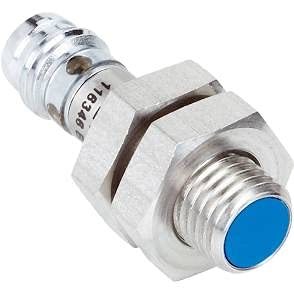
Figure 1: Sick IM08-1B5PS-ZWK Inductive Proximity Sensor. This image displays the compact M8 cylindrical body of the sensor, with a blue sensing face at one end and the cable connection point at the other. The metallic body features hexagonal sections for wrench tightening during installation.
2. Setup and Installation
2.1 Mounting
The IM08-1B5PS-ZWK is designed for flush mounting. Ensure the sensor is mounted securely in a metallic or non-metallic material such that the sensing face is flush with the surrounding surface. Avoid mounting the sensor too close to other metallic objects or sensors to prevent interference.
- Drill an appropriate hole for the M8 barrel sensor.
- Insert the sensor and secure it using the provided nuts.
- Tighten the nuts to ensure a stable and vibration-free installation.
2.2 Wiring
This sensor uses a DC 3-wire PNP Normally Open (NO) configuration. Connect the sensor to your control system according to the following color code:
- Brown wire: Connect to positive DC power supply (+VDC).
- Blue wire: Connect to negative DC power supply (0V / GND).
- Black wire: Connect to the signal input of your control device (output). This output will switch to +VDC when a metallic object is detected.
Ensure all connections are secure and insulated to prevent short circuits.
3. Operating Principles
The IM08-1B5PS-ZWK is an inductive proximity sensor that generates a high-frequency electromagnetic field at its sensing face. When a metallic object enters this field, eddy currents are induced in the object, which in turn dampens the sensor's oscillation. This change in oscillation is detected by the sensor's internal circuitry, triggering the output switch.
- Sensing Range: The nominal sensing range (Sn) for this sensor is 1.5mm. This is the maximum distance at which the sensor can reliably detect a standard target.
- Output Type: PNP Normally Open (NO). This means the output (black wire) is open (no voltage) when no metallic object is present. When a metallic object is detected within the sensing range, the output switches to a high state (approximately +VDC).
- Target Material: The sensor detects all types of metals. The sensing distance may vary depending on the type and size of the metal (e.g., ferrous metals are typically detected at a greater distance than non-ferrous metals).
4. Maintenance
The IM08-1B5PS-ZWK sensor is designed for robust and reliable operation with minimal maintenance. However, regular checks can help ensure its long-term performance.
- Cleaning: Keep the sensing face clean and free from excessive dirt, dust, or metallic chips. Use a soft, dry cloth for cleaning. Avoid abrasive cleaners or solvents that could damage the sensor housing or sensing face.
- Cable Inspection: Periodically inspect the sensor cable for any signs of damage, such as cuts, abrasions, or kinks, which could lead to intermittent operation or failure.
- Mounting Security: Verify that the sensor remains securely mounted and that the nuts have not loosened due to vibration.
- Environmental Conditions: Ensure the sensor is operating within its specified temperature and humidity ranges. Protect it from direct impact or excessive mechanical stress.
5. Troubleshooting
If you experience issues with your IM08-1B5PS-ZWK sensor, refer to the following table for common problems and their potential solutions.
| Problem | Possible Cause | Solution |
|---|---|---|
| Sensor does not detect objects. | Incorrect wiring; Object out of sensing range; Damaged sensor; Power supply issue. | Verify wiring (Brown: +V, Blue: GND, Black: Signal); Ensure object is within 1.5mm of sensing face; Check power supply voltage; Replace sensor if damaged. |
| Intermittent detection. | Loose wiring connection; Object moving too fast; Electrical noise/interference; Sensing face obstructed. | Check and secure all wire connections; Reduce object speed if possible; Shield sensor from strong electromagnetic fields; Clean sensing face. |
| Sensor always ON (output always high). | Metallic object permanently in sensing range; Short circuit in wiring; Damaged sensor. | Remove any metallic objects from the sensing area; Check for short circuits in the black wire; Replace sensor if faulty. |
| Sensor always OFF (output always low). | No power; Open circuit in wiring; Damaged sensor. | Verify power supply to brown and blue wires; Check for open circuits in all wires; Replace sensor if faulty. |
6. Specifications
| Parameter | Value |
|---|---|
| Model Number | IM08-1B5PS-ZWK |
| Sensor Type | Inductive Proximity Sensor |
| Housing Style | M8 Barrel, Flush Mount |
| Sensing Range (Sn) | 1.5 mm |
| Output Configuration | DC 3-Wire, PNP, Normally Open (NO) |
| Connection Type | Cable (2 meters) |
| Manufacturer | SICK |
| Item Weight | 6.99 pounds |
| ASIN | B09BK3X8JX |
| UPC | 710594805935 |
| Date First Available | July 30, 2021 |
7. Warranty and Support
The Sick IM08-1B5PS-ZWK Inductive Proximity Sensor is covered by the manufacturer's standard warranty. For specific warranty terms and conditions, please refer to the documentation provided with your purchase or visit the official Sick website.
For technical support, service, or further inquiries, please contact Sick customer service or your local distributor. Ensure you have your product model number (IM08-1B5PS-ZWK) and any relevant purchase information ready when contacting support.
You can typically find contact information for Sick support on their official website: www.sick.com