
1. Introduction
This manual provides detailed instructions for the proper use and maintenance of your Catiga CD-2325 Electronic Calculator. Designed for basic and advanced arithmetic, this 12-digit calculator features dual power sources and durable plastic keys, making it suitable for office, school, and general daily use.
Key features include:
- Large display for easy reading.
- Durable plastic keys for comfortable and reliable input.
- Dual power operation (solar and battery) for extended use.

Figure 1: Angled view of the Catiga CD-2325 Electronic Calculator, showing the display and key layout.
2. Getting Started (Setup)
2.1 Power Source
The Catiga CD-2325 calculator operates using a dual power system: solar power and a single AAA battery. The solar panel provides power in well-lit environments, while the AAA battery ensures operation in low-light conditions.
2.2 Battery Installation
To install or replace the AAA battery:
- Turn the calculator over to access the back panel.
- Locate the battery compartment cover.
- Slide the cover in the direction indicated by the arrow or lift the latch to open it.
- Insert one (1) AAA battery, ensuring the positive (+) and negative (-) terminals align correctly with the markings inside the compartment.
- Replace the battery compartment cover, ensuring it clicks securely into place.

Figure 2: Rear view of the calculator, highlighting the battery compartment for AAA battery installation.
3. Key Functions and Operations
Familiarize yourself with the calculator's key layout for efficient operation.

Figure 3: Front view of the Catiga CD-2325 calculator, displaying the 12-digit LCD and all function keys.
3.1 Basic Operations
- ON: Powers on the calculator.
- OFF: Powers off the calculator.
- AC (All Clear): Clears all entries and memory, resetting the calculator to its initial state.
- C (Clear Entry): Clears the last entered number or calculation error without affecting previous entries or memory.
- CE (Clear Entry): Similar to 'C', clears the current entry.
- Numeric Keys (0-9, 00, .): Used to input numbers. The '00' key allows for quick entry of two zeros. The '.' key inputs a decimal point.
- Arithmetic Operators (+, -, ×, ÷): Perform addition, subtraction, multiplication, and division.
- = (Equals): Displays the result of the calculation.
3.2 Memory Functions
The calculator includes memory functions to store and recall values.
- M+ (Memory Plus): Adds the displayed value to the current memory content.
- M- (Memory Minus): Subtracts the displayed value from the current memory content.
- MR (Memory Recall): Recalls the value stored in memory to the display.
- MC (Memory Clear): Clears the memory content.
3.3 Special Functions
- % (Percentage): Used for percentage calculations. For example, to calculate 10% of 200, enter 200 × 10 %.
- √ (Square Root): Calculates the square root of the displayed number.
- GT (Grand Total): Accumulates the results of all calculations performed since the last GT clear. Pressing GT displays the grand total.
- MU (Mark Up): Used for profit margin calculations.
- → (Backspace): Deletes the last digit entered.
- +/- (Sign Change): Changes the sign of the displayed number (positive to negative, or negative to positive).
4. Care and Maintenance
To ensure the longevity and optimal performance of your Catiga CD-2325 calculator, follow these care guidelines:
- Cleaning: Wipe the calculator with a soft, dry cloth. For stubborn dirt, slightly dampen the cloth with water or a mild, non-abrasive cleaner. Avoid using strong chemicals or solvents.
- Storage: Store the calculator in a cool, dry place away from direct sunlight and extreme temperatures.
- Avoid Impact: Do not drop the calculator or subject it to strong impacts, as this can damage internal components or the display.
- Liquid Exposure: Keep the calculator away from liquids. If it gets wet, turn it off immediately, remove the battery, and allow it to dry completely before attempting to use it again.
- Battery Replacement: Replace the AAA battery promptly when the display becomes dim or erratic, even in well-lit conditions.
5. Troubleshooting
If you encounter issues with your calculator, refer to the following common problems and solutions:
| Problem | Possible Cause | Solution |
|---|---|---|
| Display is blank or dim. | Insufficient light for solar power; low battery. | Move to a brighter area or replace the AAA battery. |
| Incorrect calculation results. | Incorrect key input; previous calculation error not cleared. | Press 'AC' to clear all entries and memory, then re-enter the calculation carefully. Use 'C' or 'CE' to clear the last entry if a mistake is made. |
| Keys are unresponsive. | Dust or debris under keys; internal malfunction. | Gently clean around the keys. If the problem persists, ensure the battery is properly installed and charged. |
6. Specifications
| Feature | Detail |
|---|---|
| Brand | CATIGA |
| Model Name | CD 2325 |
| Display Type | LCD |
| Number of Digits | 12 |
| Power Source | Dual Power (Solar and Battery) |
| Battery Type | 1 x AAA (included) |
| Material | Plastic |
| Color | Multi Colour |
| Item Weight | 150 g |
| Package Dimensions | 21 x 16 x 3.6 cm |
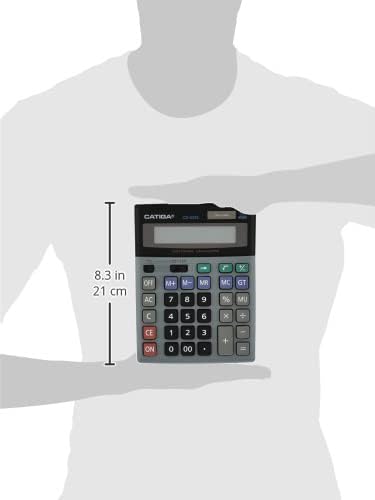
Figure 4: Size comparison of the Catiga CD-2325 calculator, illustrating its compact and portable design.
7. Warranty and Support Information
For warranty information and customer support regarding your Catiga CD-2325 Electronic Calculator, please refer to the manufacturer's official website or contact their customer service department directly. Details are typically provided with the product packaging or on the manufacturer's support pages.