1. Introduction
Welcome to the user manual for the Sick T40-E0101 Transponder Safety Switch. This document provides essential information for the safe and effective installation, operation, and maintenance of your device. Please read this manual thoroughly before proceeding with any installation or operation.
2. Safety Information
Adherence to safety guidelines is crucial for preventing injury and damage. Observe the following safety instructions:
- This device is designed for industrial safety applications.
- Installation, commissioning, and maintenance must be performed by qualified and authorized personnel only.
- Always disconnect power to the machine or system before performing any work on the device.
- Ensure all local, national, and international safety regulations and standards are observed.
- Do not bypass, modify, or tamper with the safety functions of the device.
- Regularly inspect the device for damage or malfunction. Replace faulty components immediately.
3. Product Overview
The Sick T40-E0101 is a transponder-coded safety switch from the T4000 Direct series. It is designed for reliable monitoring of movable guards, such as doors, flaps, or covers, in industrial environments. The switch features two safety outputs and supports 5-directional actuation, connecting via an M12 connector. The corresponding actuator is sold separately.
Key Features:
- Transponder-coded safety principle for high manipulation protection.
- T4000 Direct series for direct connection to safety control systems.
- Two safety outputs for redundant signal processing.
- Flexible 5-directional actuation for various mounting positions.
- Robust M12 connector for industrial applications.
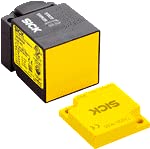
Figure 1: The Sick T40-E0101 Transponder Safety Switch (black unit) shown with its corresponding yellow actuator.
This image displays the Sick T40-E0101 Transponder Safety Switch, a compact black rectangular unit, positioned next to its yellow rectangular actuator. The switch is designed to detect the presence of this actuator to ensure machine safety.
4. Setup
4.1 Unpacking and Inspection
- Carefully remove the safety switch from its packaging.
- Inspect the device for any visible damage that may have occurred during shipping. Do not install damaged components.
4.2 Mounting
- Identify a suitable mounting location on the machine frame for the safety switch and on the movable guard for the actuator. Ensure precise alignment is possible.
- Mount the T40-E0101 safety switch securely using appropriate fasteners.
- Mount the actuator on the movable guard. Ensure that when the guard is closed, the actuator is correctly positioned within the sensing range of the switch.
- Refer to the product datasheet for specific mounting distances and alignment tolerances.
4.3 Electrical Connection
- Ensure that all power to the machine or system is disconnected and secured against accidental re-energization.
- Connect the M12 cable to the safety switch.
- Wire the safety switch according to the provided wiring diagram in the full product documentation. Pay close attention to the safety output connections.
- Verify all electrical connections are secure and correctly terminated before restoring power.
5. Operating Instructions
The T40-E0101 operates by detecting the unique code of its actuator. When the actuator is within the specified sensing range of the switch (e.g., the guard is closed), the safety outputs are enabled, allowing machine operation. When the actuator is removed from the sensing range (e.g., the guard is opened), the safety outputs are immediately disabled, initiating a safe stop condition for the machine.
5.1 Functional Test
After installation and before initial operation, and periodically thereafter, perform a functional test:
- With the machine powered on, close the guard and verify that the machine can be started and operated.
- Open the guard and verify that the machine immediately stops or cannot be started.
- Confirm that the safety outputs transition to a safe state when the guard is opened.
6. Maintenance
Regular maintenance ensures the continued safe and reliable operation of the T40-E0101 safety switch.
6.1 Regular Inspection
- Periodically inspect the safety switch and its actuator for any signs of physical damage, excessive wear, or contamination.
- Check all cable connections for tightness and integrity.
- Ensure mounting screws are secure and that the switch and actuator maintain proper alignment.
6.2 Cleaning
- Clean the surfaces of the device with a soft, damp cloth.
- Do not use abrasive cleaners, solvents, or harsh chemicals, as these can damage the housing or internal components.
6.3 Replacement
If any component of the safety switch system shows signs of damage, malfunction, or excessive wear, it must be replaced immediately with an original Sick spare part to maintain safety integrity.
7. Troubleshooting
This section provides guidance for common issues. For complex problems, contact technical support.
| Problem | Possible Cause | Solution |
|---|---|---|
| Safety outputs not enabling | Actuator not detected or misaligned | Check actuator position and alignment. Ensure it is within the specified sensing range. |
| Safety outputs not enabling | Wiring error | Verify electrical connections against the wiring diagram in the full product documentation. |
| Intermittent operation | Loose connection or electromagnetic interference | Check all cable connections for tightness. Ensure no strong electromagnetic interference sources are nearby. |
| Physical damage to switch or actuator | Impact or wear | Replace the damaged component with an original Sick spare part. |
If troubleshooting steps do not resolve the issue, please contact Sick technical support for further assistance.
8. Specifications
Detailed technical specifications for the Sick T40-E0101 Transponder Safety Switch:
| Feature | Detail |
|---|---|
| Model | T40-E0101 |
| Brand | Sick |
| Type | Transponder Safety Switch |
| Series | T4000 Direct |
| Outputs | 2 |
| Actuation Direction | 5 |
| Connector | M12 |
| Actuator | Not included (separate purchase) |
| Item Weight | 6.99 Pounds |
| Connectivity Protocol | X-10 |
| UPC | 710594805379 |
| ASIN | B09BDM4QQN |
| Manufacturer | SICK |
| Date First Available | July 28, 2021 |
9. Warranty and Support
For detailed warranty information regarding the Sick T40-E0101 Transponder Safety Switch, please refer to the official Sick website or contact your local authorized Sick distributor. Technical support and additional product documentation can be accessed through the contact details provided on the official Sick website.
For further information and support, please visit: www.sick.com


