
1. Introduction
This manual provides essential information for the proper setup, operation, and maintenance of your Polk Signature Elite ES60 Tower Speaker. Please read these instructions thoroughly before using your speaker to ensure optimal performance and longevity.
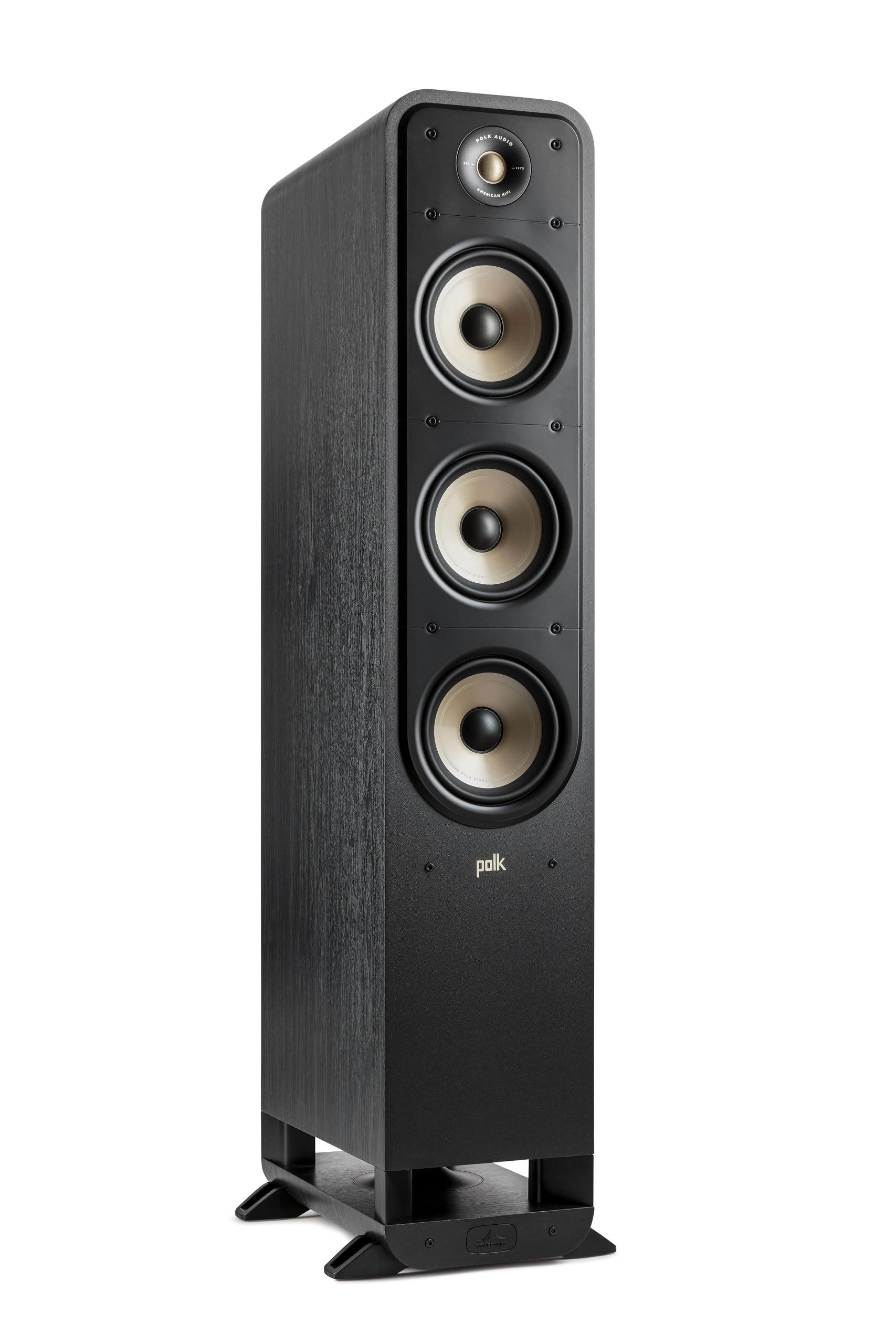
Figure 1: Polk Signature Elite ES60 Tower Speaker
2. Product Overview
The Polk Signature Elite ES60 is a high-performance floor-standing tower speaker designed to deliver immersive, high-resolution audio for movies, music, and gaming. It features a Dynamically Balanced acoustic array, a 1-inch Terylene tweeter, and three 6.5-inch Mica-Fortified Polypropylene woofers, complemented by Polk's patented Power Port Bass Enhancing Technology.
Key Features:
- Dynamically Balanced Acoustic Array: Engineered for clear, detailed sound across the entire frequency range.
- Hi-Res Audio Certified: Features a 1-inch Terylene Dome Tweeter for crystalline highs up to 40kHz.
- Mica-Fortified Polypropylene Woofers: Three 6.5-inch woofers provide clean, clear bass and superior mid-range dispersion.
- Power Port Technology: Polk's patented design for effortless bass, minimizing turbulence and distortion.
- Dolby Atmos & DTS:X Compatible: Designed to integrate seamlessly with modern home theater systems.
- Gold-Plated 5-Way Binding Posts: Ensures efficient, lossless connection to your amplifier.

Figure 2: Four-Driver Speaker Array for full-range sound.

Figure 3: Hi-Res Audio Certified Terylene Dome Tweeter.

Figure 4: Power Port for Effortless Bass.

Figure 5: Dynamic Balance Woofers for clear midrange and punchy bass.

Figure 6: Dolby Atmos and DTS:X Compatible for immersive 3D audio.

Figure 7: Gold-plated binding posts for lossless connections.
3. Setup
3.1 Unpacking
Carefully remove the speaker from its packaging. Ensure all packing materials are retained for future transport or warranty claims. The box should contain one Polk Signature Elite ES60 Tower Speaker.
3.2 Placement
For optimal sound performance, place the ES60 tower speakers equidistant from your primary listening position. Position them at least 6 inches (15 cm) from the wall to allow the Power Port to function effectively. Experiment with toe-in (angling the speakers slightly towards the listening position) to achieve the best soundstage and imaging in your room.
3.3 Connections
Connect the ES60 speakers to your amplifier or receiver using high-quality speaker wire. Ensure correct polarity: connect the positive (+) terminal on the speaker (red) to the positive (+) terminal on your amplifier, and the negative (-) terminal on the speaker (black) to the negative (-) terminal on your amplifier. The ES60 features dual gold-plated 5-way binding posts for secure connections.
Video 1: This video from Polk Audio explains the Power Port Technology, which is crucial for understanding the bass performance of the ES60 speakers.
Video 2: This official Polk Audio video provides an overview of the Signature Elite ES60 Tower Speaker, showcasing its design and features.
Video 3: This official Polk Audio video highlights the Signature Elite Tower Series, demonstrating the aesthetic and sound quality.
4. Operating Instructions
Once connected to your amplifier or receiver, operate the ES60 speakers by playing audio through your connected source devices. Adjust the volume and tone controls on your amplifier to suit your listening preferences. The ES60 speakers are designed to deliver a wide and accurate soundstage, providing an immersive audio experience.
5. Maintenance
- Cleaning: Use a soft, dry cloth to clean the speaker cabinets. Avoid using harsh chemicals or abrasive cleaners.
- Grilles: The magnetic grilles can be removed for cleaning or for a different aesthetic. Handle them carefully to avoid damage.
- Dust: Regularly dust the drivers and tweeters with a soft brush or compressed air to prevent accumulation.
- Placement: Avoid placing speakers in direct sunlight or near heat sources, as this can affect the cabinet finish and driver performance.
6. Troubleshooting
No Sound:
- Check all speaker wire connections at both the speaker and the amplifier for secure contact and correct polarity.
- Ensure your amplifier is powered on and the correct input source is selected.
- Verify that the volume on your amplifier is not set to minimum or muted.
Distorted Sound:
- Reduce the volume on your amplifier. Overdriving the speakers can cause distortion.
- Check speaker wire connections for any frayed strands that might be touching each other or the opposite terminal.
- Ensure your amplifier has sufficient power for the ES60 speakers (up to 300 Watts recommended).
Uneven Sound or Poor Imaging:
- Verify speaker placement and ensure they are equidistant from the listening position and properly angled.
- Check for any obstructions between the speakers and the listening area.
7. Specifications
| Feature | Specification |
|---|---|
| Brand | Polk Audio |
| Model | ES60BLK |
| Speaker Type | Tower Speaker |
| Maximum Recommended Amplifier Power | 300 Watts |
| Tweeter | 1" Terylene Dome |
| Woofers | (3) 6.5" Mica-Fortified Polypropylene |
| Mounting Type | Floor Standing |
| Enclosure Material | Plastic |
| Impedance | 8 Ohms |
| Dimensions (D x W x H) | 15.7" x 8.5" x 44.5" |
| Weight | 52 Pounds |
| Compatible Systems | Home Theater, Dolby Atmos, DTS:X |
8. Warranty and Support
The Polk Signature Elite ES60 Tower Speaker comes with a 5-year limited warranty. For detailed warranty information, please refer to the warranty card included with your product or visit the official Polk Audio website.
For additional support, troubleshooting tips, or to register your product, please visit the Polk Audio Store or contact their customer service.


