
1. Product Overview
The DBPOWER Portable DVD Player is designed for versatile media playback on the go. Featuring a 10.5-inch LCD screen, it supports various disc and digital media formats, offers multiple power options, and includes a car mount for in-vehicle entertainment.

Image 1.1: The DBPOWER Portable DVD Player, showing the main unit, remote control, and car headrest mount.
2. Setup
2.1 Powering the Device
The player can be powered by three methods:
- Built-in Battery: The 2500mAh rechargeable battery provides up to 5 hours of continuous playback.
- AC Adapter: Use the included AC adapter (110-220V) for home use.
- Car Charger: Use the included 12V car charger for in-vehicle use.

Image 2.1: Power options for the portable DVD player, including the internal battery, AC adapter, and car charger.
2.2 Connecting External Devices
The player features various ports for connectivity:
- USB Port: For playing media from USB memory sticks.
- SD/MS/MMC Card Slot: For playing media from memory cards.
- AV Input/Output: Connect to a TV or projector for a larger display, or connect external video sources.
- Headphone Jack: For private listening.

Image 2.2: Detailed view of the player's connectivity ports.
2.3 Car Installation
The included car headrest mount allows for easy installation in a vehicle, providing entertainment for rear-seat passengers.

Image 2.3: The portable DVD player installed on a car headrest.
3. Operating Instructions
3.1 Basic Controls
The player features intuitive buttons on the unit and a remote control for easy operation. Functions such as volume adjustment, play/pause, stop, and menu navigation are clearly labeled.

Image 3.1: The player's control panel and remote for easy operation.
3.2 Screen Adjustment
The LCD screen can rotate up to 270 degrees and fold flat, allowing for various viewing angles and compact storage. It can also be flipped 180 degrees to function as a monitor.
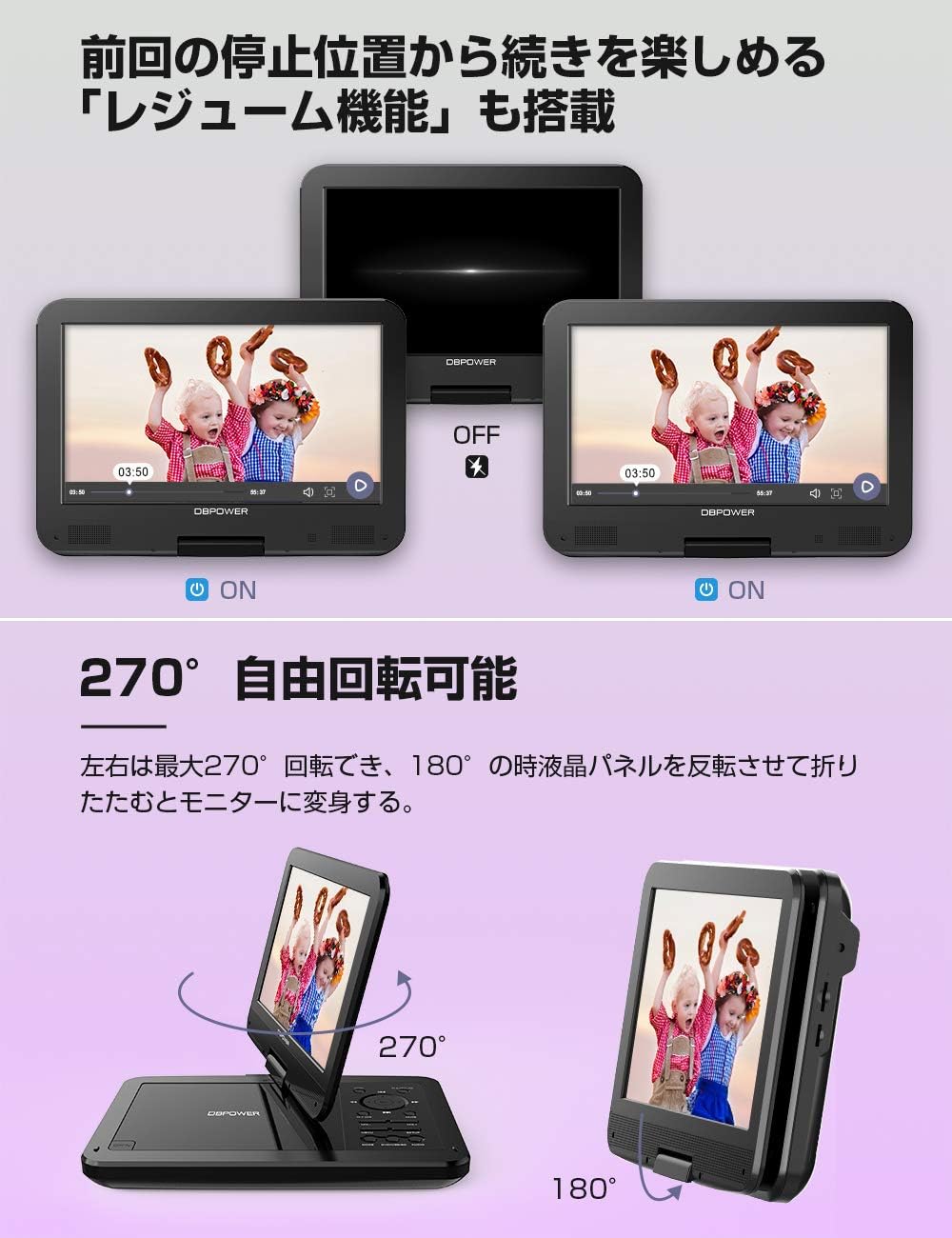
Image 3.2: Screen rotation and folding capabilities.
3.3 Media Playback
The player supports a wide range of media formats:
- Discs: CD-R/CD-RW, VCD, SVCD, CVD, DVD-R/DVD+R, DVD-RW/DVD+RW. It is region-free and supports CPRM for recorded DVDs. (Note: HD and Blu-ray discs are not supported).
- Audio: MP3, WMA, OGG (bitrate: 32-192kbps).
- Video: AVI, MPG, VOB, FLV (resolution up to 720*576. H.264/H.265 compressed video formats are not supported).
- Images: JPG.
- E-books: TXT.
The player also features a Resume Function, allowing you to continue playback from where you last stopped, even after powering off.

Image 3.3: Supported media formats and disc tray.
3.4 Audio Output
The player is equipped with high-quality dual speakers for clear sound. For enhanced audio experience, external speakers can be connected via the headphone jack or AV output.

Image 3.4: Dual speakers for audio playback.
4. Maintenance
4.1 Cleaning
To clean the player, use a soft, dry cloth. For the screen, a slightly damp, lint-free cloth can be used. Avoid abrasive cleaners or solvents.
4.2 Disc Handling
Always handle discs by their edges. Store discs in their cases to prevent scratches and dust accumulation. Do not expose discs to direct sunlight or extreme temperatures.
4.3 Battery Care
To prolong battery life, fully charge the device before first use. If storing the player for an extended period, charge it to about 50% and recharge every few months.
5. Troubleshooting
5.1 No Power / Not Charging
- Ensure the AC adapter or car charger is securely connected to both the player and the power source.
- Verify the power outlet or car cigarette lighter is functional.
- If the charging indicator light does not illuminate, try a different power source or contact support.
5.2 Remote Control Unresponsive
- Check and replace the batteries in the remote control.
- Ensure there are no obstructions between the remote and the player's IR receiver.
- Point the remote directly at the player's IR receiver.
5.3 Poor Sound Quality
- Adjust the volume on the player and ensure it is not muted.
- If using external speakers or headphones, ensure they are properly connected and functional.
- For improved audio, consider connecting external speakers to the player's headphone jack or AV output.
5.4 Image Quality Not as Expected
- The screen resolution is 1024x600 pixels. Image quality may vary depending on the source material.
- Ensure the disc or digital media file is clean and undamaged.
- Adjust brightness, contrast, and color settings via the player's menu.

Image 5.1: The player features a 1024x600 HD LCD screen.
6. Specifications
| Feature | Specification |
|---|---|
| Brand | DBPOWER |
| Model Number | CHY-10/NS-101B |
| Screen Size | 10.5 inches LCD |
| Display Type | LCD |
| Screen Resolution | 1024 x 600 pixels |
| Screen Rotation | 270° swivel, 180° flip |
| Battery Capacity | 2500mAh |
| Playback Time | Up to 5 hours |
| Power Sources | AC (110-240V), DC Car (12V), Built-in Battery |
| Weight | 910 g |
| Product Dimensions | 26 x 18.2 x 4 cm |
| Connectivity | USB, SD/MS/MMC Card Slot, AV Input, AV Output, Headphone Jack |
| Supported Disc Formats | CD-R/CD-RW, VCD, SVCD, CVD, DVD-R/DVD+R, DVD-RW/DVD+RW, CPRM (Region-Free) |
| Supported Audio Formats | MP3, WMA, OGG |
| Supported Video Formats | AVI, MPG, VOB, FLV (Max 720*576, H.264/H.265 not supported) |
| Supported Image Formats | JPG |
| Supported E-book Formats | TXT |
7. Warranty and Support
DBPOWER offers comprehensive support for its products:
- Warranty: 12-month quality warranty.
- Returns: 30-day return period.
- Customer Service: 24-hour rapid response service and dedicated customer support.
For further assistance, you may contact customer support via the following channels:
- LINE: https://lin.ee/QdlW3a0

Image 7.1: DBPOWER customer support details and contact information.


