
Cecotec Conga 9090 Ai
Cecotec Conga 9090 IA Robot Vacuum Cleaner
User Manual
Introduction
Thank you for choosing the Cecotec Conga 9090 IA Robot Vacuum Cleaner. This advanced 4-in-1 robot is designed to vacuum, sweep, mop, and scrub simultaneously, providing comprehensive floor cleaning. Equipped with Artificial Intelligence and laser technology, it offers maximum cleaning precision by recognizing household objects and adapting its cleaning path. This manual provides essential information for the safe and efficient operation and maintenance of your robot vacuum cleaner.
Safety Instructions
Please read these safety instructions carefully before using the appliance and keep them for future reference. Failure to follow these instructions may result in electric shock, fire, or serious injury.
- Ensure the power voltage matches the voltage specified on the appliance's rating label.
- Do not immerse the appliance, power cord, or plug in water or any other liquid.
- Keep the appliance away from heat sources, direct sunlight, humidity, and sharp edges.
- Do not use the appliance on wet surfaces or in areas with standing water.
- Supervise children to ensure they do not play with the appliance.
- Before cleaning or maintenance, always unplug the appliance from the power outlet.
- Do not operate the appliance if the power cord or plug is damaged.
- Remove any loose cables, small objects, or fragile items from the cleaning area before operation to prevent entanglement or damage.
Package Contents
Verify that all components are present and in good condition upon unpacking.
- Cecotec Conga 9090 IA Robot Vacuum Cleaner
- Special Silicone Brush for pets
- Jalisco Brush
- Vibration Wash Basin (Water Tank)
- Solid Tank (Dust Bin)
- Remote Control
- 2 Mops
- 2 Side Brushes
- 1 High-Efficiency Filter
- Self-Cleaning Brush
- Charging Station
- Power Adapter

Image: The Conga 9090 IA robot vacuum cleaner along with its comprehensive set of accessories, including various brushes, remote control, and a mobile phone showing the companion app.
Product Overview
The Conga 9090 IA features advanced components for intelligent and efficient cleaning.
- AI and Laser Technology: The robot uses a front camera and a three-dimensional sensor to recognize common household objects and adapt its cleaning path accordingly. It also identifies floors and rooms, automatically mapping them.
- Jalisco Brush: A specialized brush designed for effective cleaning on various floor types.
- Twerking Scrub Tank: Provides three intelligent scrubbing levels for thorough mopping.
- Room Assist: Intelligent room management for customized cleaning.

Image: The robot vacuum intelligently detects and navigates around obstacles like shoes, thanks to its advanced AI and laser technology.

Image: The robot vacuum positioned on a floor, ready to clean various small debris, demonstrating its powerful suction.

Image: The robot vacuum near its charging base, illustrating its object detection capabilities for items such as socks and power cables.
Setup
- Charging Station Placement: Place the charging station against a wall in an open area, ensuring there are no obstacles within 1 meter to the sides and 2 meters in front. Connect the power adapter to the charging station and a power outlet.
- Initial Charge: Place the robot on the charging station. Ensure the charging contacts on the robot align with those on the station. The robot will begin charging automatically. For first use, fully charge the robot (approximately 3-4 hours).
- Install Side Brushes: Snap the left (L) and right (R) side brushes into their corresponding slots on the bottom of the robot until they click into place.
- Install Main Brush: If not already installed, insert the Jalisco brush into its compartment on the underside of the robot.
- Download the Conga App: Search for "Conga" in your smartphone's app store (iOS or Android) and download the official application.
- Connect to Wi-Fi: Follow the in-app instructions to connect your robot to your home Wi-Fi network. This will enable smart features, mapping, and remote control.
Operating Instructions
Your Conga 9090 IA offers various cleaning modes and smart functionalities.
Cleaning Modes
- Auto Mode: The robot automatically plans the optimal cleaning path for your entire home.
- Edge Mode: Cleans along walls and furniture edges.
- Spot Mode: Concentrates cleaning on a specific dirty area.
- Scrubbing Mode: Utilizes the vibration wash basin for deep mopping. You can select from three intelligent scrubbing levels via the app.
- Restricted Areas: Use the app to define no-go zones or virtual walls to prevent the robot from entering specific areas.

Image: The robot vacuum demonstrating its ability to respect virtual boundaries, preventing it from entering designated areas like a play zone.
Smart Features
- App Control: Use the Conga app to start/stop cleaning, select modes, schedule cleaning, view maps, and manage rooms.
- Voice Control: The robot is compatible with Amazon Echo and Google Home. You can control it using voice commands.

Image: The robot vacuum can be controlled via voice commands through smart home devices like Amazon Echo.
Maintenance
Regular maintenance ensures optimal performance and extends the lifespan of your robot vacuum cleaner.
Cleaning Schedule
- After Each Use: Empty the dust bin and clean the main brush.
- Weekly: Clean the side brushes, filters, and sensors.
- Monthly: Clean the charging contacts and wheels. Replace filters and brushes as needed.
Detailed Cleaning Instructions
- Dust Bin and Filters: Open the robot's cover, remove the dust bin, and empty its contents. Tap the filter gently to remove dust. Do not wash the HEPA filter with water.
- Water Tank and Mop: Remove the water tank and empty any remaining water. Detach and wash the mop pad with water. Allow it to air dry completely before reattaching.
- Main Brush (Jalisco Brush): Remove the main brush cover and lift out the brush. Use the provided cleaning tool to remove hair and debris.
- Side Brushes: Pull the side brushes upwards to remove them. Clean any tangled hair or debris. If damaged, replace them.
- Sensors and Charging Contacts: Use a clean, dry cloth to wipe the anti-drop sensors (on the bottom) and the charging contacts (on the robot and charging station).
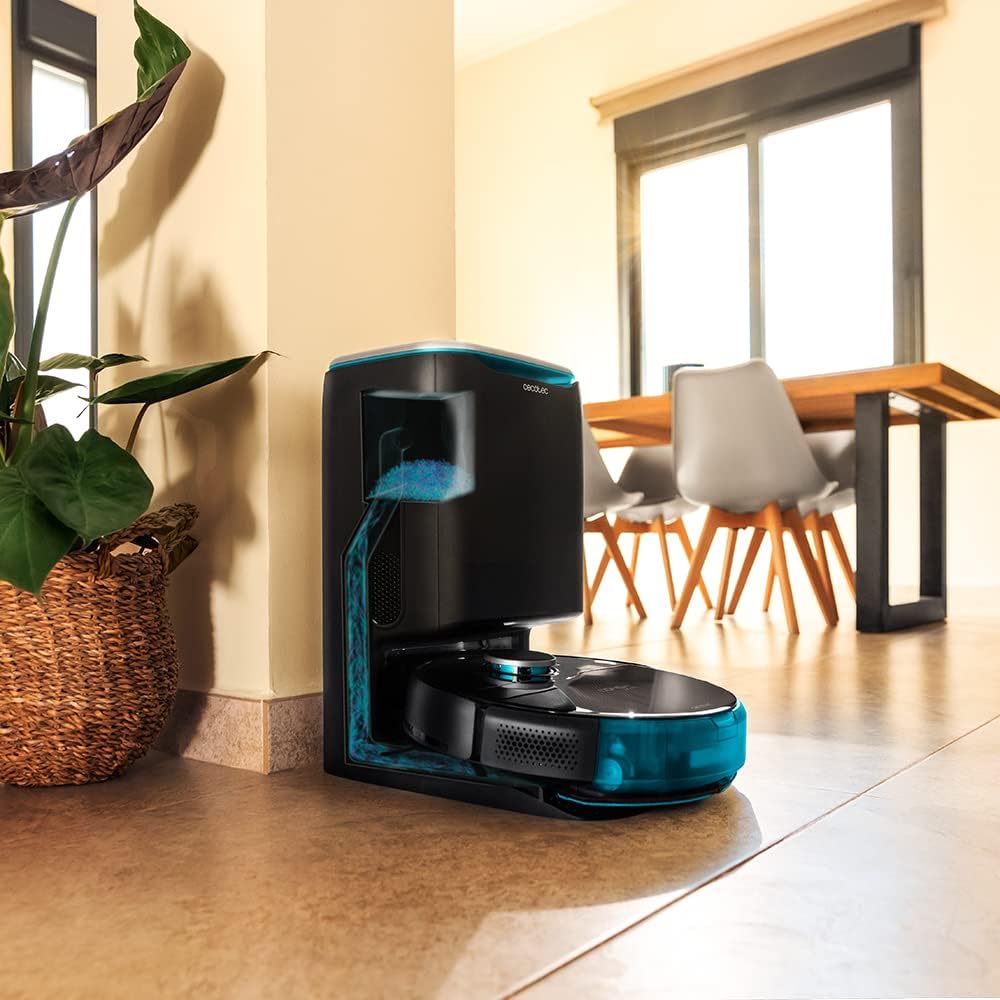
Image: The robot vacuum is compatible with the CongaHome 10.000 self-emptying station for convenient dust disposal.
Troubleshooting
If you encounter issues with your robot vacuum cleaner, refer to the table below for common problems and solutions.
| Problem | Possible Cause | Solution |
|---|---|---|
| Robot does not turn on or charge. | Low battery; charging contacts dirty; power adapter not connected. | Place robot on charging station; clean charging contacts; ensure power adapter is securely connected. |
| Poor cleaning performance. | Dust bin full; brushes tangled; filter clogged. | Empty dust bin; clean main and side brushes; clean or replace filter. |
| Robot gets stuck frequently. | Too many obstacles; sensors dirty. | Clear the cleaning area of loose cables and small objects; clean all sensors. |
| App connectivity issues. | Incorrect Wi-Fi password; weak Wi-Fi signal; robot not in pairing mode. | Verify Wi-Fi password; ensure robot is within Wi-Fi range; reset robot and re-attempt pairing as per app instructions. |
| Robot makes unusual noise. | Brush or wheel obstructed; foreign object inside. | Check and clean main brush, side brushes, and wheels for obstructions. |
Specifications
| Feature | Detail |
|---|---|
| Brand | Cecotec |
| Model Name | Conga 9090 AI |
| Model Number | 05416 |
| Color | Black |
| Product Dimensions | 17.5 x 40 x 54.2 cm |
| Item Weight | 4.1 Kilograms |
| Capacity (Dust Bin) | 2.5 Liters |
| Noise Level | 64 dB |
| Automatic Shutdown | No |
| Compatible Devices | Amazon Echo, Google Home |
| Special Feature | Programmable |
Warranty and Support
For warranty information, technical support, or service requests, please refer to the warranty card included with your product or visit the official Cecotec website. Keep your purchase receipt as proof of purchase for warranty claims.
You can also visit the Cecotec Store on Amazon for more product information and support resources.
Related documentsConga 9090 Ai


Ask a question about this manual
Ask about setup, troubleshooting, compatibility, parts, safety, or missing instructions. Manuals+ will review the question and use this page’s manual context to help answer it.