
1. Introduction
This manual provides essential information for the safe and efficient use of your Bush Business Furniture Move 60 Series 48-inch Electric Height Adjustable Standing Desk. Please read these instructions thoroughly before assembly and operation to ensure proper functionality and longevity of your product.
2. Safety Information
- Ensure all components are securely fastened before use.
- Do not exceed the maximum weight capacity of 200 pounds (90.7 kg) on the desktop.
- Keep hands and objects clear of moving parts during height adjustments.
- Only use the desk on a level surface.
- Plug the 10-foot power cord into a standard electrical outlet.
- This product is designed for indoor use only.
- Proposition 65 Warning: This product can expose you to chemicals including formaldehyde, which is known to the State of California to cause cancer. For more information go to www.P65Warnings.ca.gov.
3. Package Contents
Verify that all components are present before beginning assembly. The package includes:
- 48W x 24D Electric Height Adjustable Standing Desk components
- Assembly hardware (Note: All assembly tools are not included.)
- Instruction manual
4. Setup and Assembly
Assembly of the Move 60 Series desk is designed to be straightforward. It is recommended that two people assist with assembly for ease and safety.
Assembly Overview
The desk features a durable thermally fused laminate desktop and a welded 16-gauge steel base for stability. Pre-drilled screw holes facilitate the assembly process.
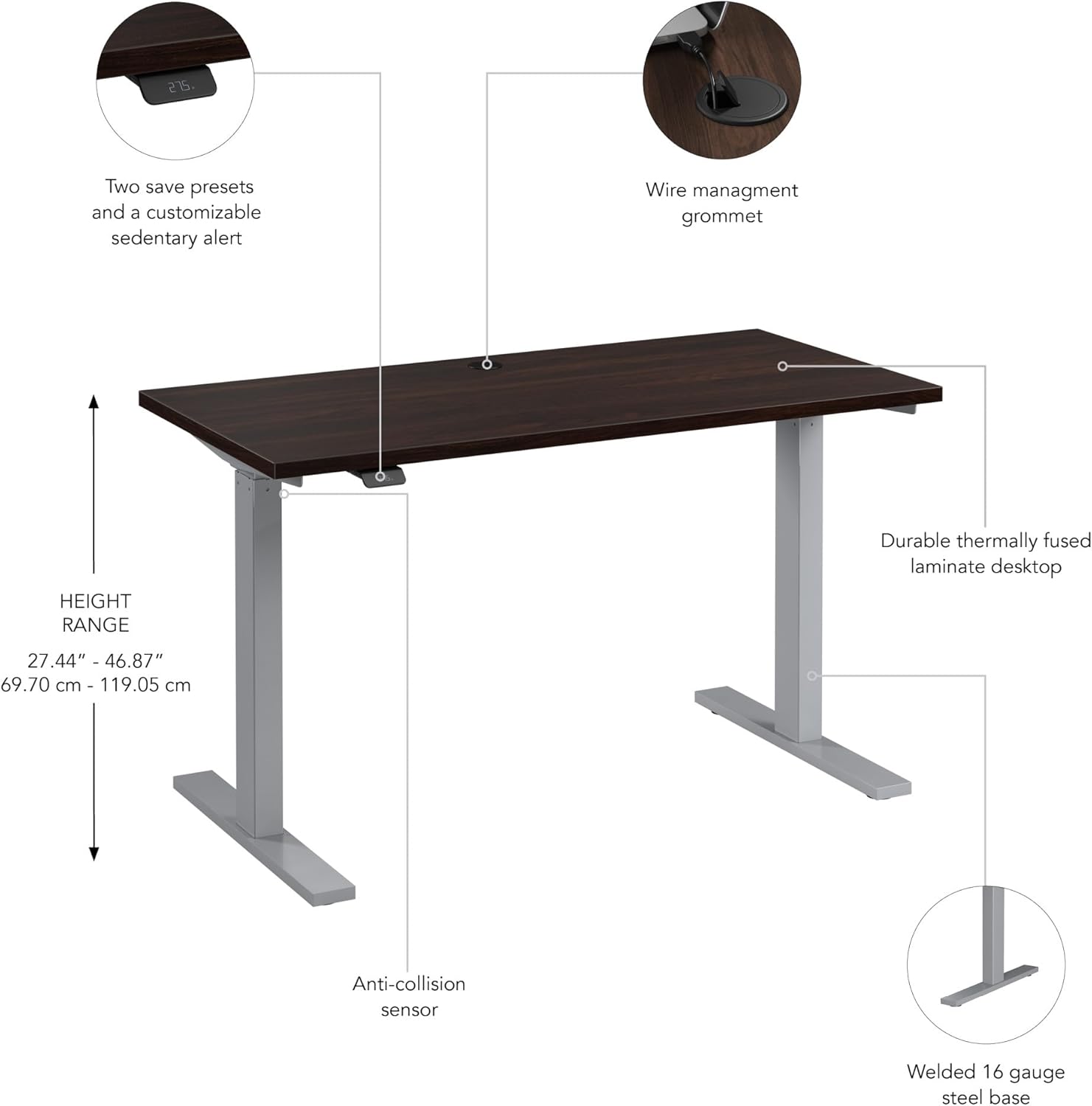
Figure 1: Key features of the Move 60 Series desk, including the height range from 27 to 46.7 inches, the 16-gauge steel base, the up/down control with four programmable presets, and the wire management grommet.
Cable Management
The desktop includes a wire management grommet to help organize cables and maintain a tidy workspace.

Figure 2: Detail of the wire management grommet for organized cable routing.
5. Operating Instructions
The Move 60 Series desk allows for quick and easy transitions between sitting and standing positions.
Height Adjustment
The desk can be adjusted electrically from a minimum height of 27 inches (68.58 cm) to a maximum height of 46.7 inches (118.62 cm).

Figure 3: The simplified control panel for height adjustment.
To adjust the height, simply lift up or press down on the display button on the control panel. The desk will move smoothly to the desired height.
Preset Heights and Alerts
The control panel features customizable presets to save your preferred seated and standing heights. You can also set a custom alert to remind you to change positions throughout your workday.
Anti-Collision Sensor
For safety, the desk is equipped with an anti-collision sensor. If an object is detected during height adjustment, the desk's movement will stop automatically to prevent damage or injury.
Product Overview Video
For a visual demonstration of the Move 60 Series desk's features and operation, please watch the official product video below.
Video 1: An overview of the Bush Business Furniture Move 60 Collection, demonstrating the electric height adjustment and various desk configurations.
6. Maintenance
To maintain the appearance and functionality of your desk, follow these simple care instructions:
- Cleaning: Wipe the desktop and base with a damp cloth. Avoid harsh chemicals or abrasive cleaners that could damage the thermally fused laminate surface.
- Surface Protection: The laminate surface is scratch-resistant, but using coasters or desk pads can further protect it from spills and heavy objects.
7. Troubleshooting
If you encounter any issues with your Move 60 Series desk, refer to the following common solutions:
Desk Not Adjusting Height
- Check that the power cord is securely plugged into both the desk and a working electrical outlet.
- Ensure no objects are obstructing the desk's movement, triggering the anti-collision sensor.
Electronic Device Interference
Some sensitive electronic devices, such as graphics tablets, may experience electromagnetic interference (EMI) when placed directly above the control unit during desk movement. This can manifest as erratic cursor behavior or unexpected actions.
- Solution: To mitigate EMI, place a layer of aluminum foil between the sensitive device and the desk surface, directly above the control unit. Alternatively, reposition the device away from the control unit during height adjustments.
8. Specifications
Detailed specifications for the Bush Business Furniture Move 60 Series 48-inch Electric Height Adjustable Standing Desk:
| Feature | Detail |
|---|---|
| Brand | Bush Furniture |
| Model Number | M6S4824BWSK |
| Desk Design | Standing Desk |
| Product Dimensions (D x W x H) | 23.62"D x 47.6"W x 47.69"H (60.00 cm D x 120.90 cm W x 121.13 cm H) |
| Minimum Height | 27 inches (68.58 cm) |
| Maximum Height | 46.7 inches (118.62 cm) |
| Item Weight | 84 Pounds (38.1 kg) |
| Maximum Weight Recommendation | 200 Pounds (90.7 kg) |
| Top Material Type | Engineered Wood (Thermally Fused Laminate) |
| Base Material | Alloy Steel (16-gauge) |
| Lifting Mechanism | Electric |
| Color | Black Walnut (Top), Silver Base |
| Required Assembly | Yes (Recommended 2 people) |
| Certifications | Meets or exceeds ANSI/BIFMA quality standards |

Figure 4: Dimensional drawing of the Move 60 Series desk.
9. Warranty and Support
Manufacturer's Warranty
This Bush Business Furniture Move 60 Series desk is backed by a 5 Year Manufacturer's Warranty. This warranty covers defects in materials and workmanship under normal use.
Customer Support
For warranty claims, replacement parts, or technical assistance, please contact Bush Furniture customer service. Refer to the contact information provided with your product packaging or visit the official Bush Furniture website for support details.