
Introduction
Thank you for choosing the BYTECH Car Vent Magnetic Mount. This product is designed to securely hold your portable electronic devices, such as smartphones, GPS units, and MP3 players, within easy reach while driving. Its strong magnetic hold and vent mounting type provide a convenient and stable solution for hands-free use.
Package Contents
- 1 x BYTECH Car Vent Magnetic Mount
- (Additional accessories may be included, refer to product packaging)
Setup and Installation
Follow these steps to properly install your BYTECH Car Vent Magnetic Mount:
- Choose a Vent Location: Select a suitable air vent in your vehicle that provides a clear view of your device without obstructing your driving view or vehicle controls.
- Attach the Mount to the Vent: Gently push the vent clip of the magnetic mount onto one of the slats of your chosen air vent. Ensure the clip is securely fastened and the mount feels stable. The mount is designed for a secure lock onto the vent.
- Prepare Your Device: For magnetic attachment, ensure your device or its case has a metal plate or is compatible with magnetic mounts. If not, attach the provided metal plate (if included) to the back of your device or inside its case.
- Attach Your Device: Once the mount is securely attached to the vent, simply bring your device close to the magnetic surface of the mount. The strong magnetic hold will secure your device in place.
- Adjust Viewing Angle: The mount features a 360-degree rotation capability. Adjust your device to the desired viewing angle for optimal visibility.
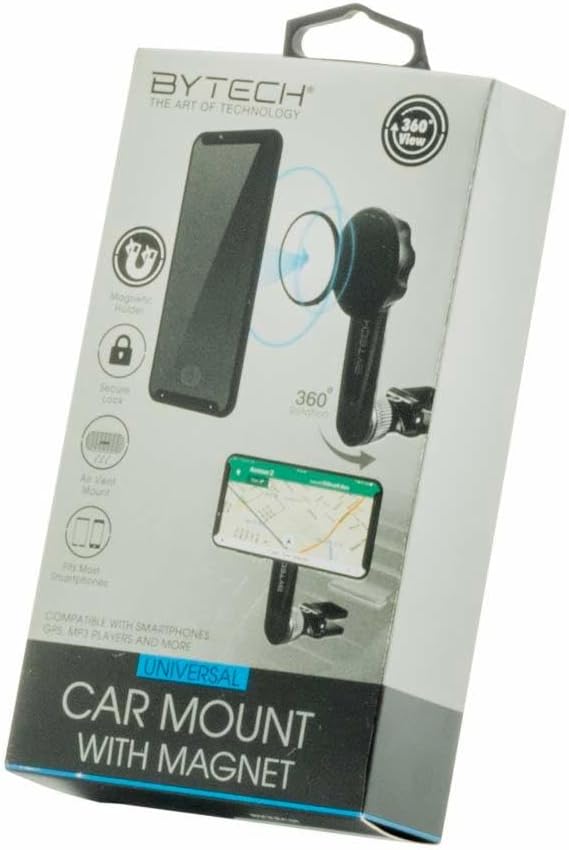
Image of the product packaging for the BYTECH Car Vent Magnetic Mount, highlighting features such as magnetic holder, secure lock, air vent mount, 360-degree rotation, and compatibility with smartphones, GPS, and MP3 players.
Operating Instructions
Using your BYTECH Car Vent Magnetic Mount is straightforward:
- Attaching Device: Simply place your device (with the metal plate attached) onto the magnetic surface of the mount. The strong magnet will hold it securely.
- Removing Device: Gently pull your device away from the magnetic surface to detach it.
- Adjusting Position: Rotate your device 360 degrees to switch between portrait and landscape orientations, or tilt it to achieve your preferred viewing angle.
Maintenance
To ensure the longevity and optimal performance of your magnetic mount:
- Cleaning: Wipe the mount with a soft, dry cloth to remove dust and debris. Do not use harsh chemicals or abrasive cleaners.
- Storage: When not in use for extended periods, store the mount in a cool, dry place away from direct sunlight.
- Avoid Over-tightening: Do not force the mount onto the vent or over-tighten any adjustable parts, as this may cause damage.
Troubleshooting
If you encounter any issues with your BYTECH Car Vent Magnetic Mount, refer to the following common solutions:
- Device Not Holding Securely:
- Ensure the metal plate is properly attached to your device or case and is positioned correctly for magnetic contact.
- Verify that the magnetic surface of the mount is clean and free of obstructions.
- Check if your device is excessively heavy for a vent mount.
- Mount Not Stable on Vent:
- Ensure the vent clip is fully inserted and securely fastened to a vent slat.
- Try a different vent slat or a different vent in your vehicle.
- Avoid placing the mount on loose or damaged vent slats.
Specifications
| Brand | Bytech |
| Model Number | BYO212BK |
| Mounting Type | Vent |
| Special Feature | Strong Magnetic Hold |
| Material | Plastic, Metal |
| Color | one colocr |
| Item Weight | 1 pounds |
| Package Dimensions | 6 x 6 x 5 inches |
Warranty Information
For detailed warranty information, please refer to the warranty card included with your product or visit the official Bytech website. Keep your proof of purchase for warranty claims.
Customer Support
If you have any questions or require further assistance, please contact Bytech customer support. Contact details can typically be found on the product packaging or the official Bytech website.