
1. Introduction
This manual provides essential information for the installation, operation, and maintenance of the ICM Controls ICM493-60A Single-Phase Line Voltage Monitor. This device is designed to protect single-phase equipment, such as mini-splits and condensing units, from various electrical anomalies including over-voltage, under-voltage, and power surges.
2. Safety Information
WARNING: Risk of Electric Shock. Installation and servicing should only be performed by qualified personnel.
- Always disconnect power at the main service panel before installing or servicing this unit.
- Ensure all wiring complies with national and local electrical codes.
- Do not operate the unit if it appears damaged.
- This device contains no user-serviceable parts.
3. Product Features
The ICM493-60A offers comprehensive protection and features:
- Protects against over and under voltage conditions.
- Prevents rapid short cycling caused by transients.
- Provides protection against high-power surges.
- Equipped with a bank of five L-L surge arresters for enhanced lightning protection.
- Integrated 60A contactor.
- Easy-to-view, backlit digital display for status monitoring.
- Housed in a NEMA 3R-rated enclosure, suitable for outdoor installations.
- UL Recognized for safety and performance.
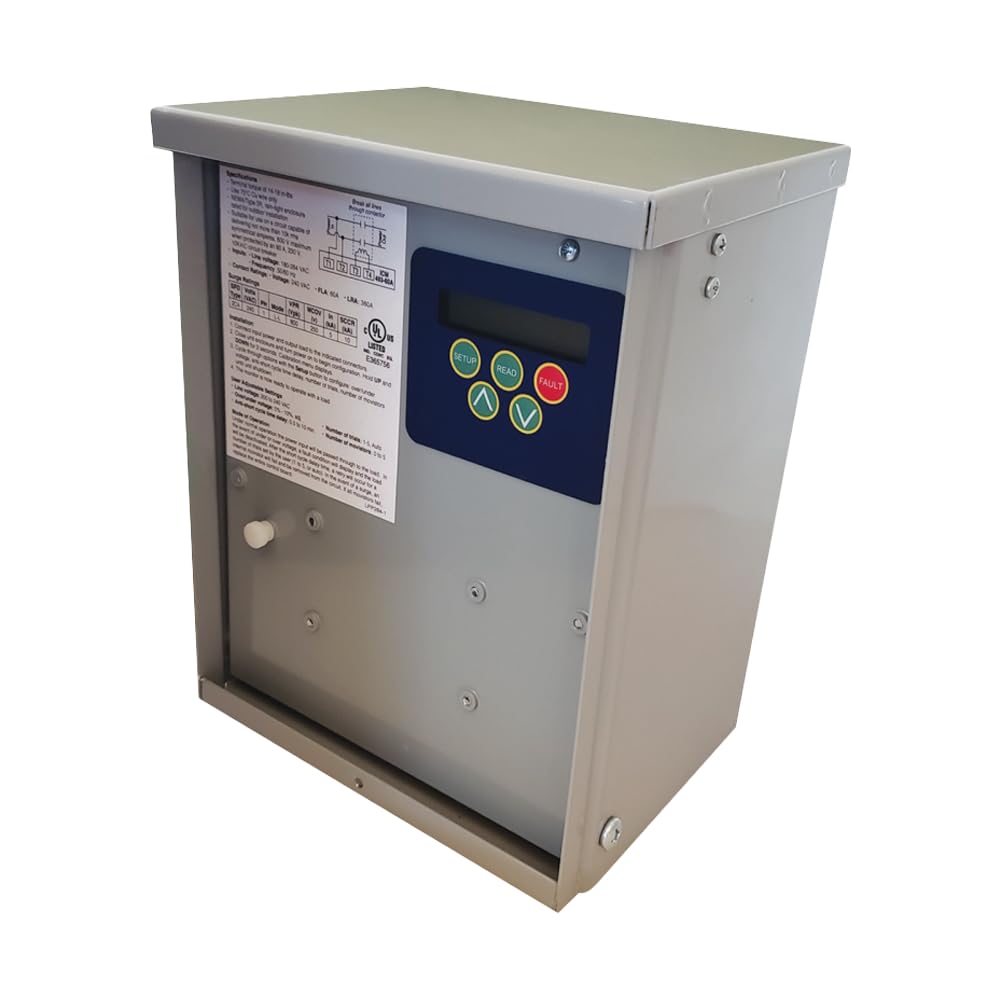
Figure 1: ICM Controls ICM493-60A Single-Phase Line Voltage Monitor. This image shows the front view of the device, highlighting its robust NEMA 3R enclosure and the integrated digital display.
4. Installation and Setup
The ICM493-60A is designed for installation between the service disconnect and the condensing unit. Due to the nature of electrical installations, it is strongly recommended that a qualified electrician perform the installation.
4.1 Pre-Installation Checklist
- Verify that the supply voltage matches the unit's specifications (240V).
- Ensure adequate space for mounting and wiring.
- Confirm all necessary tools and safety equipment are available.
4.2 Mounting
Mount the unit securely in a location that allows for proper ventilation and access for wiring. The NEMA 3R enclosure is suitable for outdoor use, providing protection against rain, sleet, and external ice formation.
4.3 Wiring
- Disconnect Power: Turn off all power to the circuit at the main breaker or disconnect switch. Verify with a voltage tester.
- Connect Line Wires: Connect the incoming line voltage wires to the designated "LINE" terminals.
- Connect Load Wires: Connect the wires leading to the condensing unit (load) to the designated "LOAD" terminals.
- Connect Ground: Ensure proper grounding according to local electrical codes.
- Secure Connections: Double-check all wire connections for tightness.
Note: The unit includes lugs for line and load wires. Some users may find it beneficial to use a lug for neutral wires if applicable to their specific installation, though the primary function is line voltage monitoring.
5. Operation
Once installed and powered, the ICM493-60A will begin monitoring the line voltage. The backlit digital display provides real-time voltage readings and status indicators.
5.1 Digital Display
The display shows the current line voltage. In the event of an over-voltage, under-voltage, or surge event, the unit will activate its protection mechanisms and display relevant fault codes or messages. Refer to the unit's specific display codes for detailed interpretations, which can typically be found in the full product datasheet.
5.2 Default Settings
The unit comes with factory default settings designed for typical applications. These settings often suit most needs. Consult the full product datasheet or manufacturer's website for details on adjustable parameters, if any, and how to modify them.
6. Maintenance
The ICM493-60A is designed for maintenance-free operation. However, periodic visual inspections are recommended, especially for outdoor installations.
- Enclosure Integrity: Periodically check the NEMA 3R enclosure for any signs of damage, cracks, or loose seals that could compromise its weather resistance.
- Connections: While power is disconnected, a qualified technician can periodically check the tightness of electrical connections.
- Cleanliness: Keep the exterior of the unit clean from excessive dirt, dust, or debris to ensure proper heat dissipation and visibility of the display. Use a soft, damp cloth for cleaning; do not use abrasive cleaners or solvents.
7. Troubleshooting
If the unit is not functioning as expected, consider the following basic troubleshooting steps. For complex issues, contact a qualified electrician or ICM Controls technical support.
- No Display/No Power:
- Ensure power is supplied to the unit and the main breaker is on.
- Check all wiring connections for proper contact.
- Equipment Not Receiving Power:
- Check the unit's display for any fault codes (e.g., over-voltage, under-voltage).
- Verify that the line voltage is within the acceptable operating range.
- If a fault is indicated, the unit may be in a lockout state. Power cycling (briefly disconnecting and reconnecting power) might reset it after the fault condition has cleared.
- Frequent Tripping:
- This may indicate persistent voltage issues on the line. Consult with your utility provider or an electrician to assess the power quality.
8. Specifications
| Feature | Specification |
|---|---|
| Model | ICM493-60A |
| Brand | ICM Controls |
| Voltage | 240 Volts |
| Maximum Current | 60 Amps |
| Special Feature | Surge Protection, Over/Under Voltage Protection |
| Enclosure Rating | NEMA 3R (Outdoor Use) |
| Product Dimensions | 8"L (Length only specified) |
| Item Weight | 13 pounds |
| Material | Metal |
| Certifications | UL Recognized |
| UPC/GTIN | 800442122021 |
9. Warranty and Support
For warranty information, technical support, or service inquiries, please contact ICM Controls directly. Keep your purchase receipt as proof of purchase.
ICM Controls Contact Information:
- Website: www.icmcontrols.com
- Refer to the product packaging or the official ICM Controls website for the most current contact details and support options.