
Introduction
This manual provides essential information for the proper setup, operation, and maintenance of your Polk Signature Elite ES30 Center Channel Speaker. Designed for home theater systems, the ES30 delivers clear dialogue and dynamic sound. Please read this manual thoroughly before installation and use to ensure optimal performance and longevity of your speaker.
Safety Information
- Placement: Ensure the speaker is placed on a stable, level surface or securely mounted to prevent accidental falls. Keep away from heat sources, direct sunlight, and moisture.
- Ventilation: Do not block ventilation openings. Adequate airflow is necessary to prevent overheating.
- Power: This is a passive speaker and requires connection to an amplifier or AV receiver. Ensure the amplifier is turned off before making any connections.
- Cleaning: Use a soft, dry cloth for cleaning. Avoid liquid cleaners or solvents.
- Servicing: Do not attempt to service this product yourself. Refer all servicing to qualified service personnel.
Package Contents
Verify that your package contains the following items:
- Polk Signature Elite ES30 Center Channel Speaker
- Instruction Manual (this document)
Note: Speaker cables are not included and must be purchased separately.
Features
The Polk Signature Elite ES30 Center Channel Speaker incorporates several design elements for enhanced audio performance:
- Dynamically Balanced Acoustic Array: Engineered for clear, room-filling sound.
- High-Resolution Terylene Tweeter: A 1-inch tweeter designed for accurate high-frequency reproduction, supporting Hi-Res Audio.
- Mica-Fortified Polypropylene Woofers: Two 5.25-inch woofers provide detailed mid-range and bass response.
- Precision Crossovers: Ensures smooth blending between the drivers.
- Patented Power Port Technology: Enhances bass output and reduces distortion for a more impactful low-frequency experience.
- Dolby Atmos & DTS:X Compatibility: Designed to integrate seamlessly with modern surround sound systems.
- Timbre-Matched Components: Allows for consistent sound when combined with other Polk Signature Elite series speakers.
Setup
Speaker Placement
Proper placement of the center channel speaker is crucial for clear dialogue and a cohesive soundstage in your home theater system.
- Central Position: Place the ES30 directly above or below the center of your television or projection screen. This ensures that dialogue appears to originate from the screen.
- Ear Level: Ideally, the tweeter of the center channel speaker should be as close to ear level as possible when seated in your primary listening position. If placed below the screen, angle the speaker slightly upwards. If placed above, angle it slightly downwards.
- Clear Path: Ensure there are no obstructions between the speaker and your listening area.

Image: The Polk ES30 center channel speaker positioned on a media console beneath a television, demonstrating typical placement in a home theater environment.
Connections
Before making any connections, ensure your AV receiver or amplifier is turned off and unplugged from the power outlet.
- Speaker Wire Preparation: Strip approximately 1/2 inch (12mm) of insulation from the ends of your speaker wires. Twist the bare strands tightly.
- Connecting to the Speaker: The ES30 features dual gold-plated five-way binding posts. Connect the positive (+) terminal (red) on the speaker to the positive (+) terminal on your AV receiver's center channel output. Connect the negative (-) terminal (black) on the speaker to the negative (-) terminal on your AV receiver's center channel output. Ensure no stray wire strands are touching between the positive and negative terminals.
- Secure Connections: Tighten the binding posts firmly by hand.
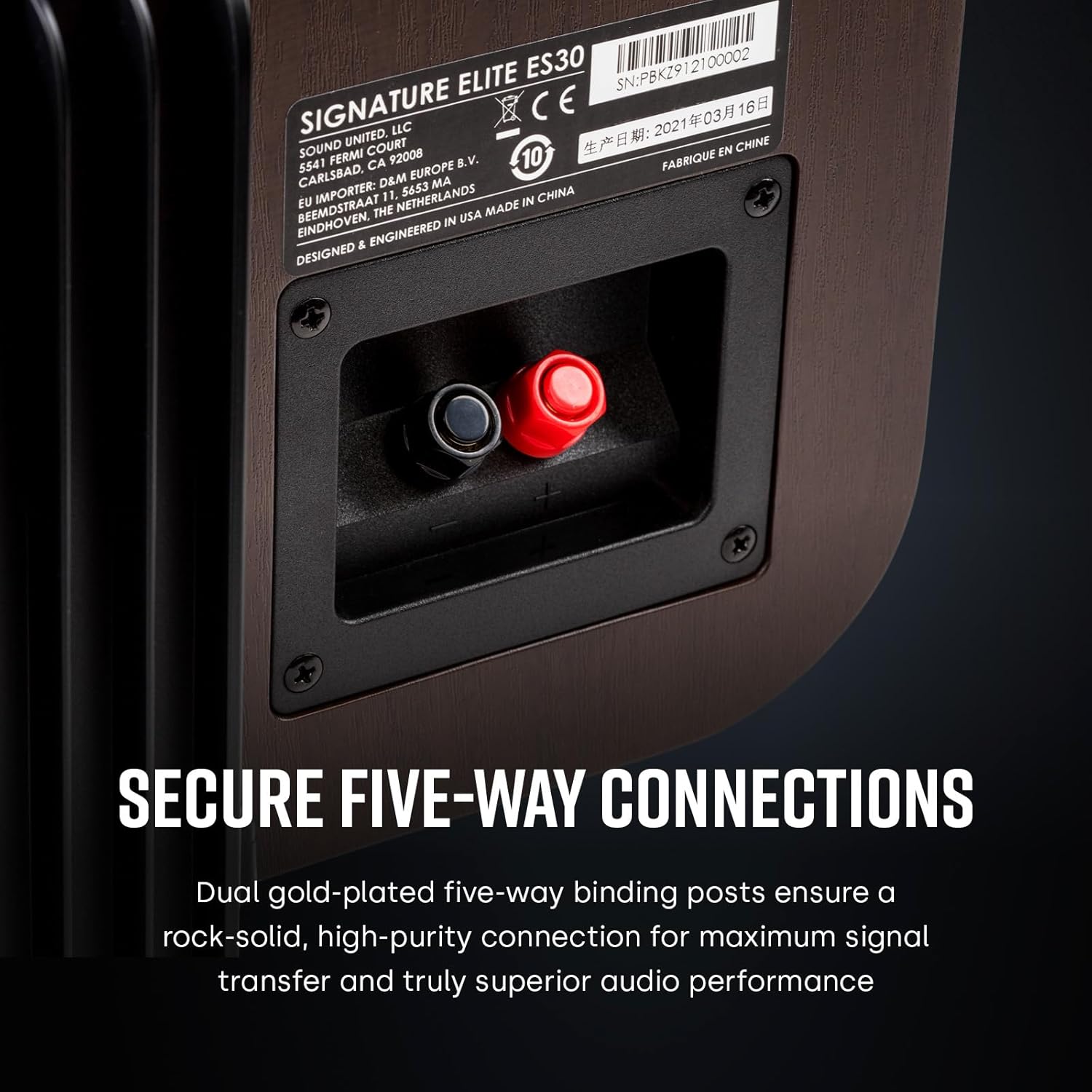
Image: A close-up of the rear of the ES30 speaker, highlighting the red and black binding posts for connecting speaker wire from an amplifier or receiver.
Initial Configuration (AV Receiver)
After connecting the speaker, power on your AV receiver and perform the following steps:
- Speaker Setup Menu: Access the speaker setup menu on your AV receiver.
- Speaker Size: Set the center channel speaker to "Small" if you are using a subwoofer, or "Large" if you are not using a subwoofer and want the ES30 to handle full-range audio. For optimal performance with a subwoofer, "Small" is generally recommended.
- Crossover Frequency: If set to "Small", configure the crossover frequency. A common starting point is 80 Hz, but you may adjust this based on your subwoofer and personal preference.
- Level Calibration: Use your receiver's auto-calibration feature (e.g., Audyssey, MCACC, YPAO) or manually adjust the channel levels to ensure the center speaker's volume matches other speakers in your system.
Operating Instructions
The Polk Signature Elite ES30 is a passive speaker, meaning its operation is directly controlled by your connected AV receiver or amplifier. There are no direct controls on the speaker itself.
- Power On/Off: The speaker will receive power and signal when your AV receiver/amplifier is turned on.
- Volume Control: Adjust the overall system volume using your AV receiver's remote or controls.
- Sound Modes: Utilize your AV receiver's various sound modes (e.g., Dolby Digital, DTS, Stereo) to optimize the audio experience for different content. The ES30 is designed to reproduce dialogue and central sound effects with clarity.

Image: A direct front view of the Polk ES30 speaker, showcasing its drivers and grille-less design.
Maintenance
- Cleaning the Cabinet: Use a soft, dry, lint-free cloth to wipe the speaker cabinet. Avoid abrasive materials or chemical cleaners, as these can damage the finish.
- Cleaning the Grille: If your speaker has a removable grille, gently remove it and use a soft brush or vacuum cleaner with a brush attachment to remove dust.
- Dusting Drivers: Avoid touching the speaker drivers (tweeter and woofers) directly. If dust accumulates, use a soft brush or compressed air from a distance.
- Environmental Care: Keep the speaker away from extreme temperatures, high humidity, and direct sunlight to prevent damage to the cabinet and internal components.
Troubleshooting
If you experience issues with your Polk Signature Elite ES30 speaker, consult the following table for common problems and solutions.
| Problem | Possible Cause | Solution |
|---|---|---|
| No sound from center speaker |
|
|
| Distorted or unclear dialogue |
|
|
| Dialogue sounds too quiet or too loud compared to other speakers |
|
|
If the problem persists after trying these solutions, please contact Polk Audio customer support or refer to your AV receiver's manual for further assistance.
Specifications
| Feature | Detail |
|---|---|
| Model Name | ES30 |
| Speaker Type | Center Channel |
| Mounting Type | Tabletop Mount |
| Included Components | Speaker |
| Material | Mica Reinforced Polypropylene |
| Product Dimensions (D x W x H) | 27D x 50.8W x 19.1H Centimetres |
| Item Weight | 19 Pounds (approx. 8.6 kg) |
| Impedance | 8 Ohms |
| Output Wattage (Amplifier) | 150 Watts (Recommended) |
| Speaker Maximum Output Power | 25 Watts (RMS, typical) |
| Frequency Response | 40 KHz (Upper limit, Hi-Res Audio Certified) |
| Tweeter | 1" Terylene High-Resolution |
| Woofers | Two 5.25" Mica-Fortified Polypropylene |
| Surround Sound Channel Configuration | 5.1 (Compatible) |
| Connectivity Technology | Wired (Dolby Atmos compatible systems) |
| Audio Output Mode | Surround, 3D Spatial Audio (via compatible receiver) |
Note: Specifications are subject to change without notice.
Warranty and Support
Polk Audio products are designed for reliability and performance. This product typically comes with a manufacturer's warranty. For specific warranty terms and conditions, including duration and coverage, please refer to the warranty card included with your purchase or visit the official Polk Audio website.
For technical support, troubleshooting assistance beyond this manual, or service inquiries, please contact Polk Audio customer support through their official website or the contact information provided with your product documentation.
Online Resources:
- Polk Audio Official Website: www.polkaudio.com
- Product Support Page: (Refer to the official website for the specific ES30 support page)