
1. Product Overview
The Lyman Pocket Touch 1500 Scale offers high-performance weighing in a compact, portable design. It features advanced touch screen controls and a capacity of up to 1500 grains. This kit includes essential accessories for powder measurement.
Key Features:
- High Capacity: Measures up to 1500 grains.
- Convenient Controls: Touch screen for power, tare, calibration, and grams/grains measurement.
- Easy-to-Read Display: Lighted display ensures visibility in various lighting conditions.
- Comprehensive Kit: Includes a funnel pan, powder scoop, calibration weight, and two AAA batteries.
2. Included Components
The Lyman Pocket Touch 1500 Scale Kit comes with the following items:
- Lyman Pocket Touch 1500 Digital Scale
- Universal Funnel Pan
- Powder Scoop
- Calibration Weight
- 2 x AAA Batteries

Image: The Lyman Pocket Touch 1500 Scale displayed with its included accessories: a black funnel pan, a small orange powder scoop, and a silver calibration weight.
3. Setup
3.1 Battery Installation
- Locate the battery compartment on the underside of the scale.
- Open the battery compartment cover.
- Insert two AAA batteries, ensuring correct polarity (+/-).
- Close the battery compartment cover securely.
3.2 Calibration
For accurate measurements, it is crucial to calibrate the scale regularly, especially after initial setup or if the scale has been moved.
- Place the scale on a stable, level surface, free from vibrations or drafts.
- Press the POWER button to turn on the scale.
- Wait for the display to show "0.00" or "0.000".
- Press and hold the CAL (Calibration) button until "CAL" appears on the display.
- Release the CAL button. The display will then show the required calibration weight (e.g., "100.00" for 100g or "1000.0" for 1000 grains, depending on the model's specific calibration weight).
- Carefully place the provided calibration weight onto the center of the weighing platform.
- The display will show "PASS" or "CAL OK" and then return to "0.00" or "0.000". This indicates successful calibration.
- Remove the calibration weight from the platform.
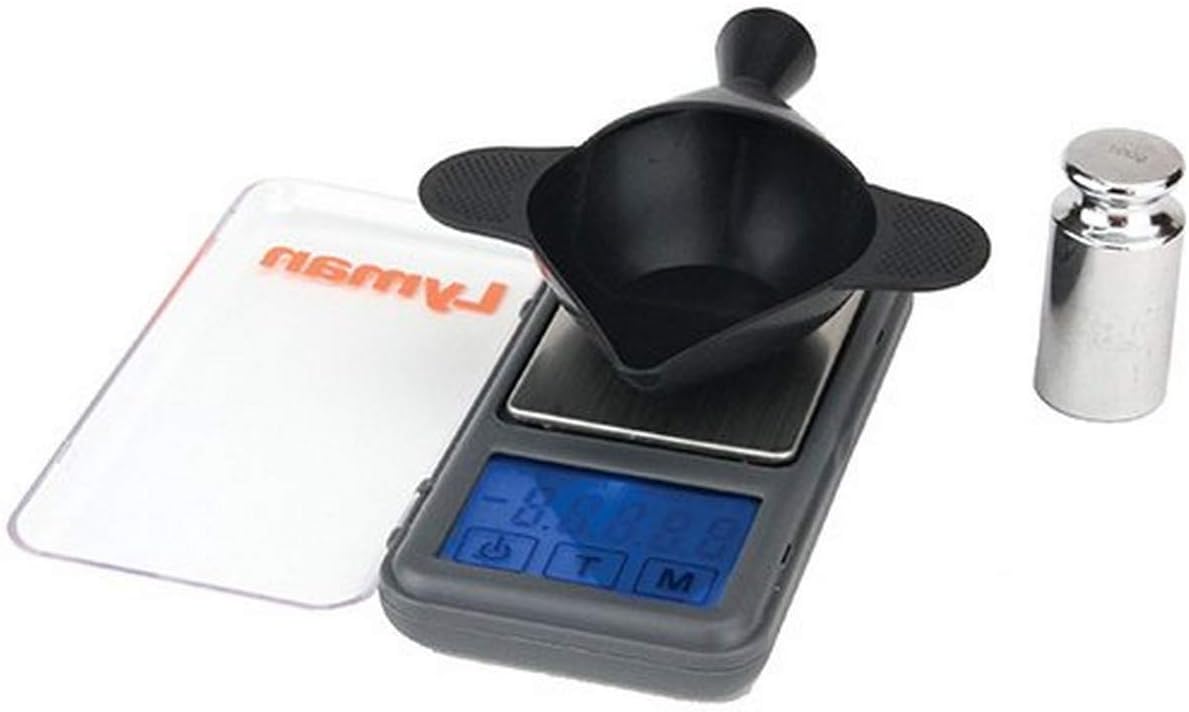
Image: The Lyman Pocket Touch 1500 Scale with a silver calibration weight placed on its weighing platform, demonstrating the calibration process.
4. Operating Instructions
4.1 Power On/Off
- To turn on the scale, press the POWER button.
- To turn off the scale, press and hold the POWER button until the display turns off. The scale also features an auto shut-off function to conserve battery life.
4.2 Tare Function
The Tare function allows you to zero out the weight of a container or pan before adding the substance to be weighed.
- Place the empty funnel pan or container onto the weighing platform.
- Press the TARE (T) button. The display will reset to "0.00" or "0.000".
- You can now add your powder or other material to the pan, and the display will show only the weight of the added substance.
4.3 Unit Conversion (Grams/Grains)
The scale can measure in both grams and grains.
- To switch between measurement units, press the MODE (M) button. The display will cycle through available units (e.g., "g" for grams, "gn" for grains).
4.4 Usage Example: Measuring Powder
- Ensure the scale is calibrated and placed on a stable surface.
- Place the Universal Funnel Pan on the weighing platform.
- Press the TARE (T) button to zero the pan's weight.
- Using the provided powder scoop, carefully add powder to the funnel pan until the desired weight is displayed.
- The unique funnel pan design allows for direct pouring of powder charges into a case without needing a separate funnel.

Image: A hand holding the Universal Funnel Pan, demonstrating how powder is poured directly from the pan into a brass cartridge case, highlighting the integrated funnel feature.
5. Maintenance
5.1 Cleaning
- Wipe the scale's surface with a soft, dry cloth.
- Do not use abrasive cleaners or immerse the scale in water.
- Keep the weighing platform clean and free of debris to ensure accurate readings.
5.2 Storage
- Store the scale in a cool, dry place, away from extreme temperatures and humidity.
- Keep the protective cover on the scale when not in use to prevent dust and damage.
- Remove batteries if the scale will not be used for an extended period to prevent leakage.
6. Troubleshooting
- Inaccurate Readings: Ensure the scale is on a stable, level surface. Recalibrate the scale using the provided calibration weight. Check for any debris on the weighing platform.
- Display Not Turning On: Check battery installation and ensure batteries are not depleted. Replace batteries if necessary.
- Fluctuating Readings: Avoid drafts, vibrations, or electromagnetic interference (e.g., from strong lights or electronic devices) near the scale during operation.
7. Specifications
| Feature | Detail |
|---|---|
| Brand | Lyman |
| Model Number | 7750725 |
| Color | Black |
| Display Type | Lighted display |
| Weight Limit | 1500 Grains (equivalent to 1500 Pounds in the provided data, but contextually 1500 grains is correct for reloading scales) |
| Form Factor | Handheld |
| Material | Aluminum |
| Measurement Type | Grams/Grains |
| Item Weight | 4.9 ounces (0.14 Kilograms) |
| Product Dimensions | 12 x 8 x 2 inches |
| Batteries | 2 AAA batteries (included) |
8. Warranty and Support
This product is covered by a Manufacturer Warranty. For specific details regarding warranty coverage, claims, or technical support, please refer to the documentation included with your product or visit the official Lyman Products website.
For additional information or assistance, you may also visit the Lyman Store on Amazon.