
ProfiCare PC-MP 3087
ProfiCare PC-MP 3087 Massage Gun User Manual
Model: PC-MP 3087
1. Introduction
Thank you for choosing the ProfiCare PC-MP 3087 Massage Gun. This device is designed to provide powerful and deep-acting percussion massage, aiding in muscle relaxation, tension relief, and improved circulation. Please read this manual carefully before use to ensure safe and effective operation.
2. Important Safety Warnings
Use the device with caution to avoid injuries. The device is not suitable for individuals with certain medical conditions or during pregnancy. Always observe electrical safety guidelines.
Consult a medical professional before use if you have any pre-existing medical conditions, are pregnant, or have any concerns about using a massage device.
3. Product Components

The ProfiCare PC-MP 3087 Massage Gun, including the main unit, four interchangeable massage heads, power adapter, and a practical storage case.

The main unit of the ProfiCare PC-MP 3087 Massage Gun, featuring a sleek silver design and ergonomic handle.
3.1. Interchangeable Massage Heads
- Ball Shape: Ideal for large muscle groups such as the chest, biceps, and quadriceps.

The spherical attachment, suitable for broad muscle areas.
- U-Shape: Designed for the neck and cervical muscles, as well as along the spine (avoiding direct contact with bones).

The U-shaped attachment, specifically designed for areas around the neck and spine.
- T-Shape: Suitable for all deep-lying muscle groups, providing targeted relief.

The T-shaped attachment, effective for deeper muscle penetration.
- Conical Shape: Perfect for fascia, deep tissue, and trigger points, offering precise massage.

The conical attachment, designed for pinpoint accuracy on trigger points and fascia.
4. Setup
4.1. Charging the Device
Before first use, fully charge the massage gun. Connect the power adapter to the charging port located at the bottom of the handle and plug it into a standard electrical outlet (100-240V, 50/60Hz). The LED indicators will show the charging status. A full charge takes approximately 3 hours and provides about 4 hours of operating time.
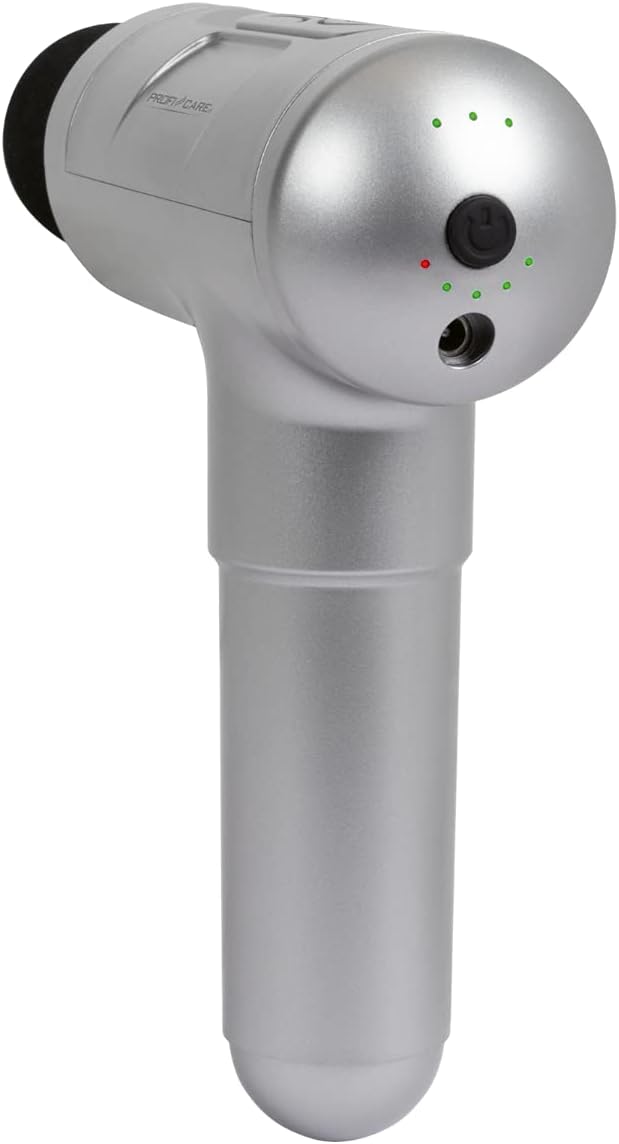
Rear view of the massage gun, highlighting the power button, LED indicators for intensity and battery level, and the charging port.
4.2. Attaching and Detaching Massage Heads
To attach a massage head, align the base of the desired head with the opening on the front of the massage gun and push it firmly until it clicks into place. To detach, gently pull the head straight out from the device.
5. Operating Instructions
5.1. Powering On/Off and Adjusting Intensity
Press and hold the power button (located on the back of the device) for a few seconds to turn the massage gun on or off. Once on, short press the power button to cycle through the 3 intensity levels:
- Level 1: 1900 strokes/min
- Level 2: 2500 strokes/min
- Level 3: 2800 strokes/min
The 8 LED indicators on the back of the device will illuminate to show the current intensity level and battery status.

Detailed view of the massage gun's control panel, indicating the function button, battery status LEDs, and charging port.
5.2. Usage Guidelines
Apply the massage gun to the desired muscle area. Move the device slowly and gently over the muscles. Do not apply excessive pressure or use on bony areas. Limit each massage session to 10-15 minutes per muscle group. Refer to section 3.1 for guidance on which attachment to use for specific muscle groups.
6. Maintenance
6.1. Cleaning
Wipe the device and attachments with a soft, damp cloth after each use. Do not use abrasive cleaners or immerse the device in water. Ensure the device is completely dry before storage.
6.2. Storage
Store the massage gun and its accessories in the provided storage case in a cool, dry place, away from direct sunlight and extreme temperatures. Keep out of reach of children.

The massage gun and its attachments neatly stored within the compact carrying case, ready for transport or storage.
7. Troubleshooting
If the device does not turn on, ensure it is fully charged. If the performance seems low, recharge the battery. For any persistent issues, please refer to the manufacturer's website or contact customer support.
8. Specifications
9. Warranty and Support
For detailed warranty information and customer support, please refer to the warranty card included with your product or visit the official ProfiCare website. Keep your proof of purchase for any warranty claims.
Ask a question about this manual
Ask about setup, troubleshooting, compatibility, parts, safety, or missing instructions. Manuals+ will review the question and use this page’s manual context to help answer it.