
1. Product Overview
The GUESS GW0313L3 is a stylish women's chronograph watch featuring a durable stainless steel case, a comfortable silicone strap, and a precise quartz movement. This manual provides essential information for setting up, operating, maintaining, and troubleshooting your watch.

Figure 1: Front view of the GUESS GW0313L3 watch. This image displays the watch face with its rose gold-tone case, grey dial, and the blue glitter silicone strap. The chronograph subdials are visible, along with the hour, minute, and second hands.
2. Setup
2.1 Setting the Time
- Pull out the crown: Gently pull the crown (the knob on the right side of the watch case) out to the first or second click position. For most watches, the first click adjusts the date (if applicable) and the second click adjusts the time. Refer to Figure 2 for crown location.
- Adjust the time: Turn the crown clockwise or counter-clockwise to set the hour and minute hands to the correct time.
- Push in the crown: Once the time is set, push the crown back into its original position to start the watch movement.

Figure 2: Side view of the watch, highlighting the crown and chronograph pushers. The crown is the central knob used for time adjustment, while the pushers activate the chronograph functions.
2.2 Adjusting the Strap
The silicone strap features a traditional buckle clasp for secure and comfortable wear. To adjust the strap:
- Insert the pin of the buckle into one of the holes on the strap that provides a snug, yet comfortable fit on your wrist.
- Thread the excess strap through the two loops to secure it.
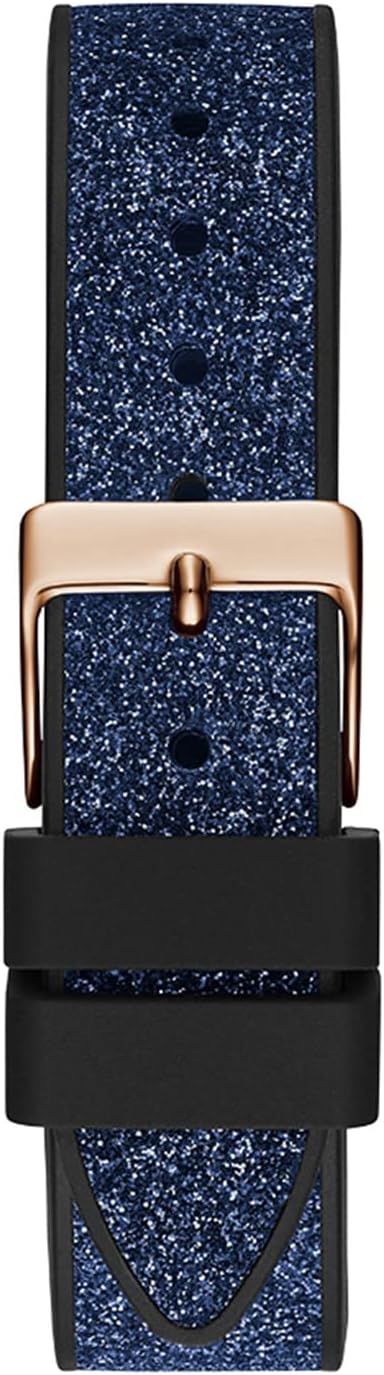
Figure 3: Detail of the silicone strap and buckle clasp. This image shows how the strap is secured using the pin buckle and the two retaining loops.
3. Operating the Watch
3.1 Time Display
The watch displays time in an analog format with hour, minute, and second hands. The subdials provide additional functionality, including a 24-hour display.
3.2 Chronograph Function
Your watch is equipped with a chronograph (stopwatch) function. The pushers located on either side of the crown control this feature.
- Start/Stop: Press the top pusher (A) to start the chronograph. Press it again to stop the timing.
- Reset: While the chronograph is stopped, press the bottom pusher (B) to reset all chronograph hands to their zero positions.

Figure 4: Detailed view of the watch face and chronograph pushers. This image highlights the three subdials used for chronograph timing and the two pushers (A and B) that control its functions.
3.3 Water Resistance
This watch is water resistant up to 50 meters (5 ATM). This means it is suitable for short periods of recreational swimming, but not for diving or snorkeling. Do not operate the crown or pushers while the watch is wet or submerged, as this can compromise the water resistance.
4. Maintenance
4.1 Cleaning
- Wipe the watch case and strap with a soft, dry cloth regularly to remove dust and dirt.
- For the silicone strap, a mild soap solution and a soft brush can be used, followed by rinsing with clean water and thorough drying.
- Avoid using harsh chemicals, solvents, or abrasive cleaners, as these can damage the watch's finish or strap material.
4.2 Battery Replacement
The watch is powered by one LR41 battery. When the watch stops or the time becomes inaccurate, it may be time to replace the battery. Battery replacement should be performed by a qualified watch technician to ensure proper sealing and maintain water resistance.
4.3 Storage
Store your watch in a cool, dry place away from direct sunlight, extreme temperatures, and strong magnetic fields when not in use.
5. Troubleshooting
- Watch not running: Check if the crown is fully pushed in. If it is, the battery may need replacement.
- Time is inaccurate: Ensure the crown is fully pushed in after setting the time. If the issue persists, the battery may be low, or the movement may require servicing.
- Condensation under crystal: This indicates a loss of water resistance. Immediately take the watch to a professional for inspection and repair to prevent further damage.
- Chronograph hands do not reset to zero: This may require a chronograph reset procedure, which typically involves pulling the crown out and using the pushers to manually align the hands. Consult a watch professional if unsure.
6. Specifications
| Brand | GUESS |
| Model Number | GW0313L3 |
| Movement Type | Quartz |
| Display Type | Analog |
| Case Material | Stainless Steel |
| Case Diameter | 38 Millimeters |
| Case Thickness | 11.4 Millimeters |
| Band Material | Silicone |
| Band Width | 16 Millimeters |
| Clasp Type | Buckle (Pin Buckle) |
| Dial Window Material | Mineral Glass |
| Water Resistance Depth | 50 Meters (5 ATM) |
| Special Features | Chronograph, 12/24 Hour Display |
| Battery Type | 1 x LR41 (included) |
7. Warranty and Support
For warranty information and customer support, please refer to the documentation provided with your purchase or contact the retailer where the watch was acquired. You may also visit the official GUESS website for further assistance.
For online support, you can visit the GUESS Brand Store on Amazon.

