
Introduction
This manual provides detailed instructions for the safe installation, operation, and maintenance of your Obabala 52 Inch Ceiling Fan. This fan features natural solid walnut wood blades, a smart memory dimmable LED light with three color temperatures, and a whisper-quiet DC motor. It is designed for both indoor and covered outdoor use, offering year-round comfort with its reversible function. Please read this manual thoroughly before installation and use, and retain it for future reference.
Safety Information
To reduce the risk of electric shock, fire, or personal injury, always follow these basic safety precautions:
- Ensure the power is turned off at the circuit breaker before installation or maintenance.
- All wiring must be in accordance with national and local electrical codes.
- The fan must be mounted to a structurally sound ceiling capable of supporting the fan's weight.
- Do not operate the fan if any part is damaged.
- Keep hands, clothing, and other objects away from the fan blades when the fan is in operation.
- This fan is suitable for damp locations but not for direct water exposure.
Package Contents
Verify that all components are present before beginning installation:
- Ceiling Fan Motor Assembly
- 3 Walnut Wood Blades
- Remote Control (2 AAA batteries included)
- Light Kit with Dimmable LED
- 5-inch Downrod
- 10-inch Downrod
- Mounting Bracket
- Canopy and Canopy Cover
- Hardware Pack (screws, washers, wire nuts)
- Instruction Manual
Installation
Professional installation is recommended for safety and optimal performance. Ensure power is disconnected at the circuit breaker before proceeding.
- Mounting Bracket Installation: Secure the mounting bracket to the ceiling junction box. Ensure the bracket is firmly attached and can support the fan's weight. This fan is compatible with flat ceilings and sloped ceilings up to 18 degrees.
- Downrod Assembly: Choose either the 5-inch or 10-inch downrod based on your ceiling height. Insert the downrod through the canopy and canopy cover, then secure it to the fan motor assembly using the provided pin and screw.
- Wiring: Carefully connect the fan's electrical wires to the household wiring according to the wiring diagram provided in the full manual. Ensure all connections are secure.
- Hanging the Fan: Lift the fan assembly and hang it from the mounting bracket.
- Blade Attachment: Attach the three walnut wood blades to the motor housing using the provided screws.
- Light Kit Installation: Connect the light kit wires and secure the light kit to the bottom of the fan motor.
- Canopy Installation: Slide the canopy up and secure it to the mounting bracket, covering the wiring connections.
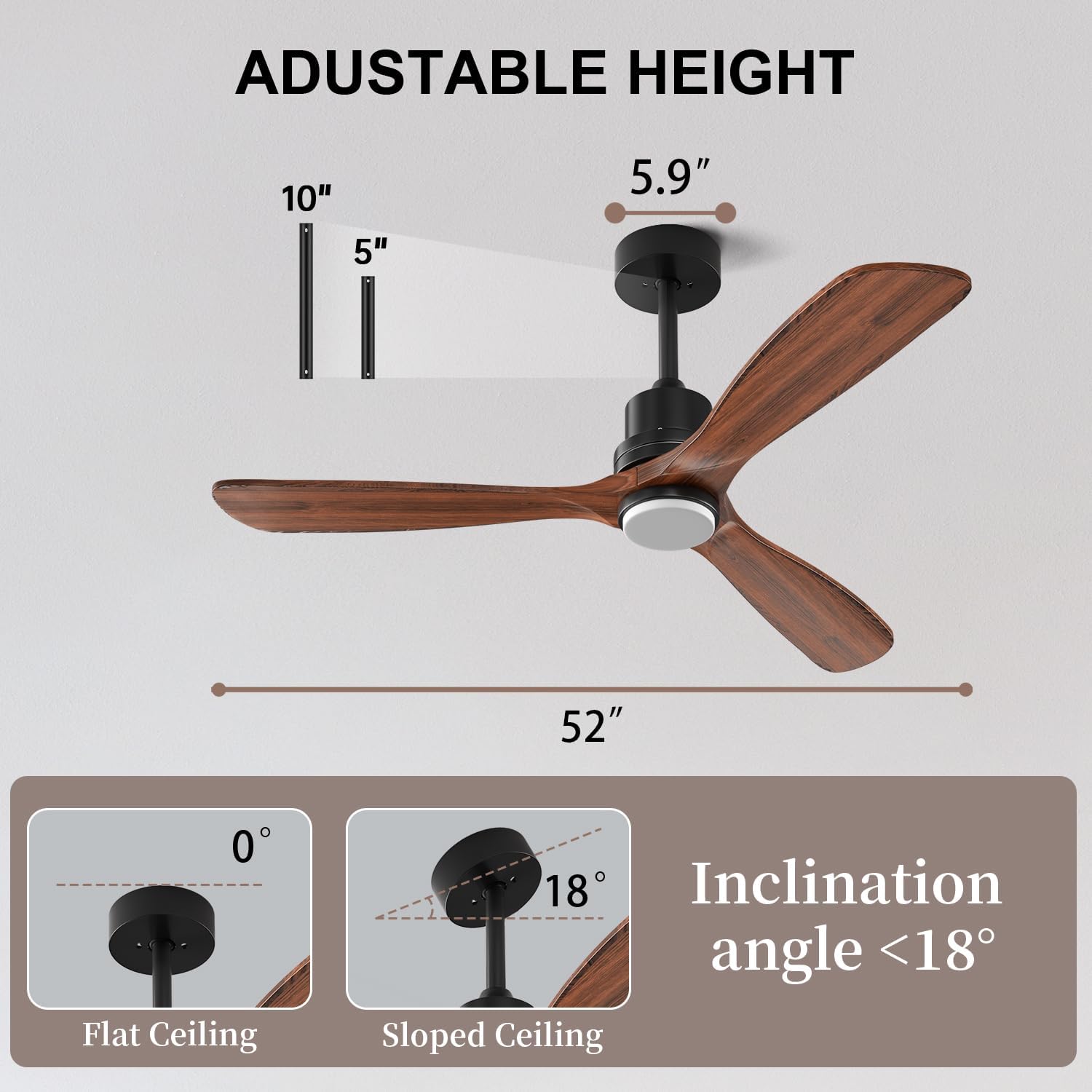
Figure 1: Ceiling fan dimensions and mounting options for flat and sloped ceilings.

Figure 2: Examples of ceiling fan installation with 5-inch and 10-inch downrods.
Video 1: Official Obabala Ceiling Fan Installation Guide. This video demonstrates the step-by-step process of installing the ceiling fan, including mounting the bracket, assembling the downrod, wiring, and attaching the blades and light kit.
Operating Instructions
Your Obabala ceiling fan is operated using the included remote control.
Remote Control Functions:
- Fan On/Off: Press the power button to turn the fan on or off.
- Fan Speed: Select from 6 adjustable fan speeds (Levels 1-6) to customize airflow. Levels 1-2 are for a comfortable breeze, 3-4 for natural wind, and 5-6 for strong wind.
- Light On/Off & Color Temperature: Press the light button to turn the LED light on/off. Cycle through 3 color temperatures (Warm 3000K, Neutral 4500K, Cool 6000K) by pressing the light button repeatedly. The intelligent memory function retains your last setting after 15 seconds.
- Reversible Function: Use the reversible button on the remote to change the direction of the fan blades. Downward airflow is ideal for cooling in summer, while upward airflow helps circulate warm air in winter.
- Timer Setting: Set the fan to automatically turn off after 1, 2, or 4 hours using the timer buttons on the remote.

Figure 3: Six adjustable fan speeds for various comfort levels.

Figure 4: Dimmable LED light with three selectable color temperatures.

Figure 5: Reversible function for seasonal comfort.

Figure 6: Quiet DC motor operation and timer settings.
Maintenance
Regular maintenance ensures the longevity and optimal performance of your ceiling fan.
- Cleaning: Periodically clean the fan blades and motor housing with a soft, damp cloth. Do not use abrasive cleaners or solvents.
- Blade Inspection: Check the fan blades for any signs of damage or warping. Ensure all blade screws are tight.
- Tighten Fasteners: Annually check all screws and fasteners on the fan and mounting hardware to ensure they are secure.
- Lubrication: The DC motor is permanently lubricated and does not require additional oiling.
Troubleshooting
If you experience issues with your fan, refer to the following common problems and solutions:
| Problem | Possible Cause | Solution |
|---|---|---|
| Fan does not start | No power to the fan; loose wire connections; remote control not paired or batteries dead. | Check circuit breaker. Ensure all wiring connections are secure. Replace remote batteries or re-pair the remote control according to the full manual. |
| Fan wobbles | Loose blade screws; unbalanced blades; loose mounting bracket. | Tighten all blade screws. Use the balancing kit (if included) to balance the blades. Ensure the mounting bracket is securely fastened to the ceiling. |
| Light does not work | Loose wire connection to light kit; LED driver issue; remote control issue. | Check light kit wiring. Ensure the remote control is functioning correctly. If the issue persists, contact customer support. |
| Noisy operation | Loose screws; fan not properly mounted; internal motor issue. | Check and tighten all screws. Ensure the fan is securely mounted. The DC motor is designed for quiet operation; if noise is excessive, contact customer support. |
Specifications
| Feature | Detail |
|---|---|
| Brand | Obabala |
| Model Name | CF-05 |
| Size | 52 Inches |
| Color | Walnut Wood Blades, Matte Black Finish |
| Number of Blades | 3 |
| Motor Type | DC Motor |
| Noise Level | 35 Decibels |
| Light Source | Dimmable LED (3000K, 4500K, 6000K) |
| Control Method | Remote Control |
| Number of Power Levels | 6 Fan Speeds |
| Downrod Lengths | 5 Inches, 10 Inches |
| Sloped Ceiling Compatibility | Up to 18 degrees |
| Indoor/Outdoor Usage | Indoor, Covered Outdoor (Damp-rated) |
| Voltage | 110 Volts |
| Wattage | 30 Watts |
Warranty and Support
For warranty information or technical support, please refer to the contact details provided with your purchase or visit the official Obabala website. Keep your proof of purchase for any warranty claims.
For further assistance, you may contact Obabala customer service directly.


