
sloHEXtted Q400 4-Button 12-24V AC/DC
sloHEXtted 4 Channel Wireless Crane Remote Control Kit User Manual
Model: Q400 4-Button 12-24V AC/DC
1. Introduction
This user manual provides essential information for the safe and efficient operation, installation, and maintenance of your sloHEXtted 4 Channel Wireless Crane Remote Control Kit. Please read this manual thoroughly before using the product to ensure proper functionality and to prevent damage or injury.
The sloHEXtted Q400 Wireless Crane Remote Control Kit is designed for industrial applications, offering reliable and precise control for equipment such as electric chain hoists, lift winches, and overhead cranes. Its robust construction ensures durability in demanding environments.
2. Safety Information
Always prioritize safety when operating industrial equipment. Failure to follow safety guidelines can result in serious injury or equipment damage.
- Ensure all wiring is performed by a qualified electrician in accordance with local electrical codes.
- Always verify the correct voltage (AC/DC 12-24V) before connecting the receiver.
- Do not operate the remote control if it is damaged or malfunctioning.
- The Emergency Stop button must be easily accessible and functional at all times. Test it before each use.
- Keep the remote control away from extreme temperatures, direct sunlight, and corrosive substances.
- Do not attempt to modify or disassemble the unit. Refer all servicing to qualified personnel.
- Ensure clear line of sight and awareness of surroundings during operation.
3. Package Contents
Verify that all components are present in your package:
- 1 x Wireless Transmitter
- 1 x Receiver
- 1 x Transmitter Dust Sleeve
- 1 x Transmitter Button Sticker Sheet
- Installation Screws and Hardware

Figure 3.1: Complete sloHEXtted Wireless Crane Remote Control Kit
4. Product Overview
The sloHEXtted Q400 kit consists of a handheld transmitter and a receiver unit, designed for robust industrial use.
4.1. Transmitter Features
The transmitter features an ergonomic design for comfortable handling and durable silicone-wrapped buttons. It includes an EU standard Emergency Stop button for immediate cessation of operations.

Figure 4.1: Transmitter with Labeled Components
The transmitter's shell is made of nylon reinforced fiberglass material, providing strong anti-pressure ability, water resistance, anti-corrosion properties, and insulation. It is designed to withstand frequent drops and impacts.

Figure 4.2: Transmitter with Nylon Reinforced Fiberglass Shell
4.2. Receiver Features
The receiver unit is designed for secure attachment and features a quality circuit board for reliable performance. Both the transmitter and receiver comply with IP65/NEMA4 international specifications, making them dust-proof and waterproof for use in harsh environments.

Figure 4.3: Transmitter and Receiver Dimensions
4.3. Durability Demonstration
The following video demonstrates the robust construction and IP65 dust-proof and waterproof capabilities of the sloHEXtted remote control kit, including resistance to impacts and water immersion.
Video 4.1: Durability and Waterproof Test of the sloHEXtted Remote Control
5. Setup
5.1. Transmitter Battery Installation
The transmitter requires 2 AA batteries (not included). To install:
- Locate the battery compartment on the back of the transmitter.
- Open the battery cover.
- Insert 2 AA batteries, ensuring correct polarity (+/-).
- Close the battery cover securely.
5.2. Receiver Wiring
The receiver unit operates on AC/DC 12-24V. Proper wiring is crucial for safe and correct operation. Refer to the wiring diagram provided on the receiver unit and consult a qualified electrician if you are unsure about the wiring process.
General Wiring Guidelines:
- Identify the power input terminals (AC/DC 12-24V).
- Connect the power supply to the receiver.
- Connect the output terminals of the receiver to your hoist or crane's control circuit. Each channel corresponds to a specific function (e.g., Up, Down, East, West).
- Ensure all connections are secure and insulated.
5.3. Pairing/Synchronization
The transmitter and receiver are typically pre-paired from the factory. If re-pairing is necessary, or if you are using multiple units, refer to the specific pairing instructions that may be included with your product packaging or contact customer support for detailed guidance.
6. Operating Instructions
The sloHEXtted Q400 remote control provides intuitive operation for your industrial equipment.
6.1. Basic Operation
- Ensure the receiver is powered on and correctly wired to your equipment.
- Press the green 'START' button on the transmitter to activate the control. The status LED will illuminate.
- Use the directional buttons (Up, Down, Left, Right, etc.) to control the corresponding movements of your hoist or crane. These are momentary buttons, meaning the function will only be active while the button is pressed.
- The control distance is up to 100 meters (328 feet) in barrier-free environments.
6.2. Emergency Stop
The red Emergency Stop button is a critical safety feature. In case of an emergency or unexpected movement:
- Twist the red Emergency Stop button clockwise to release it from its locked position.
- Press the red Emergency Stop button firmly to immediately cut power to the controlled equipment.
- To reset, twist the button clockwise again until it pops out.
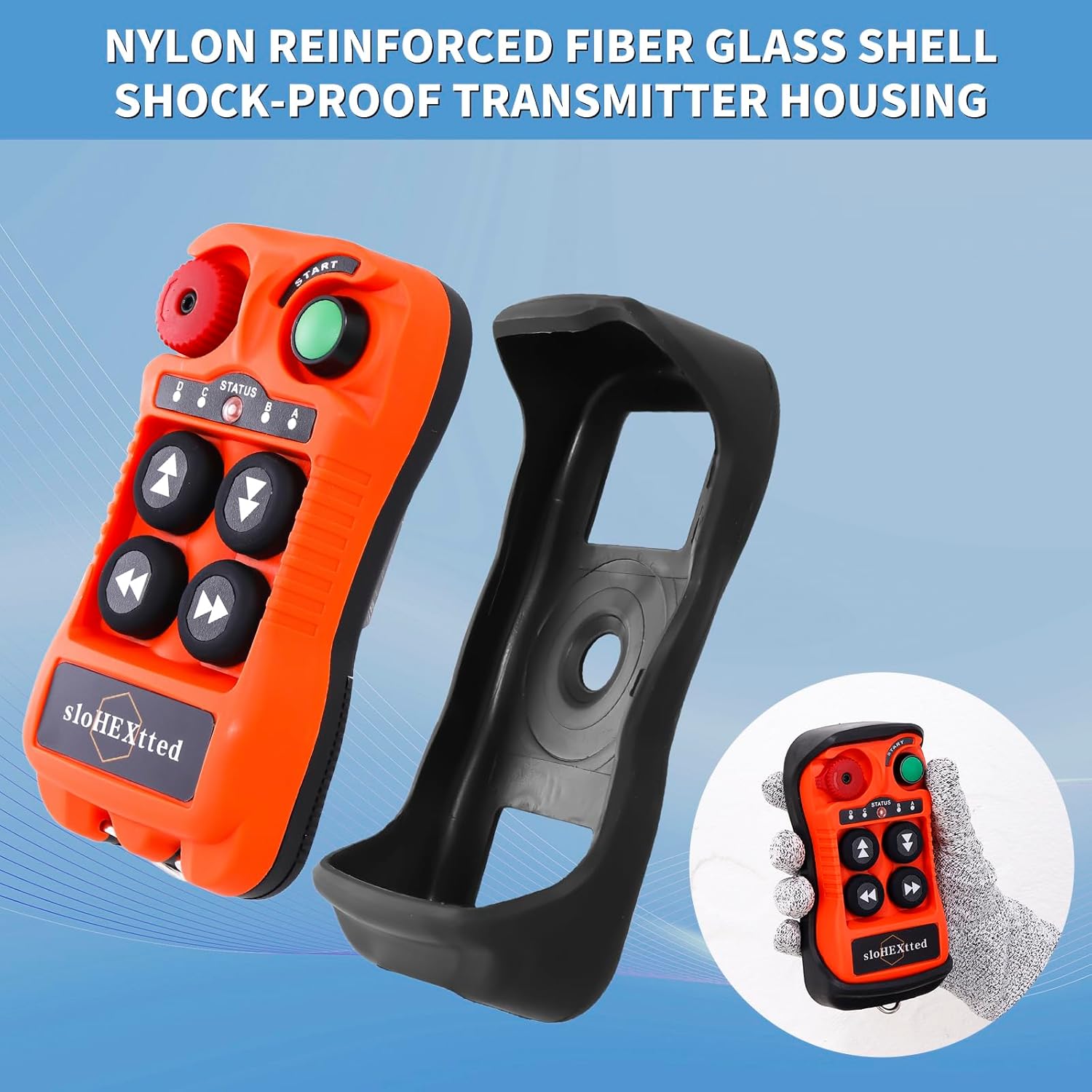
Figure 6.1: Emergency Stop Button Detail
7. Maintenance
Regular maintenance ensures the longevity and reliable performance of your remote control kit.
- Cleaning: Wipe the transmitter and receiver with a damp cloth. Do not use harsh chemicals or abrasive cleaners. Due to its IP65 rating, the unit can withstand water exposure, but avoid prolonged submersion unless necessary for cleaning.
- Battery Replacement: Replace transmitter batteries when the status indicator shows low power or when control range diminishes. Always use new AA batteries.
- Inspection: Periodically inspect the transmitter and receiver for any signs of physical damage, loose connections, or wear on buttons. Ensure the Emergency Stop button functions correctly.
- Storage: Store the unit in a dry, cool place when not in use, away from direct sunlight and extreme temperatures.
8. Troubleshooting
If you encounter issues with your sloHEXtted remote control kit, refer to the following common problems and solutions:
| Problem | Possible Cause | Solution |
|---|---|---|
| Transmitter not responding / No power | Dead or incorrectly installed batteries. | Replace batteries, ensuring correct polarity. |
| Limited control range | Low transmitter batteries; Obstructions between transmitter and receiver; Radio interference. | Replace batteries; Move closer to the receiver or clear obstructions; Identify and remove sources of interference. |
| Equipment not responding to commands | Receiver not powered; Emergency Stop engaged; Incorrect wiring; Transmitter and receiver not paired. | Check receiver power supply; Disengage Emergency Stop; Verify wiring connections; Re-pair transmitter and receiver if necessary. |
| Buttons feel sticky or unresponsive | Dirt or debris under buttons; Worn buttons. | Clean the transmitter surface and around buttons; If persistent, contact customer support for repair or replacement. |
If the problem persists after attempting these solutions, please contact sloHEXtted customer support for further assistance.
9. Specifications
| Feature | Specification |
|---|---|
| Manufacturer | sloHEXtted |
| Part Number | Q400 |
| Item Weight | 2.13 pounds |
| Product Dimensions | 9.13 x 7.8 x 2.99 inches |
| Country of Origin | China |
| Item Model Number | Q400 4-Button 12-24V AC/DC |
| Size | AC/DC 12-24V |
| Color | 1 Transmitter + 1 Receiver |
| Style | 12-24V AC/DC |
| Material | 4-Button 12-24V AC/DC Momentary Remote Control (Nylon Reinforced Fiberglass) |
| Installation Method | Surface-Mounted |
| Special Features | Easy to Install, IP65 Dust-proof and Waterproof, EU Standard Emergency Stop, 100m Control Distance |
| Included Components | Transmitter, Receiver, Transmitter Dust Sleeve, Transmitter Button Sticker Sheet |
| Batteries Required? | Yes (2 AA batteries for transmitter, not included) |
10. Warranty and Support
sloHEXtted products are manufactured to high-quality standards. For warranty information, technical support, or service inquiries, please refer to the contact information provided with your product packaging or visit the official sloHEXtted website. Please have your model number (Q400) and purchase details ready when contacting support.
Related documentsQ400 4-Button 12-24V AC/DC


Ask a question about this manual
Ask about setup, troubleshooting, compatibility, parts, safety, or missing instructions. Manuals+ will review the question and use this page’s manual context to help answer it.