
1. Introduction
The SUGON 8620DX is a high-performance 1300W digital hot air rework station designed for precision electronic repairs. It features rapid heating, adjustable temperature and airflow, memory storage for settings, and an automatic sleep function for enhanced safety and tool longevity. This manual provides essential information for the safe and effective operation of your rework station.
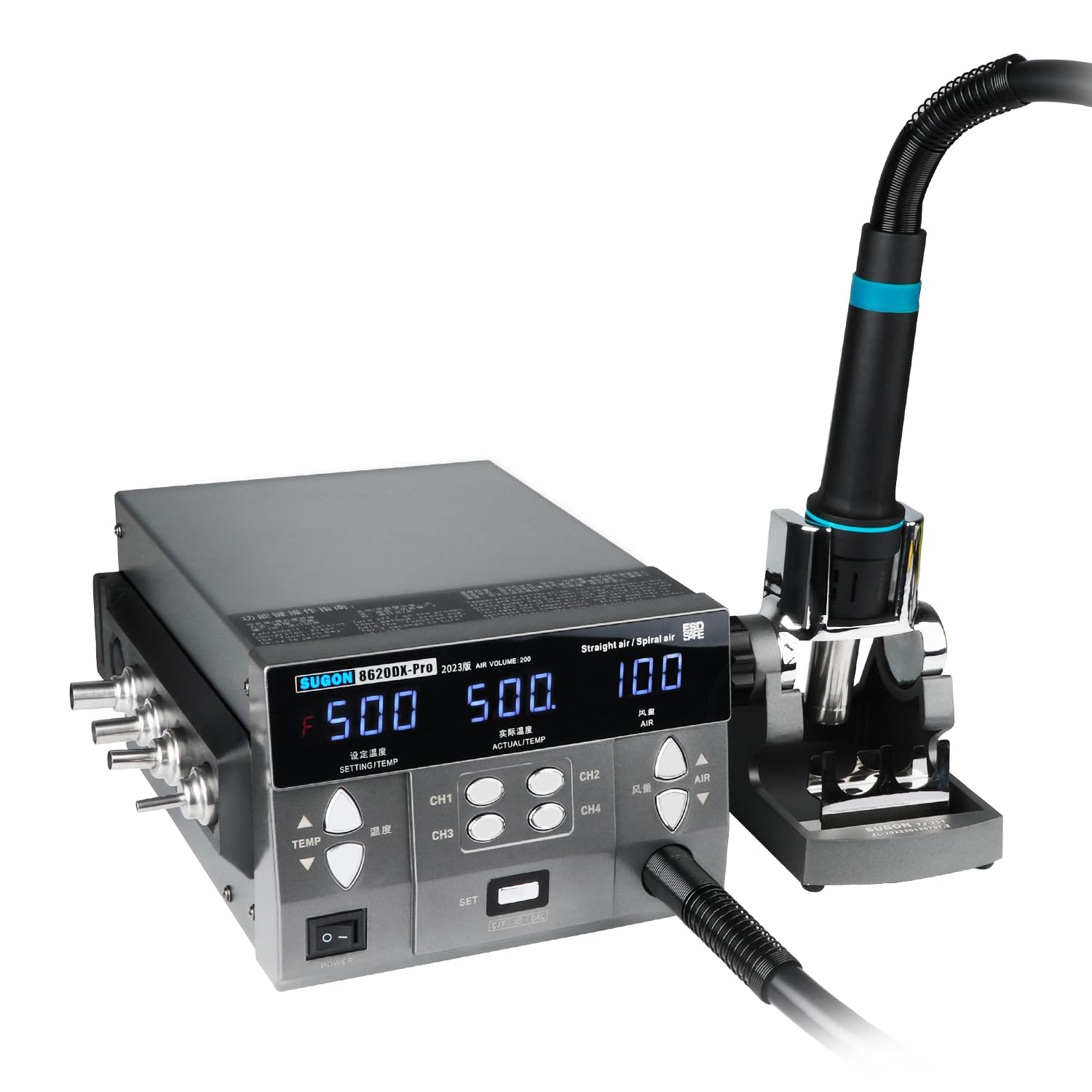
Image 1.1: The SUGON 8620DX Digital Hot Air Rework Station with its hot air handle and stand.
2. Safety Information
Please read and understand all safety instructions before operating the SUGON 8620DX rework station. Failure to follow these instructions may result in electric shock, fire, or serious injury.
- Electrical Safety: Ensure the unit is connected to a properly grounded power outlet with the correct voltage (110V). Do not operate in wet conditions.
- Hot Surfaces: The hot air nozzle and handle become extremely hot during operation. Avoid direct contact with skin. Allow the unit to cool completely before handling or storing.
- Ventilation: Use the rework station in a well-ventilated area to prevent the accumulation of fumes.
- Flammable Materials: Keep flammable liquids, gases, and materials away from the work area.
- Personal Protective Equipment: Always wear appropriate safety glasses to protect your eyes from solder splatter or debris.
- Children and Pets: Keep the device out of reach of children and pets.
3. Package Contents
Verify that all items are present in the package:
- SUGON 8620DX Digital Hot Air Rework Station
- Hot Air Handle
- Hot Air Handle Holder / Quick Change Air Nozzle Bracket
- 6 x Air Nozzles (various sizes)
- Power Cord
- User Manual

Image 3.1: Included air nozzles and an additional heating core for varied applications.

Image 3.2: Integrated silicone air nozzle storage bracket for convenience.
4. Setup
- Unpacking: Carefully remove all components from the packaging.
- Placement: Place the rework station on a stable, heat-resistant, and well-ventilated surface.
- Connect Hot Air Handle: Connect the hot air handle hose to the designated port on the front of the rework station.
- Install Handle Holder: Attach the hot air handle holder to the side of the main unit. This holder is crucial for the auto-sleep function.
- Power Connection: Plug the power cord into the back of the unit and then into a grounded 110V AC power outlet.
5. Operating Instructions
5.1 Control Panel Overview

Image 5.1: Labeled diagram of the SUGON 8620DX control panel.
- Power Switch: Turns the unit on/off.
- LED Display: Shows SETTING/TEMP (set temperature), ACTUAL/TEMP (actual temperature), and AIR (airflow level).
- TEMP Buttons (Up/Down): Adjust the desired temperature.
- AIR Buttons (Up/Down): Adjust the airflow level (1-200).
- CH1-CH4 Buttons: Memory channels to save and recall frequently used temperature and airflow settings.
- SET Button: Used to confirm settings or enter calibration mode.
- °C/°F Button: Toggles between Celsius and Fahrenheit temperature display.
5.2 Basic Operation
- Power On: Flip the red POWER switch to the 'ON' position. The display will illuminate.
- Set Temperature: Use the TEMP Up/Down buttons to set your desired temperature. The SETTING/TEMP display will show the target temperature. The ACTUAL/TEMP display will show the current temperature, which will rapidly rise to meet the set value.
- Adjust Airflow: Use the AIR Up/Down buttons to adjust the airflow level from 1 to 200.
- Temperature Unit: Press the °C/°F button to switch between Celsius and Fahrenheit.
5.3 Memory Storage (CH1-CH4)
The rework station allows you to store up to four sets of temperature and airflow settings for quick recall.
- Saving Settings: Set your desired temperature and airflow. Press and hold one of the CH1-CH4 buttons for approximately 3 seconds until the display indicates the setting has been saved.
- Recalling Settings: Briefly press one of the CH1-CH4 buttons to instantly recall the saved settings for that channel.
5.4 Auto Sleep Function
When the hot air handle is placed into its holder, the unit automatically enters a cooling phase and then goes into sleep mode after approximately 10 seconds. This protects the heating element and extends the lifespan of the handle. When the handle is lifted from the holder, it will automatically resume the last used settings.

Image 5.2: The hot air handle in its holder, demonstrating the automatic cooling and sleep mode activation.
5.5 Quick Change Air Nozzle Bracket
The quick change air nozzle bracket allows for easy and rapid nozzle changes without needing to wait for the handle to cool down or use additional tools.
- Removing a Nozzle: While the handle is hot, carefully insert the nozzle into the designated slot on the quick change bracket. Twist the handle slightly to disengage the nozzle, then lift the handle. The nozzle will remain in the bracket.
- Attaching a Nozzle: Select the desired nozzle from the storage bracket. Align the hot air handle with the nozzle in the quick change bracket and push down gently, twisting slightly until the nozzle is securely attached.
Video 5.1: This video demonstrates the rapid temperature rise and the quick change air nozzle holder feature of the SUGON 8620DX rework station.
6. Features
- High Power & Fast Heating: Equipped with a 1300W heating element, the station achieves rapid temperature increases, reaching 592°F in approximately 2 seconds.
- Precision Temperature Control: Adjustable temperature range from 212°F to 845°F (100°C to 450°C) with 1°F stability. Supports temperature calibration for accuracy.
- Adjustable Airflow: Features a brushless scroll fan with an adjustable airflow range from 1 to 200, suitable for various desoldering tasks.
- Digital LED Display: Clear display shows set temperature, actual temperature, and airflow level.
- 4 Memory Storage Channels: Allows users to save and quickly recall up to four preferred temperature and airflow settings.
- Automatic Sleep Function: When the hot air handle is placed in its holder, the unit automatically cools down and enters sleep mode, preserving the heater's lifespan and enhancing safety.
- Quick Change Air Nozzle System: The included bracket facilitates fast and tool-free changing of hot air nozzles, even when hot.
- Wide Application Range: Ideal for repairing mobile phones, iPads, laptops, PCBs, and components such as SOIC, QFP, PLCC, BGA, and cable connectors.
- Safety and Durability: FCC, CE, RoHS approved. Features an automatic high airflow cooling function to protect the hot air handle and heater.

Image 6.1: Demonstration of the rapid heating capability, reaching 529°F in 4 seconds.
7. Maintenance
Proper maintenance ensures the longevity and optimal performance of your rework station.
- Cleaning: Regularly clean the exterior of the unit with a soft, dry cloth. Do not use abrasive cleaners or solvents.
- Nozzle Care: Ensure nozzles are free from debris or carbon buildup. Clean them gently when cool.
- Air Filter (if applicable): Check and clean or replace any air filters according to manufacturer recommendations to maintain optimal airflow.
- Storage: Store the unit in a dry, dust-free environment when not in use. Ensure the hot air handle is placed in its holder to activate sleep mode before storage.
8. Troubleshooting
If you encounter issues with your SUGON 8620DX rework station, refer to the following common problems and solutions:
| Problem | Possible Cause | Solution |
|---|---|---|
| Unit does not power on | No power supply; Faulty power cord; Power switch off | Check power connection and outlet; Replace power cord; Ensure power switch is ON |
| No heat from nozzle | Heating element failure; Incorrect temperature setting; Handle not properly connected | Contact customer support; Verify temperature setting; Reconnect handle securely |
| No airflow | Fan failure; Airflow setting too low; Blocked air intake/nozzle | Contact customer support; Increase airflow setting; Check for obstructions |
| Temperature fluctuates significantly | Sensor issue; Unstable power supply; Drafty environment | Contact customer support; Ensure stable power; Work in a stable environment |
If the problem persists after attempting these solutions, please contact customer support.
9. Specifications
| Specification | Value |
|---|---|
| Brand | SUGON (Manufacturer: HengTianMei) |
| Model Number | 8620DX |
| Voltage | 110 Volts (AC) |
| Wattage | 1300 watts |
| Temperature Range | 212°F - 845°F (100°C - 450°C) |
| Temperature Stability | 1 Degrees Fahrenheit |
| Airflow Adjustment | 1 - 200 (Brushless Scroll Fan) |
| Display Type | LED |
| Memory Channels | 4 |
| Item Weight | 6.46 Kilograms |
| Certifications | FCC, CE, RoHS |
10. Warranty and Support
The SUGON 8620DX rework station is designed for reliability and performance. It is FCC, CE, and RoHS approved, ensuring compliance with relevant safety and environmental standards.
For any questions, technical assistance, or warranty claims, please contact the retailer or manufacturer's customer support. Please have your model number and purchase date available when contacting support.
