
Amazon Echo Show 5 (3rd Gen)
Amazon Echo Show 5 (3rd Gen) User Manual
Model: Echo Show 5 (3rd Gen)
Introduction
The Amazon Echo Show 5 (3rd Gen) is a smart display designed to enhance your daily life with visual and audio interactions. It features a 5.5-inch touch screen, improved audio with deeper bass and clearer vocals, and a 2 MP camera with a built-in shutter for privacy. This manual provides essential information for setting up, operating, maintaining, and troubleshooting your device.
With Alexa built-in, you can use voice commands to check the weather, make video calls, view compatible cameras, stream music and shows, manage your smart home devices, and much more.
Setup Guide
Follow these steps to set up your Echo Show 5 (3rd Gen) for the first time.
- Unpack the Device: Carefully remove the Echo Show 5 and its power adapter from the packaging.
- Connect Power: Plug the included 22W power adapter into the power port on the back of your Echo Show 5, then plug the adapter into a wall outlet. The device will power on automatically.
- Follow On-Screen Instructions: The Echo Show 5 display will guide you through the initial setup process. This includes:
- Selecting your language.
- Connecting to a Wi-Fi network (supports dual-band 802.11a/b/g/n/ac).
- Logging in with your Amazon account.
- Confirming your time zone and address.
- Explore Features: Once setup is complete, the device will display a tutorial on its features. You can say "Alexa, what can you do?" to learn more.

Image: The Echo Show 5 (3rd Gen) displaying a music interface. This illustrates the device's compact size and screen capabilities.
Operating Your Echo Show 5
The Echo Show 5 can be operated using voice commands with Alexa or by interacting directly with its touch screen.
Voice Commands
To activate Alexa, simply say the wake word "Alexa" followed by your command. Examples include:
- "Alexa, what's the weather today?"
- "Alexa, play music."
- "Alexa, show me my calendar."
- "Alexa, call Mom."
- "Alexa, turn on the living room lights."

Image: A white Echo Show 5 (3rd Gen) on a desk, demonstrating its use for audiobooks and general voice control.
Touch Screen Navigation
Swipe down from the top of the screen to access quick settings and notifications. Swipe left from the right edge to view home screen cards and shortcuts. Tap on icons and content to interact.
Privacy Controls
The Echo Show 5 is designed with multiple privacy layers:
- Microphone/Camera Off Button: Press this button on the top of the device to electronically disconnect the microphones and camera. A red light indicator will appear.
- Built-in Camera Shutter: Slide the physical shutter to cover the camera lens for complete visual privacy.
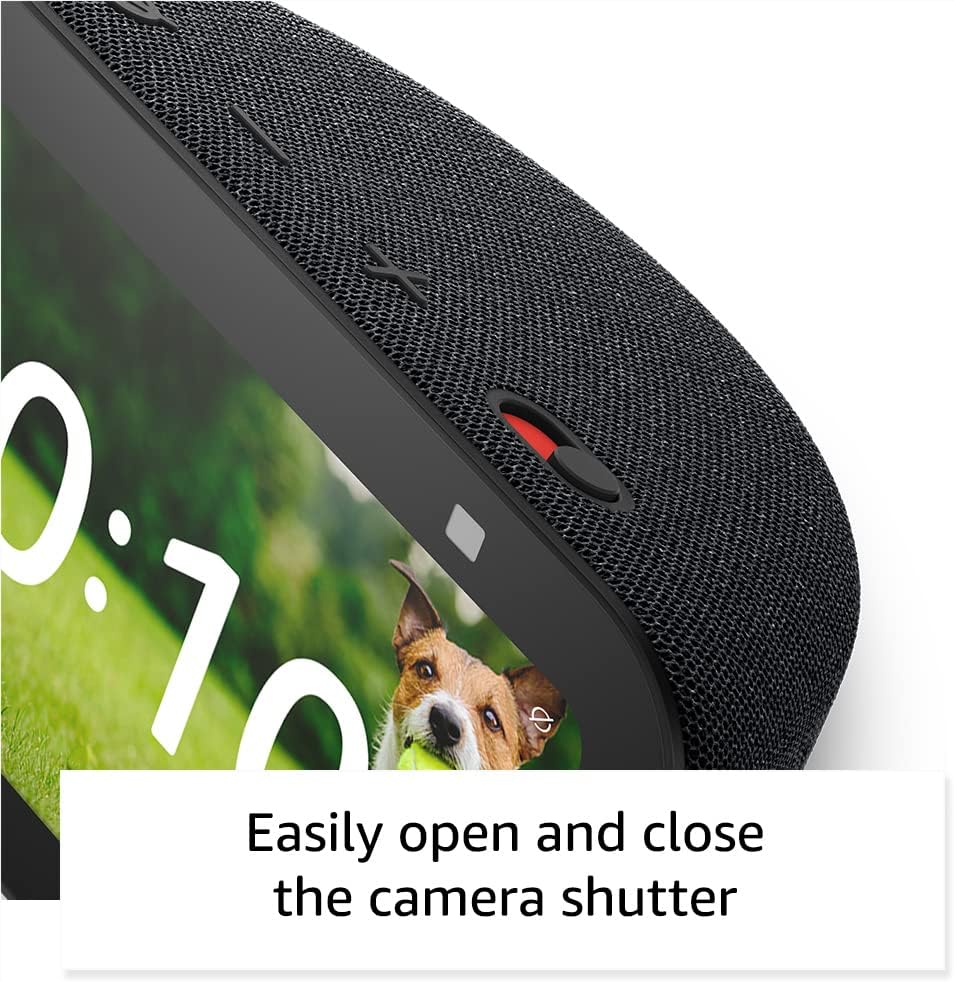
Image: A close-up view of the Echo Show 5's camera shutter, highlighting the ease of controlling camera privacy.
Maintenance and Care
Proper care ensures the longevity and optimal performance of your Echo Show 5.
- Cleaning: Use a soft, lint-free cloth to clean the screen and exterior. Do not use abrasive cleaners or sprays directly on the device.
- Placement: Place the device on a stable, flat surface away from direct sunlight, heat sources, and liquids. Ensure adequate ventilation around the device.
- Software Updates: Your Echo Show 5 automatically receives software security updates. Ensure it is connected to Wi-Fi for these updates to download and install.
Troubleshooting
If you encounter issues with your Echo Show 5, try the following solutions:
| Problem | Solution |
|---|---|
| Device not responding to voice commands. |
|
| No Wi-Fi connection. |
|
| Screen is black or unresponsive. |
|
| Camera not working. |
|
Technical Specifications
- Size: 5.8”W x 3.6”D x 3.2”H (147mm x 91mm x 82mm)
- Weight: 16.1 oz (456 grams)
- Display: 5.5” touch screen
- Camera: 2 MP camera with built-in shutter
- WiFi Connectivity: Dual-band wifi (802.11a/b/g/n/ac)
- Bluetooth Connectivity: A2DP support for audio streaming, AVRCP for voice control
- Audio: Full range 1.75” built-in speaker
- Processor: MediaTek MT 8169 B
- Included in the Box: Echo Show 5 (3rd Gen), power adapter, Quick Start Guide
- Language: Alexa speaks English and Spanish
Warranty and Support
Your Echo Show 5 (3rd Gen) comes with a 1-year limited warranty and service. Optional extended warranties (1-year, 2-year, and 3-year) are available for U.S. customers and sold separately.
For customer support, visit the official Amazon support website or contact Amazon Customer Service directly. For information specific to your device, visit Manage Your Content and Devices.
Software security updates are guaranteed for at least four years after the device is last available for purchase as a new unit on Amazon websites.
Related documentsEcho Show 5 (3rd Gen)


Ask a question about this manual
Ask about setup, troubleshooting, compatibility, parts, safety, or missing instructions. Manuals+ will review the question and use this page’s manual context to help answer it.