
1. Introduction
This manual provides detailed instructions for the setup, operation, and maintenance of your EASWEL Universal A/C Remote Control, model K-1028E. This remote is designed to control a wide range of air conditioner brands and models, including Sanyo units, offering a convenient replacement or secondary control option.
Key Features:
- Universal compatibility with over 1,000 different air conditioner brands.
- Large LCD screen for clear display of settings.
- Digital automatic code searching function for easy setup.
- Low power consumption for extended battery life.
- Effective control distance of approximately 8-10 meters.
- Built-in clock, ON/OFF timer, and night illumination functions.
2. Product Overview
The EASWEL K-1028E remote control features an ergonomic design with clearly labeled buttons and a large LCD display for intuitive operation.
Remote Control Layout:
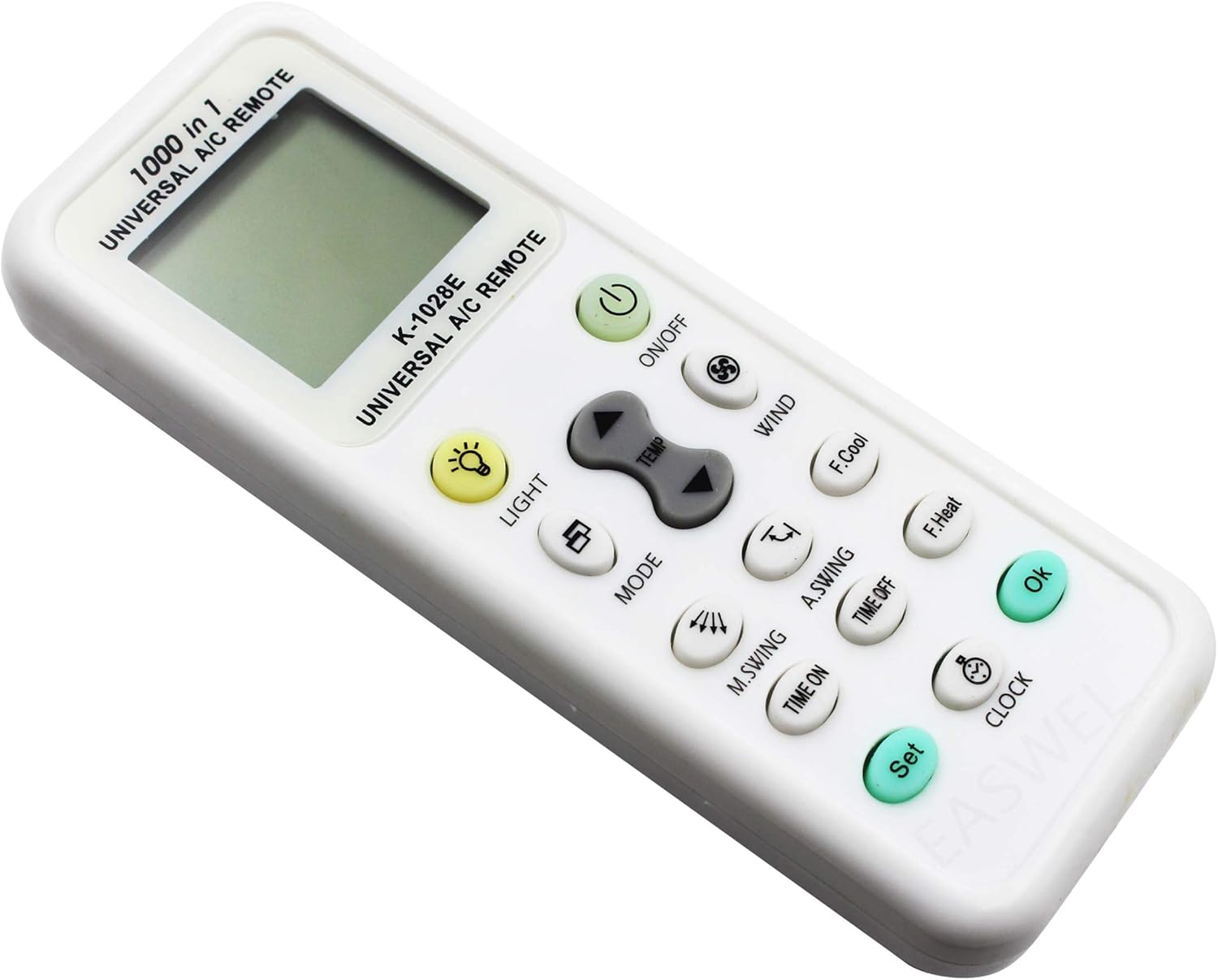
Figure 2.1: Front view of the EASWEL K-1028E Universal A/C Remote Control. This image displays the large LCD screen at the top, along with all functional buttons such as ON/OFF, TEMP, MODE, WIND, SWING, TIMER, CLOCK, SET, and OK.
Familiarize yourself with the button layout for efficient control of your air conditioner.
3. Setup
3.1 Battery Installation
The remote control requires two AAA batteries (not included) for operation.
- Open the battery compartment cover located on the back of the remote control.
- Insert two AAA batteries, ensuring the correct polarity (+ and -) as indicated inside the compartment.
- Close the battery compartment cover securely.

Figure 3.1: Front and back view of the EASWEL K-1028E remote control. The back view clearly shows the battery compartment, which requires two AAA batteries.
3.2 Automatic Code Search
The remote control features an automatic code search function to quickly find the correct code for your air conditioner.
- Ensure your air conditioner is powered ON.
- Press and hold the "SET" button for approximately 3-5 seconds until the code on the LCD screen starts flashing.
- Point the remote control towards your air conditioner. The remote will automatically begin transmitting different codes.
- Observe your air conditioner. When it responds (e.g., turns ON/OFF, changes mode, or makes a sound), immediately press the "OK" button to confirm the code.
- Test the remote's functions (ON/OFF, temperature, mode) to ensure full compatibility. If not all functions work, repeat the automatic search process to find a more suitable code.
3.3 Manual Code Entry (If Automatic Search Fails)
If the automatic code search does not yield satisfactory results, you may need to manually enter a code. Refer to the code list provided with your remote (if available) or search online for codes compatible with your specific A/C brand and the K-1028E remote.
- Ensure your air conditioner is powered ON.
- Press and hold the "SET" button for approximately 3-5 seconds until the code on the LCD screen starts flashing.
- Use the "TEMP ▲" or "TEMP ▼" buttons to manually cycle through the codes.
- When your air conditioner responds, immediately press the "OK" button to save the code.
- Test all functions.
4. Operating Instructions
Once the remote is successfully paired with your air conditioner, you can use the following buttons to control its functions.
4.1 Basic Functions
- ON/OFF: Press to turn the air conditioner ON or OFF.
- TEMP ▲ / ▼: Adjusts the temperature setting up or down.
- MODE: Cycles through operating modes (e.g., Cool, Heat, Fan, Dry, Auto).
- WIND (Fan Speed): Adjusts the fan speed (e.g., Auto, Low, Medium, High).
4.2 Advanced Functions
- M.SWING (Manual Swing): Controls the horizontal swing of the air conditioner's louvers.
- A.SWING (Auto Swing): Activates or deactivates the automatic vertical swing of the air conditioner's louvers.
- TIME ON: Sets a timer for the air conditioner to turn ON automatically.
- TIME OFF: Sets a timer for the air conditioner to turn OFF automatically.
- CLOCK: Sets the current time on the remote's display.
- LIGHT: Activates the backlight for the LCD screen, useful in low-light conditions.
- F.Cool (Fast Cool): Activates a rapid cooling function.
- F.Heat (Fast Heat): Activates a rapid heating function.
5. Maintenance
Proper maintenance ensures the longevity and optimal performance of your remote control.
- Cleaning: Wipe the remote control with a soft, dry cloth. Do not use liquid cleaners or abrasive materials.
- Battery Replacement: Replace batteries when the display becomes dim or the remote's range decreases. Always replace both batteries at the same time with new AAA batteries. Remove batteries if the remote will not be used for an extended period to prevent leakage.
- Storage: Store the remote in a cool, dry place away from direct sunlight and extreme temperatures.
- Avoid Drops: Protect the remote from physical impact, as drops can damage internal components.
6. Troubleshooting
If you encounter issues with your remote control, refer to the following common problems and solutions:
- Remote is not working or has short range:
- Check battery polarity and ensure batteries are fresh. Replace if necessary.
- Ensure there are no obstructions between the remote and the air conditioner's receiver.
- Verify that the remote is pointed directly at the air conditioner.
- Re-perform the automatic code search to ensure the correct code is set.
- Air conditioner does not respond to all functions:
- Some air conditioner models may not support all functions available on the universal remote.
- Re-perform the automatic code search. A different code might offer better compatibility for all functions.
- LCD display is dim or blank:
- Replace the batteries with new ones.
7. Specifications
| Model | K-1028E |
| Brand | EASWEL |
| Compatibility | Universal, over 1,000 A/C brands (e.g., Sanyo RCS-KS09) |
| Control Distance | Approximately 8-10 meters |
| Power Source | 2 x AAA batteries (not included) |
| Connectivity Technology | Infrared |
| Color | White |
| Dimensions | 13cm x 5cm x 1.5cm (approximate) |
| Weight | 57g (approximate, without batteries) |
8. Warranty and Support
This product is covered by a standard manufacturer's warranty against defects in materials and workmanship. Please retain your proof of purchase for warranty claims.
For technical support, troubleshooting assistance beyond this manual, or warranty inquiries, please contact the retailer or manufacturer directly. Refer to your purchase documentation for specific contact details.